
Brand new to programming and want to become a web developer?
Start here 🧵⬇️
Start here 🧵⬇️
Step 1. Get yourself a text editor that you like
I know you want to dive right into coding, but you need to know where to put this code first!
The industry favourite is VSCode and it's great for beginners too code.visualstudio.com
I know you want to dive right into coding, but you need to know where to put this code first!
The industry favourite is VSCode and it's great for beginners too code.visualstudio.com
Step 2: Learn HTML
There are plenty of resources and quick-start tutorials like on W3Schools, but I recommend that you have a broad learning of HTML (it also helps with accessibility!)
Free Codecademy course: codecademy.com/learn/learn-ht…
There are plenty of resources and quick-start tutorials like on W3Schools, but I recommend that you have a broad learning of HTML (it also helps with accessibility!)
Free Codecademy course: codecademy.com/learn/learn-ht…
Step 3: Learn CSS
You could spend years learning CSS, and most web devs are still learning and discovering something new every day. For now, you want to learn how to connect a stylesheet & know basic styling.
Free Codecademy course: codecademy.com/learn/learn-css
You could spend years learning CSS, and most web devs are still learning and discovering something new every day. For now, you want to learn how to connect a stylesheet & know basic styling.
Free Codecademy course: codecademy.com/learn/learn-css
Step 4: Build!
Now you know enough to build something, so build something! You may still feel like you know nothing, but feel free to search the internet as much as you need to. We all do.
If you're stuck for ideas, Geeks for Geeks has some great ones geeksforgeeks.org/top-10-project…
Now you know enough to build something, so build something! You may still feel like you know nothing, but feel free to search the internet as much as you need to. We all do.
If you're stuck for ideas, Geeks for Geeks has some great ones geeksforgeeks.org/top-10-project…
Step 5: Learn some Javascript!
You know how to make your site LOOK like something, so now it's time to learn how to make it DO something
I recommend learning the basics of Javascript online before trying to implement it in your website codecademy.com/learn/introduc…
You know how to make your site LOOK like something, so now it's time to learn how to make it DO something
I recommend learning the basics of Javascript online before trying to implement it in your website codecademy.com/learn/introduc…
Step 6: Make your Javascript do some funky things on your website
The best way to learn is by thinking of what you want your website to do, and doing it.
If you're stuck for ideas, check out my DEV articles for some fun ones dev.to/catmcgeecode
The best way to learn is by thinking of what you want your website to do, and doing it.
If you're stuck for ideas, check out my DEV articles for some fun ones dev.to/catmcgeecode
Step 7: Play around with developer tools
Dev tools are necessary for debugging your code.
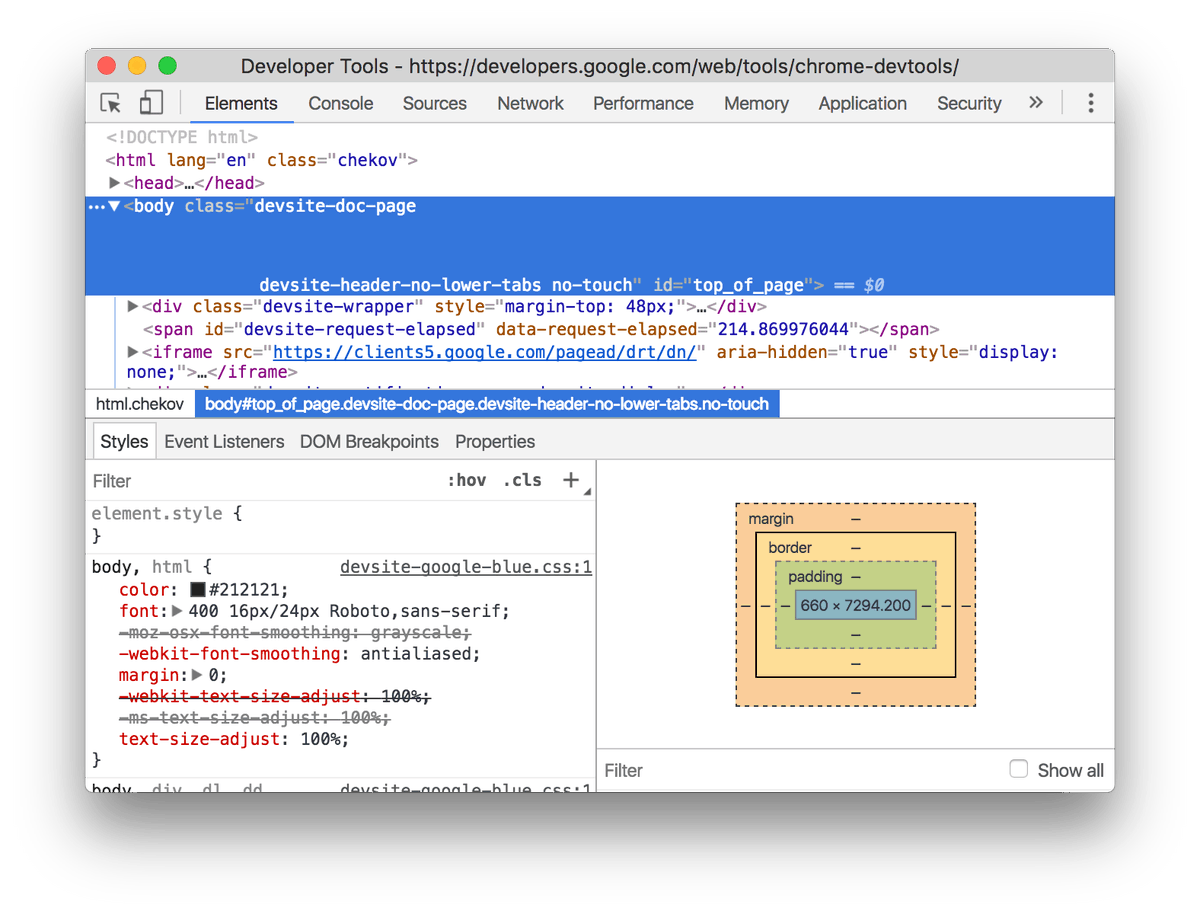
You can open developer tools in any browser, which will let you explore the DOM, edit CSS, view the console, and more. Right click, 'Inspect'. It looks like this:
Dev tools are necessary for debugging your code.
You can open developer tools in any browser, which will let you explore the DOM, edit CSS, view the console, and more. Right click, 'Inspect'. It looks like this:
Step 8: Learn responsive web design
Your website looks cool and does cool things, so now it's time to make it work on every device.
Here's another Codecademy course (you can't beat them): codecademy.com/learn/learn-re…
Your website looks cool and does cool things, so now it's time to make it work on every device.
Here's another Codecademy course (you can't beat them): codecademy.com/learn/learn-re…
Step 9: Get familiar with the command line
If you haven't used the Terminal/Cmd app yet, it's time! It's just another way of navigating & manipulating your files, nothing to be afraid of. You need it as a dev to install libraries and run your code! lifehacker.com/a-command-line…
If you haven't used the Terminal/Cmd app yet, it's time! It's just another way of navigating & manipulating your files, nothing to be afraid of. You need it as a dev to install libraries and run your code! lifehacker.com/a-command-line…
Step 10: Get your first website (HTML, CSS, Javascript) on GitHub
Now you've built a site, you know how to use the command line, it's time to learn git. Git is a version control tool, and Github lets you manage this and share with other devs & employers! freecodecamp.org/news/what-is-g…
Now you've built a site, you know how to use the command line, it's time to learn git. Git is a version control tool, and Github lets you manage this and share with other devs & employers! freecodecamp.org/news/what-is-g…
Step 11: Javascript must become your new best friend
Nowadays, web devs use Javascript frameworks to build websites. Before diving into one of these, it's important to become comfortable with Javascript. There are tutorials, but the best thing you can do is build build build!
Nowadays, web devs use Javascript frameworks to build websites. Before diving into one of these, it's important to become comfortable with Javascript. There are tutorials, but the best thing you can do is build build build!
Step 12: Learn what Javascript frameworks are
Popular Javascript frameworks, like React, Vue, and Angular, all have a reason to exist. Put away your text editor for a while and learn what they do. You'll learn more about the DOM too.
Start here jsreport.io/the-ultimate-g…
Popular Javascript frameworks, like React, Vue, and Angular, all have a reason to exist. Put away your text editor for a while and learn what they do. You'll learn more about the DOM too.
Start here jsreport.io/the-ultimate-g…
Step 13: Build your first app with Angular/React
Angular/React are more popular than Vue - I recommend one of those. I prefer React & its community, but use your knowledge from Step 12 to pick one! Follow a tutorial to get you started. Here's 1 for React: reactjs.org/docs/create-a-…
Angular/React are more popular than Vue - I recommend one of those. I prefer React & its community, but use your knowledge from Step 12 to pick one! Follow a tutorial to get you started. Here's 1 for React: reactjs.org/docs/create-a-…
Step 14: Learn the fundamentals of your chosen framework
Best way to do this? Build a to-do app.
@traversymedia has an amazing React crash course on YouTube that teaches you how to build a to-do app
Best way to do this? Build a to-do app.
@traversymedia has an amazing React crash course on YouTube that teaches you how to build a to-do app
Step 15: Play around with your new toy
There are UNLIMITED possibilities with this new knowledge. So just keep building, building, building. Continue to search the web if you're stuck.
Some good starter ideas here (add your own twist on top of these!) daveceddia.com/react-practice…
There are UNLIMITED possibilities with this new knowledge. So just keep building, building, building. Continue to search the web if you're stuck.
Some good starter ideas here (add your own twist on top of these!) daveceddia.com/react-practice…
Step 16: Deploy something - anything!
When you're happy with something you've built, get it on the web for all to see.
I recommend using @Netlify, it makes things extremely simple & every time you push something new to GitHub, it'll deploy it for you! netlify.com
When you're happy with something you've built, get it on the web for all to see.
I recommend using @Netlify, it makes things extremely simple & every time you push something new to GitHub, it'll deploy it for you! netlify.com
Step 17: You're ready to start applying for jobs
Once you have projects on GitHub and something deployed on a domain, you're ready to start applying to jobs. Even if you feel totally unqualified, go for it! You may land it anyway, and you'll find out what to show off on a resume
Once you have projects on GitHub and something deployed on a domain, you're ready to start applying to jobs. Even if you feel totally unqualified, go for it! You may land it anyway, and you'll find out what to show off on a resume
Step 18: Practice for coding interviews
Coding interviews are tough, but we gotta do them. They will ask you about data structures & algorithms, so learn a few of these and practice solving problems on pen & paper. leetcode.com
Coding interviews are tough, but we gotta do them. They will ask you about data structures & algorithms, so learn a few of these and practice solving problems on pen & paper. leetcode.com
Step 19: Keep building, keep learning
Every single developer is learning every single day. We all started somewhere and it was hard for us when we were starting out too. Keep building new projects and trying new things. But make sure to take a break when you need it!
Every single developer is learning every single day. We all started somewhere and it was hard for us when we were starting out too. Keep building new projects and trying new things. But make sure to take a break when you need it!
This is a good route for anyone just starting out, but it's totally possible to get a web dev job other ways, like:
😍 Become an expert at HTML/CSS/JS without frameworks
🎓 Do accredited courses
1⃣Build one awesome thing
🎟️ Enter the industry in a different route (backend)
😍 Become an expert at HTML/CSS/JS without frameworks
🎓 Do accredited courses
1⃣Build one awesome thing
🎟️ Enter the industry in a different route (backend)
Good luck! Tweet about your journey, ask for help, and don't give up! ❤️
Alright, it’s time to mute this. I didn’t want to mute it so I could reply to all your questions, but it’s getting too much! 😅
If you have any questions, feel free to DM me. But please put your question in your first message! ❤️
If you have any questions, feel free to DM me. But please put your question in your first message! ❤️