

HOW TO BECOME A CRYPTO MARKET MAKET IN LESS THAN 30 MINUTES - on $DYDX using #Hummingbot
Setting up MetaMask
1. Go to metamask.io/download.html and Install MetaMask for your Chrome browser. MetaMask is a software cryptocurrency wallet used to interact with the Ethereum blockchain.
1. Go to metamask.io/download.html and Install MetaMask for your Chrome browser. MetaMask is a software cryptocurrency wallet used to interact with the Ethereum blockchain.
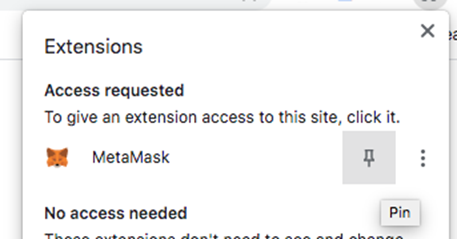
2. Open up your chrome extensions at top right of your chrome (puzzle icon) and pin MetaMask to your extension toolbar. Hit the fox icon and a webpage should appear to sign up to MetaMask 
3. Complete the sign up process. You will be given a 12-word Secret Backup Phrase which you should write down on somewhere secure. Do NOT store or share this phrase online as hackers can use to steal funds from your wallet.
4. Clicking the MetaMask icon will now open your wallet to which you can deposit different fiat and cryptocurrencies. Your wallet will already be set up for ETH but you need to set up other currencies in your wallet if you want to use. Hit “Add Token” and search for USDC.

5. Next you’ll need to deposit some USDC for trading and ETH to cover transaction costs of sending that USDC to dydx. You can find your address under “Account 1” in MetaMask. I recommend using FTX to get USDC and ETH as they only charge 0.0005 ETH per withdrawal and free for USDC
This is much lower than other exchanges such as binance which charges 25USD. You also won’t need to convert USD deposits to USDC as you can withdraw USD Stablecoins 1:1 as any of USDC. If you don’t have my account use my referral link (ftx.com/#a=cryptoulette) for some discounts
6. Head to trade.dydx.exchange to trade perpetuals on dYdX. dYdX is a decentralized exchange that runs on smart contracts on the Ethereum blockchain, and allows users to trade with no intermediaries. This means there are low fees, lots of liquidity and you can trade on margin
7. Hit “Connect Wallet” -> MetaMask and click through the prompts on your MetaMask Wallet. dydx will then generate a Stark Key which identifies your account on ETH layer 2.

Complete the onboarding and create your account with your username and email
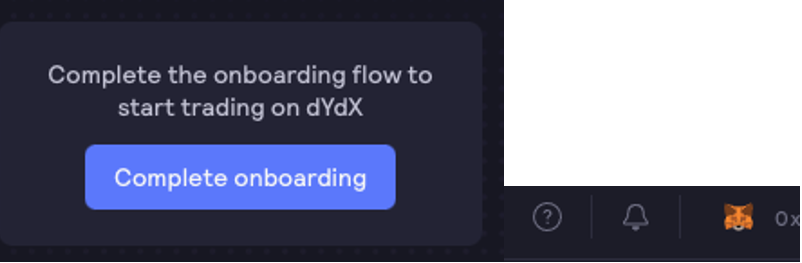
8. From the portfolio page you’ll want to head to “Trade on the top left”. You’ll need to enable USDC deposits and deposit USDC from your wallet.

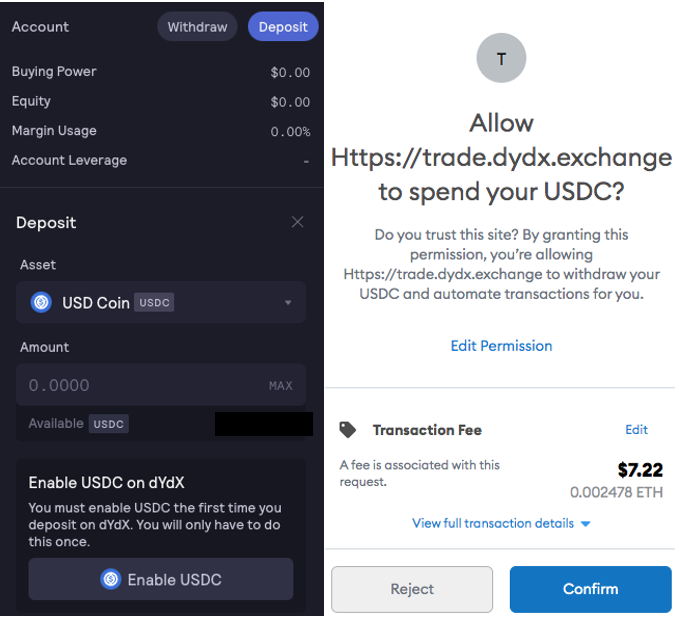
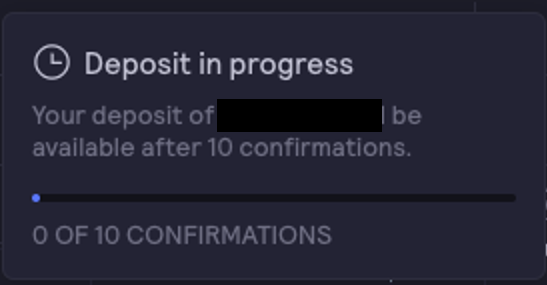
Hit confirm deposit. You’ll need to pay some gas fees to get your money into the $dydx wallet.

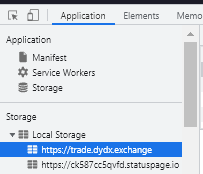
9. From the dydx Perpetuals exchange, right-click anywhere on your web browser, and select Inspect to open Developer Tools. Go to Application > Local Storage > trade.dydx.exchange
Select STARK_KEY_PAIRS and click the drop-down next to your Wallet Address to get the stark private key
Select API_KEY_PAIRS and click the drop-down next to your Wallet Address to get (1) API key, (2) secret key, and (3) passphrase. You will need these later
Select API_KEY_PAIRS and click the drop-down next to your Wallet Address to get (1) API key, (2) secret key, and (3) passphrase. You will need these later
Setting up Hummingbot
10. Go to hummingbot.io/download/ and download the installation for your OS system. Double-click the Setup.exe hummingbot binary package to launch the installer.
10. Go to hummingbot.io/download/ and download the installation for your OS system. Double-click the Setup.exe hummingbot binary package to launch the installer.
11. Start Hummingbot in your Windows start menu. The hummbingbot command line interface will open up where you can create new trading bots on different exchanges

12. From Hummingbot, run "connect dydx_perpetual" command. Enter the required dydx Perpetual credentials from before on each prompt (API key, API secret, API passphrase). Set account number to 0. Enter your Stark private key and Ethereum wallet address

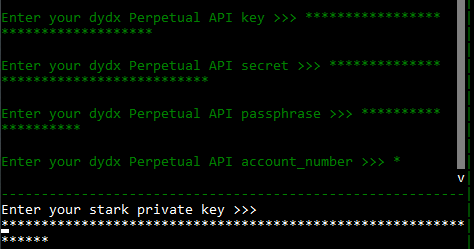
Hummingbot will confirm when you have successfully connected to the exchange

Starting your bot
13. There are currently two strategies for hummingbot-dydx_perpetual: spot_perpetual_arbitrage captures the difference between spot and perpetual prices Perpetual_market_making places a bid and offer in the orderbook to capture spread between buy and sell orders
13. There are currently two strategies for hummingbot-dydx_perpetual: spot_perpetual_arbitrage captures the difference between spot and perpetual prices Perpetual_market_making places a bid and offer in the orderbook to capture spread between buy and sell orders
We’ll start of with Perpetual_market_making.
Run the "create" command and enter "perpetual_market_making strategy".
Enter "dydx_perpetual" as your connector and your trading pair (e.g. "SUSHI-USD")
Run the "create" command and enter "perpetual_market_making strategy".
Enter "dydx_perpetual" as your connector and your trading pair (e.g. "SUSHI-USD")
14. Enter how much leverage you want to use. Leverage allows you to open a position at a fraction of a cost. The higher the leverage, the higher the risk.
Select a position_mode from either One-way or Hedge mode. You can find out more here:
docs.hummingbot.io/strategies/per…
docs.hummingbot.io/strategies/per…
Next is bid and ask spreads you want to charge. I suggest starting wide with something like 0.8-1% and tightening as you get more comfortable with the market
Next will be a series of parameters to determine what to do once you get a position on. The below url explains each
docs.hummingbot.io/strategies/per…
I suggest low spread from position entry (0.1% to cover fees) and MARKET orders as conservative parameters
docs.hummingbot.io/strategies/per…
I suggest low spread from position entry (0.1% to cover fees) and MARKET orders as conservative parameters
You can always adjust these later by running"config + [parameter you want to change]
Lastly, name your startegy
Lastly, name your startegy

15. Run "Start" to run the bot
you'll start to see orders in the $dydx browser. You can also see how your bots doing by running "status"
you'll start to see orders in the $dydx browser. You can also see how your bots doing by running "status"
• • •
Missing some Tweet in this thread? You can try to
force a refresh



