Nano Course On Python For Trading
==========================
Module 1
Python makes it very easy to analyze and visualize time series data when you’re a beginner. It's easier when you don't have to install python on your PC (that's why it's a nano course, you'll learn python...
==========================
Module 1
Python makes it very easy to analyze and visualize time series data when you’re a beginner. It's easier when you don't have to install python on your PC (that's why it's a nano course, you'll learn python...
... on the go). You will not be required to install python in your PC but you will be using an amazing python editor, Google Colab Visit colab.research.google.com
This course is for anyone out there who is confused, frustrated, and just wants this python/finance thing to work!
This course is for anyone out there who is confused, frustrated, and just wants this python/finance thing to work!
In Module 1 of this Nano course, we will learn about :
# Using Google Colab
# Importing libraries
# Making a Random Time Series of Black Field Research Stock (fictional)
# Using Google Colab
# Importing libraries
# Making a Random Time Series of Black Field Research Stock (fictional)
# Using Google Colab
Intro link is here on YT:
Create a new Notebook at colab.research.google.com and name it AnythingOfYourChoice.ipynb
You got your notebook ready and now the game is on!
You can add code in these cells and add as many cells as you want
Intro link is here on YT:
Create a new Notebook at colab.research.google.com and name it AnythingOfYourChoice.ipynb
You got your notebook ready and now the game is on!
You can add code in these cells and add as many cells as you want
# Importing Libraries
Imports are pretty standard, with a few exceptions.
For the most part, you can import your libraries by running the import.
Type this in the first cell you see. You need not worry about what each of these does, we will understand it later.
Imports are pretty standard, with a few exceptions.
For the most part, you can import your libraries by running the import.
Type this in the first cell you see. You need not worry about what each of these does, we will understand it later.
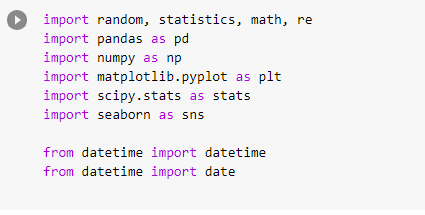
(Note: I have posted a link to my own notebook used for this course at the end of the thread. You can use it for reference)
Once you have imported the packages, run the code by clicking on the play button ▶️.
Once you have imported the packages, run the code by clicking on the play button ▶️.
# Making a Random Time Series of Black Field Research Stock (fictional)
Let's add some more code and create a fictional stock price chart of a multinational investment management firm Black Field Research (aka @BlackFieldRes ) and use it for statistics and graphs.
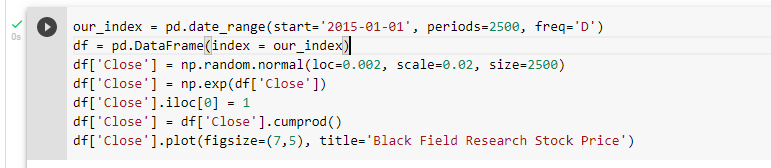
Exact Code:
Let's add some more code and create a fictional stock price chart of a multinational investment management firm Black Field Research (aka @BlackFieldRes ) and use it for statistics and graphs.
Exact Code:
In the next thread, I’ll show you how to import data from URLs, but that’s not the focus of this nano course.
First, make the index of our data using "date_range." I picked today’s date, 2015/01/01, as the start date, used a daily frequency, and created 2500 rows.
First, make the index of our data using "date_range." I picked today’s date, 2015/01/01, as the start date, used a daily frequency, and created 2500 rows.
Then I'll make an empty DataFrame that uses the date range we created as its index. Typically, I call this variable df, but you can call it anything you want.

Let's create fake data for our stock's closing value, let's call it "Close." To make a random series, I am using a random() function from NumPy. The below steps might look complicated to you but feel free to skip the next 2 threads and just add the code in your notebook.
Steps to generate random stock price time series.
1. Idea is to will the data frame with normal redistribute random numbers for our close price
2. Its mean is 0.002 and the standard deviation is 0.02. Total 2500 entries have been made.
3. Call above array as N, Replace N by..
1. Idea is to will the data frame with normal redistribute random numbers for our close price
2. Its mean is 0.002 and the standard deviation is 0.02. Total 2500 entries have been made.
3. Call above array as N, Replace N by..
.. e^N .
4. Take the first row as 1, which is our stock price on day 1.
5. Finally, take the cumulative product of the columns.
It's fine if you didn't understand this. We will come on it in later posts. Let's see the output in the next post
4. Take the first row as 1, which is our stock price on day 1.
5. Finally, take the cumulative product of the columns.
It's fine if you didn't understand this. We will come on it in later posts. Let's see the output in the next post
Its output will look like this.

Next, we will calculate Moving Average. A stock can be volatile, but it's moving average is smoother and gives us an idea of the overall trend. Let's calculate 200 day moving average.
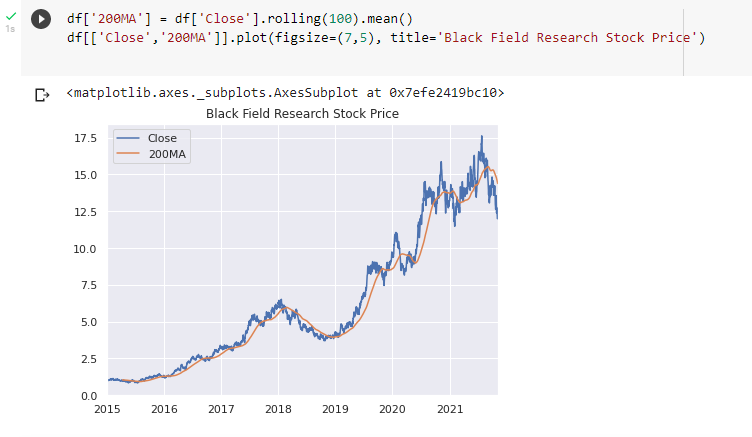
Let's add one more column, 200MAdist, which is equal to distance b/w 'close' and 200 moving average.

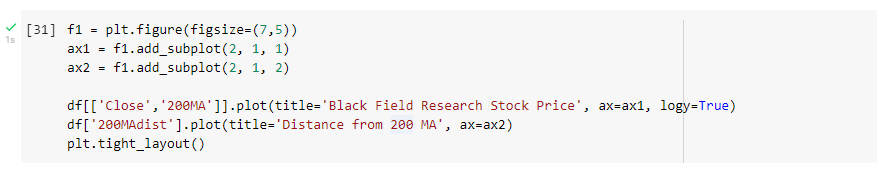
In order to plot multiple graphs to visualize what we did till now, we will use add_subplot() function.
Add this code and the output will look like :
Add this code and the output will look like :
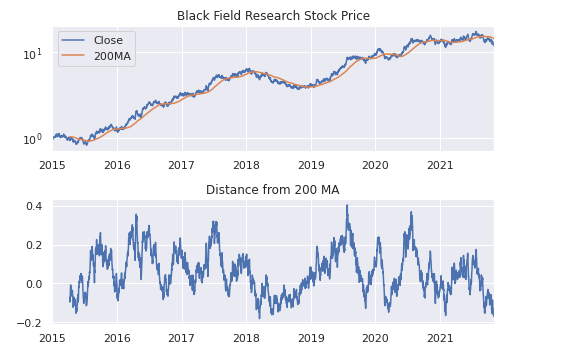
Till now, we have learned about how to use google colab, generate fake data for our stock using python, and we have learned how to calculate moving averages and plot multiple plots together.
In Module 2 of this nano course, we will learn :
# Visualing Logical conditions as signals
# Simulating a trading strategy and considering slippages
I got you started with python. Meanwhile, learn about python and the terms we have used here. You can comment below with doubts.
# Visualing Logical conditions as signals
# Simulating a trading strategy and considering slippages
I got you started with python. Meanwhile, learn about python and the terms we have used here. You can comment below with doubts.
Link to my colab notebook :
colab.research.google.com/drive/10TtpBt8…
You can make a copy of it and play around with it.
Until next time.
colab.research.google.com/drive/10TtpBt8…
You can make a copy of it and play around with it.
Until next time.
If you have read it till now, follow @M1tchRosenthal and subscribe to his amazing blog stocksavvy.substack.com . The thread is inspired by his work stocksavvy.substack.com/about?utm_sour…
Link to module 2
https://twitter.com/indian_quant/status/1484755533059923976?t=Ua02dm3z_AuDuvqqQjfCmw&s=19
• • •
Missing some Tweet in this thread? You can try to
force a refresh