
On Wed I shared this visualization on @tableaupublic: public.tableau.com/app/profile/kl…
The feature I like most is the custom axes in my parallel coordinates plot, something we cannot do out of the box in @tableau.
I thought it was interesting to share the steps to get there in a THREAD.
The feature I like most is the custom axes in my parallel coordinates plot, something we cannot do out of the box in @tableau.
I thought it was interesting to share the steps to get there in a THREAD.

(1/13)
CW: A wild mix of Tableau functions will be leveraged, including exotic functions like LOG, POWER, CEILING and FLOOR...
CW: A wild mix of Tableau functions will be leveraged, including exotic functions like LOG, POWER, CEILING and FLOOR...
(2/13)
The data Model
An axis needs a ruler and some tick marks. Therefore in my axis model you see 1 ruler object and 12 tick mark objects (more on that later). For each object I need 2 points to draw a line (->2 points in Model). Relationship on 1=1 to put everything together.
The data Model
An axis needs a ruler and some tick marks. Therefore in my axis model you see 1 ruler object and 12 tick mark objects (more on that later). For each object I need 2 points to draw a line (->2 points in Model). Relationship on 1=1 to put everything together.


(3/13)
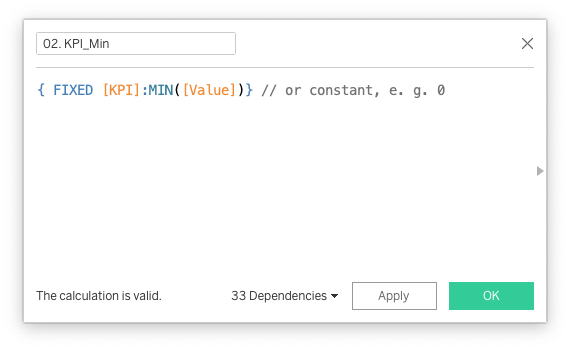
The scalings of the axes depend on the range to be displayed. To keep it dynamic, we need a couple of calculations to find the maximum and the minimum value (could also be a constant like 0) on each axis, and to calculate the range between both.
And now the fun begins...
The scalings of the axes depend on the range to be displayed. To keep it dynamic, we need a couple of calculations to find the maximum and the minimum value (could also be a constant like 0) on each axis, and to calculate the range between both.
And now the fun begins...


(4/13)
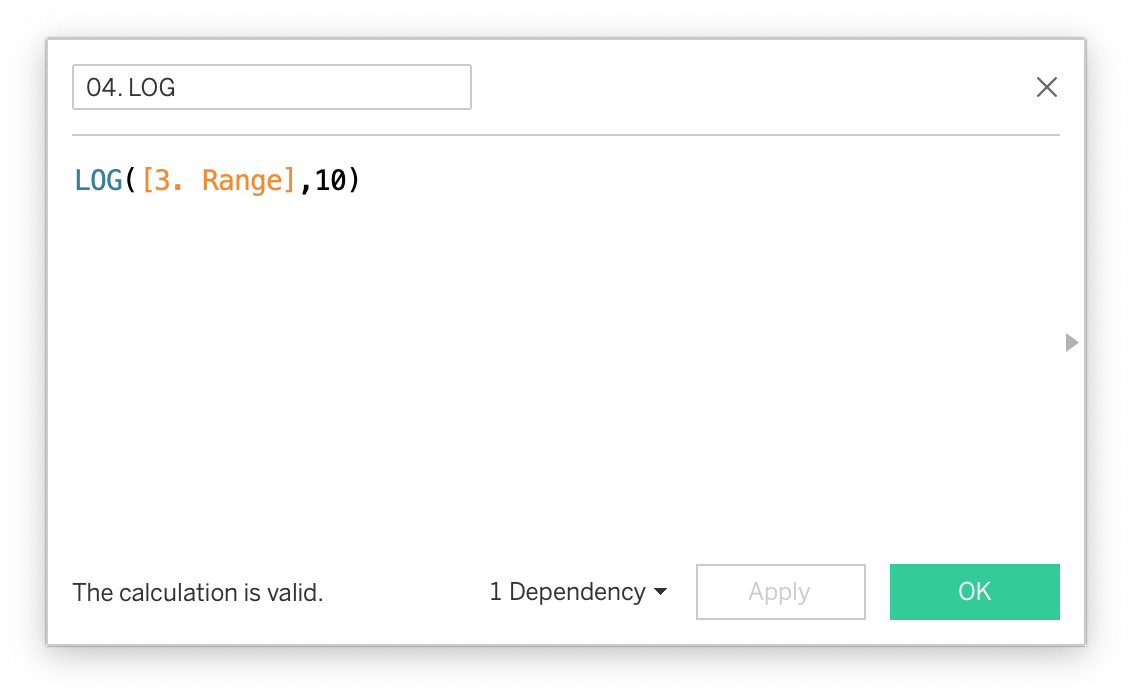
First thing we need to do is to calculate the logarithm to base 10 of my ranges using the function LOG. This gives us back the value by which we have to exponentiate 10 to get the ranges back.
First thing we need to do is to calculate the logarithm to base 10 of my ranges using the function LOG. This gives us back the value by which we have to exponentiate 10 to get the ranges back.

(5/13)
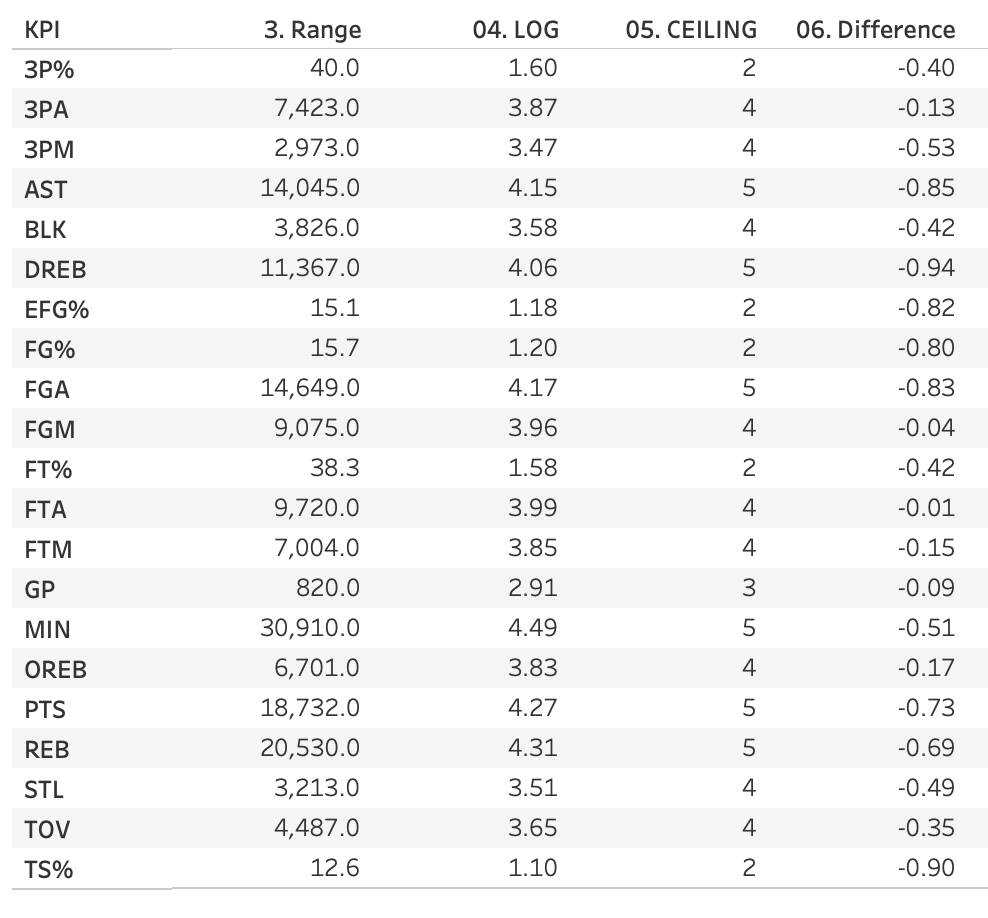
Next step is to use CEILING to round up the value from the previous step. This way we determine the number of digits of the respective range, e.g. 5 digits for the DREB range of 11,367.
Next step is to use CEILING to round up the value from the previous step. This way we determine the number of digits of the respective range, e.g. 5 digits for the DREB range of 11,367.


(6/13)
Then I calculate the difference between the log value and the ceiling value of the log value, to determine the actual scale in the next step.
Then I calculate the difference between the log value and the ceiling value of the log value, to determine the actual scale in the next step.

(7/13)
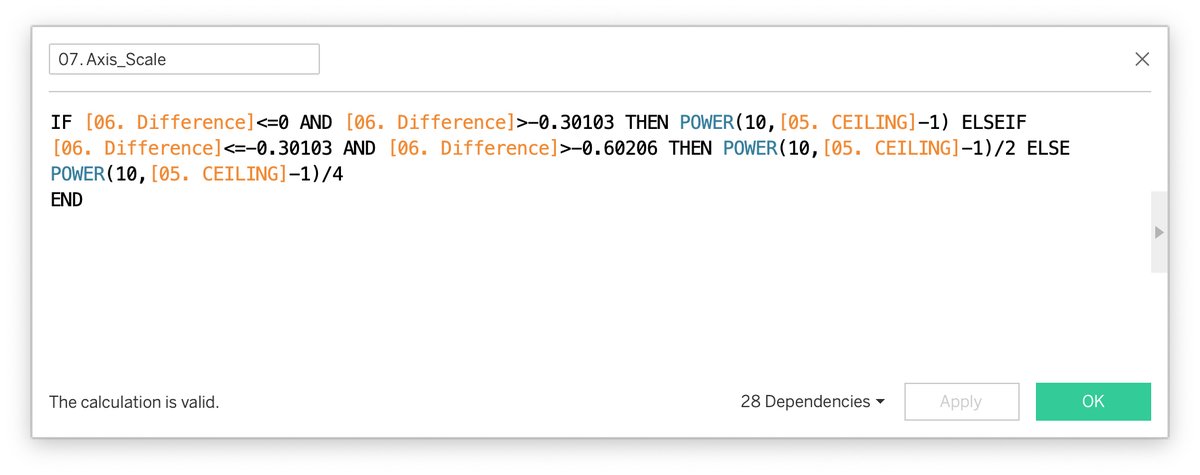
The scale is calculated with POWER & the ceiling value. For diff>-0.30103 it will be 10 to the power of the ceiling value -1 (0.01, 0.1, 1, 10, 100,...)., for the next range (-0.60206 till -0.30103) I divide by 2 (0.05, 0.5, 5, ...) and else by 4 (0.025, 0.25, 2.5, 25).
The scale is calculated with POWER & the ceiling value. For diff>-0.30103 it will be 10 to the power of the ceiling value -1 (0.01, 0.1, 1, 10, 100,...)., for the next range (-0.60206 till -0.30103) I divide by 2 (0.05, 0.5, 5, ...) and else by 4 (0.025, 0.25, 2.5, 25).

(8/13)
Now we can use this Axis scale value to determine the minimum and maximum tick mark, using our Min and Max KPI value and again the CEILING and the FLOOR function...
Now we can use this Axis scale value to determine the minimum and maximum tick mark, using our Min and Max KPI value and again the CEILING and the FLOOR function...
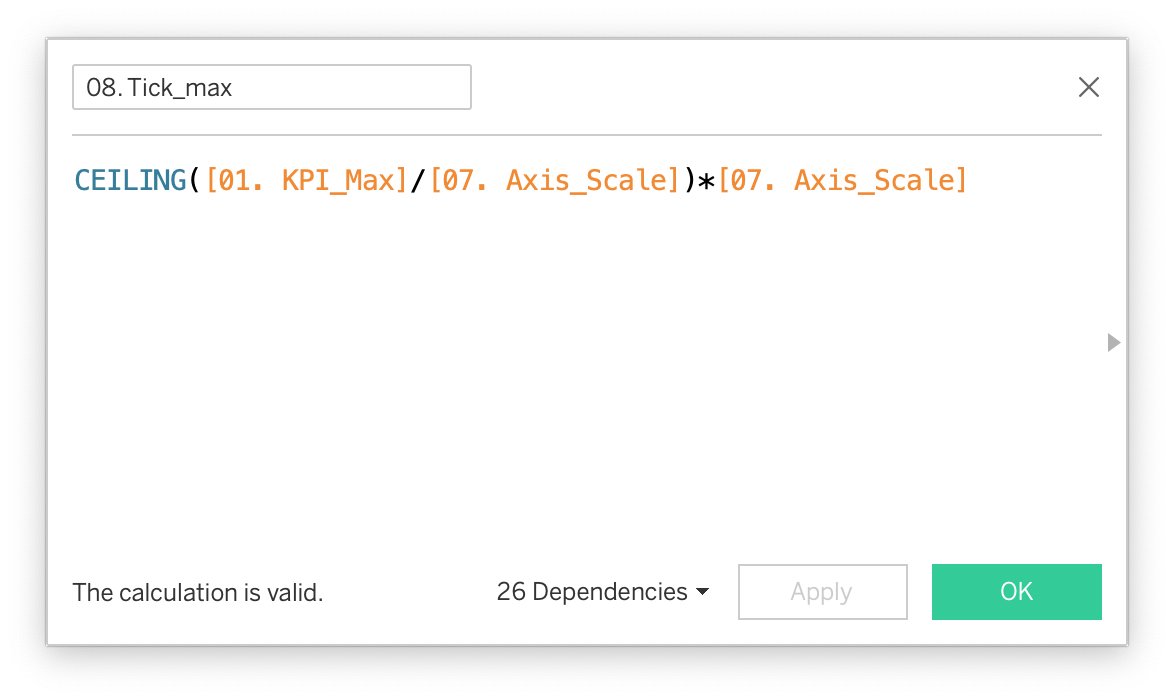

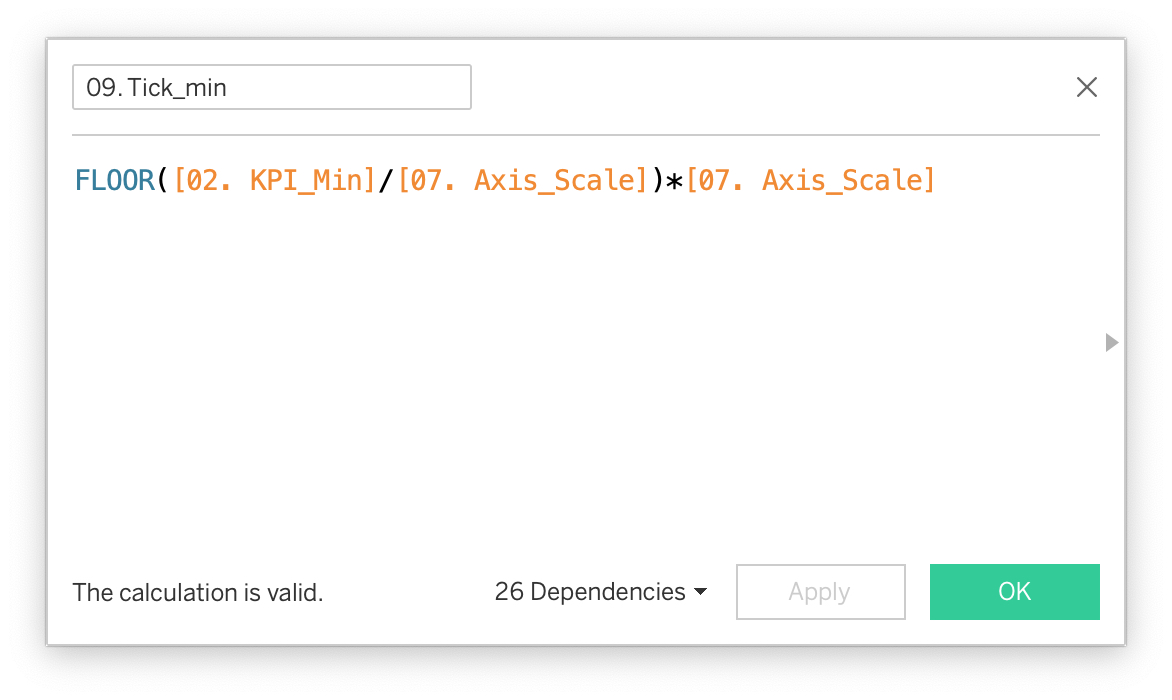
(9/13)
...which will give us eventually the number of ticks needed on our axis.
If you've made it until here: we're almost there!
...which will give us eventually the number of ticks needed on our axis.
If you've made it until here: we're almost there!

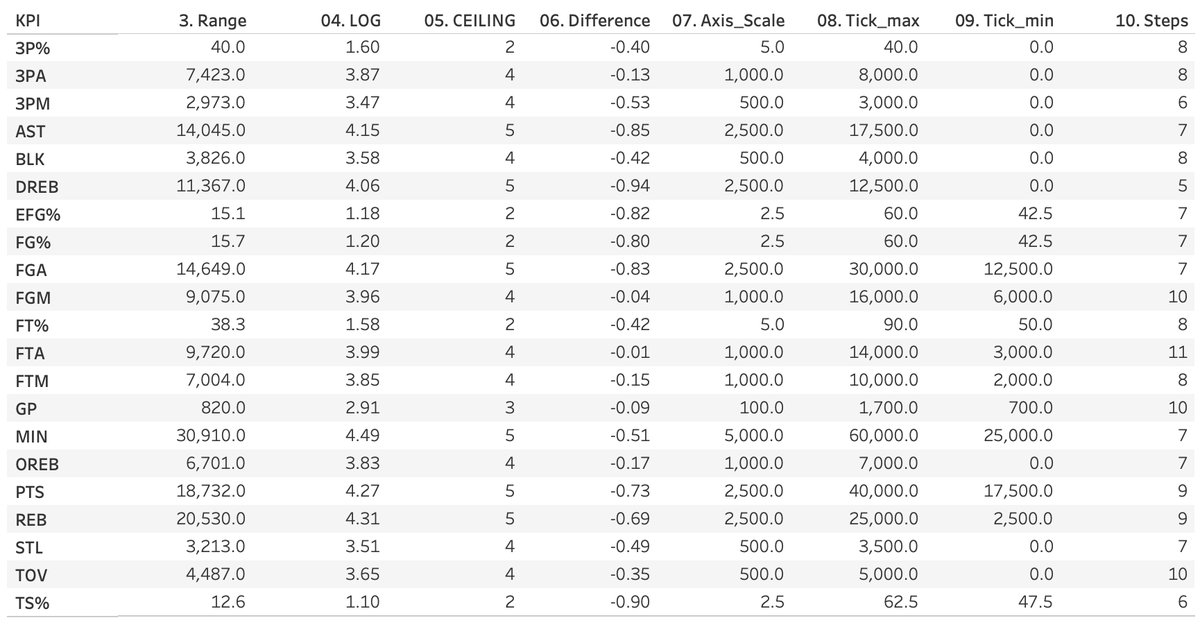
(10/13)
For the tick labels, we start with Tick_min (see step 8) and add further steps as long as the (Object ID-1) is less or equal than the number of steps needed.
For the tick labels, we start with Tick_min (see step 8) and add further steps as long as the (Object ID-1) is less or equal than the number of steps needed.

(11/13)
Last step: calculate the position of each value based on Tick_max and Tick_min. This does not necessarily have to be an aggregation like I did here.
And that's it! Congratulations, you've made it through the thread.
Almost.
Last step: calculate the position of each value based on Tick_max and Tick_min. This does not necessarily have to be an aggregation like I did here.
And that's it! Congratulations, you've made it through the thread.
Almost.

(12/13)
I you want to check the workbook @tableaupublic to see how I've put together the view follow the link: public.tableau.com/app/profile/kl…
I you want to check the workbook @tableaupublic to see how I've put together the view follow the link: public.tableau.com/app/profile/kl…
(13/13)
Is all of this relevant for business users? For 99.9% of them probably not. I can imagine very few use cases, for example when you want to reverse an axis on user control. Or when you just want to bring in axes where Tableau by default doesn't.
Thanks for reading!
Is all of this relevant for business users? For 99.9% of them probably not. I can imagine very few use cases, for example when you want to reverse an axis on user control. Or when you just want to bring in axes where Tableau by default doesn't.
Thanks for reading!
@threadreaderapp unroll
• • •
Missing some Tweet in this thread? You can try to
force a refresh




