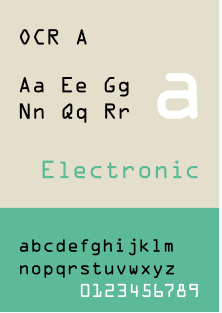
Tip voor @xs4all:
In de rest van de xs4all->KPN migratie, stuur "Onderwerp Uw wachtwoord voor Telefonie" brieven gaarne in een lettertype waar de 000 en OOO heel duidelijk van elkaar kunnen worden onderscheiden.
Hier 4 pogingen (de helft van de permutaties) nodig gehad.
In de rest van de xs4all->KPN migratie, stuur "Onderwerp Uw wachtwoord voor Telefonie" brieven gaarne in een lettertype waar de 000 en OOO heel duidelijk van elkaar kunnen worden onderscheiden.
Hier 4 pogingen (de helft van de permutaties) nodig gehad.

Helaas nog steeds niet goed:
met in "User name" in plaats van "user" nu "user@ims.imscore.net" is deze foutmelding weg: "Registration of Internet telephone number user failed. Remote site reports reason for error 403"
Maar nu deze foutmelding:
met in "User name" in plaats van "user" nu "user@ims.imscore.net" is deze foutmelding weg: "Registration of Internet telephone number user failed. Remote site reports reason for error 403"
Maar nu deze foutmelding:
"Registration of Internet telephone number ########## failed. Reason for error: Remote site not responding. Timeout."
Dus VoIP werkt niet.
Dit zijn de settings (met ### vanwege privacy).
Help!
Dus VoIP werkt niet.
Dit zijn de settings (met ### vanwege privacy).
Help!

NB:
Zonder proxy "voip1-ext.kpn.net" (die heb ik van het KPN forum; stond niet in brief of mail) krijg ik foutmelding "Registration of Internet telephone number ########## failed. Reason for error: DNS error"
Zonder proxy "voip1-ext.kpn.net" (die heb ik van het KPN forum; stond niet in brief of mail) krijg ik foutmelding "Registration of Internet telephone number ########## failed. Reason for error: DNS error"
Nu krijg ik afwisselend deze foutmeldingen:
Registration of Internet telephone number ######## failed. Reason for error: Remote site not responding. Timeout.
Registration of Internet telephone number ######## failed. Remote site reports reason for error 403
Registration of Internet telephone number ######## failed. Reason for error: Remote site not responding. Timeout.
Registration of Internet telephone number ######## failed. Remote site reports reason for error 403
Helaas heeft de VoIP expert van @xs4all/@KPNwebcare niet meer teruggebeld, maar ik denk dat in tegenstelling tot XS4ALL de @AVM_NL Fritz!Box 7360 niet meer door KPN ondersteund wordt omdat die het veld "Authentication name" daar niet in zit.
Daarom deze workaround bedacht:
Daarom deze workaround bedacht:
Even in het Engels zodat het later op mijn blog voor alle lezers begrijpelijk is. Wellicht iets voor @xs4all/@KPNwebcare/@AVM_NL om ergens in de documentatie op te nemen.
@xs4all @KPNwebcare @AVM_NL On the first Fritz!Box:
1. Note the IPV4 address (often 192.168.178.1) as you need it on the second Fritz!Box.
2. Logon.
1/
@xs4all @KPNwebcare @AVM_NL
1. Note the IPV4 address (often 192.168.178.1) as you need it on the second Fritz!Box.
2. Logon.
1/
@xs4all @KPNwebcare @AVM_NL
3. Follow the menu to Telephony>Telephony Numbers
4. Ensure the Telephone Number is enabled and make a note of the Telephone number field as you need it second Fritz!Box.
2/
@xs4all @KPNwebcare @AVM_NL
4. Ensure the Telephone Number is enabled and make a note of the Telephone number field as you need it second Fritz!Box.
2/
@xs4all @KPNwebcare @AVM_NL
5. Follow the menu to Telephony>Telephony Devices
6. In Telephony>Telephony Devices, click Configure New Device.
3/
@xs4all @KPNwebcare @AVM_NL
6. In Telephony>Telephony Devices, click Configure New Device.
3/
@xs4all @KPNwebcare @AVM_NL
7. In Configure a Telephony Device, keep the choice from Telephone (with or without answering machine) and click Next.
4/
@xs4all @KPNwebcare @AVM_NL
4/
@xs4all @KPNwebcare @AVM_NL
@xs4all @KPNwebcare @AVM_NL 8. In Connecting a Telephone, switch the choice from FON S0 (ISDN telephone) to LAN/Wi-Fi (IP telephone), enter a name (or keep IP telephone 1) and click Next.
5/
@xs4all @KPNwebcare @AVM_NL
5/
@xs4all @KPNwebcare @AVM_NL
9. In Apply Settings to the IP Telephone, chose a Username and Password, then click Next.
10. In Configure a telephone for outgoing calls keep the default outgoing calls numbers, then press Next.
6/
@xs4all @KPNwebcare @AVM_NL
10. In Configure a telephone for outgoing calls keep the default outgoing calls numbers, then press Next.
6/
@xs4all @KPNwebcare @AVM_NL
11. In Configure a telephone for incoming calls keep the default setting accept all calls, then press Next.
7/
@xs4all @KPNwebcare @AVM_NL
7/
@xs4all @KPNwebcare @AVM_NL
@xs4all @KPNwebcare @AVM_NL 12. In Apply Settings, observe what you configured in the above steps for Name, connected to/via (should be LAN/WiFi (IP telephone)), Number for outgoing calls, and Numbers for incoming calls are correctly shown, then click Apply.
8/
@xs4all @KPNwebcare @AVM_NL
8/
@xs4all @KPNwebcare @AVM_NL
@xs4all @KPNwebcare @AVM_NL 13. In Telephony>Telephony Devices, verify the new entry has been added (columns Name, Connected via, Telephone Number Outgoing, and Incoming should reflect the values from the previous step,
9/
@xs4all @KPNwebcare @AVM_NL
9/
@xs4all @KPNwebcare @AVM_NL
@xs4all @KPNwebcare @AVM_NL ... the value for Internal (often **620) which you cannot configure but you do need on the second Fritz!Box.
14. Logoff.
10/
@xs4all @KPNwebcare @AVM_NL
14. Logoff.
10/
@xs4all @KPNwebcare @AVM_NL
@xs4all @KPNwebcare @AVM_NL On the second Fritz!Box (the 7360)
1. Logon
2. Follow the menu to Telephony>Telephony Numbers, then click New telephone number
11/
@xs4all @KPNwebcare @AVM_NL
1. Logon
2. Follow the menu to Telephony>Telephony Numbers, then click New telephone number
11/
@xs4all @KPNwebcare @AVM_NL
3. For Telephony provider, select Other provider, then enter the below fields (keep all other fields with default values) with the information from the first Fritz!Box:
12/
@xs4all @KPNwebcare @AVM_NL
12/
@xs4all @KPNwebcare @AVM_NL
@xs4all @KPNwebcare @AVM_NL A. Telephone number for registration becomes the value for Internal from the first Fritz!Box without the preceding asterisks (so the value **620 from above would become 620 here)
13/
@xs4all @KPNwebcare @AVM_NL
13/
@xs4all @KPNwebcare @AVM_NL
@xs4all @KPNwebcare @AVM_NL B. Internal telephone number in the FRITZ!Box becomes the Telephone number field from the first Fritz!Box.
C. User name in the FRITZ!Box becomes the Username field from the first Fritz!Box.
14/
@xs4all @KPNwebcare @AVM_NL
C. User name in the FRITZ!Box becomes the Username field from the first Fritz!Box.
14/
@xs4all @KPNwebcare @AVM_NL
@xs4all @KPNwebcare @AVM_NL D. Password in the FRITZ!Box becomes the Password field from the first Fritz!Box.
E. Registrar in the FRITZ!Box becomes the IPv4 Address field from the first Fritz!Box.
4. Click Next.
15/
@xs4all @KPNwebcare @AVM_NL
E. Registrar in the FRITZ!Box becomes the IPv4 Address field from the first Fritz!Box.
4. Click Next.
15/
@xs4all @KPNwebcare @AVM_NL
@xs4all @KPNwebcare @AVM_NL 5. In Saving Internet Telephone Numbers, verify the values for Provider, Internet telephone number, User name, Registrar are correct (and Proxy server is blank), then click Next.
16/
@xs4all @KPNwebcare @AVM_NL
16/
@xs4all @KPNwebcare @AVM_NL
@xs4all @KPNwebcare @AVM_NL 6. In Checking Internet Telephone Numbers, wait for the progress bar to turn green (from blueish), then click Next.
7. In Telephone Numbers, observe the new entry has been added.
8. Logoff
17/
@xs4all @KPNwebcare @AVM_NL
7. In Telephone Numbers, observe the new entry has been added.
8. Logoff
17/
@xs4all @KPNwebcare @AVM_NL
@xs4all @KPNwebcare @AVM_NL Now test both incoming and outgoing calls.
Note it can take quite some time for the VoIP settings to 'settle`, so if things do not work at first try again in some 15 minutes.
18/18
@xs4all @KPNwebcare @AVM_NL
Note it can take quite some time for the VoIP settings to 'settle`, so if things do not work at first try again in some 15 minutes.
18/18
@xs4all @KPNwebcare @AVM_NL
• • •
Missing some Tweet in this thread? You can try to
force a refresh