

My thread on SQL joins!
Long overdue!! I hope it helps you in your journey🧵
Long overdue!! I hope it helps you in your journey🧵
Why are joins important?
The truth is that no table in a proper database lives in isolation. This is a quick way to get information that resides in various tables in your database.
The truth is that no table in a proper database lives in isolation. This is a quick way to get information that resides in various tables in your database.
If you are working with a relational database, your tables have to be in relationships.(foreign and primary key).
Data comes alive when tables are in relationships; tables are not meant to be single!👀
Data comes alive when tables are in relationships; tables are not meant to be single!👀
An example is this:
In a school database, we have a student table that stores student information with columns such as id, name, faculty_id, etc.
A second table for faculty has columns such as faculty_id, faculty_name, faculty_head, etc
In a school database, we have a student table that stores student information with columns such as id, name, faculty_id, etc.
A second table for faculty has columns such as faculty_id, faculty_name, faculty_head, etc
If you need to get the information about who the Faculty head of a student is, you need to join the student table to the faculty table to retrieve this information. Using the common column that exists between the 2 tables, in this case faculty_id.
If you understand this, let’s see how it works in reality.
Types of joins:
(a) Inner join (also known as join)
(b) Left join (aka left outer join)
(c) Right join (aka right outer join)
We will skip these guys listed below
(d) Full outer join
(e) Cross join
(f) Self join
Types of joins:
(a) Inner join (also known as join)
(b) Left join (aka left outer join)
(c) Right join (aka right outer join)
We will skip these guys listed below
(d) Full outer join
(e) Cross join
(f) Self join
For each type of join, I will start by explaining the idea/concept and how it works before showing you the actual syntax with a practical example
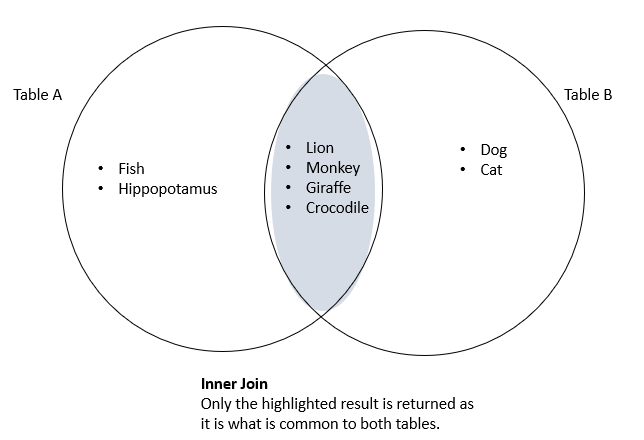
(a) Inner Join: When you use inner joins, you are retrieving the data that is common between the tables and ignoring others. i.e. data in Table A must exist in Table B and data in Table B must exist in Table A
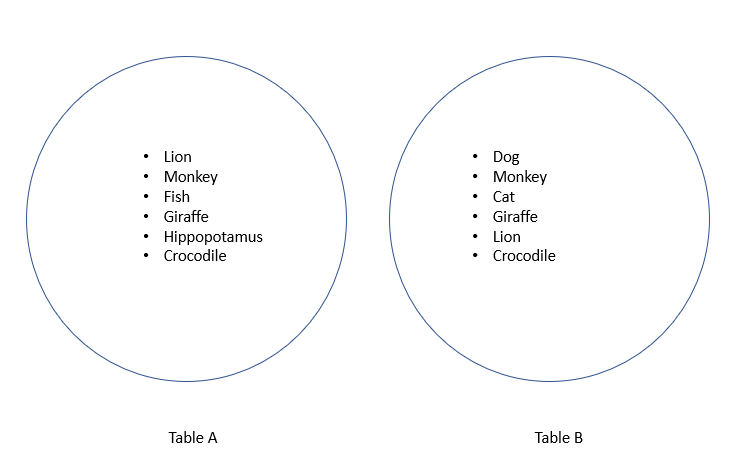
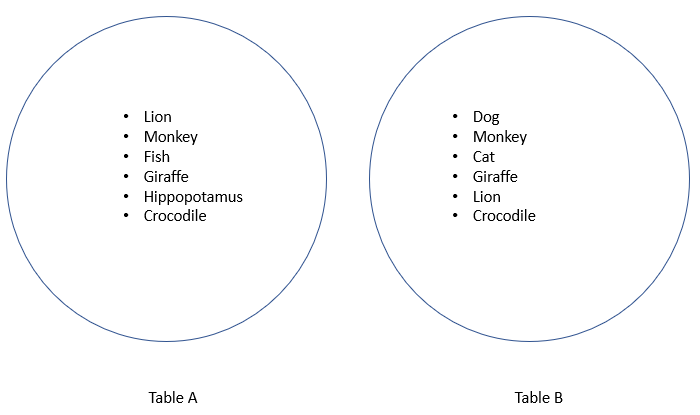
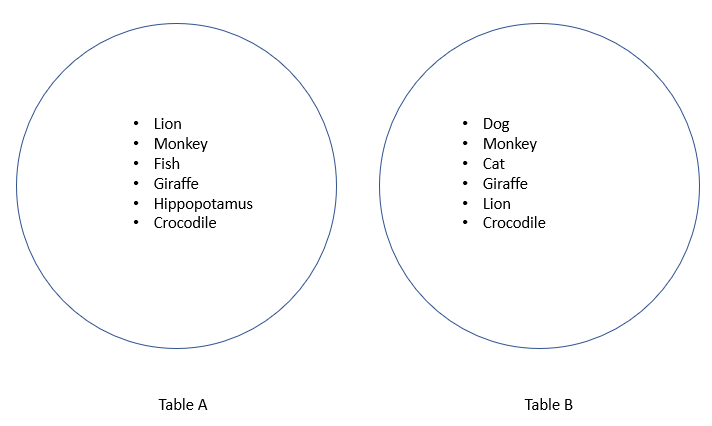
In the first image, I have 2 tables containing animal names. Using the concept of an inner join, you will get the animal names that exist in both tables (i.e circles)
2nd image shows the result of the common values between both tables i.e the colored section
2nd image shows the result of the common values between both tables i.e the colored section
Now let’s look at how this is done in SQL.
The syntax to perform an inner join in SQL is
Select columnName(s) from
tableA join tableB
on tableA.columnName = tableB.columnName
The syntax to perform an inner join in SQL is
Select columnName(s) from
tableA join tableB
on tableA.columnName = tableB.columnName
NB:
1. Column names can be as many columns as you choose to display
2. You can use ‘join’ or ‘inner join’ in the query, it works the same way
3. Observe the 3rd line in the syntax
The 2 columns used in the 'on' clause must be d same value type, but can have diff column names
1. Column names can be as many columns as you choose to display
2. You can use ‘join’ or ‘inner join’ in the query, it works the same way
3. Observe the 3rd line in the syntax
The 2 columns used in the 'on' clause must be d same value type, but can have diff column names
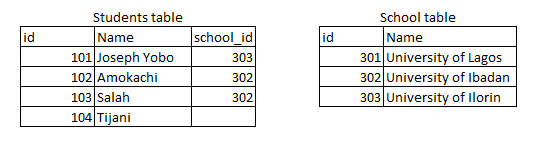
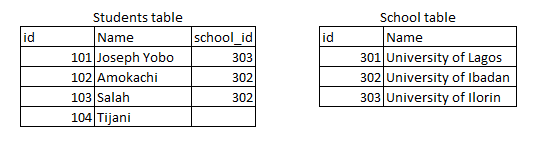
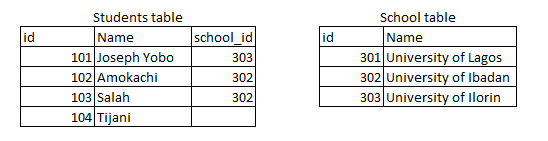
I have 2 tables called students and school as seen in the image.
The task is to join the tables to return the school each student attended.
As you can see, we have school_id in students and id in school table. We will retrieve this data using school_id to join both tables
The task is to join the tables to return the school each student attended.
As you can see, we have school_id in students and id in school table. We will retrieve this data using school_id to join both tables
This query below returns the table:
Select
students.id
, students.name
, school.id as school_id
, school.Name as school_name
From students
Join school
On students.school_id = https://t.co/bZuaKTJtoV
Select
students.id
, students.name
, school.id as school_id
, school.Name as school_name
From students
Join school
On students.school_id = https://t.co/bZuaKTJtoV
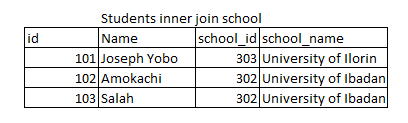
Let's go over the result,
(a) Tijani does not have a school_id and because of that, his record is not retrieved.
(b) Secondly, University of the Lagos does not have a student who has its school_Id on students table so it is not returned either
(a) Tijani does not have a school_id and because of that, his record is not retrieved.
(b) Secondly, University of the Lagos does not have a student who has its school_Id on students table so it is not returned either
(b) Left join:
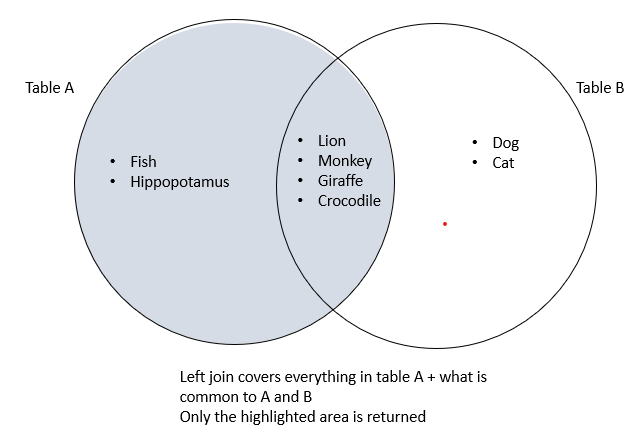
For a left join, all values in the table on the left-hand side would be returned. The values returned from the table on the right are the ones that match the values of the table on the left.
Every value from the table on the left must be returned
For a left join, all values in the table on the left-hand side would be returned. The values returned from the table on the right are the ones that match the values of the table on the left.
Every value from the table on the left must be returned
You will notice that the second image has all the values in table A, this is because it will return all values of the table on the left side (in this case Table A) whether those values in table A exist in table B or not
Practically, how will this work ?
Syntax:
Select columnName(s) from
tableA left join tableB
On tableA.columnName = tableB.columnName
Syntax:
Select columnName(s) from
tableA left join tableB
On tableA.columnName = tableB.columnName
Using the same tables, student and school, you will notice all records from the students table were returned including student_id 104 which has no school_id
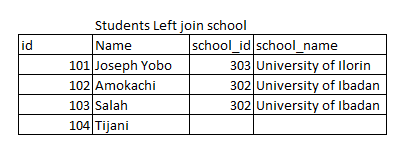
NB: When you use a left join, and a record on table A does not exist on table B, every column you refer to for that record on table B returns NULL (empty value) just like school_id and school name were empty for Tijani
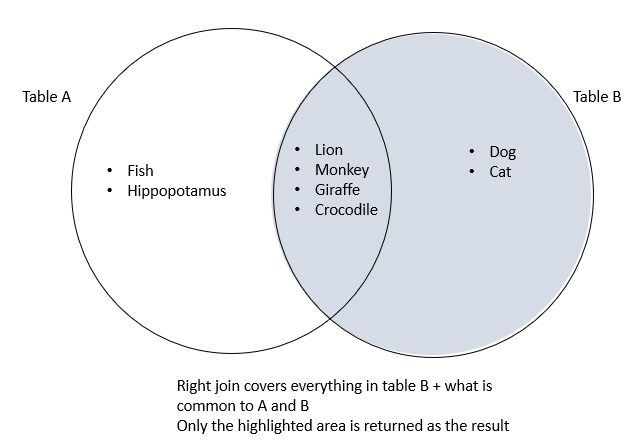
(c) Right Join: Right join is the opposite of left join, what this means is that every record in the table on right is returned and only values in the left table that match the right table are returned.
So imagine what happens with left join but this time with the right table
So imagine what happens with left join but this time with the right table
Just like the image below, only the value on the right table is returned back
Syntax is same with left join, but change left to right
Select students.id, students.name, school.id as school_id, school.Name as school_name
From students
right Join school
on students.school_id= https://t.co/bZuaKTJtoV
Select students.id, students.name, school.id as school_id, school.Name as school_name
From students
right Join school
on students.school_id= https://t.co/bZuaKTJtoV
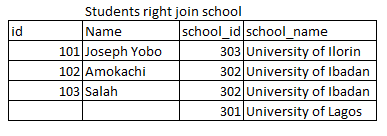
The use of an inner join or an outer join (left/right) is dependent on the result you want to achieve.
Using our tables above, i could use an inner join to know only students who have gone to university and a left join if i want all students irrespective of university attended
Using our tables above, i could use an inner join to know only students who have gone to university and a left join if i want all students irrespective of university attended
Personally, i try to avoid right joins, i will just move the table to the left side and use a left join so it is easier to manage in my head.
But always think about the end result first and that helps you determine which join to use.
I might touch on the others later.
But always think about the end result first and that helps you determine which join to use.
I might touch on the others later.
Learn more: w3schools.com/sql/sql_ref_jo…
mode.com/sql-tutorial/s…
Test your skills here with questions: hackerrank.com/domains/sql/jo…
mode.com/sql-tutorial/s…
Test your skills here with questions: hackerrank.com/domains/sql/jo…
Let me know if you need more tweets like this.
Should I continue using Twitter or should I use medium/ a blog and share links here
Should I continue using Twitter or should I use medium/ a blog and share links here
• • •
Missing some Tweet in this thread? You can try to
force a refresh



