Poorly designed slides can destroy your presentation.
Here are 9 must follow rules to create slides that pop and keep your audience engaged:🧵👇
Here are 9 must follow rules to create slides that pop and keep your audience engaged:🧵👇
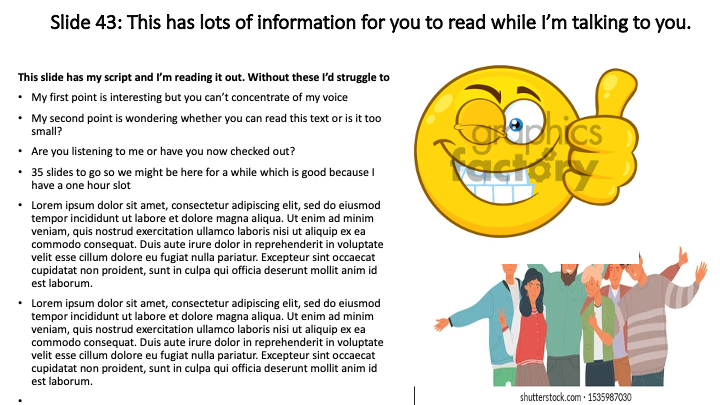
Rule #1: Don't read text out from your slides.
The slides aren't your script. They aren't your notes.
When your audience has to process multiple sources of info, learning is more difficult.
Instead, allow the audience to focus on YOU.
The slides aren't your script. They aren't your notes.
When your audience has to process multiple sources of info, learning is more difficult.
Instead, allow the audience to focus on YOU.
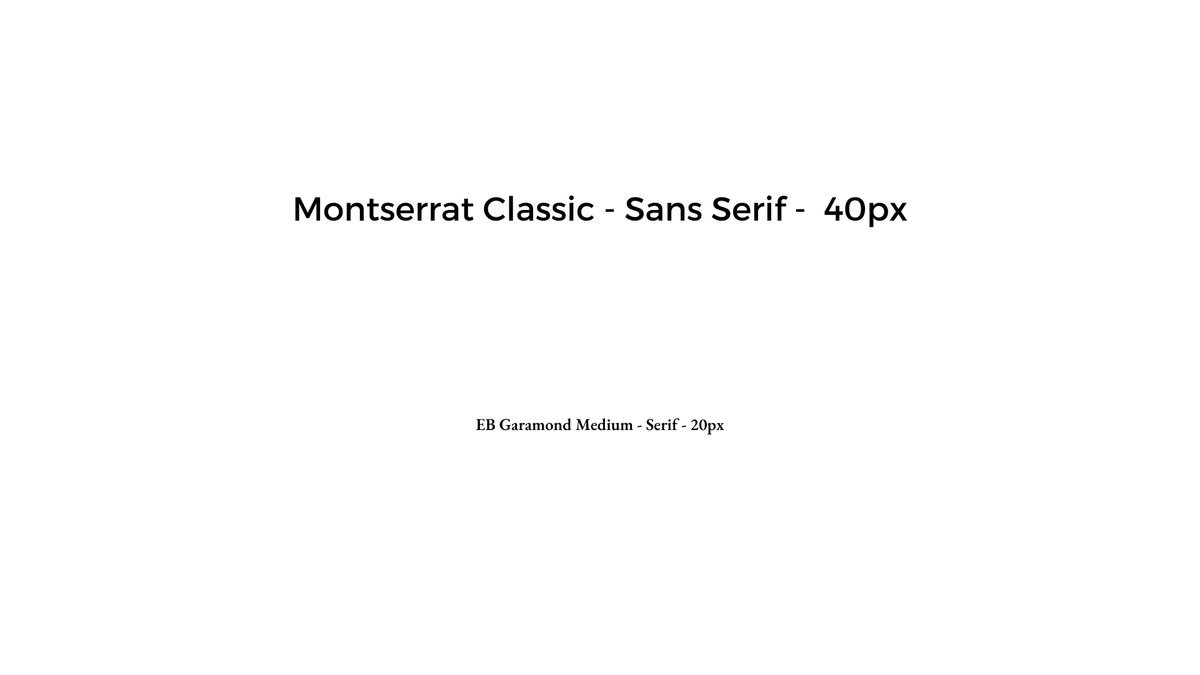
Rule #2: Use a decent font size.
Tiny fonts lead to unreadable text and a confused audience.
Always use a font size that can be seen from the back of the room (usually at least 30px)
And use sans serif fonts as they are clearer to read.
Tiny fonts lead to unreadable text and a confused audience.
Always use a font size that can be seen from the back of the room (usually at least 30px)
And use sans serif fonts as they are clearer to read.
Rule #3: Show the audience exactly what you want them to see.
Highlighting words helps your audience learn:
• Change the colour of one word
• Make an image larger
• Place emphasis on a particular word
We learn best when shown what we need to pay attention to.
Highlighting words helps your audience learn:
• Change the colour of one word
• Make an image larger
• Place emphasis on a particular word
We learn best when shown what we need to pay attention to.
Rule #4: Keep words and pictures near each other.
Most people space out information on their slide.
But then your audience has to scan the screen and put all the items together.
Keep items close together for more effective learning.
Most people space out information on their slide.
But then your audience has to scan the screen and put all the items together.
Keep items close together for more effective learning.
Rule #5: Use high quality images.
The worst slides have:
• Images that are pixelated & blurry
• Clip art with a giant watermark
Use images that are crisp & clear even on a large screen.
The worst slides have:
• Images that are pixelated & blurry
• Clip art with a giant watermark
Use images that are crisp & clear even on a large screen.
Rule #6: White space is your friend.
How can you design beautiful slides if you're not a designer?
• Use @canva for templates
• Embrace white space
• Ruthlessly edit
Extra content competes for space in our brains & we don't remember it as well.
Less is more.
How can you design beautiful slides if you're not a designer?
• Use @canva for templates
• Embrace white space
• Ruthlessly edit
Extra content competes for space in our brains & we don't remember it as well.
Less is more.
Rule #7: Create a consistent look & feel.
When we first start out, we create slides with no common theme.
It’s not until we watch brilliant presentations that we start to realise how important consistency is:
• Colors
• Fonts
• Alignment
You message will be more powerful.
When we first start out, we create slides with no common theme.
It’s not until we watch brilliant presentations that we start to realise how important consistency is:
• Colors
• Fonts
• Alignment
You message will be more powerful.
Rule #8: Avoid animations.
It's tempting to add special effects everywhere.
• Transitions between slides
• Fancy animations
Eventually though, we realise that neither of these accomplishes our goal.
Instead, remove animations & transitions.
Focus on your core message.
It's tempting to add special effects everywhere.
• Transitions between slides
• Fancy animations
Eventually though, we realise that neither of these accomplishes our goal.
Instead, remove animations & transitions.
Focus on your core message.
Rule #9: Create your slides as the last step, not the first.
It's tempting to start our presentation planning by designing our slides first.
Instead, leave this task till the very end.
The slides should be the finishing touch, not the main event.
It's tempting to start our presentation planning by designing our slides first.
Instead, leave this task till the very end.
The slides should be the finishing touch, not the main event.
And remember:
Slides ≠ accessibility
It's our responsibility to make our presentations accessible, and this is achieved in many ways:
• Captions
• Transcripts
• Handouts
• Quality audio
• Recordings
And much more.
Don't confuse this with slide design.
Slides ≠ accessibility
It's our responsibility to make our presentations accessible, and this is achieved in many ways:
• Captions
• Transcripts
• Handouts
• Quality audio
• Recordings
And much more.
Don't confuse this with slide design.
TL;DR - 9 must-follow rules to design slides that pop
• #1: Don't read them out
• #2: Use large font
• #3: Use emphasis
• #4: Keep words & pictures near
• #5: Add quality images
• #6: Use white space
• #7: Be consistent
• #8: Skip animations
• #9: Create the slides last
• #1: Don't read them out
• #2: Use large font
• #3: Use emphasis
• #4: Keep words & pictures near
• #5: Add quality images
• #6: Use white space
• #7: Be consistent
• #8: Skip animations
• #9: Create the slides last
If you found this thread valuable:
1. Follow me for more threads on education, writing, and tech → @TessaRDavis
2. Jump up to the first tweet and retweet it:
1. Follow me for more threads on education, writing, and tech → @TessaRDavis
2. Jump up to the first tweet and retweet it:
https://twitter.com/TessaRDavis/status/1532424356239900672?s=20&t=l4D6v61Wk9XFkattQo16Dw
Need a place to start with creating your slides?
1) Sign up for this brand new course (free 30 day trial - aff): skl.sh/3tcKtRX
2) Follow the simple instructions (less than an hour to learn it all)
3) Made your next set of slides sparkle
1) Sign up for this brand new course (free 30 day trial - aff): skl.sh/3tcKtRX
2) Follow the simple instructions (less than an hour to learn it all)
3) Made your next set of slides sparkle
• • •
Missing some Tweet in this thread? You can try to
force a refresh