Ivan Velichko Profile picture
Jul 24, 2022 8 tweets 3 min read Read on X
Kubernetes basics explained by analogy 🧵

...or "How Kubernetes Just Repeats Good Old Deployment Patterns"

1. For a long time, people had been deploying services as groups of virtual (or physical) machines.

But VMs were often slow and bulky. Hence, not very efficient.
2. Then containers gained quite some popularity.

With containers, it became easier to distribute services. Reproducibility also improved. But containers haven't become a replacement for VMs.

Mainly, because of their deliberate focus on being an environment to run a single app:
3. Instead of containers, another abstraction took off - Kubernetes Pods!

A Pod is a group of semi-fused containers. External borders were preserved, but some of the internal isolation b/w containers substituting a Pod got weakened.

A Pod is a much closer abstraction to a VM.
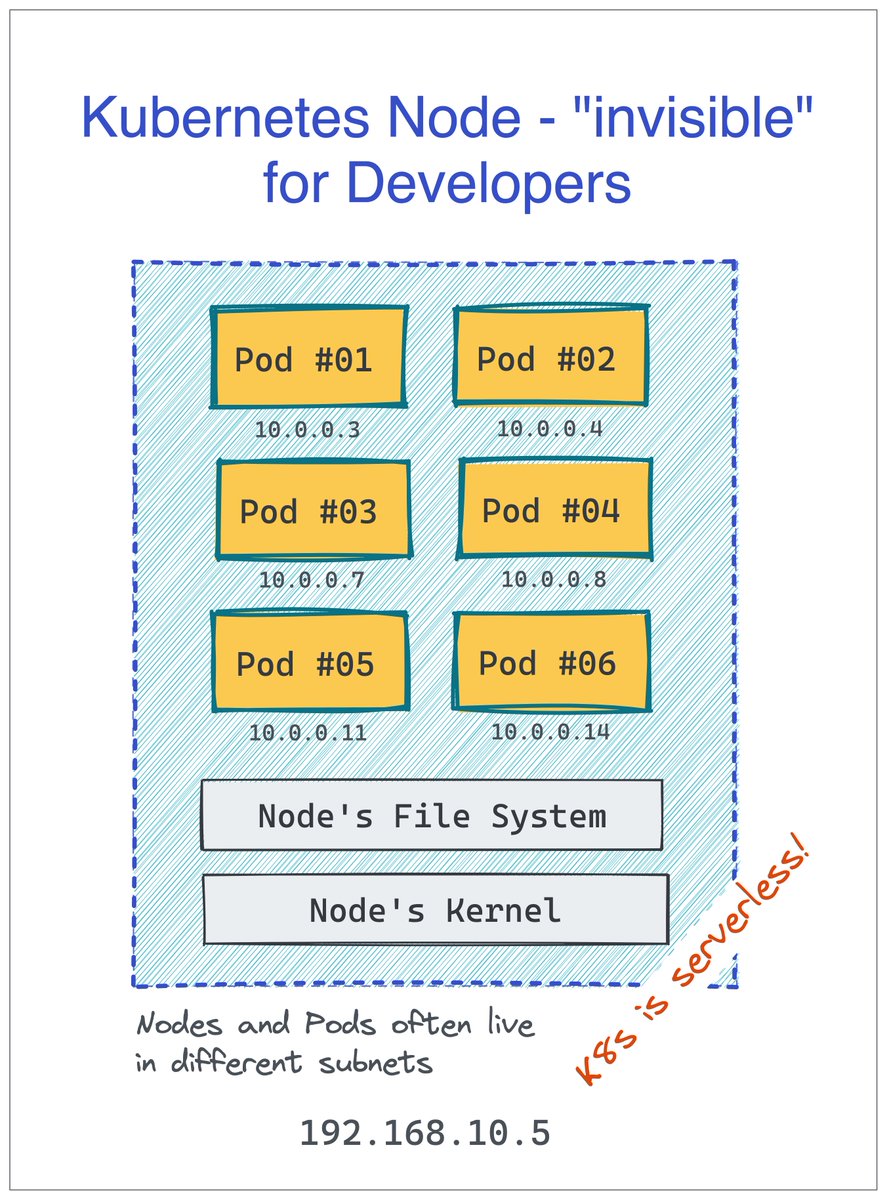
4. A single (virtual or physical) machine can run many independant Pods.

In Kubernetes, machines substituting a cluster are called Nodes, but developers are rarely concerned with this abstraction. For them, Kubernetes is serverless! 🙈

More Pods per server means better packing.
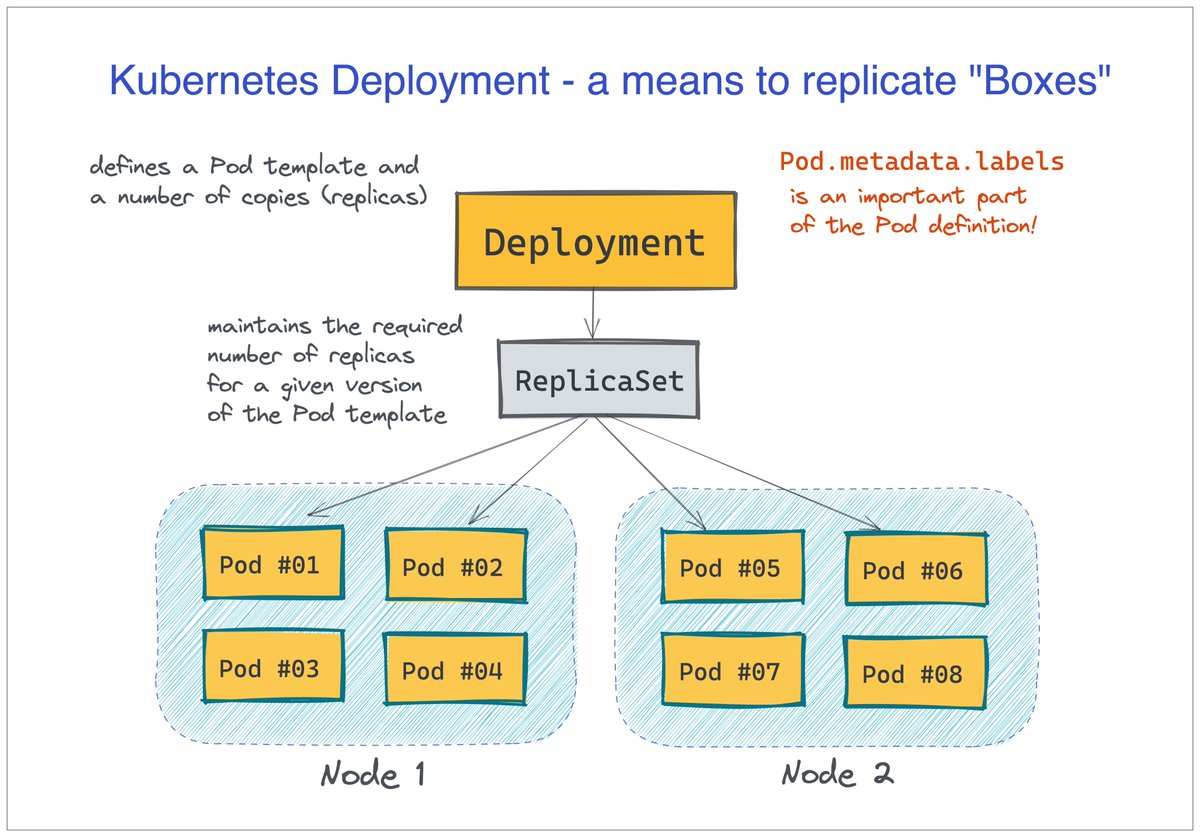
5. Deployment of Pods happens through replicating a Pod template.

There is a Deployment object in Kubernetes that holds the desired Pod template and the needed number of "copies." But logically, there is not much difference between scaling Pods and VMs.
6. Kubernetes Service is a means of grouping Pods behind a logical name.

Kubernetes comes with built-in service discovery.

The implementation is neither client- nor server-side (rather network-side). But from the clients' standpoint, it feels like a good old reverse proxy.
Further reading 👇

iximiuz.com/en/posts/conta…

• • •

Missing some Tweet in this thread? You can try to force a refresh

 

Keep Current with Ivan Velichko

Ivan Velichko Profile picture

Stay in touch and get notified when new unrolls are available from this author!

Read all threads

This Thread may be Removed Anytime!

PDF

Twitter may remove this content at anytime! Save it as PDF for later use!

Try unrolling a thread yourself!

how to unroll video
  1. Follow @ThreadReaderApp to mention us!

  2. From a Twitter thread mention us with a keyword "unroll"
@threadreaderapp unroll

Practice here first or read more on our help page!

More from @iximiuz

Jul 4, 2024
Grasping Kubernetes Pods, Deployments, and Services 🧵

...through the lens of "old school" Virtual Machines.

Before the rise of Cloud Native:

- A VM was a typical deployment unit (a box)
- A group of VMs would form a service
- Everyone would build their own Service Discovery Image
Then, Docker containers showed up.

A container attempted to become a new deployment unit...

However, Docker's restriction of having a single process per container was too limiting. Many apps weren't built that way, and people needed more VM-ish boxes. Image
Kubernetes got the deployment unit right.

In Kubernetes, a minimal runnable thing is a Pod - a group of semi-fused containers.

Now, you can run (and scale!) the main app and its satellite daemons (sidecars) as a single unit. Image
Read 6 tweets
Jun 20, 2024
SSH Tunnels - A Visual Guide To Port Forwarding 🧵

One of my favorite parts of SSH is tunneling. With just the regular ssh client, you can do wonders!

1. Local Port forwarding

Access private ports of a remote machine using local tools (your browser, a fancy DB UI client, etc) Image
2. Local Port Forwarding with a Bastion Host

A more flexible and auditable variant of local port forwarding.

Typical use: A poor man's way to access services in a private VPC (when you don't have time to set up SSM or any other "proper" solution). Image
3. Remote Port Forwarding

Handy when you need to quickly expose a local service to the outside world, but your laptop doesn't have a public IP.

Of course, for that, you'll need a public-facing "ingress gateway". But fear not! Any server with an SSH daemon on it will do! Image
Read 6 tweets
Jan 28, 2024
Docker vs. containerd vs. Podman 🧵

Containers are everywhere, and Docker is the most popular (and user-friendly) way of running them. But it's definitely not the only way!

I prepared a series of exercises to help you explore the alternative single-host runtimes 👇 Image
To set up a baseline, I recommend starting with Docker.

Try launching a container and inspecting it:

- What is it exactly that you just launched?
- Is it a single process? A lightweight VM?
- Can you find the IP address of the container?

labs.iximiuz.com/challenges/sta…
Image
Docker relies on containerd, a lower-level container runtime, to run its containers. It is possible to use containerd from the command line directly, but the UX might be quite rough at times.

contaiNERD CTL (nerdctl) to the rescue!

Try it out 👉 labs.iximiuz.com/challenges/sta…
Image
Read 5 tweets
Jan 10, 2024
What Actually Happens When You Publish a Container Port? Mini-🧵

docker run -p 8080:80 nginx

Have you ever wondered what `-p 8080:80` in the above command does? Then read on! Image
When you launch Nginx (or any other service), it opens a socket on a certain address - e.g., 172.17.0.3:80.

Clients that can reach this IP address can access the service. Image
However, when a service runs in a container, its socket will likely be on the container's primary IP address.

...which may or may not be reachable from the host!

Hence, port forwarding. Or, as Docker calls it - port publishing. Image
Read 8 tweets
Nov 27, 2023
How Container Networking Works 🧵

1. Network namespaces - a Linux facility to virtualize network stacks.

Every container gets its own isolated network stack with (virtual) network devices, a dedicated routing table, a scratch set of iptables rules, and more. Image
2. Virtual Ethernet Devices (veth) - a means to interconnect network namespaces.

Container's network interfaces are invisible from the host - the latter runs in its own (root) network namespace.

To punch through a network namespace, a special Virtual Ethernet Pair can be used. Image
3. The need for a (virtual) switch device.

When multiple containers run in the same IP network, leaving the host ends of the veth devices dangling in the root namespaces will make the routes clash. So, you won't be able to reach (some of) the containers. Image
Read 6 tweets
Nov 17, 2023
What is Service Discovery - in general, and in Kubernetes 🧵

Services (in Kubernetes or not) tend to run in multiple instances (containers, pods, VMs). But from the client's standpoint, a service is usually just a single address.

How is this single point of entry achieved? Image
1⃣ Server-Side Service Discovery

A single load balancer, a.k.a reverse proxy in front of the service's instances, is a common way to solve the Service Discovery problem.

It can be just one Nginx (or HAProxy) or a group of machines sharing the same address 👇 Image
2⃣ Client-Side Service Discovery

The centralized LB layer is relatively easy to provision, but it can become a bottleneck and a single point of failure.

An alternative solution is to distribute the rosters of service addresses to every client and let them pick an instance. Image
Read 7 tweets

Did Thread Reader help you today?

Support us! We are indie developers!


This site is made by just two indie developers on a laptop doing marketing, support and development! Read more about the story.

Become a Premium Member ($3/month or $30/year) and get exclusive features!

Become Premium

Don't want to be a Premium member but still want to support us?

Make a small donation by buying us coffee ($5) or help with server cost ($10)

Donate via Paypal

Or Donate anonymously using crypto!

Ethereum

0xfe58350B80634f60Fa6Dc149a72b4DFbc17D341E copy

Bitcoin

3ATGMxNzCUFzxpMCHL5sWSt4DVtS8UqXpi copy

Thank you for your support!

Follow Us!

:(



