Ivan Velichko Profile picture
Jul 24 8 tweets 3 min read
Kubernetes basics explained by analogy 🧵

...or "How Kubernetes Just Repeats Good Old Deployment Patterns"

1. For a long time, people had been deploying services as groups of virtual (or physical) machines.

But VMs were often slow and bulky. Hence, not very efficient.
2. Then containers gained quite some popularity.

With containers, it became easier to distribute services. Reproducibility also improved. But containers haven't become a replacement for VMs.

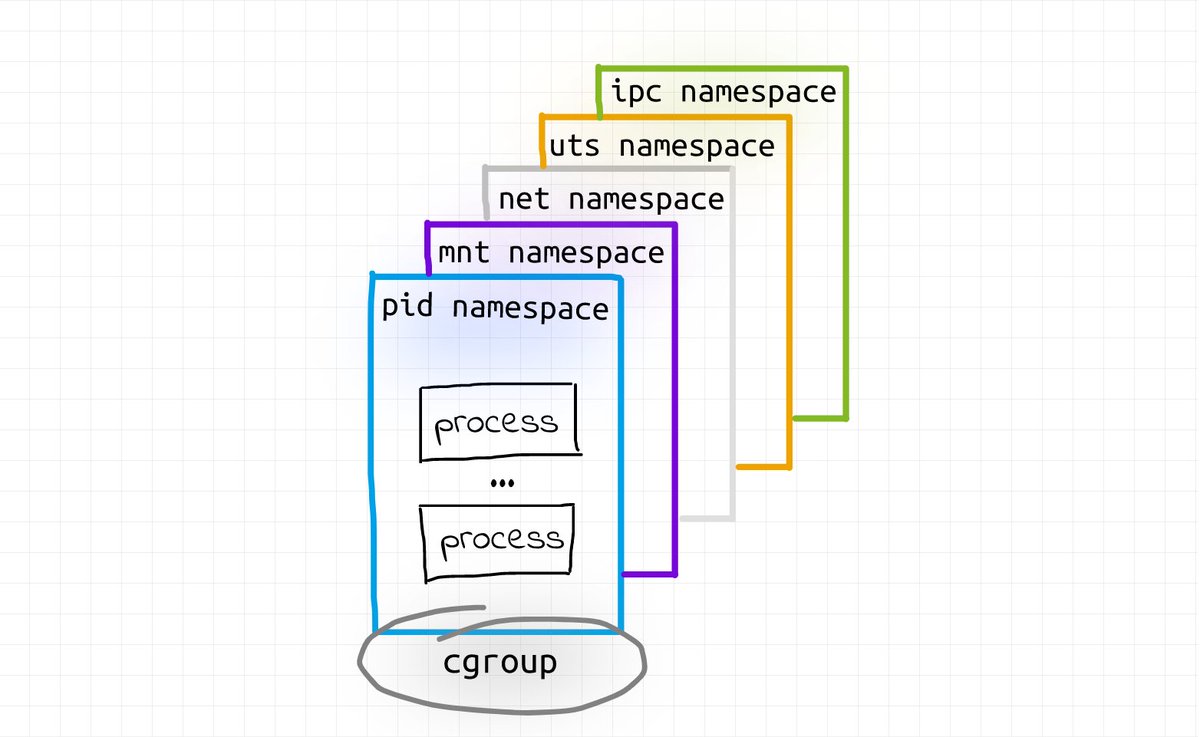
Mainly, because of their deliberate focus on being an environment to run a single app:
3. Instead of containers, another abstraction took off - Kubernetes Pods!

A Pod is a group of semi-fused containers. External borders were preserved, but some of the internal isolation b/w containers substituting a Pod got weakened.

A Pod is a much closer abstraction to a VM.
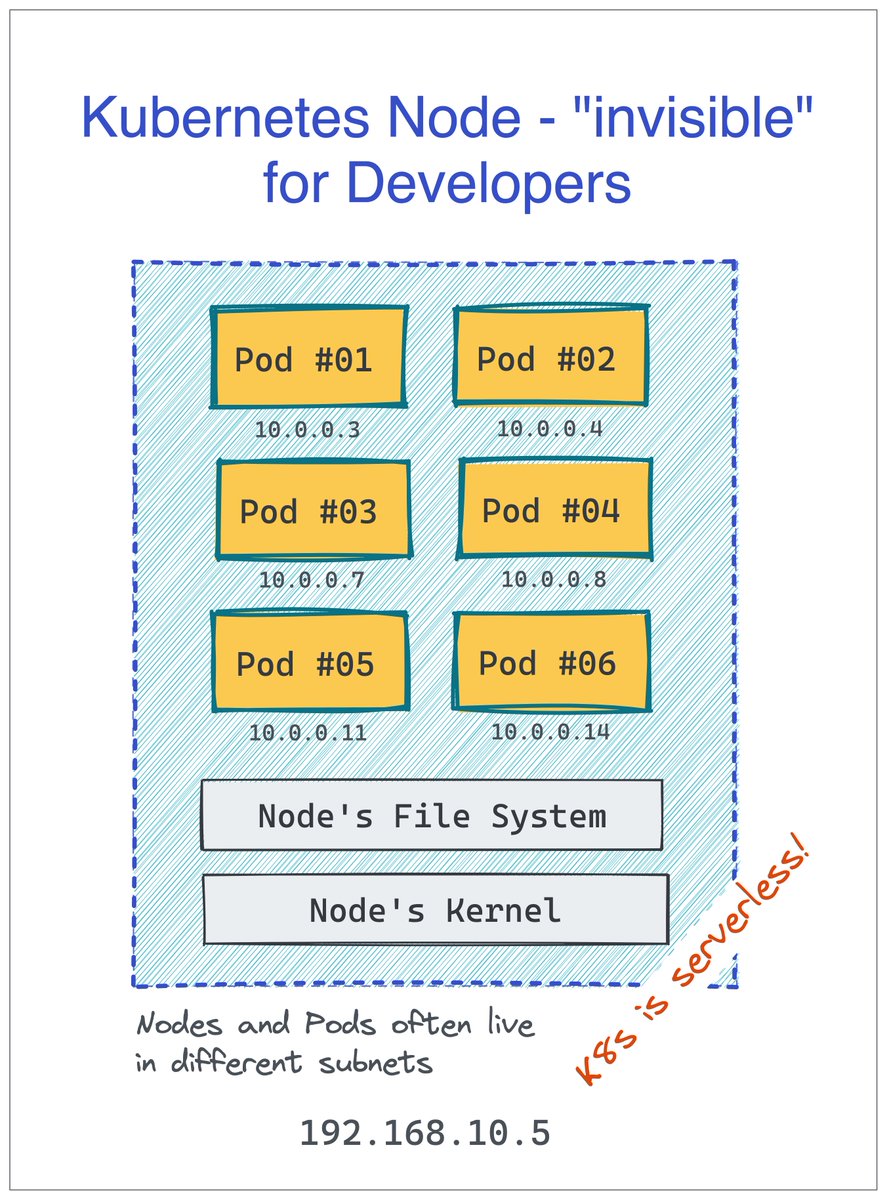
4. A single (virtual or physical) machine can run many independant Pods.

In Kubernetes, machines substituting a cluster are called Nodes, but developers are rarely concerned with this abstraction. For them, Kubernetes is serverless! 🙈

More Pods per server means better packing.
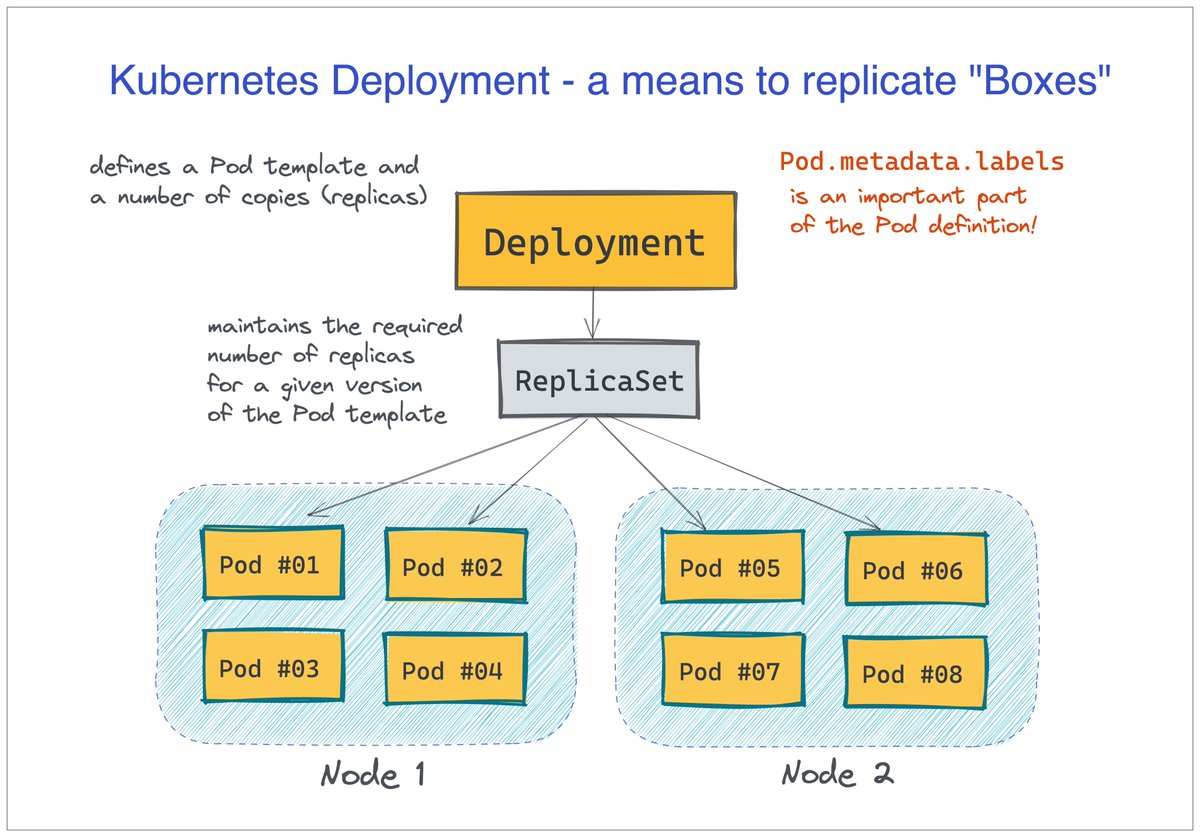
5. Deployment of Pods happens through replicating a Pod template.

There is a Deployment object in Kubernetes that holds the desired Pod template and the needed number of "copies." But logically, there is not much difference between scaling Pods and VMs.
6. Kubernetes Service is a means of grouping Pods behind a logical name.

Kubernetes comes with built-in service discovery.

The implementation is neither client- nor server-side (rather network-side). But from the clients' standpoint, it feels like a good old reverse proxy.
Further reading 👇

iximiuz.com/en/posts/conta…

• • •

Missing some Tweet in this thread? You can try to force a refresh

 

Keep Current with Ivan Velichko

Ivan Velichko Profile picture

Stay in touch and get notified when new unrolls are available from this author!

Read all threads

This Thread may be Removed Anytime!

PDF

Twitter may remove this content at anytime! Save it as PDF for later use!

Try unrolling a thread yourself!

how to unroll video
  1. Follow @ThreadReaderApp to mention us!

  2. From a Twitter thread mention us with a keyword "unroll"
@threadreaderapp unroll

Practice here first or read more on our help page!

More from @iximiuz

Jul 22
How could I miss Async Hooks arrival in Node.js!

Me in 2014, using Python: Thread-local storage for ctx propagation is awesome!

Me in 2017, switching to Node.js: Can I have seamless ctx propagation, pleeease!

Me in 2019, using mainly Go: Explicit ctx passing! This is the way!
For the context (no pun intended), I've been reading the OpenTelemetry JS SDK code lately, and couldn't understand how this may work:

```
import { context, trace } from 'opentelemetry/api'

function async myHandler() {
const span = trace.getSpan(context․active())
...
}
```
Since the async `myHandler` function can be called concurrently from multiple request handlers, the `active` context cannot be not shared. Or so thought I...

But then I learned about the AsyncHooksContextManager module 👇

github.com/open-telemetry…
Read 6 tweets
Jul 19
Why AWS Lambda is great for pure FaaS and poor for generic HTTP workloads (thread) 🔽

As always, my take. YMMV.

1/ Lambdas are just great as ad-hoc tiny little handlers for:

- Stream events: CloudWatch/Kinesis/DynamoDB
- Queue messages: SNS/SQS
- Simple webhooks: API Gateway
2/ Why AWS Lambda excels in the above scenarios:

- Easy to deploy: you can just submit a piece of code
- Easy to monitor: you're generally interested in the absolute invocation duration and the binary outcome (ok/ko).
- Easy to scale 🫰
- And no servers! 🔥
3/ Everything changes when you start using AWS Lambda for full-blown HTTP services:

- Deployment slows down (it'd in any case but it cancels out one of the former pros)
- Observability isn't on par with ECS/EKS
- Scaling up becomes expensive
- What's up with blue/green & canary?
Read 9 tweets
May 29
Kubernetes Ephemeral Containers 101

Slim production images is a must - they are fast(er) and secure(r). But there is a problem - they lack debugging tools.

Ephemeral Containers and the `kubectl debug` command help you make the debugging tools available in the cluster on-demand.
The simplest way to start an ephemeral container in an already running Pod:

```
kubectl debug -it --image busybox <POD>
```

The command:
- Updates the Pod spec.
- Starts a new busybox container.
- Attaches your terminal to it.

Without disrupting the Pod!
But there is a problem with the `kubectl debug` default behavior.

You need this command to debug containers in a Pod. However, by default, you won't even see their processes. Nor you'd have access to their filesystems.

Solution 1: Enable shared process namespace on the workload
Read 5 tweets
Apr 27
How to master Container Management Commands 🧵

🤔 docker create vs. docker start
🤨 docker start vs. docker run
🙄 docker run vs. docker exec
🥺 docker exec vs. docker attach
🤯 docker attach vs. docker logs

It's hard to memorize the difference. But there might be no need! 🔽
Two simplifications that speed up the adoption of containers:

- Use `docker run` everywhere
- Containers are just processes

Both are of great help in the short run. But eventually, you need to get over them to really understand the containers.

It's 🗝️ to mastering Docker CLI.
Containers aren't files. Containers are isolated and restricted execution environments _for processes_.

Don't believe me? Then go take a look at the OCI Runtime Spec yourself 😉

iximiuz.com/en/posts/oci-c…
Read 10 tweets
Apr 3
How to debug issues in containers 🔽

You started a server in a container. It's supposed to open a bunch of ports. The container is running fine, but you cannot connect to some of the ports from the outside. You exec into the container, but `ss` is not there. Now what?
Installing extra tools to container images is rarely a good idea. Slim production images are generally faster and safer.

Knowledge of the containerization theory to the rescue!

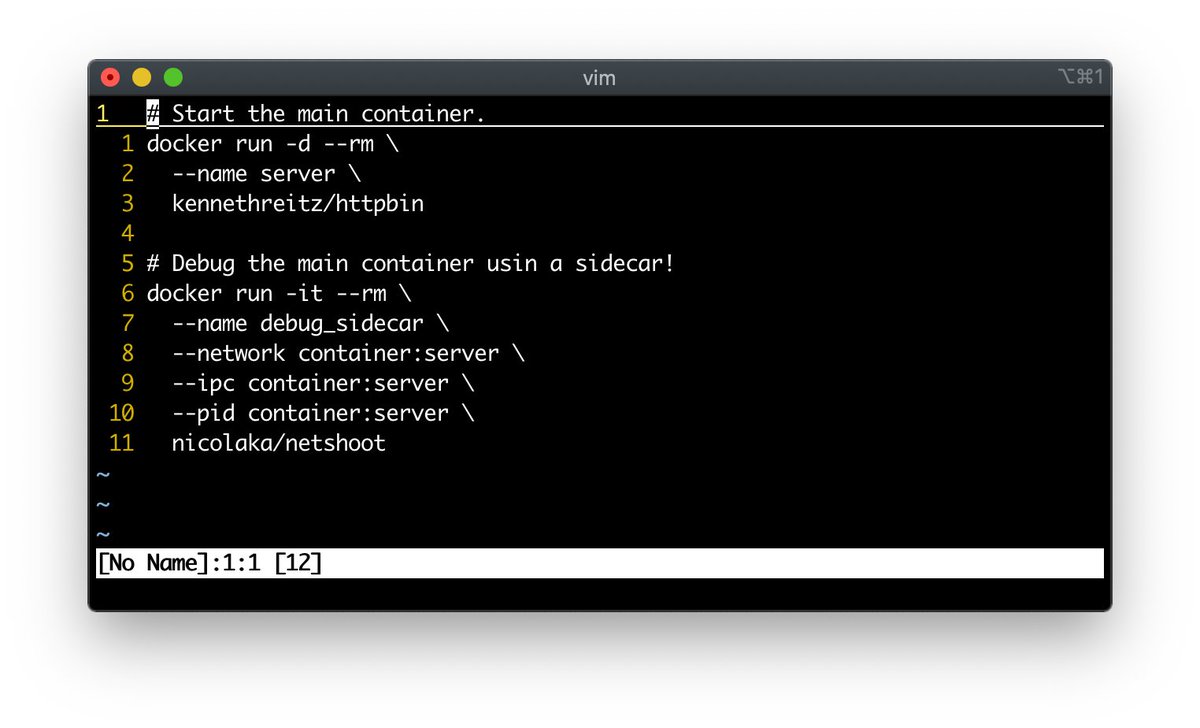
A container is an isolated execution environment for a process. But this environment can be shared 😉
By supplying a bunch of extra flags to the `docker run` command, you can start an ephemeral container with a specially tailored image that will share [most of] the environment of the target container.

A good example of such a trouble-shooting container 🔽
github.com/nicolaka/netsh…
Read 4 tweets
Apr 2
Working with Kubernetes API 🧵

A work-in-progress series of articles on how to consume and extend the Kubernetes API for:

- Writing efficient Custom Controllers
- Automation and Platform Engineering
- Better understanding of Kubernetes itself 🔽

iximiuz.com/en/series/work…
1. Kubernetes API Basics - Resources, Kinds, and Objects

The article talks about:
- High-level Kubernetes API structure
- The most fundamental API concepts
- Common sources of confusion

iximiuz.com/en/posts/kuber…
2. How To Call Kubernetes API using Simple HTTP Client

- How to get the Kubernetes API server address
- How to authenticate the API server to clients
- How to authenticate clients to the API server
- How to call the Kubernetes API from inside Pods
- etc.

iximiuz.com/en/posts/kuber…
Read 7 tweets

Did Thread Reader help you today?

Support us! We are indie developers!


This site is made by just two indie developers on a laptop doing marketing, support and development! Read more about the story.

Become a Premium Member ($3/month or $30/year) and get exclusive features!

Become Premium

Don't want to be a Premium member but still want to support us?

Make a small donation by buying us coffee ($5) or help with server cost ($10)

Donate via Paypal

Or Donate anonymously using crypto!

Ethereum

0xfe58350B80634f60Fa6Dc149a72b4DFbc17D341E copy

Bitcoin

3ATGMxNzCUFzxpMCHL5sWSt4DVtS8UqXpi copy

Thank you for your support!

Follow Us on Twitter!

:(