codemarch Profile picture
Nov 29 4 tweets 2 min read
CSS Box Model

Visually Explained📝

Thread 🧵
🔶Explanation of the different parts:

🔹Content - The content of the box, where text and images appear
🔹Padding - Clears an area around the content. The padding is transparent
🔹Border - A border that goes around the padding and content
🔹Margin - Clears an area outside the border. The margin is transparent

The box model allows us to add a border around elements, and to define space between elements.

Example👇
If you find the thread useful
1. Like the thread
2. Retweet the first tweet.
3. Follow me and enable notifications: ✅
@codemarch

And also look at our E-book (HTML & CSS Visual Treat!)👇codemarch.gumroad.com/l/hxazr

• • •

Missing some Tweet in this thread? You can try to force a refresh

 

Keep Current with codemarch

codemarch Profile picture

Stay in touch and get notified when new unrolls are available from this author!

Read all threads

This Thread may be Removed Anytime!

PDF

Twitter may remove this content at anytime! Save it as PDF for later use!

Try unrolling a thread yourself!

how to unroll video
  1. Follow @ThreadReaderApp to mention us!

  2. From a Twitter thread mention us with a keyword "unroll"
@threadreaderapp unroll

Practice here first or read more on our help page!

More from @codemarch

Nov 29
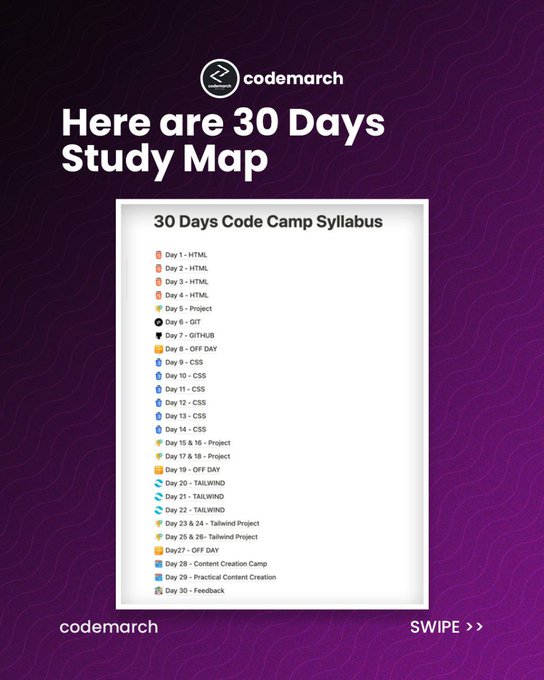
✨30 Days CodeCamp✨

Learn HTML, CSS, Tailwind & Git Image
Bonus:

- Our 2 eBooks worth $20 for FREE👇.

1. HTML & CSS Visual Treat😍!
2. JavaScript for Starters: The Complete Guide.
Feedback from Batch 1 Students: ImageImage
Read 6 tweets
Nov 28
✨30 Days CodeCamp✨
Bonus:

- Our 2 eBooks worth $20 for FREE👇.

1. HTML & CSS Visual Treat😍!
2. JavaScript for Starters: The Complete Guide.
Feedback from Batch 1 Students:
Read 12 tweets
Nov 28
If you want to learn "CSS Margins" open this thread

Visually Explained📝

Thread 🧵
CSS Margins

Margins are used to create space around elements, outside of any defined borders.
Margin - Individual Sides

CSS has properties for specifying the margin for each side of an element:

- `margin-top`
- `margin-right`
- `margin-bottom`
- `margin-left`

Example 1👇
Read 10 tweets
Nov 28
5 JavaScript Debugging tools -

Thread 🧵
2. JavaScript Development Tools (JSDT)

eclipse.org/webtools/jsdt/
Read 8 tweets
Nov 26
🔥30 Days CodeCamp🔥

Next Batch is going to Start from 1st December.
Read 11 tweets
Nov 26
7+ Best JavaScript Chart Libraries

Thread 🧵
amCharts

amcharts.com
Read 13 tweets

Did Thread Reader help you today?

Support us! We are indie developers!


This site is made by just two indie developers on a laptop doing marketing, support and development! Read more about the story.

Become a Premium Member ($3/month or $30/year) and get exclusive features!

Become Premium

Don't want to be a Premium member but still want to support us?

Make a small donation by buying us coffee ($5) or help with server cost ($10)

Donate via Paypal

Or Donate anonymously using crypto!

Ethereum

0xfe58350B80634f60Fa6Dc149a72b4DFbc17D341E copy

Bitcoin

3ATGMxNzCUFzxpMCHL5sWSt4DVtS8UqXpi copy

Thank you for your support!

Follow Us on Twitter!

:(