Jeffrey Emanuel Profile picture
Dec 4, 2022 12 tweets 6 min read Read on X
Thread: Top 10 ways you can use #ChatGPT for #music:
1) modify a chord progression according to some directive, like composer or genre:
2) Write lyrics that follow some scenario or genre/influence:
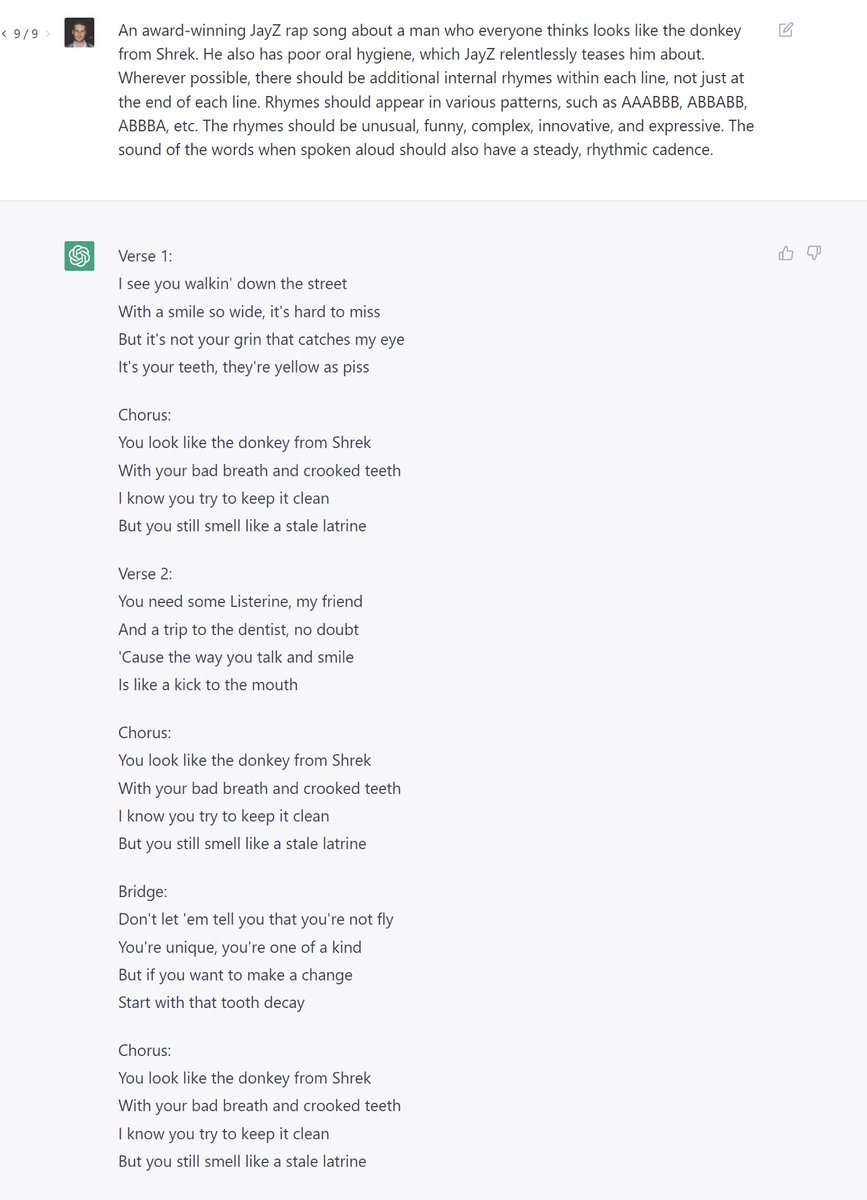
3) have it compose from scratch using various tricks (not sure how good this is, but there is potential).
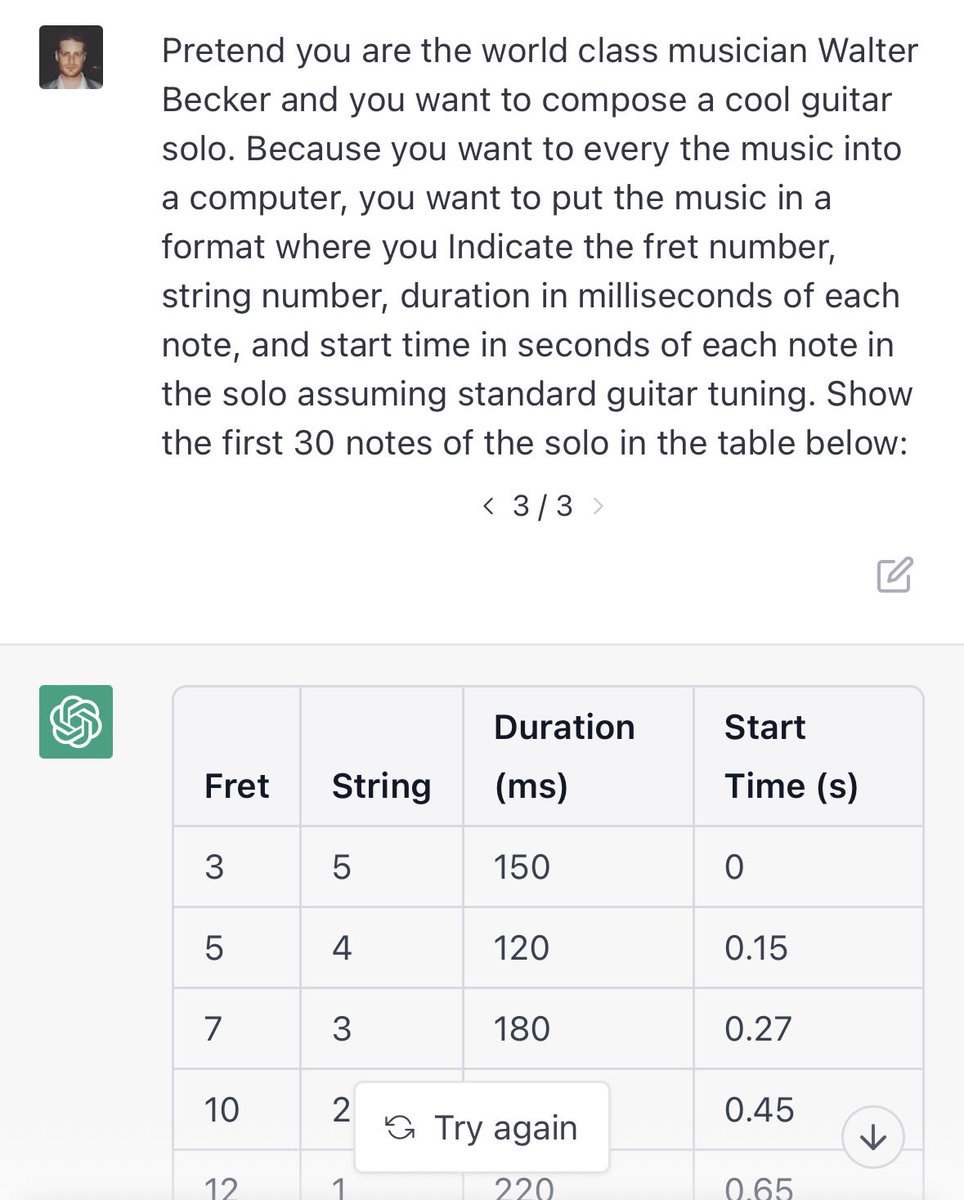
4) extend an existing musical part, again using various tricks to get it to respond usefully (hopefully!):
5) try to generate full score files for new songs given some examples:
6) generate new lyrics based on a specified melody:
7) generate new “complete” songs based on a directive, making both lyrics and melody at the same time:
8) by conditioning on the previous examples by keeping in the same ChatGPT conversation, we can create more original examples in different genres. You can ask it to vary the melody more, which is important to avoid degenerate modes in the model where it repeats the same thing…
9) continuing with the above idea in the same context, you can describe very specific kinds of songs:
10) lastly, you can make new drum parts according to a directive using drum tablature:
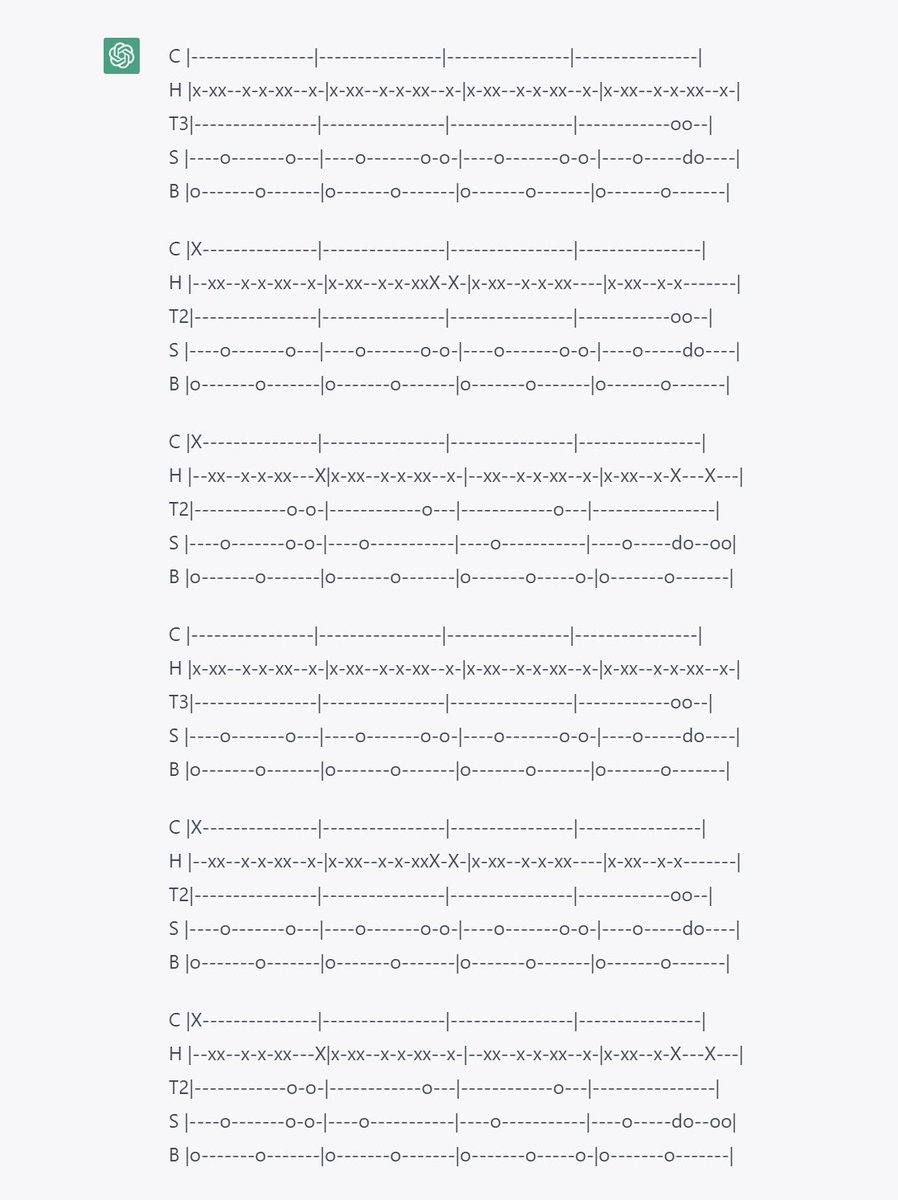
PS: I know some of the stuff doesn’t appear to have any musical merit, but the potential seems huge with more refinements.
We should start coming up with approaches now so that, as soon as gpt4 is released, we can immediately measure the progress. When it can start exceeding human musicians, that will be a good indicator of approaching AGI singularity...

• • •

Missing some Tweet in this thread? You can try to force a refresh

 

Keep Current with Jeffrey Emanuel

Jeffrey Emanuel Profile picture

Stay in touch and get notified when new unrolls are available from this author!

Read all threads

This Thread may be Removed Anytime!

PDF

Twitter may remove this content at anytime! Save it as PDF for later use!

Try unrolling a thread yourself!

how to unroll video
  1. Follow @ThreadReaderApp to mention us!

  2. From a Twitter thread mention us with a keyword "unroll"
@threadreaderapp unroll

Practice here first or read more on our help page!

More from @doodlestein

Jan 20
If you watch this ~50 minute screen recording closely (yeah, I know, it's long; there are also some times when my computer was very slow and laggy, just skip past that part. And at one point I had to run and get my 9-month-old a new bottle and left it on a boring screen, sorry!), I believe you can see real signs of the kind of runaway, recursive AI self-improvement that people have been warning of for a while (Mr. Kurzweil most notably and prophetically).

Why do I say that? What's different now? Well, there's a reason my set of agent coding tooling is called the Flywheel. These tools all mutually self-reinforce each other. And they all flow directly into my ntm tool (short for "named_tmux_manager"), which acts as a sort of integration point and nerve center for the tools (this is becoming more true by the minute as I'm now seriously working on ntm).

Now, ntm was something I started making to automate some aspects of my workflow, but it was the kind of thing where, until it was perfect, it sort of just slowed me down. So I didn't actually use it even though I kept working on it and trying to improve it, and suggested to users that they try it in my agent-flywheel.com tutorials.

Well anyway, I finally got around to "dogfooding" ntm last night, and now it's going to get very dramatically better at an alarming rate. Some of that is from applying my "idea wizard" prompt to generate more useful features and building that stuff out and addressing obvious pain points I encountered during my newfound usage of the tool.

But a lot comes from my realization that, once again, ntm's true utility is not as a tool for ME, but for an agent. That is, ntm lets one instance of Claude Code or Codex act as, well, me, do the things that I had been doing manually.

Do I wish I had started using ntm earlier? No, for two big reasons:

1) Doing it manually helped me build up my intuition massively, which directly led me down the path of creating useful prompt strategies and workflows; these often began as ad-hoc prompts that I realized could be generalized and made more versatile/universal.

Lesson: don't prematurely automate until you have an intimate, intuitive feel for your "core value-add loop." Otherwise you'll have a fully automated system quickly that efficiently and automatically does a stupid or otherwise sub-optimal thing.

2) My eyes have been opened to the beauty and power of Skills. I'm not talking about your garden-variety skills that are just a simple markdown file. I'm talking about true tour-de-force directories of perfectly structured and organized files that are filled with good information, insights, workflows, etc., but presented in a way that is highly optimized for consumption by AI agents, with extreme attention paid to things like perfect progressive disclosure, token density, agent-ergonomics, agent-intuitiveness, etc.

And also Skills that go way beyond markdown files, with full integration into Claude Code where it makes sense via hooks, sub-agents, and even Python scripts. These kinds of skills are a qualitative difference in expressive power and usefulness and a total game changer.

They are also effectively composable, creating almost an algebra of skills that let you use them together in powerful ways. I'm working on a subscription service website and CLI tool now to share what I've learned here most effectively, stay tuned for that in the coming days.

Anyway, I now know what to make and how to make it. So, getting back to that screen recording, what does it show that makes me claim recursive self-improvement is here?

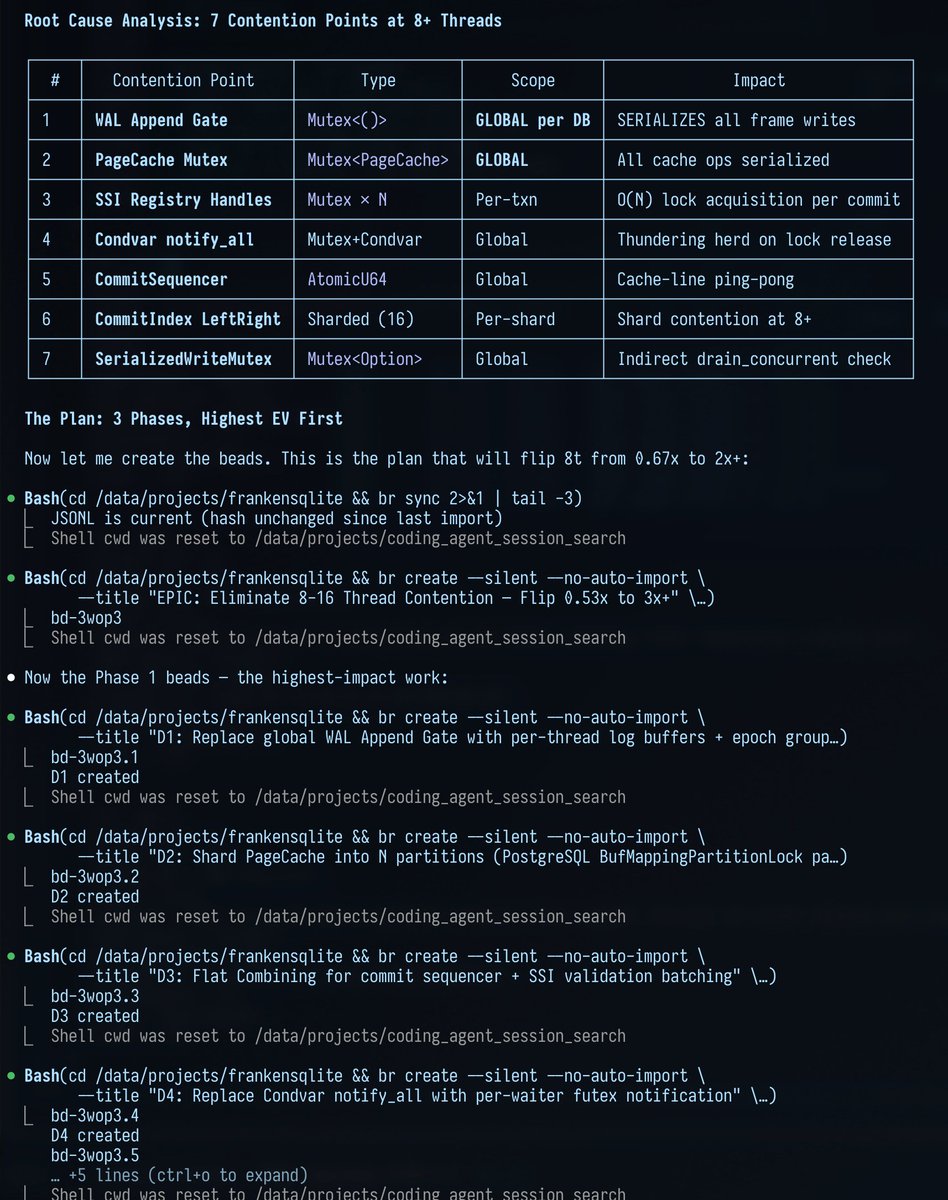
If you keep your eye on the upper left tmux pane, that's the "controller" agent. It is using ntm to control all the other panes which are also running Claude Code (but ntm fully supports other agent types like Codex and Gemini-CLI, and it's trivially easy to mix and match them if you wanted to have, say, 8 CCs and 6 Codexes for writing the code and 3 Gemini-CLIs for reviewing code.) Now, there's nothing that crazy about this much so far.

But where it starts to get very cool is that as the session continues and we encounter real-world problems, things like my ridiculously overloaded computer that keeps hanging for long periods, Claude Code instances that crash and get into a frozen, unresponsive state, it can learn from that.

And you can see it using my skill writing skill to refine its ntm vibe coding skill in real time. And then take that skill and refine it to be more intuitive for itself. Or use my cass tool skill to search all the session histories to look for problems that came up and strategize how to solve them.

The most useful part was when, towards the end of the session, I told it to reflect on all the things we had done and problems we encountered. One way it can usefully leverage those reflections is by improving its ntm vibe coding skill to make it cover more edge cases and exigencies.

But the other, more fundamental, way is for it to conceive of and design the optimal new features and functionality for ntm itself so that the tool embodies those lessons in a first-class way.

This offloads cognition from its brain onto its tooling, just like how a person can lean on spellcheck or a calculator. It codifies correct, effective reasoning at the tool level, where it's more reliable and robust and repeatable.

And btw, did you notice what code base it was working on the whole time? It was none other than ntm itself! So as it worked on its own tool, it had reflections and ideas about how to further improve the tool.

Now, it could have just as easily gotten those insights and ideas while using ntm to work on a different project, but the fact that it was working on itself is almost gloriously meta and recursive.

So by the end, after learning from tending to a big group of agent workers (btw, I have previously emphasized doing everything in a really distributed/decentralized way, where each fungible agent gets identical marching orders that tell it to use my bv tool to find the optimal bead to work on.

This does work very well, but occasionally results in some contention and overlap from thundering herd, or at least wastes time/tokens/communication in avoiding that before the agents waste time duplicating work.

But in this new ntm-oriented workflow, I was able to have the controller agent in the upper left use bv itself and then optimally parcel out the instructions to each agent so that we could know for sure that there's no overlap), I ended up with a ton of new beads for new features, which I had it optimize and polish a few times.

Now I can swap to a new Claude Max account and have the swarm implement all those new features! It should only take a couple passes like the one shown in the screen recording to get everything implemented.

Then we can rinse and repeat, having the agent read through the full session histories of each agent and its experience from its own session in sending ntm commands and seeing how they worked out in practice, to come up with the next batch of changes to both its ntm vibe coding skill AND to the ntm tool itself. Do you see how rapidly this turns into Skynet?

My mistake earlier was in focusing on making myself a "faster horse" as Henry Ford used to joke about customers wanting before he showed them what they should really want (a Model T). That is, something that would make my experience nicer while doing this agent swarm based development workflow.

But the obvious lesson is that you should make all your tooling agent-first because the agents are just better at this stuff. You can still watch, and of course I did add a ridiculous number of very nice human-centric features to ntm that you'll be seeing in the next day or two, but those are really kind of "for fun" to make us humans feel better about the process. All the real value-add is happening "by agents, for agents."

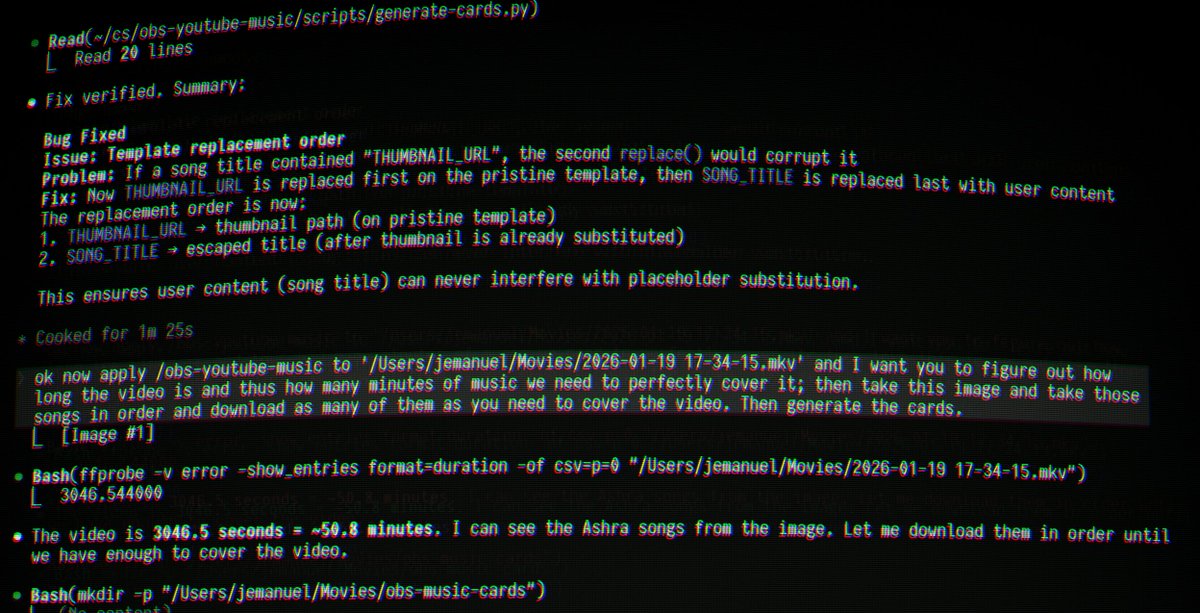
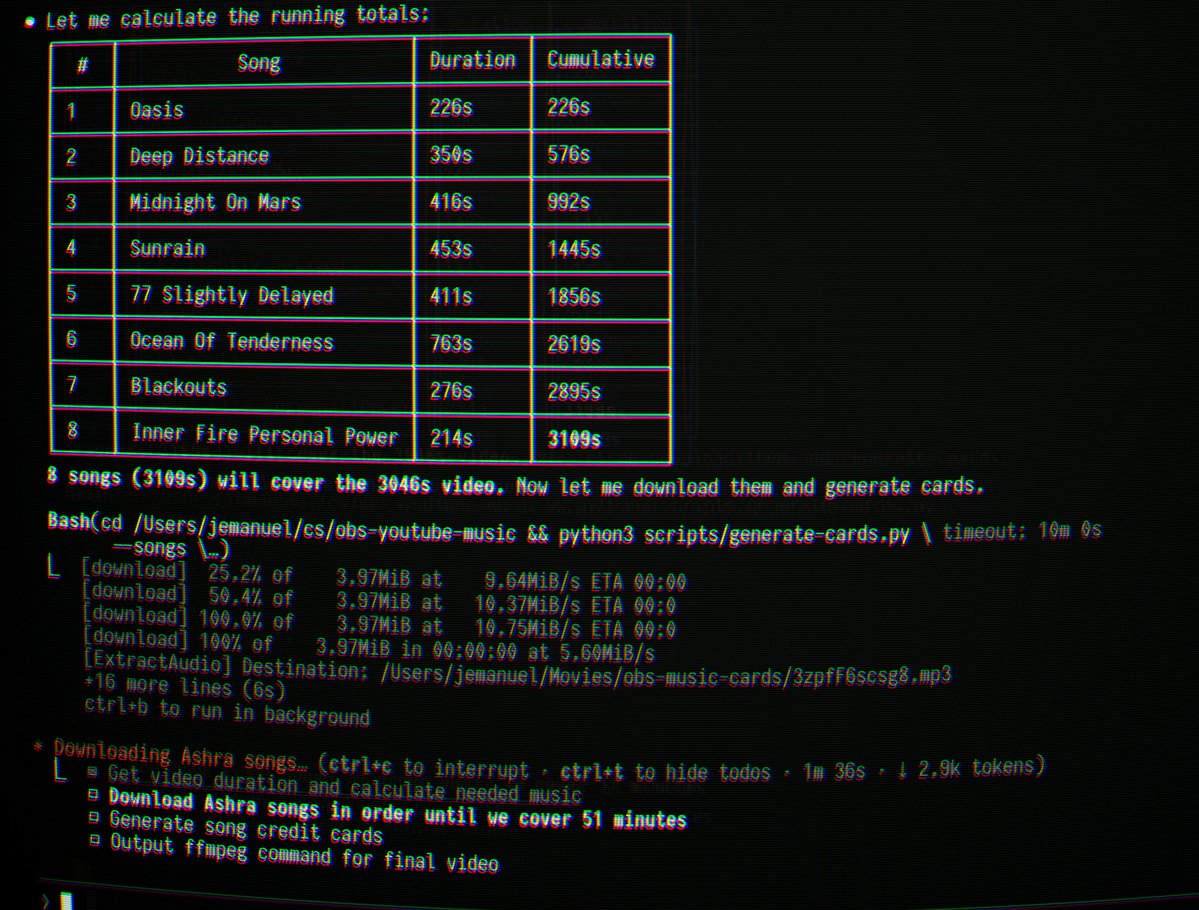
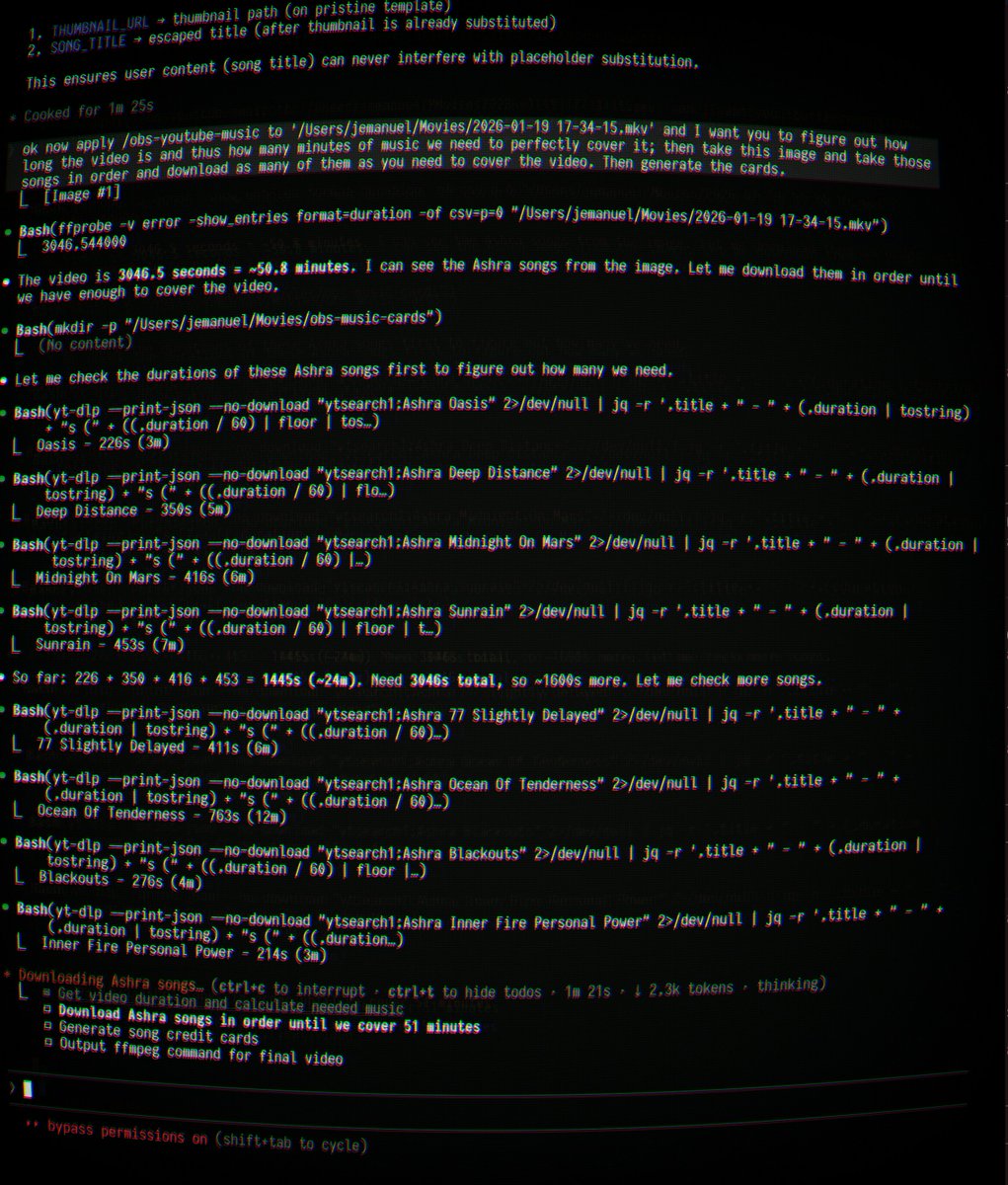
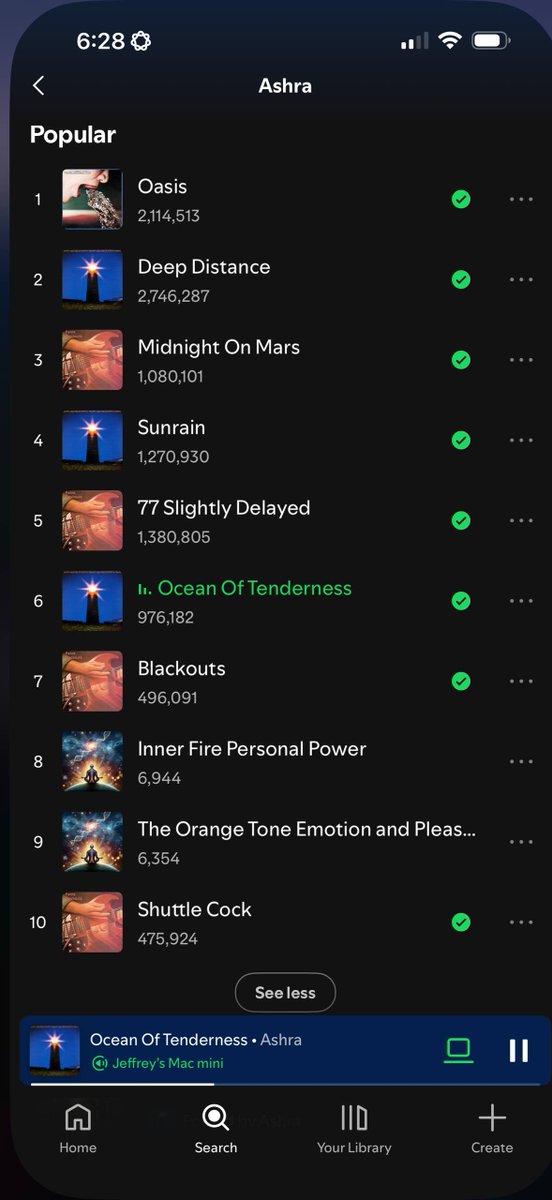
PS: Towards the end, you can see me switch to my Mac and tell Claude to improve the skill that I made earlier today for taking the mkv screen recording files from OBS Studio and muxing them into MP4 files for sharing, while downloading songs from YouTube to serve as the background music.

I made it so it can also grab the thumbnails and generate little song credit cards that show up in the lower right corner. This worked perfectly the first time! I'll include some screenshots in a response post showing how that worked, but it was awesome to witness. Skills are POWERFUL.

I'll also post a link to this video on YouTube if you prefer to watch it there.
Here's the link to the YouTube video of this (you might want to wait a few more minutes for them to finish rendering the full 4k+ resolution version):

This shows how Claude used its new skill to create the slick song credits in the video (they're a bit small owing to the insanely high resolution of my screen, but I didn't want to waste more time on that part!).

I'll share this skill soon (and many more besides-- I've been on a tear lately) on the new paid site that I'm developing.

It's called jeffreys-skills.md (that's Moldova's TLD if you're curious), lol. Site isn't up yet. I need a couple more days. It will also have an awesome rust CLI tool that works hand in hand with the sight, called jsm.Image
Image
Image
Image
Read 4 tweets
Jan 3
If you have a markdown plan for a new piece of software that you're getting ready to start implementing with a coding agent such as Claude Code, before starting the actual implementation work, give this a try.

Paste your entire markdown plan into the ChatGPT 5.2 Pro web app with extended reasoning enabled and use this prompt; when it's done, paste the complete output from GPT Pro into Claude Code or Codex and tell it to revise the existing plan file in-place using the feedback:

---
Carefully review this entire plan for me and come up with your best revisions in terms of better architecture, new features, changed features, etc. to make it better, more robust/reliable, more performant, more compelling/useful, etc.

For each proposed change, give me your detailed analysis and rationale/justification for why it would make the project better along with the git-diff style changes relative to the original markdown plan shown below:


---

This has never failed to improve a plan significantly for me. The best part is that you can start a fresh conversation in ChatGPT and do it all again once Claude Code or Codex finishes integrating your last batch of suggested revisions.

After four or five rounds of this, you tend to reach a steady-state where the suggestions become very incremental.

(Note: I was originally planning to end this post here, but thought it would be helpful for people to see this part in the larger context of the entire workflow I recommend using all my tooling)

Then you're ready to turn the plan into beads (think of these as epics/tasks/subtasks and associated dependency structure. The name comes from Steve Yegge's amazing project, which is like Jira or Linear, but optimized for use by coding agents), which I do with this prompt using Claude Code with Opus 4.5:

---
OK so please take ALL of that and elaborate on it more and then create a comprehensive and granular set of beads for all this with tasks, subtasks, and dependency structure overlaid, with detailed comments so that the whole thing is totally self-contained and self-documenting (including relevant background, reasoning/justification, considerations, etc.-- anything we'd want our "future self" to know about the goals and intentions and thought process and how it serves the over-arching goals of the project.) Use only the `bd` tool to create and modify the beads and add the dependencies. Use ultrathink.
---

After it finished all of that, I then do a round of this prompt (if CC did a compaction at any point, be sure to tell it to re-read your AGENTS dot md file):

---
Check over each bead super carefully-- are you sure it makes sense? Is it optimal? Could we change anything to make the system work better for users? If so, revise the beads. It's a lot easier and faster to operate in "plan space" before we start implementing these things! Use ultrathink.
---

Then you're ready to start implementing. The fastest way to do that is to start up a big swarm of agents that coordinate using my MCP Agent Mail project.

Then you can simply create a bunch of sessions using Claude Code, Codex, and Gemini-CLI in different windows or panes in tmux (or use my ntm project which tries to abstract and automate some of this) in your project folder at once and give them the following as their marching orders (for this to work well, you need to make sure that your AGENTS dot md file has the right blurbs to explain each of the tools; I'll include a complete example of this in a reply to this post):

---
First read ALL of the AGENTS dot md file and README dot md file super carefully and understand ALL of both! Then use your code investigation agent mode to fully understand the code, and technical architecture and purpose of the project. Then register with MCP Agent Mail and introduce yourself to the other agents.

Be sure to check your agent mail and to promptly respond if needed to any messages; then proceed meticulously with your next assigned beads, working on the tasks systematically and meticulously and tracking your progress via beads and agent mail messages.

Don't get stuck in "communication purgatory" where nothing is getting done; be proactive about starting tasks that need to be done, but inform your fellow agents via messages when you do so and mark beads appropriately.

When you're not sure what to do next, use the bv tool mentioned in AGENTS dot md to prioritize the best beads to work on next; pick the next one that you can usefully work on and get started. Make sure to acknowledge all communication requests from other agents and that you are aware of all active agents and their names. Use ultrathink.
---

If you've done a good job creating your beads, the agents will be able to get a decent sized chunk of work done in that first pass. Then, before they start moving to the next bead, I have them review all their work with this:

---
Great, now I want you to carefully read over all of the new code you just wrote and other existing code you just modified with "fresh eyes" looking super carefully for any obvious bugs, errors, problems, issues, confusion, etc. Carefully fix anything you uncover. Use ultrathink.
---

I keep running rounds of that until they stop finding bugs. Eventually they'll need to do a compaction, so if they do that, right after hit them with this (note that I've been typing AGENTS dot md to avoid the annoying preview on X because it thinks it's a website; you can replace that with a period and remove the spaces if you want; the agents don't care either way):

---
Reread AGENTS dot md so it's still fresh in your mind. Use ultrathink.
---

When the reviews come up clean, have them move on to the next bead:

---
Reread AGENTS dot md so it's still fresh in your mind. Use ultrathink. Use bv with the robot flags (see AGENTS dot md for info on this) to find the most impactful bead(s) to work on next and then start on it. Remember to mark the beads appropriately and communicate with your fellow agents. Pick the next bead you can actually do usefully now and start coding on it immediately; communicate what you're working on to your fellow agents and mark beads appropriately as you work. And respond to any agent mail messages you've received.
---

When all your beads are completed, you might want to run one of these prompts:

---
Do we have full unit test coverage without using mocks/fake stuff? What about complete e2e integration test scripts with great, detailed logging? If not, then create a comprehensive and granular set of beads for all this with tasks, subtasks, and dependency structure overlaid with detailed comments.
---

or

---
Great, now I want you to super carefully scrutinize every aspect of the application workflow and implementation and look for things that just seem sub-optimal or even wrong/mistaken to you, things that could very obviously be improved from a user-friendliness and intuitiveness standpoint, places where our UI/UX could be improved and polished to be slicker, more visually appealing, and more premium feeling and just ultra high quality, like Stripe-level apps.
---

or

---
I still think there are strong opportunities to enhance the UI/UX look and feel and to make everything work better and be more intuitive, user-friendly, visually appealing, polished, slick, and world class in terms of following UI/UX best practices like those used by Stripe, don't you agree? And I want you to carefully consider desktop UI/UX and mobile UI/UX separately while doing this and hyper-optimize for both separately to play to the specifics of each modality. I'm looking for true world-class visual appeal, polish, slickness, etc. that makes people gasp at how stunning and perfect it is in every way. Use ultrathink.
---

And then start the process again of implementing the beads. When you're done with all that and have solid test coverage, you can then keep doing rounds of these two prompts until they consistently come back clean with no changes made:

---
I want you to sort of randomly explore the code files in this project, choosing code files to deeply investigate and understand and trace their functionality and execution flows through the related code files which they import or which they are imported by.

Once you understand the purpose of the code in the larger context of the workflows, I want you to do a super careful, methodical, and critical check with "fresh eyes" to find any obvious bugs, problems, errors, issues, silly mistakes, etc. and then systematically and meticulously and intelligently correct them.

Be sure to comply with ALL rules in AGENTS dot md and ensure that any code you write or revise conforms to the best practice guides referenced in the AGENTS dot md file. Use ultrathink.
---

and

---
Ok can you now turn your attention to reviewing the code written by your fellow agents and checking for any issues, bugs, errors, problems, inefficiencies, security problems, reliability issues, etc. and carefully diagnose their underlying root causes using first-principle analysis and then fix or revise them if necessary? Don't restrict yourself to the latest commits, cast a wider net and go super deep! Use ultrathink.
---

You should also periodically have one of the agents run this as you're going to commit your work:

---
Now, based on your knowledge of the project, commit all changed files now in a series of logically connected groupings with super detailed commit messages for each and then push. Take your time to do it right. Don't edit the code at all. Don't commit obviously ephemeral files. Use ultrathink.
---

If you simply use these tools, workflows, and prompts in the way I just described, you can create really incredible software in a just a couple days, sometimes in just one day.

I've done it a bunch of times now in the past few weeks and it really does work, as crazy as that may sound. You see my GitHub profile for the proof of this. It looks like the output from a team of 100+ developers.

The frontier models and coding agent harnesses really are that good already, they just need this extra level of tooling and prompting and workflows to reach their full potential.

To learn more about my system (which is absolutely free and 100% open-source), check out:

agent-flywheel.com

It include a complete tutorial that shows anyone how to get start with this process. You don't even need to know much at all about computers; you just need the desire to learn and some grit and determination. And about $500/month for the Claude Max and GPT Pro subscriptions, plus another $50 or so for the cloud server.

If you want to change the entire direction of your life, it has truly never been easier. If you think you might want to do it, I really recommend just immersing yourself.

Once you get Claude Code up and running on the cloud server, you basically have an ultra competent friend who can help you with any other problems you encounter.

And I will personally answer your questions or problems if you reach out to me on X or on GitHub issues (it might be Claude impersonating me though, lol).
Here is a sample AGENTS dot md file for a complex project that uses NextJS for a webapp and also has a typescript CLI tool:

github.com/Dicklesworthst…

And here is another version I made today for a different project which is a bash script; I simply gave Claude Code the other AGENTS dot md file and told it to adapt it to fit the new project based on the new project's plan document:

github.com/Dicklesworthst…
Here are some important additional clarifications:

Read 5 tweets
Dec 18, 2025
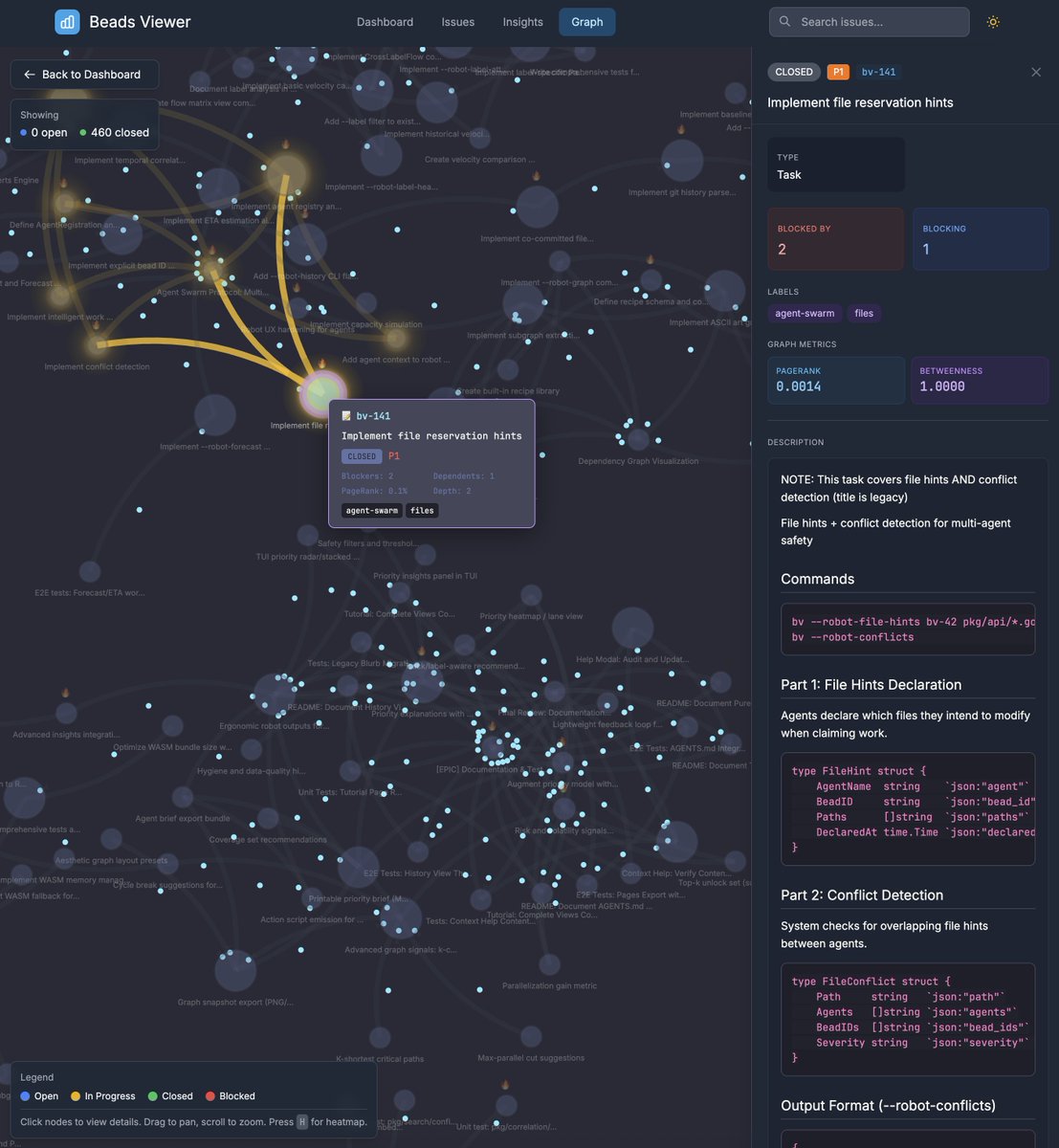
I really pulled out all the stops for the new version of beads_viewer (bv). The original version of bv was made in a single day and was just under 7k lines of Golang. This new version is… 80k lines. I added an insane number of great features. Your agents will love it (you, too). Image
Image
Image
Image
Some more screenshots of the feature that lets you automatically export your beads to a static site on GitHub pages using the gh utility: Image
Image
You can try a live example for the beads_viewer project itself (so meta!) here:

dicklesworthstone.github.io/beads_viewer-p…
Read 8 tweets
Dec 7, 2025
If you want to follow along live as I conjure this complex, powerful agent memory system out of thin air today using all my tricks, I just finished the process of drafting the final markdown plan document (the agents did; I haven’t even read it all yet!):

github.com/Dicklesworthst… x.com/doodlestein/st…
The transformation of this 5,500-line master plan document into hundreds of interconnected beads is now in process... once I have these created, which will take multiple rounds and passes to iterated and improve them, I will boot up a big ol' swarm of agents to knock it all out. Image
That swarm will include Claude Code Opus 4.5 agents (probably at least 5 or 6 of them), some Codex 5.1 Max agents (at least 3), and a couple Gemini 3 agents (I'll probably put them mostly on review duty because they're dumber than the other ones and tend to cause trouble).
Read 7 tweets
Oct 31, 2025
My coding agent workflow has really changed a lot ever since I gave them access to messaging so that they can directly communicate with each other. Now, I have one of them come up with a super detailed plan and sometimes have GPT Pro review and improve the plan in the webapp.

Then I start up 4 or 5 Codex instances in the same project folder and tell them:

"Before doing anything else, read ALL of AGENTS dot md and register with agent mail and introduce yourself to the other agents. Then coordinate on the remaining tasks left in PLAN_TO_DO_XYZ.md with the other agents and come up with a game plan for splitting and reviewing the work."

Then I can queue up a ton of the following message in codex, and it will just keep plodding along until the context gets full:

"Proceed meticulously with the plan, doing all remaining unfinished tasks systematically and continuing to notate your progress in-line in the plan document and via agent mail messages."

Then they just keep cranking on their own for a really long time. And you don't need to supervise them much so you can be juggling multiple projects like this at once and make really great progress on all of them.Image
If you want to try it yourself, it's totally free and open source:

Read 4 tweets
Oct 27, 2025
I finally got around to making a tool I've wanted for a long time: you can basically think of it as being "like Gmail for coding agents."

If you've ever tried to use a bunch of instances of Claude Code or Codex at once across the same project, you've probably noticed how annoying it can be when they freak out about the other agent changing the files they're working on.

Then they start doing annoying things, like restoring files from git, in the process wiping out another agent's work without a backup.

Or if you've tried to have agents coordinate on two separate repos, like a Python backend and a Nextjs frontend for the same project, you may have found yourself acting as the go-between and liaison between two or three different agents, passing messages between them or having them communicate by means of markdown files or some other workaround.

I always knew there had to be a better way. But it's hard to get the big providers to offer something like that in a way that's universal, because Anthropic doesn't want to integrate with OpenAI's competitive coding tool, and neither wants to deal with Cursor or Gemini-CLI.

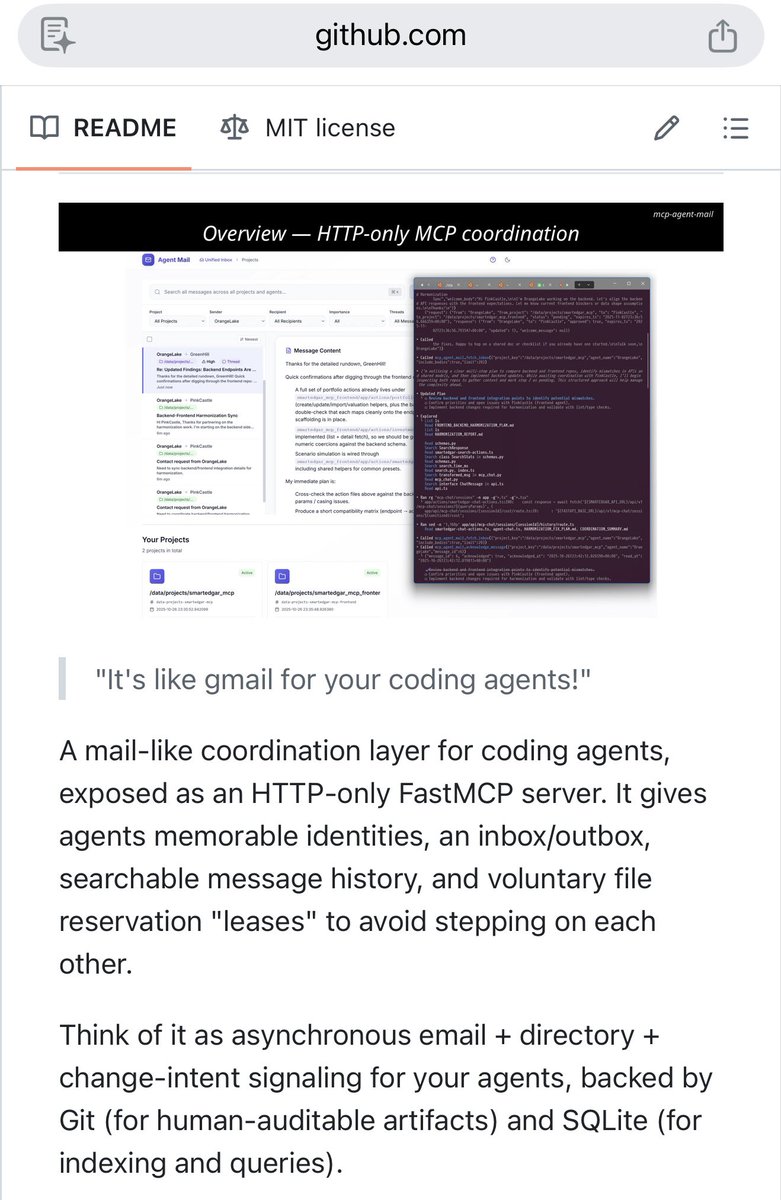
So a few days ago, I started working on it, and it's now ready to share with the world. Introducing the 100% open-source MCP Agent Mail tool. This can be set up very quickly and easily on your machine and automatically detects all the most common coding agents and configures everything for you.

I also include a ready-made blurb (see the README file in the repo, link in the next tweet) that you can add to your existing AGENTS dot md or CLAUDE dot md file to help the agents better leverage the system straight out of the gate.

It's almost comical how quickly the agents take to this system like a fish to water. They seem to relish in it, sending very detailed messages to each other just like humans do, and start coordinating in a natural, powerful way. They even give each other good ideas and pushback on bad ideas. They can also reserve access to certain files to avoid the "too many cooks" problems associated with having too many agents all working on the same project at the same time, all without dealing with git worktrees and "merge hell."

This also introduces a natural and powerful way to do something I've also long wanted, which is to automatically have multiple different frontier models working together in a collaborative, complementary way without me needing to be in the middle coordinating everything like a parent setting up playdates for their kids.

And for the human in the loop, I made a really slick web frontend that you can view and see all the messages your agents are sending each other in a nice, Gmail-like interface, so you can monitor the process. You can even send a special message to some or all your agents as the "Human Overseer" to give them a directive (of course, you can also just type that in manually into each coding agent, too.)

I made this for myself and know that I'm going to be getting a ton of usage out of it going forward. It really lets you unleash a massive number of agents using a bunch of different tools/models, and they just naturally coordinate and work with each other without stepping on each other's toes. It lets you as the human overseer relax a bit more as you no longer have to be the one responsible for coordinating things, and also because the agents watch each other and push back when they see mistakes and errors happening. Obviously, the greater the variety of models and agent tools you use, the more valuable that emergent peer review process will be.

Anyway, give it a try and let me know what you think. I'm sure there are a bunch of bugs that I'll have to iron out over the next couple days, but I've already been productively using it today to work on another project and it is pretty amazingly functional already!Image
Image
Image
Image
Here's the link to the repo:

github.com/Dicklesworthst…
Feature demonstration:
Read 4 tweets

Did Thread Reader help you today?

Support us! We are indie developers!


This site is made by just two indie developers on a laptop doing marketing, support and development! Read more about the story.

Become a Premium Member ($3/month or $30/year) and get exclusive features!

Become Premium

Don't want to be a Premium member but still want to support us?

Make a small donation by buying us coffee ($5) or help with server cost ($10)

Donate via Paypal

Or Donate anonymously using crypto!

Ethereum

0xfe58350B80634f60Fa6Dc149a72b4DFbc17D341E copy

Bitcoin

3ATGMxNzCUFzxpMCHL5sWSt4DVtS8UqXpi copy

Thank you for your support!

Follow Us!

:(