Heather Cooper Profile picture
Jan 11, 2023 10 tweets 6 min read Read on X
Check out these 3 alternatives similar to ChatGPT and get creating again:
Access to ChatGPT has been more difficult than usual lately.

I saw this message when I opened it on my PC:

"We're experiencing exceptionally high demand. Please hang tight as we work on scaling our systems."

Previous conversations are temporarily unavailable, too.
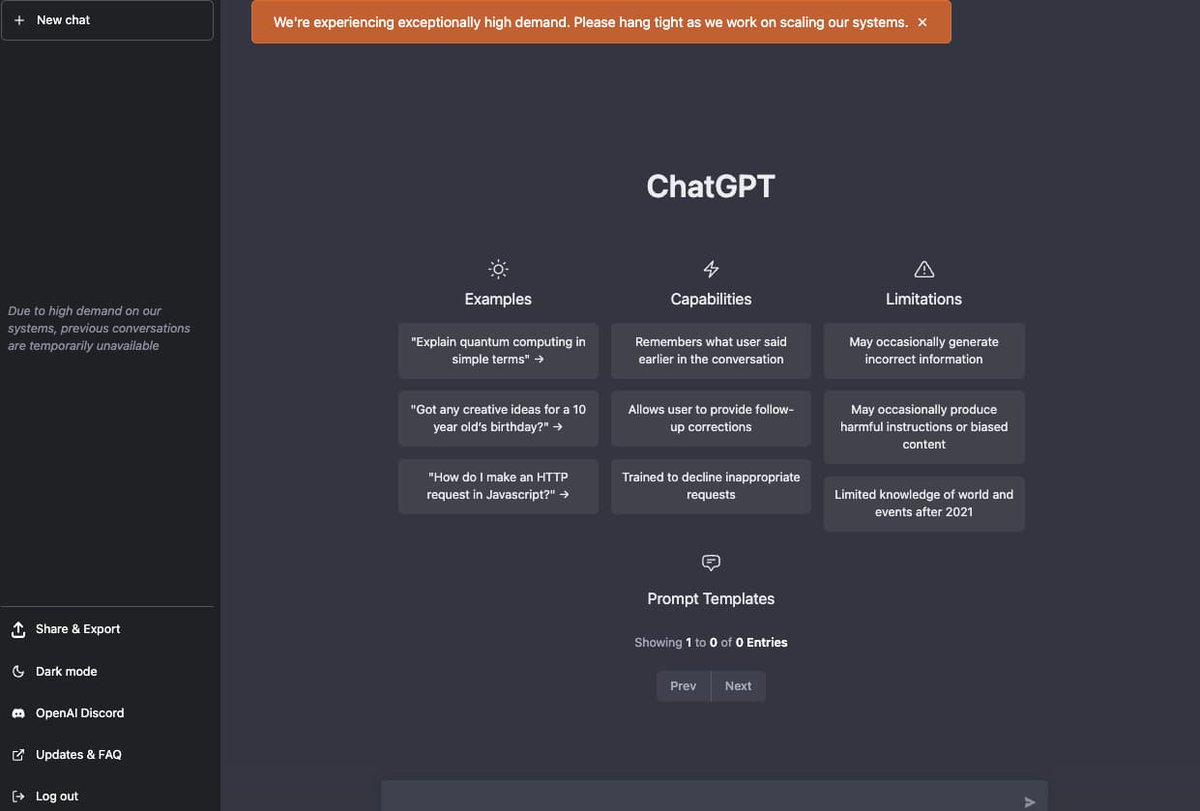
If you planned to use ChatGPT in your workflow, there are 3 alternatives that you can try.

1. JasperChat (requires paid subscription)
2. Chatsonic
3. YouChat

I'll show you a few quick tips to help you get the information you need.
1. JasperChat

Jasper AI partnered with OpenAI to provide JasperChat to paid subscribers in Boss Mode and Business Plans.

I've been using JasperChat since it became available.

Go to jasper .ai

You can see examples of how I use it here:

2. Chatsonic

Writesonic has a ChatGPT-like chatbot available called Chatsonic.

Chatsonic has information after 2021, so you can get current events in your answers.

Features include:
• voice commands with response
• AI-generated images
• download chats

@WriteSonic
@WriteSonic 3. YouChat

@YouSearchEngine has a chatbot similar to ChatGPT called YouChat.

You can use it to answer prompts and get up-to-date information with links.
@WriteSonic @YouSearchEngine YouChat is a good option if you need information quickly, but the answers can be incomplete or incorrect - so use caution.

I asked several questions about different topics including:

• Benefits of using YouChat
• Advantages vs. ChatGPT

See some of the responses below:
@WriteSonic @YouSearchEngine Some of my follow-up questions weren't related to the previous question.

And YouChat seems to stop during certain answers, and that can be frustrating.
@WriteSonic @YouSearchEngine Recap

3 alternatives to ChatGPT:

1. JasperChat
2. Chatsonic
3. YouChat

Each of the alternatives have many additional features that you can use, for researching, writing and creating content.

Use what works for you.
@WriteSonic @YouSearchEngine Thank you for reading.

If you found this information useful, follow @HBCoop_ for more content on visual information design and AI.

Retweet the 1st tweet below to share this thread:

• • •

Missing some Tweet in this thread? You can try to force a refresh

 

Keep Current with Heather Cooper

Heather Cooper Profile picture

Stay in touch and get notified when new unrolls are available from this author!

Read all threads

This Thread may be Removed Anytime!

PDF

Twitter may remove this content at anytime! Save it as PDF for later use!

Try unrolling a thread yourself!

how to unroll video
  1. Follow @ThreadReaderApp to mention us!

  2. From a Twitter thread mention us with a keyword "unroll"
@threadreaderapp unroll

Practice here first or read more on our help page!

More from @HBCoop_

Sep 9, 2025
Kling Start & End Frames: First person POV

I thought these images would be great to use this perspective to simulate someone walking through an abandoned area.

Images: Midjourney
Sound: Kling AI Sound
Prompts below:
Prompt 1:
First-person POV of walking forward along an abandoned concrete path surrounded by overgrown vines and trees, moving toward the open doorway ahead. Use a whip-pan push-through transition as the camera passes through the doorway, seamlessly revealing the dark, overgrown corridor inside. Maintain the immersive FPV perspective, slight handheld motion, damp atmospheric lighting, and lush green foliage overtaking the walls
Prompt 2:
First-person POV of moving steadily down a narrow overgrown path between two ivy-covered buildings, footsteps crunching against mossy concrete. As the camera advances, perform a whip-pan transition into a tighter enclosed alley with crumbling brick walls, boarded doors, and vines crawling up the sides. Keep motion smooth and immersive, slightly shaky handheld FPV, with a sense of exploration and mystery.
Read 4 tweets
Sep 8, 2025
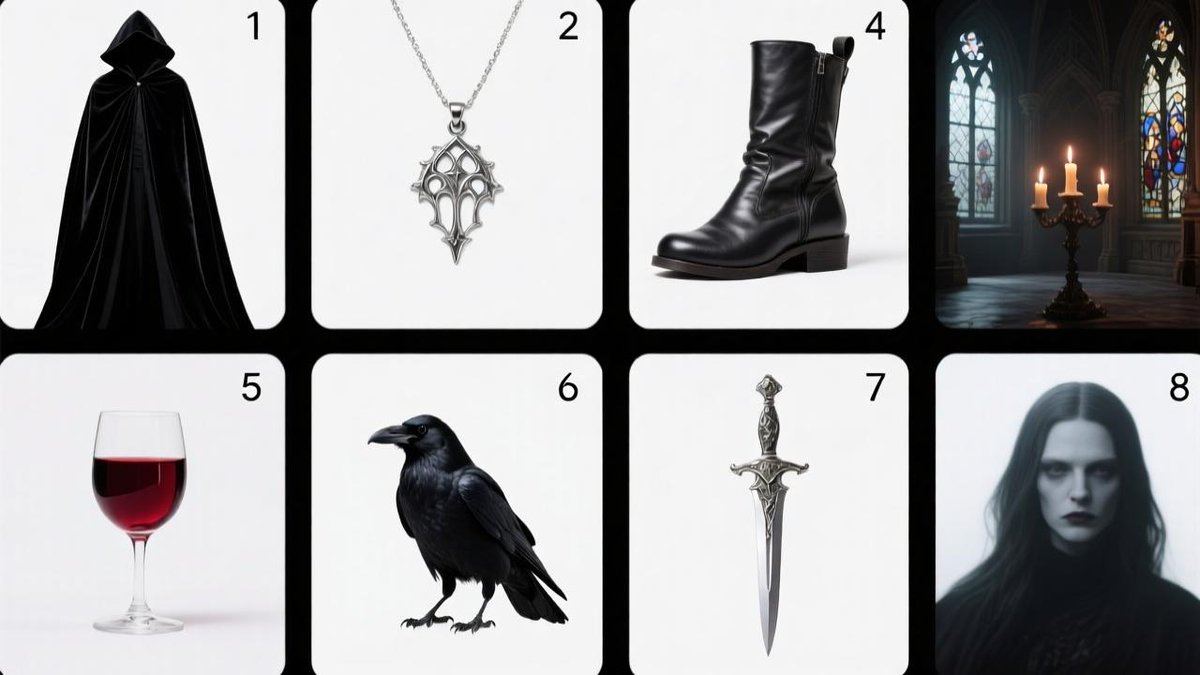
Nano Banana Image to Video 3-Step Prompt Worklfow 🍌

Step 1 - Grid theme prompt:

8-panel grid layout:
Panel 1) flowing black velvet cloak on white background,
Panel 2) silver gothic pendant centered on white background,
Panel 3) dark leather boots centered on white background,
Panel 4) candlelit gothic castle hall with stained glass windows,
Panel 5) goblet of blood-red wine on white background,
Panel 6) black raven centered on white background,
Panel 7) ornate dagger centered on white background,
Panel 8) mysterious pale figure portrait on white background. Each item distinct, styled as product photography.Image
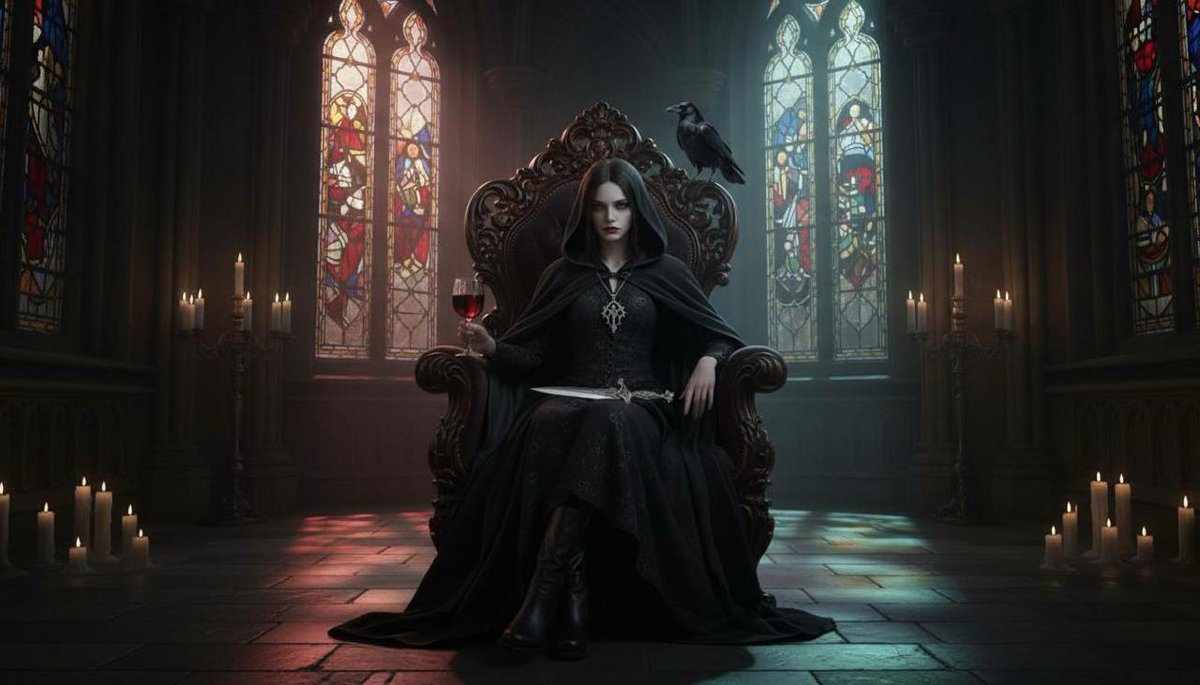
Step 2 - Grid to scene prompt:

Remove the grid lines and compose these elements into a dark romantic scene. Show the pale mysterious woman in the hooded black cloak over elegant attire, wearing the gothic pendant necklace and black leather boots. Position her seated in an ornate chair in the candlelit gothic church interior, with the raven perched on the chair's back. She's holding a goblet of red wine in one hand and an ornate dagger rests across her lap. Stained glass windows cast colored light patterns across the scene, creating an atmosphere of elegant menace and aristocratic mystery.Image
Step 3 - Add motion with Veo 3 prompt:

A gothic cathedral interior lit by flickering candlelight and stained glass windows casting red and blue glows. A mysterious woman in a black cloak sits regally on a carved throne, holding a glass of red wine as a raven perches on the throne’s back. The camera slowly dollies forward, capturing her steady gaze, the soft shimmer of candle flames, and the raven shifting its wings. Subtle shafts of light pierce through the stained glass, illuminating the stone floor with colored patterns, creating a haunting, medieval atmosphere
Read 4 tweets
Aug 29, 2025
Nano Banana on @lovart_ai is so simple and practical. Select a region, hit tab, and type what you want.

Let the agent do the rest...

Free to use all weekend 🧵
@lovart_ai Workflow:

Select region → Tab → comment → Run.

Results in minutes: Image
Quick list of additional examples you can use:

• add a hat
• give a student the tools they need
• swap the lead character
• replace background clutter
• extract a brand color and reuse it
• apply a texture to a new surface
• b-roll keyframes for story beats

Your imagination is the limit.Image
Read 7 tweets
May 29, 2025
Video Model Comparison: Image to video

I updated an older comparison with a new image and prompt to test in several models:

• Pika 2.2
• PixVerse 4
• Runway Gen-4
• Google Veo 3
• OpenAI Sora
• Kling 2.1 Pro
• Luma Ray2
• Hailuo I2V

I used the same prompt and Midjourney image in each model 2-3 times and chose my favorite results below:
Prompt:

Cinematic action shot in the style of an action movie with a drone pilot racing through a forest woodland at noon, navigating between trees. Sunlight streaking through leaves, close front follow angle, dynamic movement, high contrast, intense atmosphere, detailed composition

Original image:Cinematic action shot in the style of an action movie with a drone pilot racing through a forest woodland at noon, navigating between trees. Sunlight streaking through leaves, close front follow angle, dynamic movement, high contrast, intense atmosphere, detailed composition
I used the same prompt for the image to generate each video, as I did several months ago for the same test below:

Read 5 tweets
May 7, 2025
I love using Runway Gen-4 References to continue the story beyond the first frame.

I'll show you how to do it step-by-step below:
1/ I started by placing a character into a Mediterranean scene:

2/ Then I asked to "Zoom in to the island in the background" Image
Read 13 tweets
Mar 12, 2025
The era of lipdub AI is over.

Captions just launched Mirage.

The most advanced AI video model we’ve seen.

Here’s why:
Lipdub AI is obsolete:

Most current models only tweak mouth movements while keeping the base video intact.

The result is robotic, awkward, and easy to spot. Mirage doesn’t just move lips. It generates actual reality.
Full-body & full-expression AI video completely built from scratch:

→ Realistic facial expressions
→ Natural movement & body language
→ Even the background is AI-generated

This isn’t a simple overlay. It’s a complete AI-generated performance.
Read 6 tweets

Did Thread Reader help you today?

Support us! We are indie developers!


This site is made by just two indie developers on a laptop doing marketing, support and development! Read more about the story.

Become a Premium Member ($3/month or $30/year) and get exclusive features!

Become Premium

Don't want to be a Premium member but still want to support us?

Make a small donation by buying us coffee ($5) or help with server cost ($10)

Donate via Paypal

Or Donate anonymously using crypto!

Ethereum

0xfe58350B80634f60Fa6Dc149a72b4DFbc17D341E copy

Bitcoin

3ATGMxNzCUFzxpMCHL5sWSt4DVtS8UqXpi copy

Thank you for your support!

Follow Us!

:(