Mike Driscoll Profile picture
Feb 6 β€’ 5 tweets β€’ 2 min read
If you are a Windows user, #Python has a few special libraries just for you.

Once such module is `winsound`

Let's learn more in this mini-thread!

πŸ§΅πŸπŸ‘‡
#Python's `winsound` module is a sound-playing interface for Windows.

Here's a link to the documentation:

docs.python.org/3/library/wins…
If you'd like to give `winsound` a try on your Windows machine, I would recommend trying to `Beep()` the speaker.

`Beep()` takes in the frequency and the duration of the sound in milliseconds.

The code below beeps your system speaker at 3 different frequencies Image
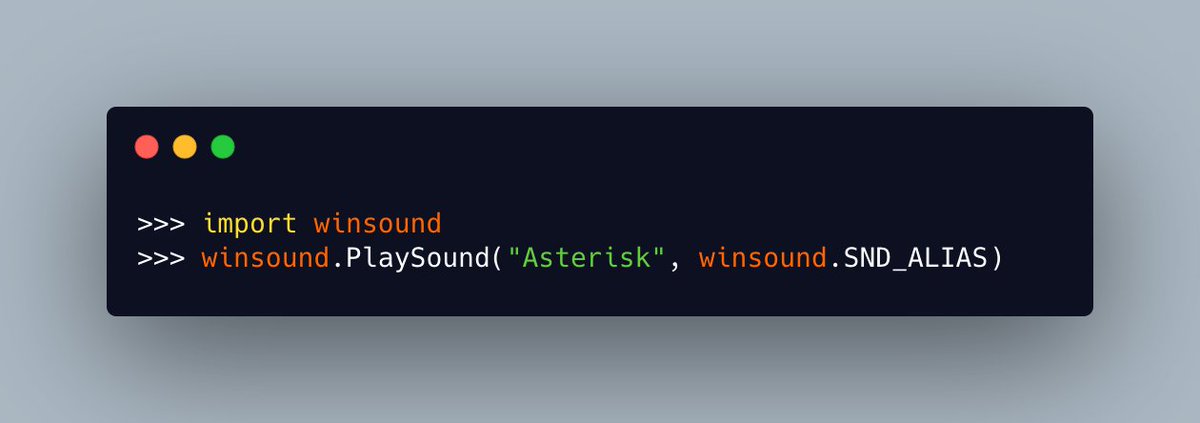
`winsound.PlaySound()` is another fun function to play around with on Windows using #Python. Image
I hope you enjoyed learning about the `winsound` module.

Give #Python's `winsound` a try and let me know what you come up with!

β€’ β€’ β€’

Missing some Tweet in this thread? You can try to force a refresh

γ€€

Keep Current with Mike Driscoll

Mike Driscoll Profile picture

Stay in touch and get notified when new unrolls are available from this author!

Read all threads

This Thread may be Removed Anytime!

PDF

Twitter may remove this content at anytime! Save it as PDF for later use!

Try unrolling a thread yourself!

how to unroll video
  1. Follow @ThreadReaderApp to mention us!

  2. From a Twitter thread mention us with a keyword "unroll"
@threadreaderapp unroll

Practice here first or read more on our help page!

More from @driscollis

Feb 8
Logging in #Python is a popular topic and it's a really useful one to understand.

Today we are going to learn more about that!

πŸ§΅πŸπŸ‘‡
Python includes the `logging` module as a part of its standard library.

You can get started using it quite easily: Image
Python's `logging` module supports multiple logging levels:

🐍 notset
🐍 debug
🐍 info
🐍 warning
🐍 error
🐍 critical
Read 17 tweets
Feb 6
You can sort #Python lists in a couple of different ways. Find out how in this thread!

πŸ§΅πŸ‘‡
#Python lists come with a `sort()` method that makes sorting easy! Image
#Python pro-tip: Don't assign the result of calling a list's `sort()` method to a variable.

`sort()` does NOT return a sorted list. It returns NONE!

`sort()` will sort the list in-place instead Image
Read 5 tweets
Jan 20
Today is a great day to learn about exception handling in #Python!

Let's find out how they work!

πŸ§΅πŸπŸ‘‡
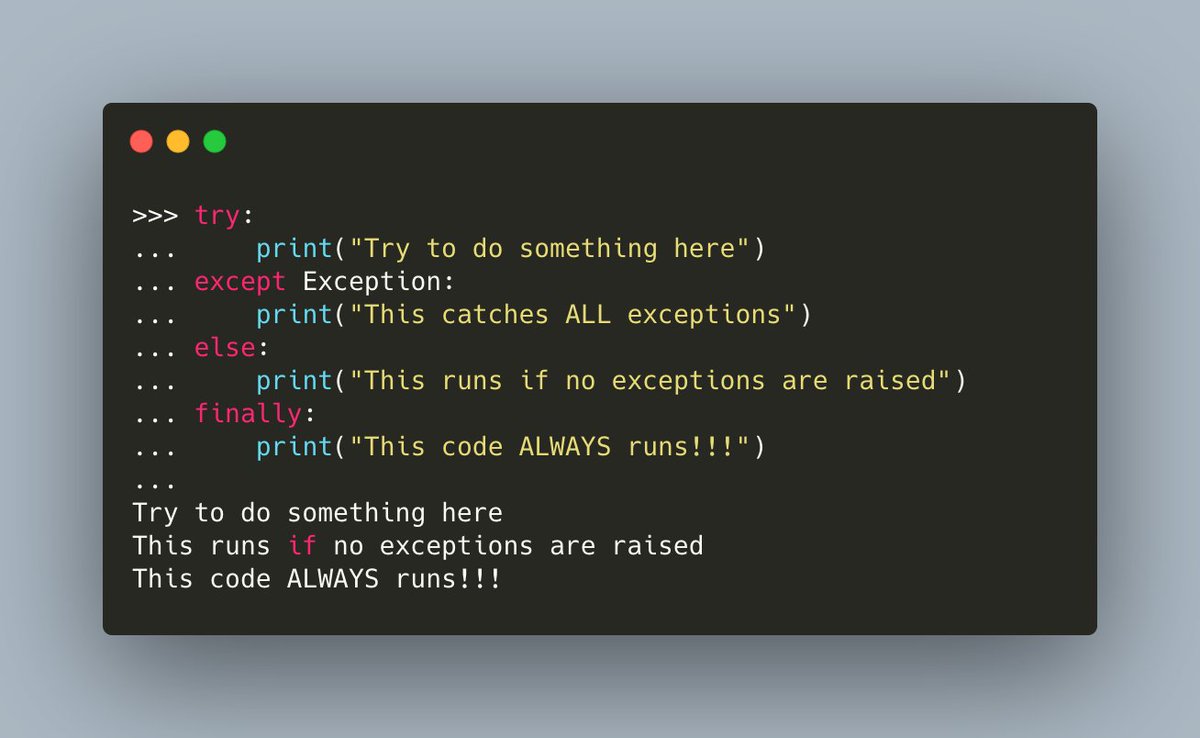
#Python handles exceptions using the `try/except` keywords.

You can optionally add `finally` and `else` to the mix too!

Here's an example that uses all of them:
#Python has the concept of the "bare except". What that means is that you catch ALL exceptions.

You can do this by catching Exception, which is the base class of ALL other exceptions.

Or you can just not specify an exception type all!
Read 15 tweets
Jan 20
You can use Pycryptodome to encrypt a file and decrypt it.

In this example, you use RSA encryption to encrypt a file with #Python
Now let's decrypt the file using Pycrytodome! 🐍πŸ”₯

Here's how to do it:
PyCrytodome supports generating RSA keys with 2048-bits and higher

pycryptodome.org/src/examples#e…
Read 4 tweets
Jan 13
Today I am going to show you how to create 7️⃣ different file types with #Python:

🐍 Text file
🐍 CSV
🐍 XML
🐍 JSON
🐍 Tar file
🐍 PDF
🐍 Excel

Join me for this fun πŸ§΅πŸ‘‡
1️⃣ Creating a text file with #Python is a breeze! The recommended method is to use Python's `with` statement as it will automatically close the file for you

That means you can create a text file with TWO lines of code if you want to:
2️⃣ Creating a CSV file with #Python can be accomplished using the `csv` module

Here's a small example:
Read 16 tweets
Jan 11
#Python 3 has had asynchronous capabilities since 3.4. So let's talk about that today!

πŸ§΅πŸπŸ‘‡
Your first stop when learning about async in #Python is the official documentation.

There you will learn about the following:

🐍 The `asyncio` module
🐍 The `async` and `await` keywords

docs.python.org/3/library/asyn…
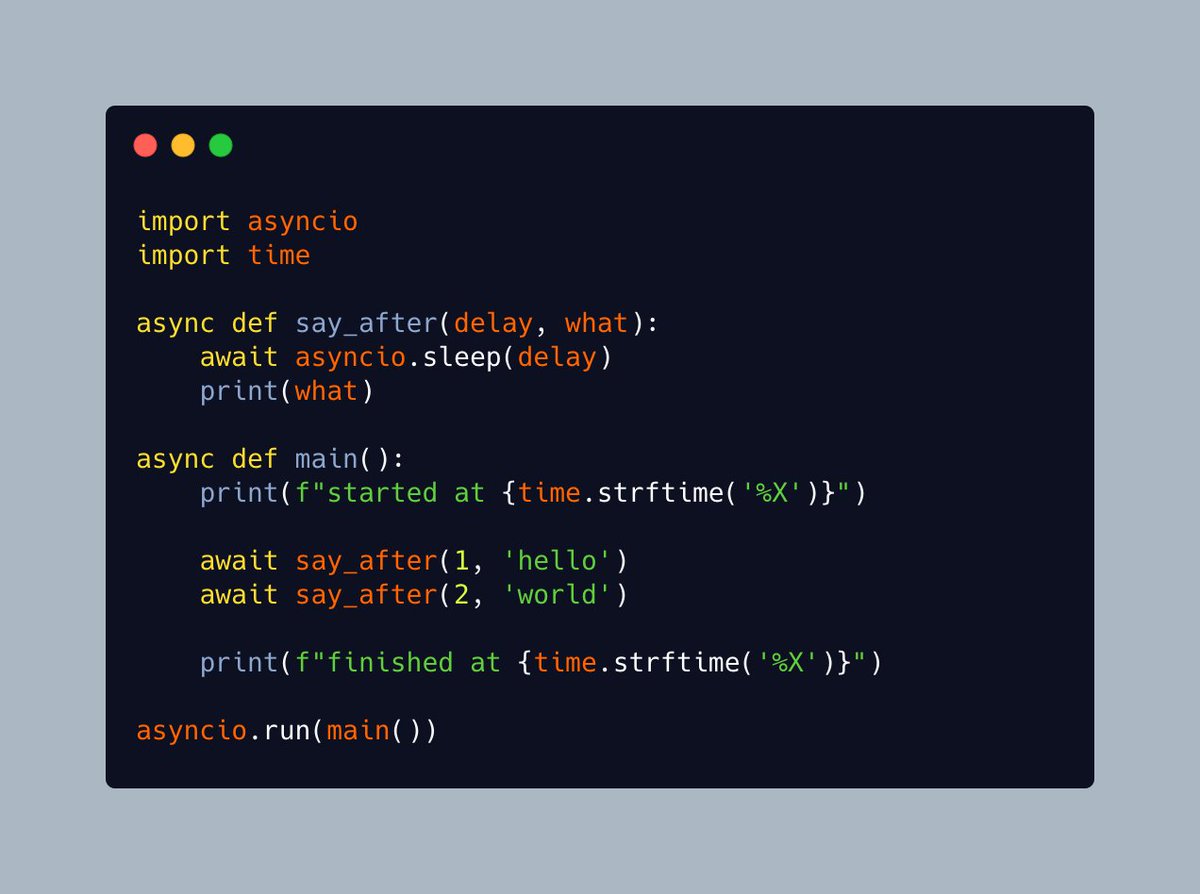
The #Python documentation has a nice "Hello World" example for async.

In this example, you see how to create an asynchronous function, sleep and print out some strings: Image
Read 10 tweets

Did Thread Reader help you today?

Support us! We are indie developers!


This site is made by just two indie developers on a laptop doing marketing, support and development! Read more about the story.

Become a Premium Member ($3/month or $30/year) and get exclusive features!

Become Premium

Don't want to be a Premium member but still want to support us?

Make a small donation by buying us coffee ($5) or help with server cost ($10)

Donate via Paypal

Or Donate anonymously using crypto!

Ethereum

0xfe58350B80634f60Fa6Dc149a72b4DFbc17D341E copy

Bitcoin

3ATGMxNzCUFzxpMCHL5sWSt4DVtS8UqXpi copy

Thank you for your support!

Follow Us on Twitter!

:(