Hasan Toor Profile picture
Mar 1, 2023 10 tweets 6 min read Read on X
ChatGPT is a phenomenal AI Tool.

But don't limit yourself to just ChatGPT.

Here're 8 AI-powered tools you should try in 2023:
1. KaiberAI

@KaiberAI helps you generate beautiful videos in minutes.

Transform your ideas into the visual stories of your dreams with this Amazing Tool.

New features:
1. Upload your custom music
2. Prompt Templates
3. Camera Movements:

Check here

kaiber.ai
2. @tldview TLDV

Best ChatGPT Alternative for meetings.

Make your meetings 10X more productive with this amazing tool.

Try it now:

tldv.io
3. ComposeAI

Use ComposeAI for generating any text using AI.

It’s will help you write better content in seconds.

Try it here:

compose.ai
4. Browser AI

Use this AI tool to extract and monitor data from any website.

Train a robot in 2 minutes to do your work.

No coding required.

browse.ai
5. Simplified

All-in-one platform for content creation.

• Video editing
• Copywriting
• Graphic designing
• Social Media Management

This tool is like all in one workplace for creators.

simplified.com
6. Sembly AI

The smartest AI team assistant for you.

Sembly transcribes, takes meeting notes, and generates insights for your professional meetings.

sembly.ai
7. Teleport @teleportHQio

Want to generate a website?

With the help of this Low code AI tool you can generate website UI in minutes.

Try it here - teleporthq.io
8. AISEO AI

A powerful tool for paraphrasing, copywriting and photo generation tool.

aiseo.ai
That's a wrap!

If you enjoyed this thread:

1. Follow me @hasantoxr for more of these
2. RT the tweet below to share this thread with your audience

• • •

Missing some Tweet in this thread? You can try to force a refresh

 

Keep Current with Hasan Toor

Hasan Toor Profile picture

Stay in touch and get notified when new unrolls are available from this author!

Read all threads

This Thread may be Removed Anytime!

PDF

Twitter may remove this content at anytime! Save it as PDF for later use!

Try unrolling a thread yourself!

how to unroll video
  1. Follow @ThreadReaderApp to mention us!

  2. From a Twitter thread mention us with a keyword "unroll"
@threadreaderapp unroll

Practice here first or read more on our help page!

More from @hasantoxr

Mar 15
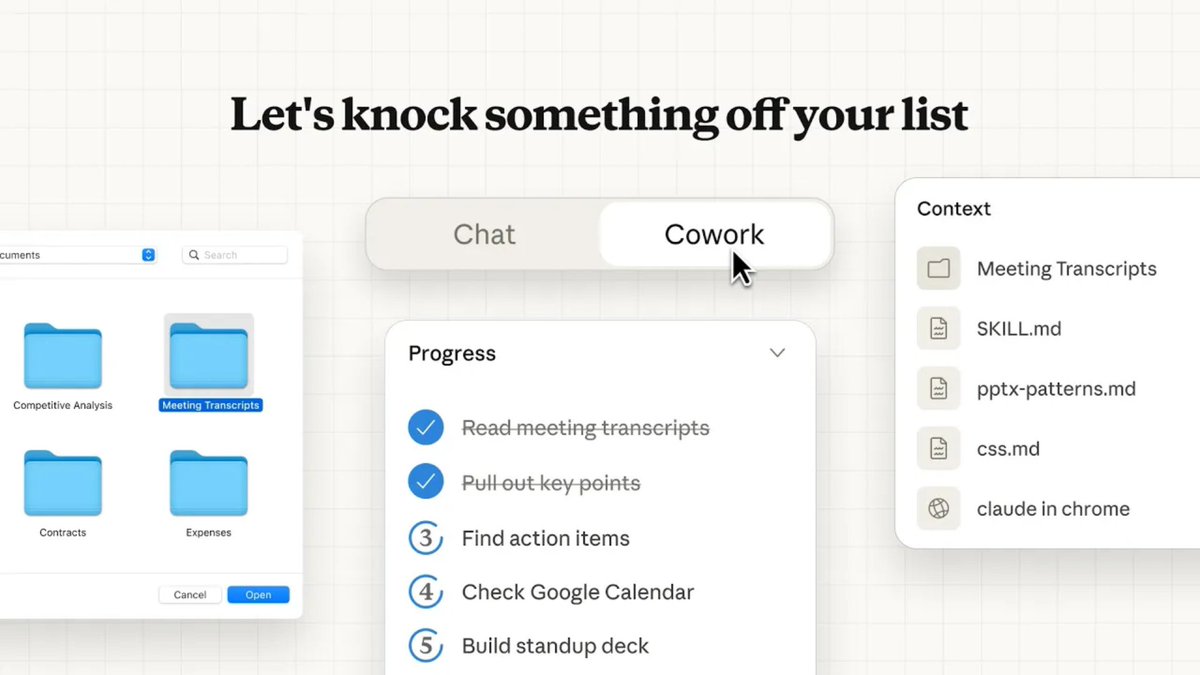
🚨 BREAKING: Someone just leaked their full Claude Cowork setup and it compresses an entire workday into 90 seconds.

I scraped every power user workflow across X, Reddit, and private Slack groups to find out how.

99% of people are using it completely wrong.

Here's what the top 1% actually do 👇Image
Prompt 1: Inbox triage + summarization

"You are a Chief of Staff with 10 years of executive support experience.

I need you to process my inbox one email at a time using this exact chain of reasoning:

Step 1 → Classify: Is this urgent (needs reply today), important (needs reply this week), or noise (unsubscribe/archive)?
Step 2 → Extract: Pull out the sender, request, deadline, and any names mentioned.
Step 3 → Draft: Write a reply under 4 sentences. Match the sender's tone. Never use "I hope this email finds you well."
Step 4 → Flag: If it involves money, legal language, or a deadline under 24 hours, mark it [ESCALATE] before the reply.

Process every email in my inbox folder. Output in this format:
[CLASSIFICATION] | [EXTRACTED INFO] | [DRAFT REPLY] | [FLAG IF NEEDED]

Do not stop until every email is processed."
Prompt 2: Document drafting

"You are a McKinsey Senior Consultant who writes exclusively in plain English.

Hard constraints:
- No bullet points. Prose only.
- No sentence longer than 20 words.
- Every paragraph must end with a decision or action.
- Never use: "leverage," "synergy," "circle back," or "moving forward."

Task: Read every file in my [Documents/Drafts] folder. For each document that is more than 50% complete, turn it into a final polished version ready to send.

For documents under 50% complete, write a 3-sentence brief explaining exactly what still needs to be done and who should do it.

Save all outputs as [filename]_FINAL.docx in the same folder."
Read 12 tweets
Mar 12
🚨BREAKING: This github has entire blueprint for building ChatGPT from scratch and put it on GitHub for free.

It's called LLMs-from-scratch and it walks you through building a GPT model in PyTorch line by line.

No black boxes. No hand-waving. Every single piece of the architecture explained and coded.

Here's why this changes everything for AI builders: ↓Image
Most people using ChatGPT every day have zero idea how it actually works under the hood.

Attention mechanisms. Tokenization. Pretraining. Finetuning. RLHF.

They're all magic words until you build one yourself.

This repo fixes that.
What you'll build, chapter by chapter:

→ Ch 2: Working with text data + BPE tokenizer from scratch
→ Ch 3: Coding multi-head attention from zero
→ Ch 4: Full GPT model implementation in PyTorch
→ Ch 5: Pretraining on unlabeled data
→ Ch 6: Finetuning for text classification
→ Ch 7: Instruction finetuning (how ChatGPT-style behavior actually works)Image
Read 8 tweets
Mar 8
🚨BREAKING: GOODBYE POWERPOINT forever.

Claude just collapsed 10 hours of presentation building into 100 seconds completely free.

Here are 12 prompts to go from completely unprepared to completely untouchable in every meeting: (Save this): Image
1. Complete Presentation Blueprint

Act like a professional presentation consultant who has built decks for Fortune 500 boardrooms and billion-dollar pitch meetings. Create a complete presentation blueprint for [topic]. Define the objective, target audience, key message, emotional arc, and exact slide flow. Make every section earn its place and eliminate anything that doesn't move the audience toward one clear decision.
2. Hook Slide That Stops Scrolling

You are a TED Talk opening specialist. Write the first slide and opening 30 seconds of spoken script for a presentation on [topic]. The hook must create immediate tension, make the audience feel something is at stake, and promise a payoff they can't ignore. No welcome slides. No agenda. Start mid-story.
Read 15 tweets
Feb 27
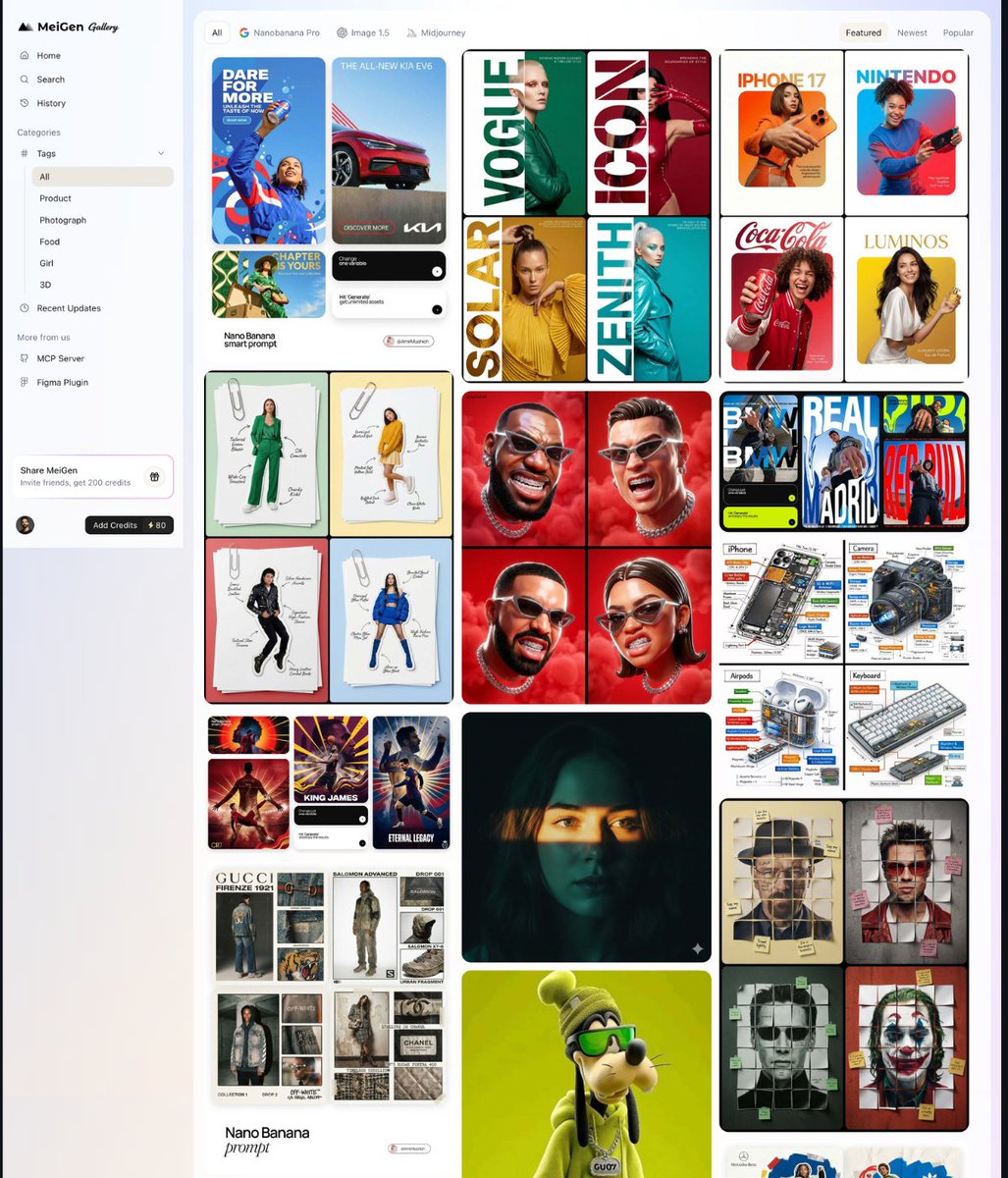
Holy shit... Someone just built the ultimate prompt collection for AI image creators.

It's called MeiGen, it scrapes the hottest prompt posts from X every week and curates them in one place.

No more bookmarking 50 tweets. No more losing that prompt you saw 3 days ago.

100% free. 100% Open Source.Image
Here's the problem MeiGen solves:

The best AI image prompts live on X.

But they're buried in your bookmarks, your likes, your "I'll come back to this" pile that you never come back to.

MeiGen pulls the hottest ones weekly curated, organized, searchable.
What you get:

→ Weekly curated prompts trending on X (real engagement, not random)
→ Filter by model like NanoBanana Pro, GPT Image, Midjourney
→ One-click generate + save to your collection
→ Real view/like counts so you know what actually performs

The top prompt right now? 159K views on X.
Read 6 tweets
Feb 24
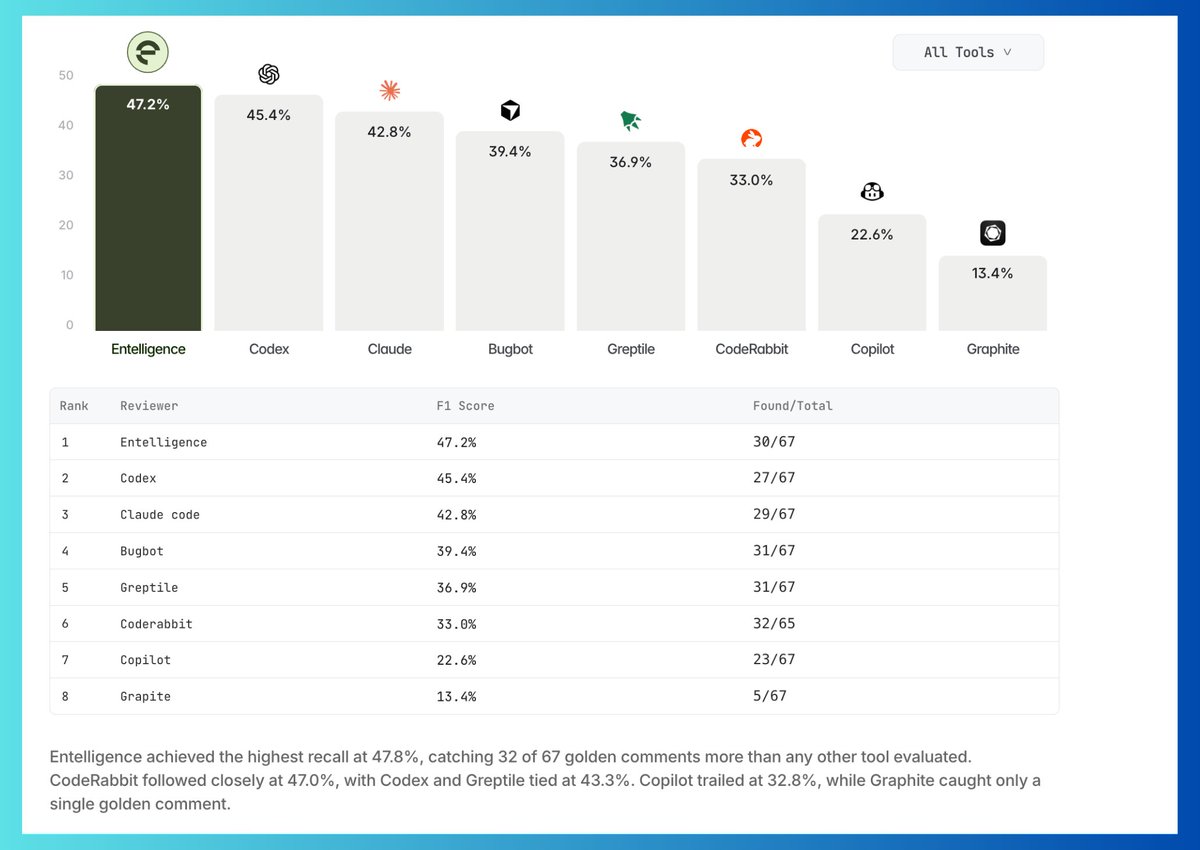
Holy shit... Someone finally benchmarked AI code reviewers on REAL pull requests.

Not demos. Not vibes. Actual F1 scores across 8 tools.

The gap between #1 and #8?

34 percentage points.

Your eng team is probably using the wrong one right now: ↓
@entelligence benchmarked 8 tools on real pull requests.

Every "which code review tool should we use" convo ends the same way:

→ Someone shares a demo
→ Someone shares a vibe
→ Nobody has real numbers
→ Team picks based on brand recognition

That era is over.
The full F1 score breakdown across 8 tools:

🥇 Entelligence — 47.2%
🥈 Codex — 45.4%
🥉 Claude — 42.8%
4. Bugbot — 39.4%
5. Greptile — 36.9%
6. CodeRabbit — 33.0%
7. Copilot — 22.6%
8. Graphite — 13.4%

Copilot at 22.6%. Graphite at 13.4%.

These tools are being sold to your eng team RIGHT NOW.Image
Read 7 tweets
Feb 24
I just ran 6 AI tools in one workflow.

No API keys. No dashboard switching. No glue code.

Just typed what I wanted and Claudcode + SkillBoss executed the entire thing.

Here's the breakdown: 👇
Most AI setups look like this:

→ ChatGPT tab for writing
→ Midjourney for images
→ Runway for video
→ Zapier to connect them
→ 4 API keys you'll inevitably break
→ 2 hours wasted before you even start

That's not a workflow. That's a second job.
SkillBoss changes this completely.

100+ AI models & skills in one workspace.

Chat. Image. Video. Audio. Email. Scraper. PPT. Storage.

Claudcode orchestrates all of it you just give the instruction.

One prompt. Full execution.
Read 7 tweets

Did Thread Reader help you today?

Support us! We are indie developers!


This site is made by just two indie developers on a laptop doing marketing, support and development! Read more about the story.

Become a Premium Member ($3/month or $30/year) and get exclusive features!

Become Premium

Don't want to be a Premium member but still want to support us?

Make a small donation by buying us coffee ($5) or help with server cost ($10)

Donate via Paypal

Or Donate anonymously using crypto!

Ethereum

0xfe58350B80634f60Fa6Dc149a72b4DFbc17D341E copy

Bitcoin

3ATGMxNzCUFzxpMCHL5sWSt4DVtS8UqXpi copy

Thank you for your support!

Follow Us!

:(