Kanika Profile picture
Jul 10, 2023 13 tweets 4 min read Read on X
Chat GPT's Code interpreter is ready to wipe out 57 BILLION DOLLAR Data analytics MARKET.

Here are 10 experiments I ran leveraging Code interpreter for a Dataset, that I used for personal learning, and the results are SPECTACULAR!

THREAD AHEAD 🧵👇
📌 How to Enable Code Interpreter in ChatGPT plus?
- Go to settings
- Select Beta Features
- Enable Code Interpreter
- Once enabled, go to GPT 4 and tick Code Interpreter
1. Simpler explanations

I had a really interesting file of Customer Lifetime Value, an important metric for every business.

Asked Code Interpreter to explain everything in simple language

✅Prompt - Can you please explain this file in simpler terms
2. Asked for data Insights and recommendations

✅ Prompt - Provide actionable insights and recommendations for improving customer retention and maximizing profitability based on the analysis.
3. Creating Heatmap:

This part was amazing!

I asked CODE INTERPRETER to generate a heat map from the data.

To my surprise, I got a spectacular map with all relevant explanations

✅ PROMPT - Create a Heat map using this data.
4. Visual Chart Representation - Bar Chart

I wanted a bar chart to share, here is my result.

✅ Prompt - Create a visual chart, based on this data and explain the chart with pointers
5. 10 VISUAL CHARTS in one go:

Asked Code Interpreter to create 10 Visuals from the data.

✅ Prompt - Can you create 10 visuals to represent different data? Include explanations in the last.
6. Segmentation and Analysis:

I really wanted to know more about High Value, Medium Value and Low Value Customers

✅ Prompt: Can you please do a Segmentation and Analysis for HighValue, Medium Value and Low Value customers & highlight some interesting Key points using the data?
7. Analysis of Trends:

✅ Prompt - Can you show me the top trends in a visual format using the data?
8. Asked insights about highest REVENUE grossing channel

✅ Prompt: Can you tell me some interesting insights about the highest revenue grossing channel & share 5 tips to improve the lowest grossing channel
9. Presentation Outlining

Code Interpreter gave me an interesting outline for the presentation.

✅ Prompt - Can you create a presentation based on this dataset?
10. Calculation: Cost/Revenue
Asked Code Interpreter, to calculate CR ratio, gave me the result, but wasn't able to calculate it for the whole file, as it's super long. However correct formula was shared

✅Prompt: Use Columns 3 & 5 & share the cost revenue ratio for each row
That's a wrap!

If you enjoyed this thread:

1. Follow me @KanikaBK for more of these
2. RT the tweet below to share this thread with your audience

• • •

Missing some Tweet in this thread? You can try to force a refresh

 

Keep Current with Kanika

Kanika Profile picture

Stay in touch and get notified when new unrolls are available from this author!

Read all threads

This Thread may be Removed Anytime!

PDF

Twitter may remove this content at anytime! Save it as PDF for later use!

Try unrolling a thread yourself!

how to unroll video
  1. Follow @ThreadReaderApp to mention us!

  2. From a Twitter thread mention us with a keyword "unroll"
@threadreaderapp unroll

Practice here first or read more on our help page!

More from @KanikaBK

Mar 3
😱 WAIT! WHAT?

GREG ISENBERG just dropped a masterclass on replacing your entire marketing team with digital employees.

Marketing team: $25K/month
Digital employees: $47/month

Same output. Better performance. Runs 24/7

Here's the complete breakdown👇

Let me break down what he showed:

The Old Way (Marketing Team):
Typical marketing team:

Media buyer: $8K/month
Copywriter: $6K/month
Analyst: $7K/month
Email marketer: $5K/month

Total: $26K/month = $312K/year

Plus:
Management time: 15 hours/week
Meetings, revisions, oversight
Limited to 8-5pm M-F
Vacation, sick days, turnover
The New Way (Digital Employees):

Greg shows how to build automated workflows that:
→ Run 24/7
→ Never need direction
→ Compound daily
→ Cost ~$47/month
Read 12 tweets
Mar 1
🚨 BREAKING: MATTHEW BERMAN just released a video on how he runs his entire META ADS operation for $0/MONTH WITH OPENCLAW.

No agency. No VA. Just an AI agent that monitors, kills, scales, writes, and uploads ads autonomously.

Here's the system he built👇
He has been running Meta ads manually for 20 years.

He just packaged his entire workflow into 5 autonomous OpenClaw skills that replaced dozens of hours in Ads Manager every week.

The agent handles everything from health checks to creative uploads without human intervention.

Here's exactly what runs on autopilot in his setup every single day:
Step 1: Daily health check via social-cli

The agent wraps Meta's Marketing API and handles token refresh, pagination, and rate limits automatically.

Asks the same 5 questions Matthew used to ask Ads Manager every morning for 20 years:
→ Am I on track for my targets?
→ What campaigns are currently running?
→ Which ads are winning right now?
→ Which ones are bleeding money?
→ Is there any creative fatigue happening?

Same questions. Zero manual checking required.
Read 11 tweets
Mar 1
🚨 BREAKING!

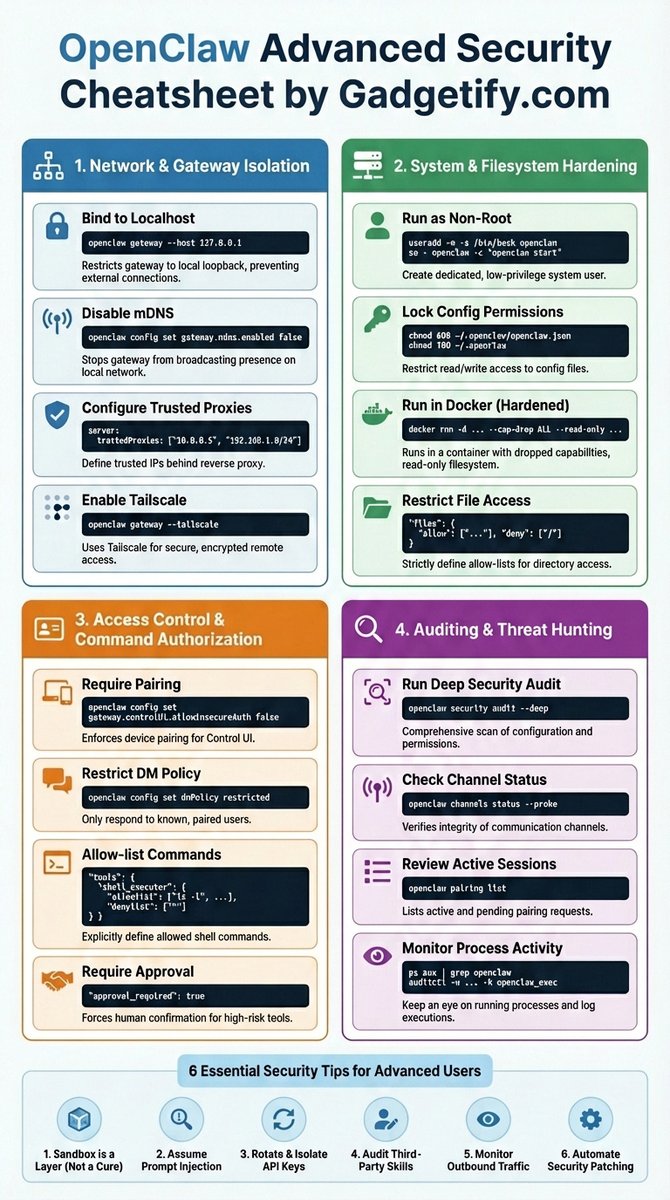
2,000+ OPENCLAW USERS HAVE THIS SECURITY MISTAKE RIGHT NOW.

It's costing people their entire business.

API keys exposed. Files readable. Commands executable.

Here's the cheat sheet that fixes it in 30 minutes for $0.

🔖 Bookmark before it gets buried Image
Your agent can read files, run commands, access API keys.

Unsecured = open door.

First thing to do RIGHT NOW:
openclaw gateway --host 127.0.0.1

60 seconds. External connections blocked forever.
Never run as root. Ever.

Agent gets compromised as root = attacker gets your entire system.

Create a low-privilege user.
Set "approval_required": true

Now nothing runs without YOUR confirmation.
Read 7 tweets
Feb 23
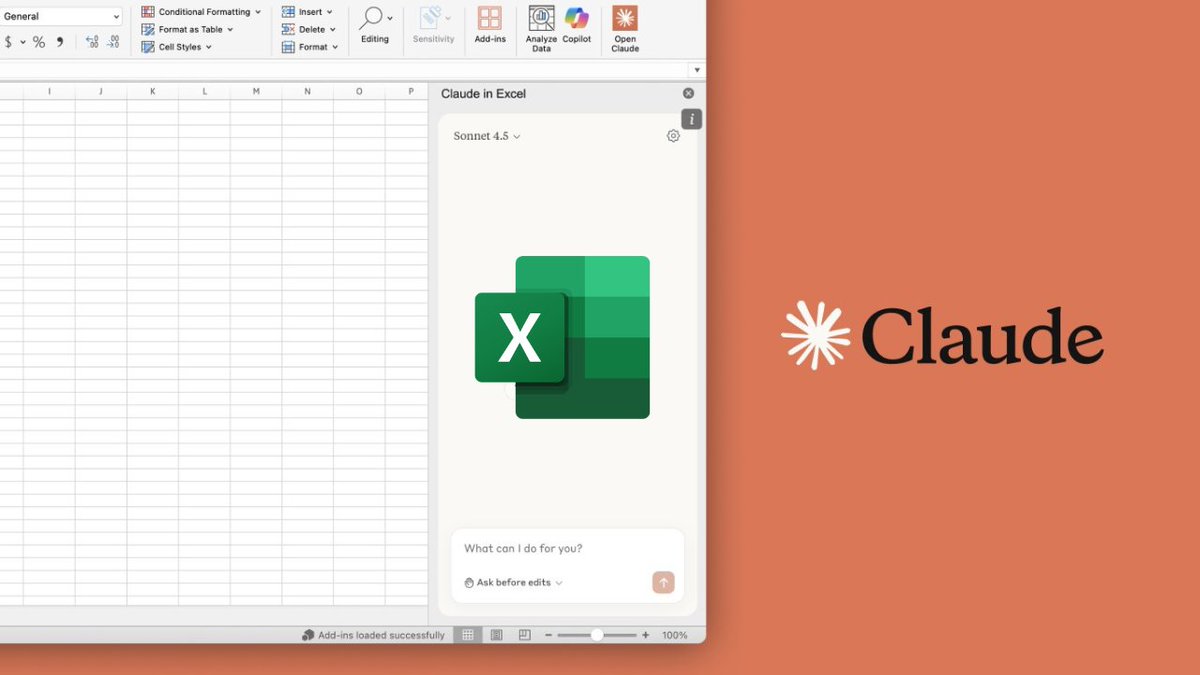
🚨 AI can now build Excel formulas like Microsoft's Power BI consultants (for free).

Here are 15 insane Claude prompts that replace $550/hour spreadsheet specialists

(🔖 Bookmarked for later) Image
1. Nested IF Logic Builder

You are an expert Excel formula consultant with Power BI data modeling experience. I need you to build a Nested IF formula for me based on my conditions. Follow these rules strictly:

↳ Ask me first for the column/field I am evaluating, the conditions I want to test (in priority order), and the output values for each condition, including a fallback/else value.
↳ Build the formula using proper nested IF syntax: =IF(test1, val1, IF(test2, val2, IF(test3, val3, else_val)))
↳ Indent and annotate the formula in a human-readable breakdown so I understand the logic tree before I use it.
↳ Warn me if any condition is logically redundant, unreachable, or if the order of conditions will cause incorrect results.
↳ Suggest a modern equivalent (IFS, SWITCH, or CHOOSE) if my Excel version supports it and if it would simplify the formula.
↳ Handle edge cases - tell me if I need to account for blanks (ISBLANK), errors (IFERROR), or text vs. number mismatches.
↳ If my logic exceeds 7 levels of nesting, flag it as a maintainability risk and offer a restructured approach using helper columns or SWITCH.

↳ My conditions are: [paste your conditions here in plain English, e.g., "If Sales > 10000 then 'High', if Sales > 5000 then 'Medium', if Sales > 0 then 'Low', otherwise 'No Sales'"]
2. Dynamic Dashboard KPI Formula

You are a senior Excel and Power BI consultant building dynamic KPI formulas for an executive dashboard. I will describe my KPI and you will build the complete formula set for it. Follow these rules:

↳ Ask me for: the KPI name, the raw data range or table name, the time dimension (daily/monthly/quarterly), whether I'm using a dropdown or slicer for filtering, and my target value (fixed number, cell reference, or calculated).

Build three formula variants for each KPI:
↳ Current Period Value - the actual measure for the selected period
↳ Target vs. Actual Variance - absolute and percentage difference
↳Period-over-Period Change - vs. prior period (MoM, QoQ, or YoY)

↳Use structured table references (Table[Column]) where possible instead of range references for dynamic resilience.
↳ Use SUMIFS, AVERAGEIFS, COUNTIFS, or SUMPRODUCT as the aggregation engine - not SUMIF or VLOOKUP.
↳ Make the formula respond to a dropdown cell (e.g., a month selector in cell $B$2) so the KPI updates automatically when the user changes the period.
↳ Add conditional logic so the formula returns a meaningful fallback (e.g., "No Data" or 0) if the selected period has no records - not an error.
↳ Flag if I need IFERROR, IFNA, or LET to clean up the formula.
↳ Output a KPI status label formula separately - a text formula that returns "✅ On Track", "⚠️ At Risk", or "🔴 Off Track" based on variance thresholds I define.
↳ If my Excel version supports it, show the LET() version of the formula for readability.

↳ My KPI is: [describe it in plain English, e.g., "Monthly Revenue for the selected region and month from my Sales table, compared to a monthly target in a separate Targets table"]
Read 17 tweets
Feb 21
😱 THIS FEELS ILLEGAL: Greg Isenberg just revealed how to turn $1K Upwork gigs into $500K/year using OpenClaw.

Most people think: OpenClaw = productivity hack
He is thinking: OpenClaw = 24/7 digital employees

Here's the 8-step system: 👇

↳Spin up 5-10 OpenClaw machines (Mac Mini, VM, whatever)
↳Pick ONE boring workflow (insurance, real estate, law)
↳Map it tip-to-tail (trigger → clicks → parsing → CRM)
↳Use Claude Code for the Python pipeline
↳Package as: "Setup + 30 days + new workflows weekly"
↳Use Upwork as lead source + validation
↳Turn best workflow into vertical workspace
↳Sell to BigCo as "AI employees for [department]"

"But you can't build a big company doing Upwork deals"
Think about it:

↳ Upwork = paid reps + proof someone pays
↳ Those reps = case studies ("saved 12 hrs/week")
↳ Stack 5-10 workflows = vertical package
↳ BigCo buys packages (they understand scopes)

OpenClaw = wrapper
Claude Code = factory
Sub-agents = workforce
Vertical bundle = product
Read 4 tweets
Feb 20
🤯 HOLY SHIT... I just found 10 X articles that will save your OpenClaw
project from the mistakes.

Real users.
Real shipped products.
Real post-mortems.

No courses. No gurus. No fluff.
Bookmark this before it gets buried ↓

👇 Here's the list:
2. My First 24 Hours with OpenClaw (Wacko)
Read 12 tweets

Did Thread Reader help you today?

Support us! We are indie developers!


This site is made by just two indie developers on a laptop doing marketing, support and development! Read more about the story.

Become a Premium Member ($3/month or $30/year) and get exclusive features!

Become Premium

Don't want to be a Premium member but still want to support us?

Make a small donation by buying us coffee ($5) or help with server cost ($10)

Donate via Paypal

Or Donate anonymously using crypto!

Ethereum

0xfe58350B80634f60Fa6Dc149a72b4DFbc17D341E copy

Bitcoin

3ATGMxNzCUFzxpMCHL5sWSt4DVtS8UqXpi copy

Thank you for your support!

Follow Us!

:(