Pradeep Pandey Profile picture
Aug 14, 2023 10 tweets 4 min read Read on X
ChatGPT is INCAPABLE of doing the same.

For several days, Tugan AI has been booming in the US.

Here's the craziest thing Tugan AI can do:🧵 Image

1/ @tugan_ai has launched a new feature that allows you to take any video on YouTube and turn it into a Twitter thread.

I'll show you how👇
2/ First of all, you need to start by creating an account on

It doesn't take more than 2 minutes. https://t.co/rzIj2nlX92tugan.ai/?via=pradeep-p…
Image
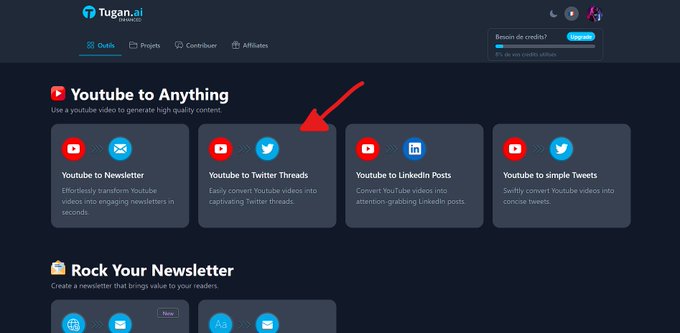
3/ Here you are on the interface.

There are a lot of features, but I've already talked about them in other threads.

Today, we're going to focus on "YouTube video to Twitter thread." Image
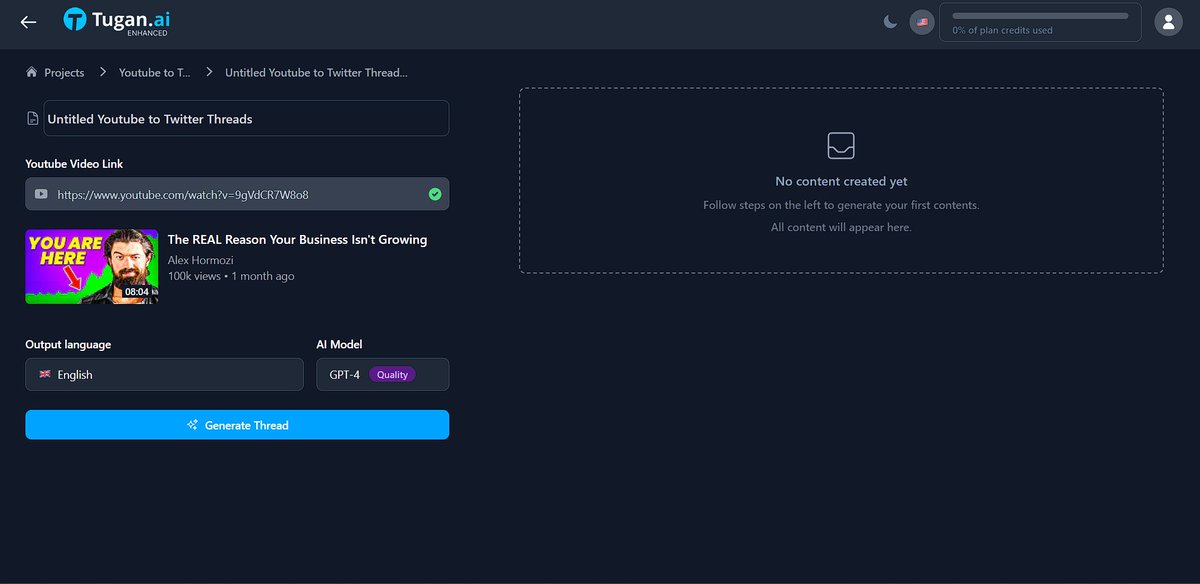
4/ As you can see, there aren't a lot of settings, blinking things, it's simple.

All you have to do is put the URL of your video.

Don't forget to set the language you want for your thread.

All you have to do now is click on "generate content". Image
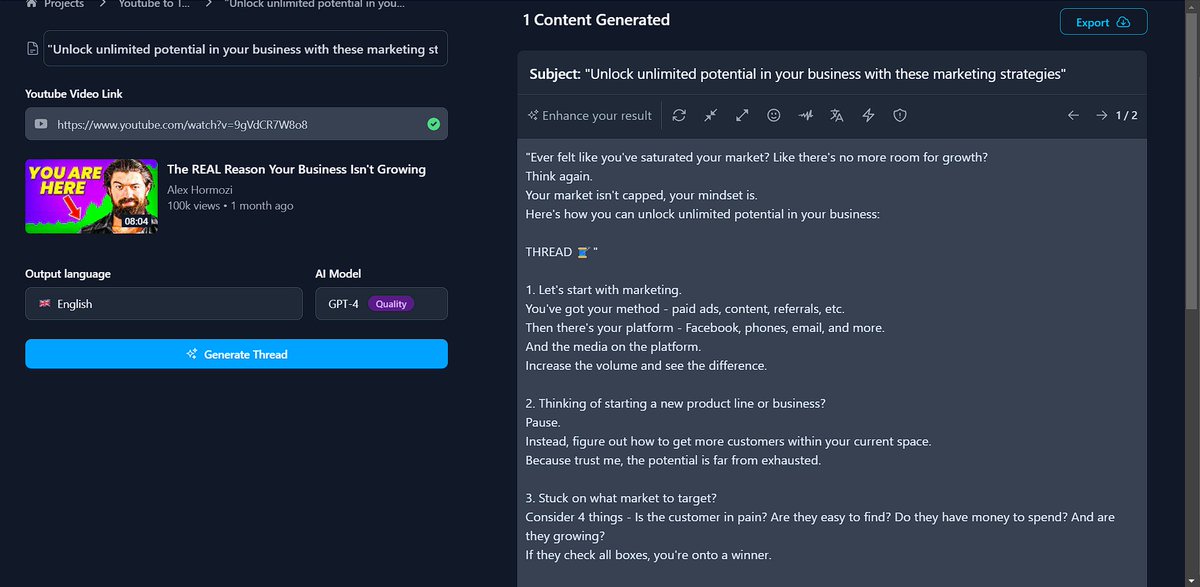
5/ After a few seconds, your content is generated.

You can still modify it with the modifiers built into . https://t.co/4MsVWlfirvTugan.ai
Image
6/ I've shown you a small example by asking it to focus on the benefits.

In a thread, it's super important to focus on what you bring to the readers.

But I'm going to go a little further
7/ Because here I've changed the "direction" in which the thread is going.

But I can also change the tone.

In the video, I show you how I made it a little more provocative

A good thread is like good copy.

You get to the point.
8/ I'll leave you with the thread that @tugan_ai wrote for me.

Don't hesitate to pause the video to take the time to read it.

I have a special link to try the tool for free (I don't know until when) 👇

https://t.co/zRJKSCe8DRtugan.ai/?via=pradeep-p…
That's a wrap!

If You liked this thread.

1. Follow @Div_pradeep for more such content around web development, resources, tips, and cheatsheet.

2. RT the first tweet to share it with other people.

I appreciate it!

• • •

Missing some Tweet in this thread? You can try to force a refresh

 

Keep Current with Pradeep Pandey

Pradeep Pandey Profile picture

Stay in touch and get notified when new unrolls are available from this author!

Read all threads

This Thread may be Removed Anytime!

PDF

Twitter may remove this content at anytime! Save it as PDF for later use!

Try unrolling a thread yourself!

how to unroll video
  1. Follow @ThreadReaderApp to mention us!

  2. From a Twitter thread mention us with a keyword "unroll"
@threadreaderapp unroll

Practice here first or read more on our help page!

More from @Div_pradeep

Apr 24
Your iPhone has been hacked if you see THESE 7 signs.

I ignored #4 for 3 months.

Someone in Russia had full access to my photos, messages, and bank accounts.

Here's what to check RIGHT NOW:
Sign #1: Battery draining faster than usual.

Hacking apps run in the background 24/7.

They're constantly uploading your data, photos, and location.

This drains battery at 3-4x normal rate even when you're not using your phone
Go to Settings → Battery.

Check "Battery Usage by App."

See apps using power that you rarely open?
Red flag.

Especially apps with names like "System Service" or "Background Activity."
That's not Apple.

That's malware.
Read 15 tweets
Apr 23
YOUR PHONE ISN'T LISTENING TO YOU BY ACCIDENT.

It's doing exactly what it was designed to do.

I said "Rome" once out loud.

10 minutes later, flight ads to Italy everywhere.

This is called shadow logging.

And it runs through 5 settings that 90% of people never check.

Here's how to shut it down:
Setting 1: Important Locations (iPhone)

Your phone keeps a log of places you visit often.

Used for suggestions… but also builds behavior patterns.

Turn it off:

Settings → Privacy & Security → Location Services → System Services → Important Locations → Disable
Setting 2: Google web and app activity

Google saves searches and activity from “associated” apps. That includes voice and audio, although it may not seem like it.

Solution:

Google Account > Data & privacy > Web and app activity > Turn off Include voice and audio activity.
Read 8 tweets
Apr 22
97% of iPhone users are shooting at 12MP.

Their phone does 48MP.

Apple defaults your $1200 camera to a quarter of its actual resolution.

I changed 7 settings last week and my photos instantly looked professional.

Here's what Apple doesn't tell you:
1/ Shoot in 48MP Instead of 12MP

Settings → Camera → Formats → Photo Mode → Select "HEIF Max (48 MP)"

Apple defaults your $1200 phone to 12MP. The sensor does 48MP. You've been shooting at a quarter of what your camera can do since the day you bought it
2/ Turn Off Auto HDR

Settings → Camera → Turn OFF "Auto HDR"

Auto HDR overprocesses every photo. Halos around objects. Skin looks plastic. Skies look fake.

Turn on Smart HDR instead. Same processing, more natural results. Your photos stop looking like AI generated them.
Read 9 tweets
Apr 16
97% of iPhone users never touch Camera settings.

Which means 97% are shooting with settings that make photos look worse than they should.

I changed 5 of them last week.

My photos instantly looked more professional.

Here is what I changed:
1/ Turn Off Auto HDR (Makes Photos Look Fake)

Settings → Camera → Turn OFF "Auto HDR"

Why: Auto HDR overprocesses photos, creates weird halos around objects, makes skin look plastic

Turn ON Smart HDR instead: Better processing, more natural look

Photos look way more natural immediately.
2/ Enable ProRAW or ProRes (If You Have Pro Model)

Settings → Camera → Formats → Turn ON "Apple ProRAW"

Why: Captures way more detail, gives you editing flexibility later, professional quality

Warning: Files are huge (25MB per photo), only use for important shots
Makes iPhone photos actually match DSLR quality
Read 7 tweets
Nov 29, 2025
Every startup today has an opportunity to become visible in AI search but most don’t know how AI actually sees them.

AI search engines don’t list you just because you exist they list you because the internet talks about you more (or less) than your competitors.

@s_Wellows tracks those signals, fills the gaps, and helps startups become visible where ChatGPT, Gemini & Perplexity look for answers.Image
AI search engines don’t read your website.

They read the world’s interpretation of your brand.

Niche blogs. Lists. Category pages. Databases. Product roundups. These shape how LLMs rank & cite you.

Wellows shows exactly where you should appear but don’t, and where competitors are earning the citations you’re missing.
The biggest visibility wins come from implicit mentions — places where AI expects your startup to appear, but you’re missing while competitors are credited.

Wellows uncovers them instantly:

• Missing category lists
• Comparison articles that skipped you
• Blogs citing competitors but not your brand
• Databases where you're absent
• Pages AI models rely on but don’t credit you for.

This is the fastest path to becoming AI-discoverable.Image
Read 8 tweets
Sep 6, 2025
The future of ads is fake.

Higgsfield's new Ads 2.0 suite lets you make ads without the product.

The AI generates everything, and the new text rendering is perfect.

Let's get into it.
The 25+ new Ads Apps are a game-changer.

They are designed for creating viral, cinematic product clips.
The update includes insane VFX presets like "Wonderland" and "Multiverse".

You can make your product ad look like a blockbuster movie.
Read 6 tweets

Did Thread Reader help you today?

Support us! We are indie developers!


This site is made by just two indie developers on a laptop doing marketing, support and development! Read more about the story.

Become a Premium Member ($3/month or $30/year) and get exclusive features!

Become Premium

Don't want to be a Premium member but still want to support us?

Make a small donation by buying us coffee ($5) or help with server cost ($10)

Donate via Paypal

Or Donate anonymously using crypto!

Ethereum

0xfe58350B80634f60Fa6Dc149a72b4DFbc17D341E copy

Bitcoin

3ATGMxNzCUFzxpMCHL5sWSt4DVtS8UqXpi copy

Thank you for your support!

Follow Us!

:(