Abhishek Profile picture
Aug 20 7 tweets 3 min read Twitter logo Read on Twitter
AI won’t take your job.

But the person who knows how to use it will.

Here is a step-by-step tutorial to generate your professional LinkedIn headshot with AI.

And you can do it all in less than 10 minutes: Image

It only takes 3 steps:

1. Sign up for
2. Train a custom model and upload your selfies
3. Generate your headshots

Here's a full video that shows how it works👇 tryleap.ai
The best part?

You can create more than just quality headshots for social media with @leap_api.

Generate marketing assets, product shots, and even license-free music for your work.
Image
Image
BONUS:

Learn how to use AI to generate images, music, and more from the guides on the Leap AI blog:

blog.tryleap.ai/create-an-ai-h…
Additional for developers:

Build AI apps with the Leap AI API & SDK.

Check out their docs and working code: docs.tryleap.ai
And that's a wrap!

If you enjoyed it, I'd be grateful if you could:

1. Follow me @HeyAbhishekk for more of these.

2. Retweet the tweet below to share it with others.
P.S.

In my free newsletter, I share Latest AI news, and handy tips to leverage AI and improve your life.

Subscribe for free:
thebrainwave.ai/subscribe

• • •

Missing some Tweet in this thread? You can try to force a refresh

 

Keep Current with Abhishek

Abhishek Profile picture

Stay in touch and get notified when new unrolls are available from this author!

Read all threads

This Thread may be Removed Anytime!

PDF

Twitter may remove this content at anytime! Save it as PDF for later use!

Try unrolling a thread yourself!

how to unroll video
  1. Follow @ThreadReaderApp to mention us!

  2. From a Twitter thread mention us with a keyword "unroll"
@threadreaderapp unroll

Practice here first or read more on our help page!

More from @HeyAbhishekk

Aug 21
More than 100 Million people use ChatGPT.

Most people don't ask the right question.

But FlowGPT allows you to use expert's 10000+ well-designed questions and it's FREE.

Here’s how to get Massive collection 10000+ advance prompts for Free:
1. Best student prompts:

Boost your learning efficiency with FlowGPT's Top 40 Student Prompts!

Boost critical thinking and writing skills, and rediscover the joy of learning.

🔗 flowgpt.com/collections/tj…
2. Software Development mega Prompts Collection:

Unleash smarter coding strategies with AI-powered tasks, from crafting pristine API docs to precise test cases.

🔗 flowgpt.com/collections/2J…
Read 12 tweets
Aug 12
Google integrated AI into Docs.

Now AI can help you to create content for Social media, Blog, SEO and more.

Here’s how to use Google AI writing assistant for FREE 👇
It is available for free for everyone.

Let's go over a fast 3-step tutorial:
Step 1:

First click on the below Link

Then Select "Google Workspace"

And Join the waitlist.

🔗 https://t.co/BQvBTZdrvhlabs.withgoogle.com
Read 7 tweets
Aug 9
This is literally ChatGPT for Designs.

Generate Realistic Designs without spending $10/month.

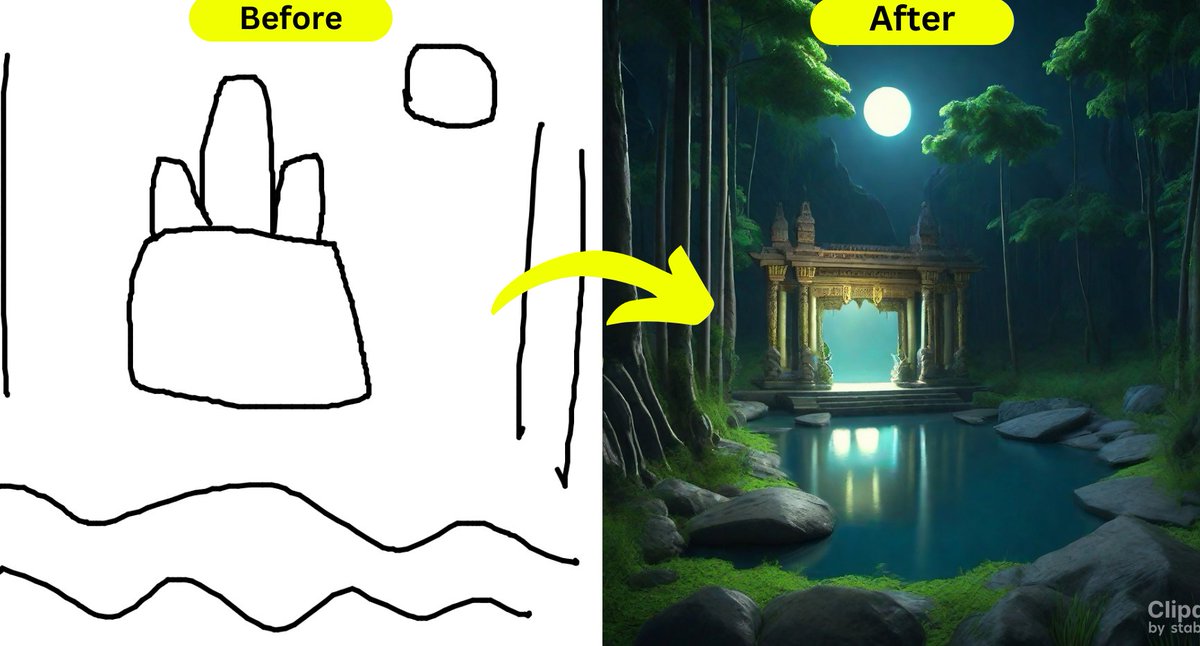
Here’s how to convert your sketches into professional Designs (for Free): Image
Step 1: Getting Started

- Go to

- Scroll down and click on "Tools" section

- From the available options, select 'Stable Doodle'. https://t.co/zwoF476vo0Clipdrop.co
Step 2: Sketch It Out

- It's time to let your imagination run wild.

- Sketch out the rough outline of your idea.

- Don't stress about getting every line perfect.
Read 6 tweets
Aug 8
This is literally ChatGPT for Animation.

Professional animation for your videos used to cost $1,000+.

Introducing HeyGen, the only AI photo-animation tool you'll ever need [Try for FREE]
Step 1:

→ Visit Bing Chat.

→ Describe your avatar image

→ Click on Download.
Step 2:

→ Go to:

→ Upload your Photo Avatar

→ Change Your Avatar Frame

→ Enter Your Script https://t.co/LRhiVmEcudheygen.com
Read 7 tweets
Aug 7
Never write notes for your meetings or classes again.

You can use AI to do it for you.

Here's how to use AI with Google Meet, Zoom, Microsoft Teams, or live recordings [Try for FREE]
1️. Go to Fireflies AI:

It’s an AI assistant that's a game-changer for meetings.

- Transcribes, analyzes & takes notes
- Joins platforms like Zoom, Google Meet, or MS Teams.
- Used across 100,000+ businesses, taking notes for millions

🔗 https://t.co/wo9deu4HAlfireflies.ai/?utm_source=Ab…
2. Amazing Benefits with Fireflies:

- Never take notes again
- Focus on the conversation
- Perfect recall, even years later
- Share & collaborate with ease
- Know all key dates & deadlines
- Integrate with Dropbox, Slack, Salesforce & more
Read 9 tweets
Aug 6
No more struggles with sketching complex ideas.

ChatGPT can now help you visualize your ideas with Charts, mind maps and more with just a single prompt.

I will show you how in 5 easy steps 👇
Step 1: Installation

→ Go to the ChatGPT plugin store.

→ Search for “Show Me Diagrams" and hit "Install."

→ Activate the plugin, and you're ready to go.
Step 2 : Getting Started

Ask ChatGPT to draw a chart, line diagrams and many more.

Prompt → “Can you draw a timeline of the major events in World War II?”

The plugin fetches a comprehensive, well-labeled, and easy-to-understand diagram.
Read 7 tweets

Did Thread Reader help you today?

Support us! We are indie developers!


This site is made by just two indie developers on a laptop doing marketing, support and development! Read more about the story.

Become a Premium Member ($3/month or $30/year) and get exclusive features!

Become Premium

Don't want to be a Premium member but still want to support us?

Make a small donation by buying us coffee ($5) or help with server cost ($10)

Donate via Paypal

Or Donate anonymously using crypto!

Ethereum

0xfe58350B80634f60Fa6Dc149a72b4DFbc17D341E copy

Bitcoin

3ATGMxNzCUFzxpMCHL5sWSt4DVtS8UqXpi copy

Thank you for your support!

Follow Us on Twitter!

:(