Josh (Your CFO Guy) Profile picture
Aug 27, 2023 โ€ข 6 tweets โ€ข 2 min read โ€ข Read on X
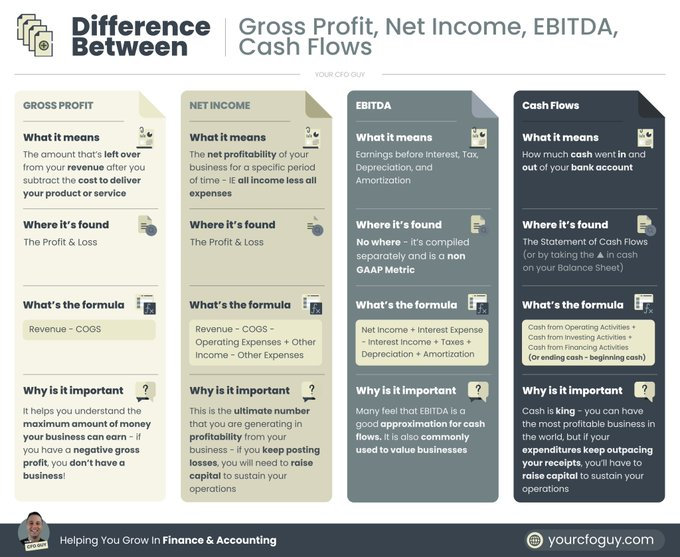
Do you know the difference between Gross Profit, Net Income, EBITDA, and Cash Flows?

Learn all about it over here ... Image
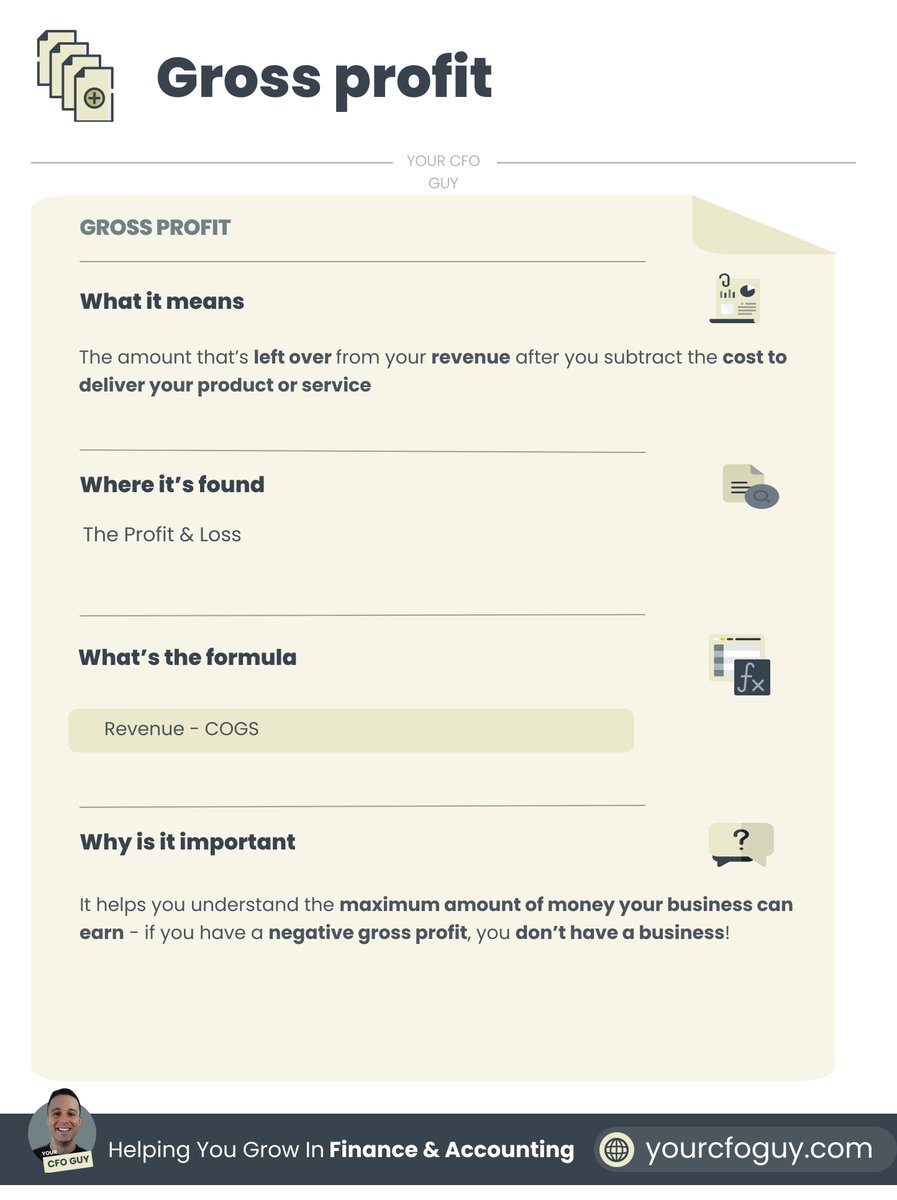
๐—š๐—ฟ๐—ผ๐˜€๐˜€ ๐—ฝ๐—ฟ๐—ผ๐—ณ๐—ถ๐˜

This is the amount thatโ€™s left over from your revenue after you subtract the cost to deliver your product or service Image
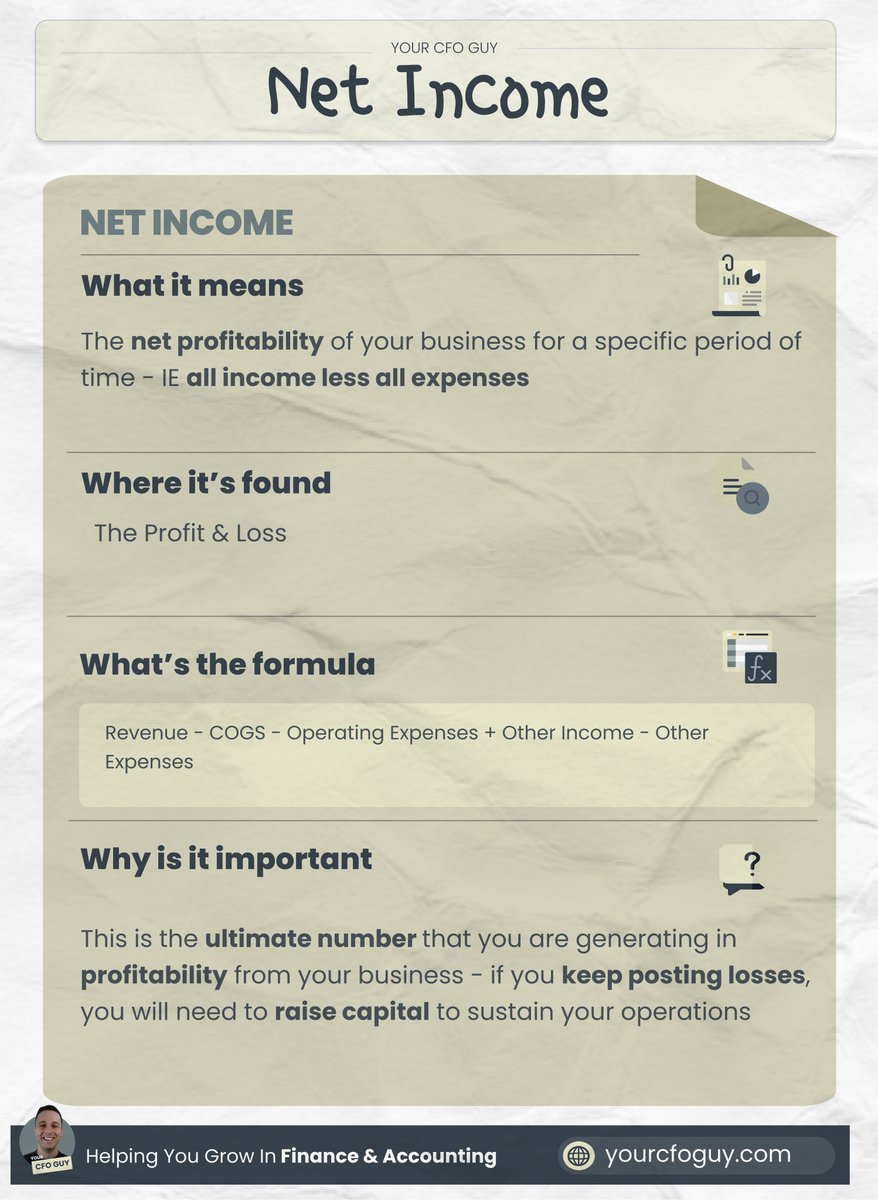
๐—ก๐—ฒ๐˜ ๐—ถ๐—ป๐—ฐ๐—ผ๐—บ๐—ฒ ๐Ÿ’ฐ

This is the net profitability of your business for a specific period of time - IE all income less all expenses Image
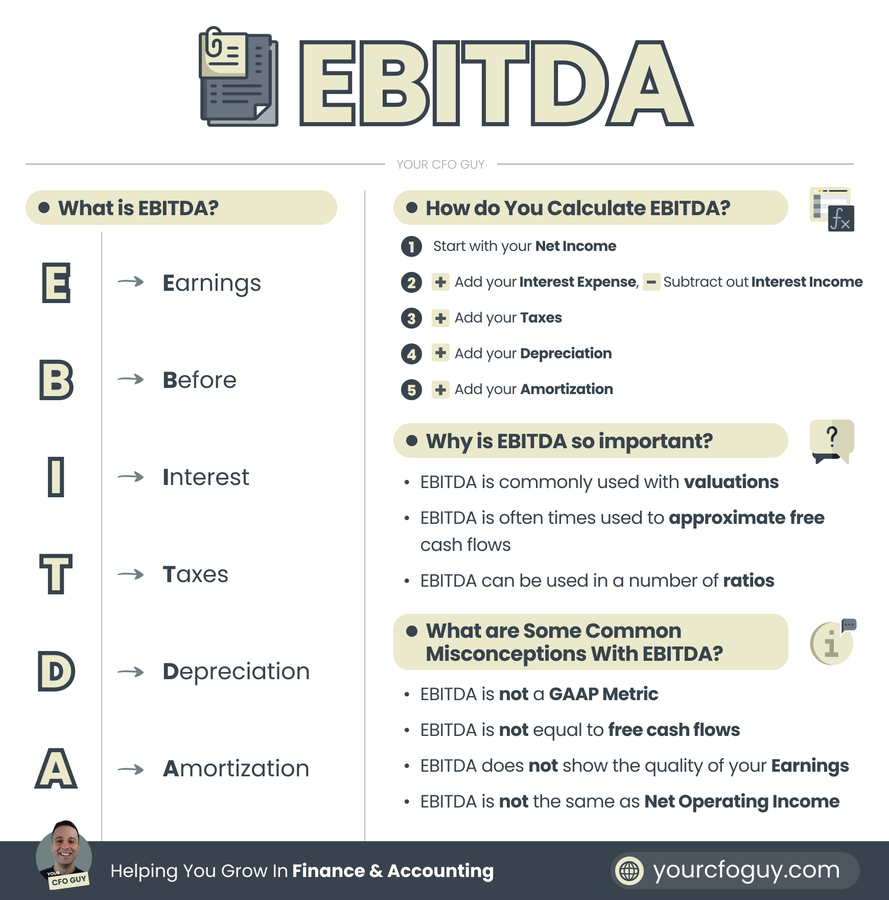
๐—˜๐—•๐—œ๐—ง๐——๐—”

Earnings Before Interest Tax Depreciation Amortization

Commonly used for valuations, and approximating free cash flows Image
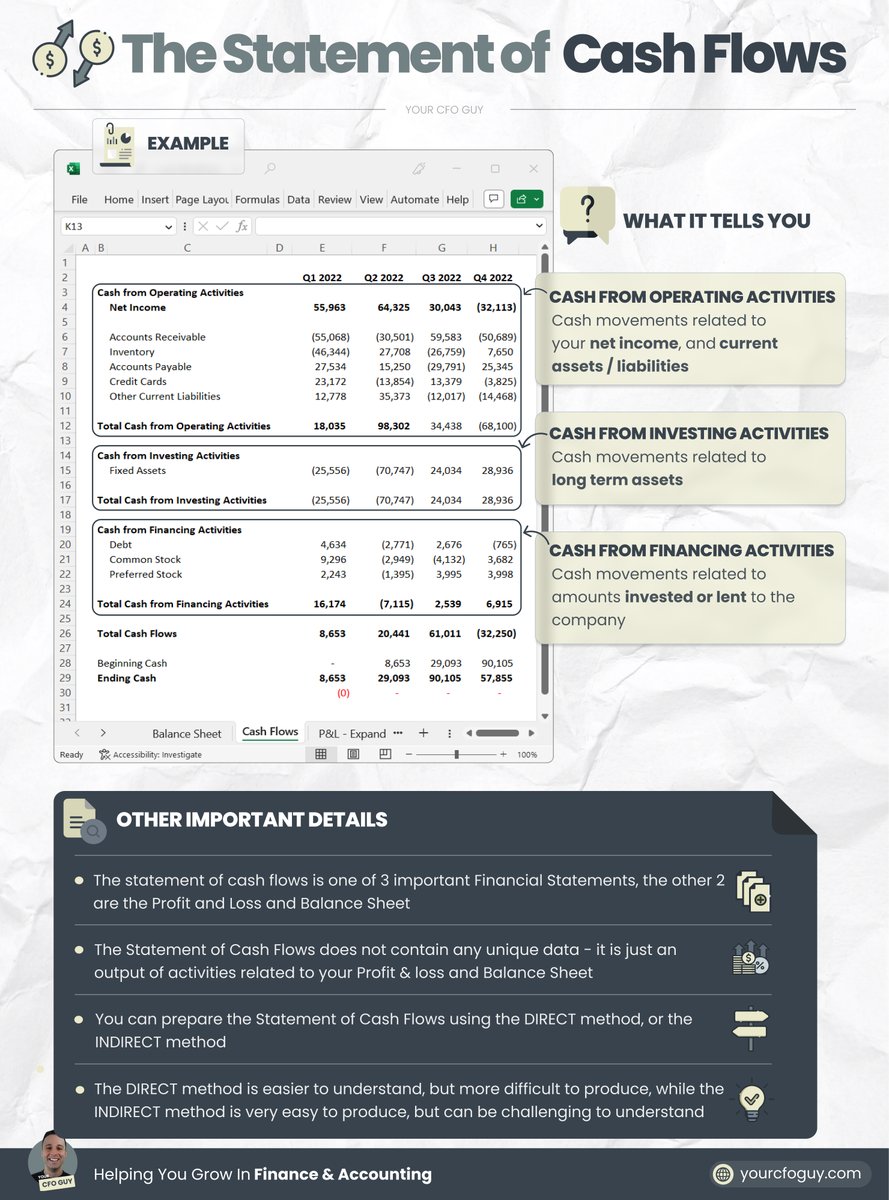
๐—–๐—ฎ๐˜€๐—ต ๐—™๐—น๐—ผ๐˜„๐˜€ ๐Ÿ’ธ๐Ÿ’ธ

This is the net cash balance change from one period to the next

It's shown on the Statement of Cash Flows Image
๐—”๐—ป๐—ฑ ๐˜๐—ต๐—ฎ๐˜'๐˜€ ๐—ฎ ๐˜„๐—ฟ๐—ฎ๐—ฝ!

๐—œ๐—ณ ๐˜†๐—ผ๐˜‚ ๐—ฒ๐—ป๐—ท๐—ผ๐˜†๐—ฒ๐—ฑ ๐˜๐—ต๐—ถ๐˜€, ๐—ฐ๐—ผ๐—ป๐˜€๐—ถ๐—ฑ๐—ฒ๐—ฟ:

๐Ÿญ. ๐—™๐—ผ๐—น๐—น๐—ผ๐˜„๐—ถ๐—ป๐—ด ๐—บ๐—ฒ @๐—ฌ๐—ผ๐˜‚๐—ฟ๐—–๐—™๐—ข๐—š๐˜‚๐˜†

๐Ÿฎ. ๐—๐—ผ๐—ถ๐—ป๐—ถ๐—ป๐—ด ๐—บ๐˜† ๐—ป๐—ฒ๐˜„๐˜€๐—น๐—ฒ๐˜๐˜๐—ฒ๐—ฟ yourcfoguy.com/newsletter

โ€ข โ€ข โ€ข

Missing some Tweet in this thread? You can try to force a refresh

ใ€€

Keep Current with Josh (Your CFO Guy)

Josh (Your CFO Guy) Profile picture

Stay in touch and get notified when new unrolls are available from this author!

Read all threads

This Thread may be Removed Anytime!

PDF

Twitter may remove this content at anytime! Save it as PDF for later use!

Try unrolling a thread yourself!

how to unroll video
  1. Follow @ThreadReaderApp to mention us!

  2. From a Twitter thread mention us with a keyword "unroll"
@threadreaderapp unroll

Practice here first or read more on our help page!

More from @YourCFOGuy

May 22, 2025
I use these Excel functions EVERY single day in my fractional CFO work ๐Ÿ’ผ

While there are hundreds of Excel functions available, there are only a select few that I use almost every day...9 to be exact.

Today, we're going to do a deep dive on these 9 functions, and how you can use them in your work too. ๐Ÿ‘‡Image
โžก๏ธ SUMIFS

This one is my go-to, and is what it sounds like. It "SUMS" data in a range "IF" it meets a certain level of criteria.

For exampleโ€ฆI'll often times condense a profit & loss into a summarized profit and loss using SUMIFS. Image
โžก๏ธ INDEX MATCH

The Dynamic Duo

It in essence combines both the Index and the Match value, allowing you to have complete flexibility over your range with dynamic inputs.

Many feel that XLOOKUP is superior, and I won't fight it - it's all a matter of personal preference! Image
Read 11 tweets
Jan 24, 2025
Dashboards are my favorite thing to create in Microsoft Excel...

and when set up correctly, they add a ton of value to a presentation

Here is how I build Dashboards using just 8 steps... Image
Step 1: Import your data

This can be anything...

but most commonly, it involves your:

1. Profit & Loss
2. Balance Sheet

from there you can get your cash flows via the indirect method

other areas to import can be revenue, headcount, and other KPIs Image
Step 2: Clean with Power Query

Before you can work with your data in a flexible & dynamic wayโ€ฆ

it needs to be structured correctly.

Thatโ€™s where Power Query comes in.

If you havenโ€™t used Power Queryโ€ฆ.oh boyโ€ฆyou are missing out. Image
Read 10 tweets
Jun 22, 2024
Two elements can fund your business...

but each has their tradeoffs

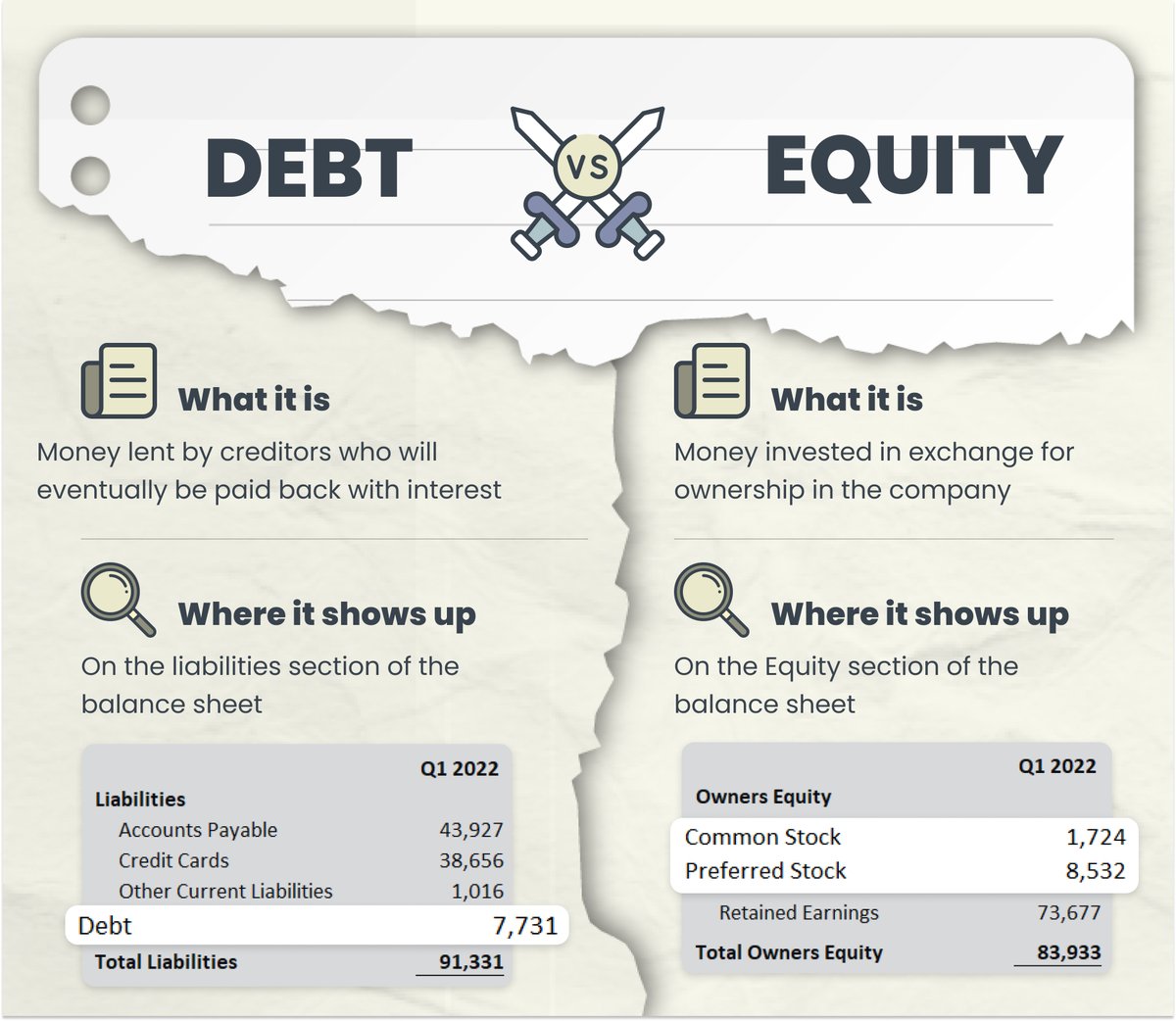
๐——๐—ฒ๐—ฏ๐˜ ๐˜ƒ๐˜€ ๐—˜๐—พ๐˜‚๐—ถ๐˜๐˜†

Learn more about them here... Image
๐—ช๐—ต๐—ฎ๐˜ ๐—ฎ๐—ฟ๐—ฒ ๐˜๐—ต๐—ฒ๐˜†?

๐——๐—ฒ๐—ฏ๐˜ โžก๏ธ Money lent by creditors who will eventually be paid back with interest

๐—˜๐—พ๐˜‚๐—ถ๐˜๐˜† โžก๏ธMoney invested in exchange for ownership in the company Image
๐—ช๐—ต๐—ฒ๐—ฟ๐—ฒ ๐—ฑ๐—ผ ๐˜๐—ต๐—ฒ๐˜† ๐˜€๐—ต๐—ผ๐˜„ ๐˜‚๐—ฝ?

๐——๐—ฒ๐—ฏ๐˜ โžก๏ธ On the liabilities section of the balance sheet

๐—˜๐—พ๐˜‚๐—ถ๐˜๐˜† โžก๏ธOn the Equity section of the balance sheet Image
Read 8 tweets
May 25, 2024
Dashboards are my favorite thing to create in Microsoft Excel...

and when set up correctly, they add a ton of value to a presentation

Here is how I build Dashboards using just 8 steps... Image
Step 1: Import your data

This can be anything...

but most commonly, it involves your:

1. Profit & Loss
2. Balance Sheet

from there you can get your cash flows via the indirect method

other areas to import can be revenue, headcount, and other KPIs Image
Step 2: Clean with Power Query

Before you can work with your data in a flexible & dynamic wayโ€ฆ

it needs to be structured correctly.

Thatโ€™s where Power Query comes in.

If you havenโ€™t used Power Queryโ€ฆ.oh boyโ€ฆyou are missing out. Image
Read 10 tweets
May 24, 2024
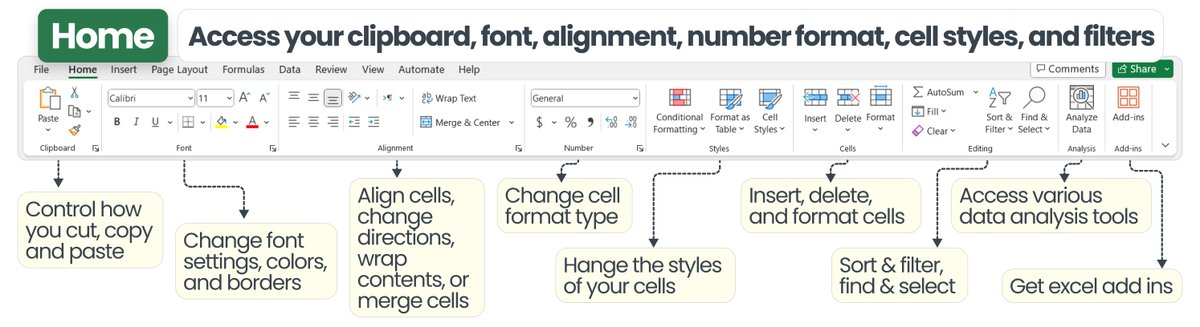
This post contains EVERYTHING you can do in excel ๐Ÿ˜ฑ๐Ÿ‘‡

Excel continues to be the #1 tool used for Finance & Accounting professionalsโ€ฆ

and for good reason.

With excel, there are pretty much no limits to what you can accomplish.

Letโ€™s do a walk through it all ๐Ÿ‘€ : Image
๐Ÿ“ File โ†’ access & manage key areas of your workbook

This is where most people start out when they open an excel fileโ€ฆ

here you can create a new fileโ€ฆopen an existing file..

access a templateโ€ฆor access key options. Image
๐Ÿ  Home โ†’ access your clipboard, font, alignment, number format, cell styles, and filters

My favorite tools here are:

โ€ข Set paste options

โ€ข Control cell aesthetics

โ€ข Change cell format

โ€ข Formatting cells Image
Read 12 tweets
May 10, 2024
Learn about the 3 financial statements, and how they are all connected

In just a few minutes, I'm going to teach you the most important concepts behind the Financial Statements...

and we're going to have a TON of fun along the way... Image
The 3 financial statements are:

1. The Profit & Loss
2. The Balance Sheet
3. The Statement of Cash Flows

You may also hear of the Statement of Changes in Equity, and Notes to the financial statements, but those aren't as commonly included
Before we dive into each statement...

It's important to understand the difference between:

the CASH basis
โ†’ treats money in as income
โ†’ money out as expenses

the ACCRUAL basis
โ†’ treats amounts EARNED as income
โ†’ amounts INCURRED as expenses Image
Read 22 tweets

Did Thread Reader help you today?

Support us! We are indie developers!


This site is made by just two indie developers on a laptop doing marketing, support and development! Read more about the story.

Become a Premium Member ($3/month or $30/year) and get exclusive features!

Become Premium

Don't want to be a Premium member but still want to support us?

Make a small donation by buying us coffee ($5) or help with server cost ($10)

Donate via Paypal

Or Donate anonymously using crypto!

Ethereum

0xfe58350B80634f60Fa6Dc149a72b4DFbc17D341E copy

Bitcoin

3ATGMxNzCUFzxpMCHL5sWSt4DVtS8UqXpi copy

Thank you for your support!

Follow Us!

:(