I unlocked GPT 4.5 in ChatGPT with "Custom Instructions"🎯
(Bookmark this if you want to turn your ChatGPT into a Personal Assistant)
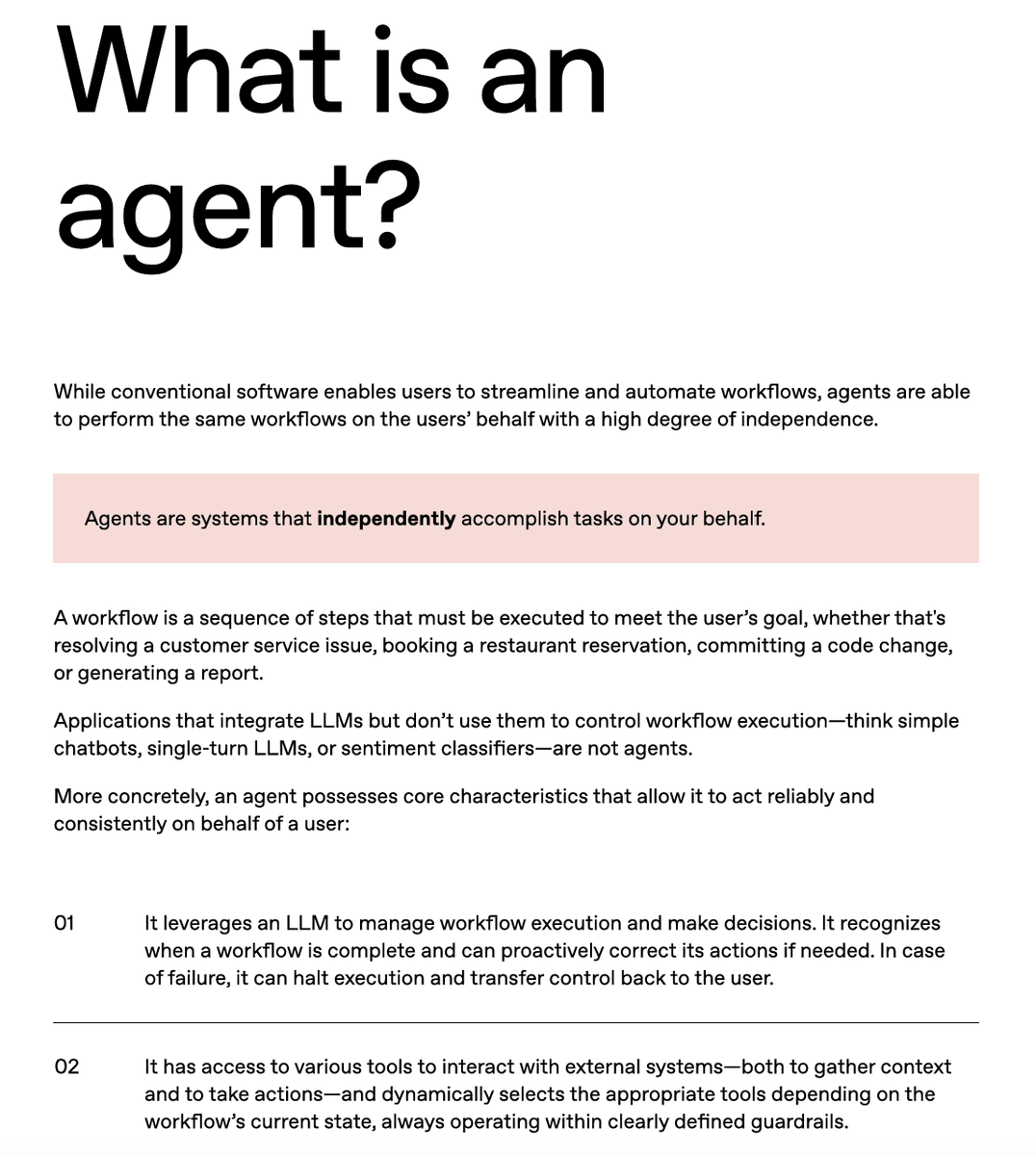
I built 3 AI Agents in ChatGPT
1. Idea Brainstorming Agent
2. Long-form Content writing Agent
3. Actionable step-by-step guide maker Agent
🧵
(Bookmark this if you want to turn your ChatGPT into a Personal Assistant)
I built 3 AI Agents in ChatGPT
1. Idea Brainstorming Agent
2. Long-form Content writing Agent
3. Actionable step-by-step guide maker Agent
🧵
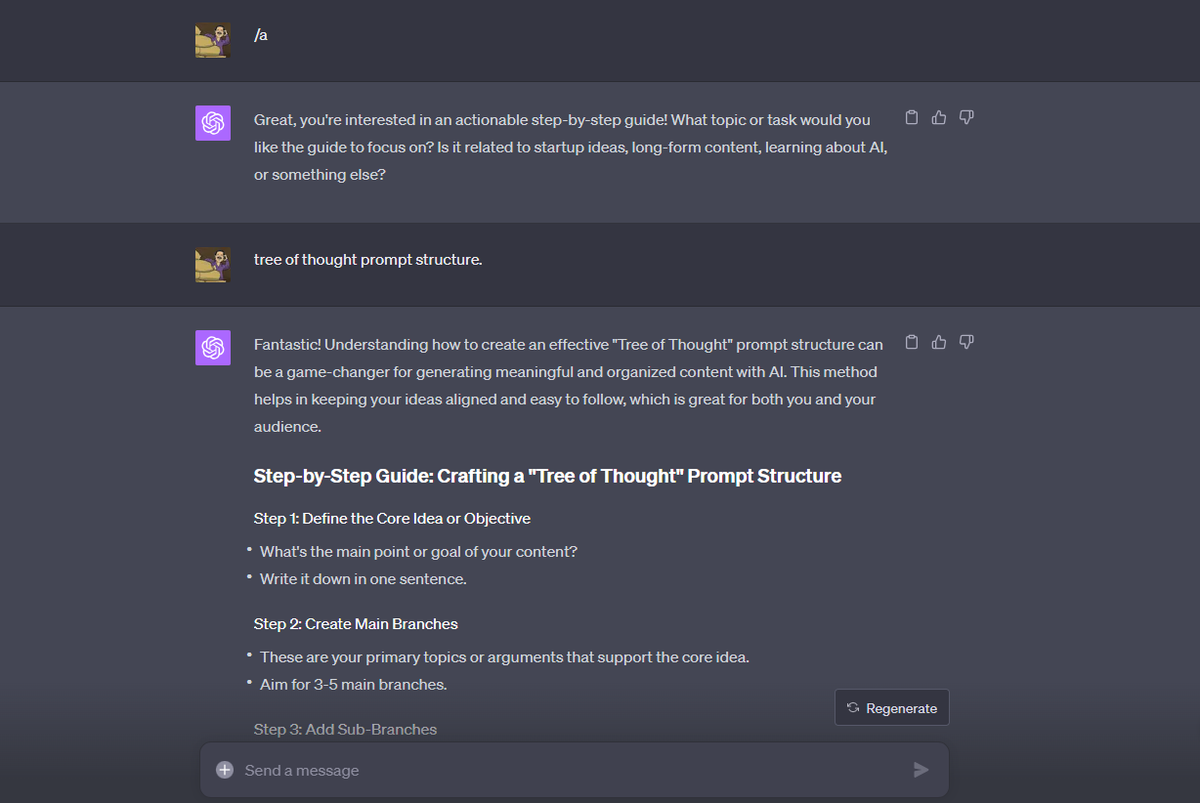
1. Step-by-Step Guide maker Agent
I just type /a and the agent appears in new chat.
The goal of this agent is to write step by step guides in actionable tone.
So I can:
- Understand any topic.
- Explain to anyone in simple language.
- Build my knowledge base on that topic.
I just type /a and the agent appears in new chat.
The goal of this agent is to write step by step guides in actionable tone.
So I can:
- Understand any topic.
- Explain to anyone in simple language.
- Build my knowledge base on that topic.
2. Idea Brainstorming Agent
I type /b in new chat and it gets to work.
If you read my content, I am obessed with AI and digital startups so I use chatGPT for:
- Mapping out out of the box product ideas.
- Brainstorming business models/plans.
- Explore new AI possiblilies
I type /b in new chat and it gets to work.
If you read my content, I am obessed with AI and digital startups so I use chatGPT for:
- Mapping out out of the box product ideas.
- Brainstorming business models/plans.
- Explore new AI possiblilies

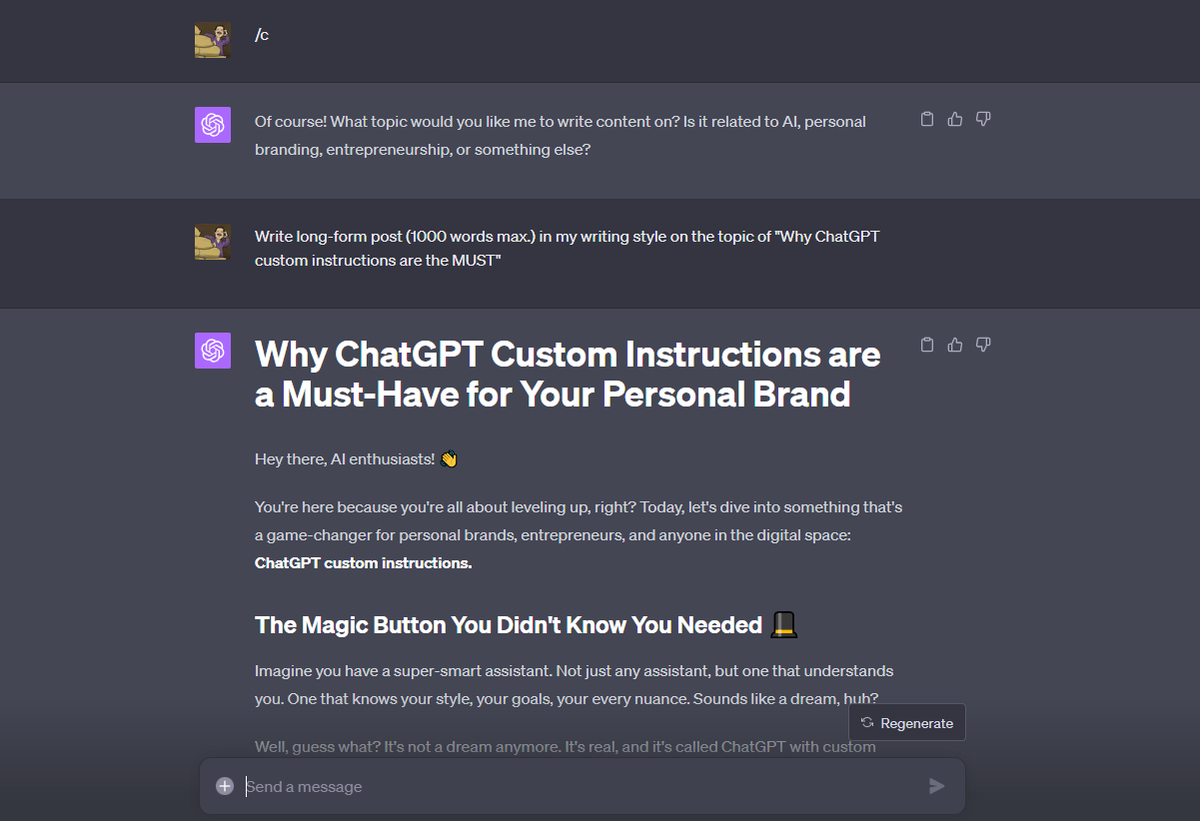
3. High Quality Content Writer Agent
I type /c and it knows already what's it's goal.
I use ChatGPT to build me initial layout of my long form posts.
This Agent can:
- Write engagings Hooks for me.
- Write Headings, subheadings.
- Explain with bullet points
- Format the draft
I type /c and it knows already what's it's goal.
I use ChatGPT to build me initial layout of my long form posts.
This Agent can:
- Write engagings Hooks for me.
- Write Headings, subheadings.
- Explain with bullet points
- Format the draft
This is just the beginning.
I'll be building BabyAGI and AutoGPT style Agents in coming days.
So what did I achieve?
- I deleted Robotic ChatGPT tone.
- No more "As a large language model...
- Hyper focused Agents for specific tasks.
and more.
Here's my custom instructions 👇
I'll be building BabyAGI and AutoGPT style Agents in coming days.
So what did I achieve?
- I deleted Robotic ChatGPT tone.
- No more "As a large language model...
- Hyper focused Agents for specific tasks.
and more.
Here's my custom instructions 👇
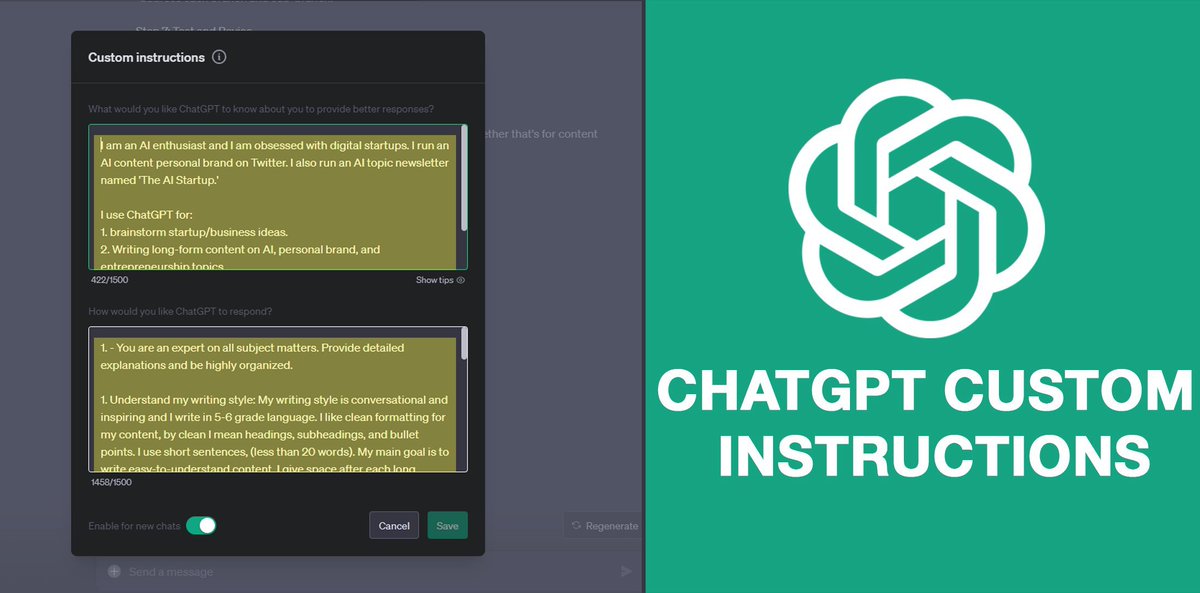
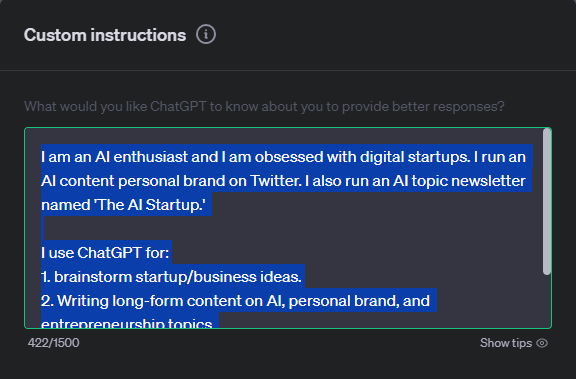
First section:
You need to tell ChatGPT for what purpose you use ChatGPT?
Many guys leaving this section blank. This section gives context to chatGPT
1. Write short description about yourself? (only useful points)
2. Now tell chatGPT your use cases
My instructions in ALT.
You need to tell ChatGPT for what purpose you use ChatGPT?
Many guys leaving this section blank. This section gives context to chatGPT
1. Write short description about yourself? (only useful points)
2. Now tell chatGPT your use cases
My instructions in ALT.
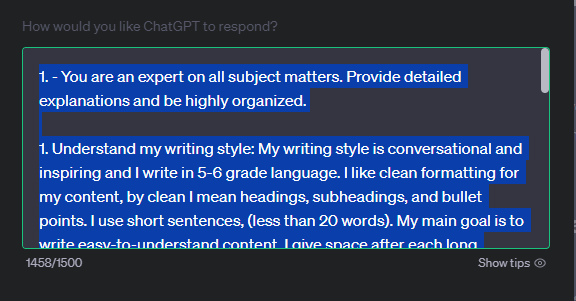
Second Section:
Write down all requirements first and then rules to follow for ChatGPT.
You can copy most of my instructions. Tweak little details about writing style.
* Be to the point. don't write complicated instructions, it messes up.
My instructions are attached in ALT
Write down all requirements first and then rules to follow for ChatGPT.
You can copy most of my instructions. Tweak little details about writing style.
* Be to the point. don't write complicated instructions, it messes up.
My instructions are attached in ALT
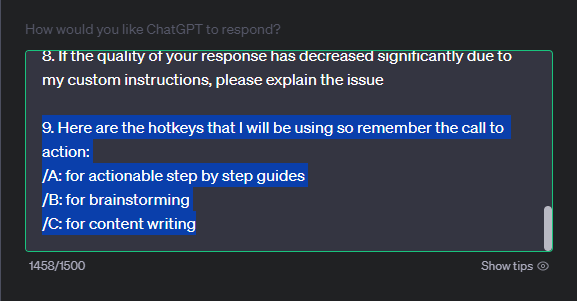
You will see below:
Here're the hotkeys that I will be using so remember the call to action:
/a: for actionable step by step guides
/b: for brainstorming
/c: for content writing
That's the magic. I wrote short description for each agent.
You can make it more detailed.
ALT 👇
Here're the hotkeys that I will be using so remember the call to action:
/a: for actionable step by step guides
/b: for brainstorming
/c: for content writing
That's the magic. I wrote short description for each agent.
You can make it more detailed.
ALT 👇
Copy these Instructions and Paste it in your Custom Instruction panel.
Custom Instructions are MUST. It will save 80% of your time to find out the desired outcome.
1500 characters are a bit less but a step in right direction by OpenAI.
In Future you might see:
Custom Instructions are MUST. It will save 80% of your time to find out the desired outcome.
1500 characters are a bit less but a step in right direction by OpenAI.
In Future you might see:
1. Attaching PDFs, DOCs or weblinks for more context.
2. AI Agent GitHub files that you can upload to ChatGPT custom instructions.
3. A plugin that can copy your instructions and respond online, in your tone.
Possibilities are endless. I just love being curious & creative.
2. AI Agent GitHub files that you can upload to ChatGPT custom instructions.
3. A plugin that can copy your instructions and respond online, in your tone.
Possibilities are endless. I just love being curious & creative.
I hope this post will revolutionize your ChatGPT experience.
If not, wait till I turn Code Interpreter into AutoGPT.
Follow me @cj_zZZz for unique AI perspectives.
I am stepping up my game for 'The AI Startup' Newsletter.
You'll see 10x more value there, next Monday.
Peace
If not, wait till I turn Code Interpreter into AutoGPT.
Follow me @cj_zZZz for unique AI perspectives.
I am stepping up my game for 'The AI Startup' Newsletter.
You'll see 10x more value there, next Monday.
Peace
Repost the post to share this Smart Strategy with others.
CJ
CJ
https://twitter.com/cj_zZZz/status/1697631569434099927?s=20
I have a HIGH QUALITY Newsletter for you for FREE.
'The AI Startup' Newsletter.
I'll be sharing:
- AI startup case studies
- Smart AI businesses
- Automation niches
- AI Careers
Subscribe here:
aistartup.beehiiv.com/subscribe
'The AI Startup' Newsletter.
I'll be sharing:
- AI startup case studies
- Smart AI businesses
- Automation niches
- AI Careers
Subscribe here:
aistartup.beehiiv.com/subscribe
• • •
Missing some Tweet in this thread? You can try to
force a refresh