Read on Twitter
Love using Jupyter notebooks, but after a while, they look like a total mess? 😵💫
What if I told you there is a quick, simple, and efficient way to make them tidy and shiny?
These 3 tips will help you keep your notebooks clean and boost your productivity 🚀↓
What if I told you there is a quick, simple, and efficient way to make them tidy and shiny?
These 3 tips will help you keep your notebooks clean and boost your productivity 🚀↓
Jupyter notebooks are the most popular environment to develop Machine Learning models.
They are the faster way to
→ add code
→ fix code
→ re-run code
for your Machine Learning project.
However, they quickly turn into a mess...
... unless you follow these 3 tips.
They are the faster way to
→ add code
→ fix code
→ re-run code
for your Machine Learning project.
However, they quickly turn into a mess...
... unless you follow these 3 tips.
Tip #1. Encapsulate common code as functions.
If you do not encapsulate your code, you are doomed to duplicate it.
And code duplication is both a productivity killer and an endless source of bugs.
The solution:
→ Define functionality ONCE.
→ Call it as many times as you need
If you do not encapsulate your code, you are doomed to duplicate it.
And code duplication is both a productivity killer and an endless source of bugs.
The solution:
→ Define functionality ONCE.
→ Call it as many times as you need
Tip #2. Extract common functions into a separate src/ folder
Often you have the same function defined in several notebooks. Which is, again, code duplication.
To solve this create a source code folder (aka src/) at the same level where your notebooks are...
Often you have the same function defined in several notebooks. Which is, again, code duplication.
To solve this create a source code folder (aka src/) at the same level where your notebooks are...
...and extract your functions as code in .py files.
You can group these functions into separate .py files, depending on their main functionality:
→ Plotting
→ Data transformation
→ Model training
→ Utils
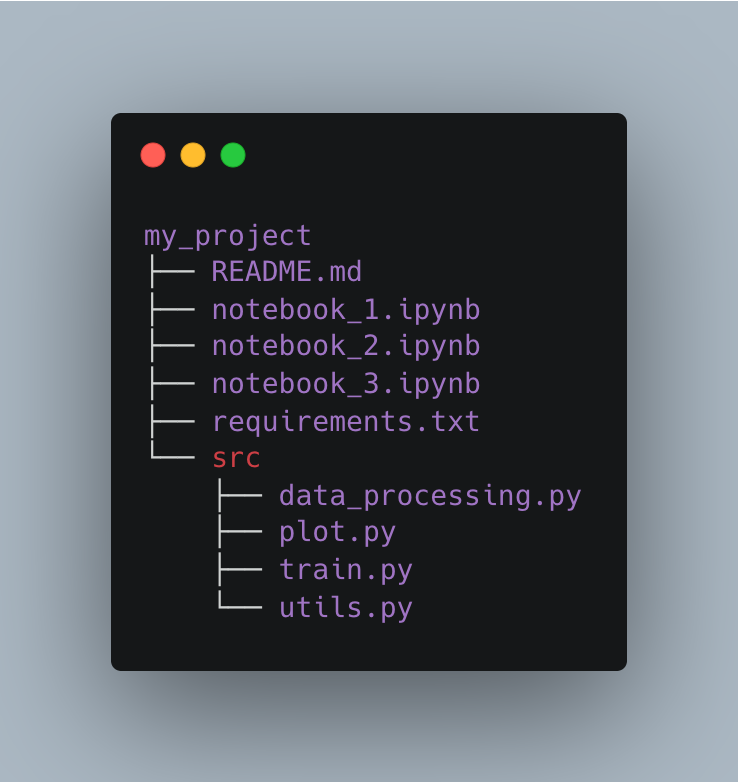
Your project structure will look like this ↓
You can group these functions into separate .py files, depending on their main functionality:
→ Plotting
→ Data transformation
→ Model training
→ Utils
Your project structure will look like this ↓
Tip #3: Add `autoreload` magic to your Jupyter notebook.
To use your functions inside Jupyter, you need to import them.
For example:
To use your functions inside Jupyter, you need to import them.
For example:
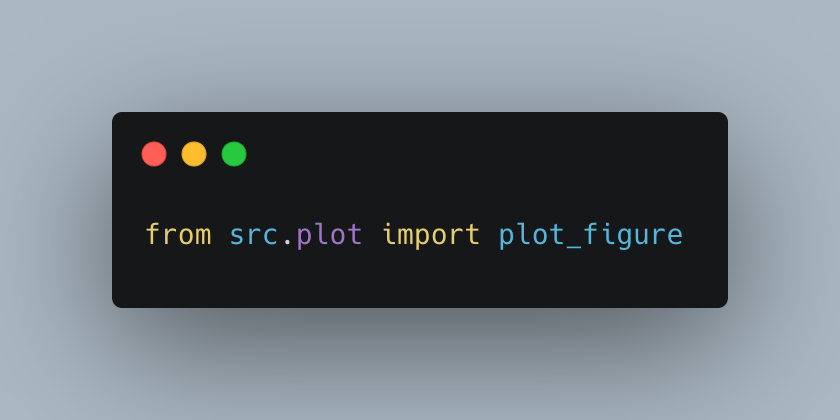
By default, Jupyter caches all library imports, and only loads them once, unless you restart the kernel.
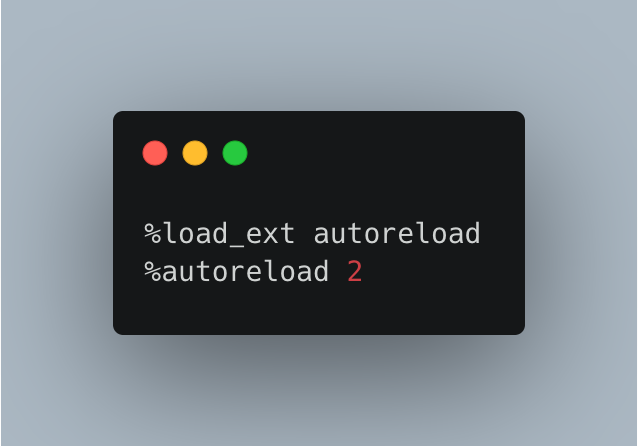
So when you update the .py files in src/, the changes are not picked up by Jupyter.
To solve this, you just add these 2 lines at the beginning of your notebook.
So when you update the .py files in src/, the changes are not picked up by Jupyter.
To solve this, you just add these 2 lines at the beginning of your notebook.
To sum up:
→ Reduce code duplication, by encapsulating and extracting common functionality into separate functions under src/.
→ Add autorelaod magic to your notebook, to keep it in sync with your src/ code.
And Voila!
→ Reduce code duplication, by encapsulating and extracting common functionality into separate functions under src/.
→ Add autorelaod magic to your notebook, to keep it in sync with your src/ code.
And Voila!
Wanna get more tweets like this?
→ Follow me @paulabartabajo_
Wanna help me spread the word?
→ Like/Retweet the first tweet below ↓↓↓
→ Follow me @paulabartabajo_
Wanna help me spread the word?
→ Like/Retweet the first tweet below ↓↓↓
https://twitter.com/1408789941040058369/status/1716515138927259926
Join 2k members to the 𝗦𝗲𝗿𝘃𝗲𝗿𝗹𝗲𝘀𝘀 𝗠𝗟 𝗖𝗼𝗺𝗺𝘂𝗻𝗶𝘁𝘆 🤗
A Discord community of ML builders 👩💻👨🏽💻 focused on building 𝗿𝗲𝗮𝗹-𝘄𝗼𝗿𝗹𝗱 𝗠𝗟 𝗮𝗽𝗽𝘀
↓↓↓
serverless-ml.carrd.co
A Discord community of ML builders 👩💻👨🏽💻 focused on building 𝗿𝗲𝗮𝗹-𝘄𝗼𝗿𝗹𝗱 𝗠𝗟 𝗮𝗽𝗽𝘀
↓↓↓
serverless-ml.carrd.co
• • •
Missing some Tweet in this thread? You can try to
force a refresh