How to make your own AI model!
This is going to be a step-by-step tutorial but at the same time, I'll keep it as simple as possible so anyone can replicate it.
So let's get started:
(this is a repost)
This is going to be a step-by-step tutorial but at the same time, I'll keep it as simple as possible so anyone can replicate it.
So let's get started:
(this is a repost)

Here is some context about AI models that led me to make this tutorial.
Also, I want to mention that this tutorial is highly inspired by Fireship.
And you need at least a decent PC to produce images faster. I have a 6th gen rig with a 3070 and only 8 gigs of RAM.
Also, I want to mention that this tutorial is highly inspired by Fireship.
And you need at least a decent PC to produce images faster. I have a 6th gen rig with a 3070 and only 8 gigs of RAM.
https://twitter.com/1615314195490443265/status/1730818748981158299
First of all, we need an image generator.
For this project, I'm going to use Stable Diffusion XL, which is a free and open-source product.
Why not DALL-E/Midjourney?
They are not as flexible as SDXL. Plus they are paid and closed-source products.
For this project, I'm going to use Stable Diffusion XL, which is a free and open-source product.
Why not DALL-E/Midjourney?
They are not as flexible as SDXL. Plus they are paid and closed-source products.
To use SDXL, we need a web interface. Some popular choices are:
1. Automatic1111 - Web UI
2. Comfyanonymous - ComfyUI
3. lllyasviel - Fooocus
Fooocus is the simpler one, plus it has all the features we need at the moment. So let's install Fooocus.
1. Automatic1111 - Web UI
2. Comfyanonymous - ComfyUI
3. lllyasviel - Fooocus
Fooocus is the simpler one, plus it has all the features we need at the moment. So let's install Fooocus.
How to install Foocus:
Visit github page: and download the package.
You can clone the repo and run python script manually, but for this tutorial I'm keeping it as simple as possible.
Just click on download to download the install file. github.com/lllyasviel/Foo…
Visit github page: and download the package.
You can clone the repo and run python script manually, but for this tutorial I'm keeping it as simple as possible.
Just click on download to download the install file. github.com/lllyasviel/Foo…
Extract it to your desired location.
Next, click on 'run' to download the base files. Depending on your internet speed it can take a while.
Once it's complete you can open Fooocus in your browser.
Click on 'run', it will check for the updates and open Foocus in a browser tab.
Next, click on 'run' to download the base files. Depending on your internet speed it can take a while.
Once it's complete you can open Fooocus in your browser.
Click on 'run', it will check for the updates and open Foocus in a browser tab.
Now we're ready to generate some realistic images. Simply write your prompt and click 'Generate'.
For example- I've created this gentleman using:
"Middle-Aged Gentleman Standing on a Luxurious Yacht"
But we are not here for the gentleman. Are we?
So let's create our model.
For example- I've created this gentleman using:
"Middle-Aged Gentleman Standing on a Luxurious Yacht"
But we are not here for the gentleman. Are we?
So let's create our model.
First, let's generate the face.
Click on Advanced-
• Choose an aspect ratio
• Turn on 'Fooocus Photograph' style preset
• Select a base model (juggernaut is good enough, it's the default)
Now describe how you want her to look like and click 'Generate'.
Click on Advanced-
• Choose an aspect ratio
• Turn on 'Fooocus Photograph' style preset
• Select a base model (juggernaut is good enough, it's the default)
Now describe how you want her to look like and click 'Generate'.
Now we have a pretty good base face for our model.
Get creative with the prompt until you're happy with the model. Try google'ing photo-realistic prompts. You'll get tons of good ideas.
Now let's make our model do something.
Get creative with the prompt until you're happy with the model. Try google'ing photo-realistic prompts. You'll get tons of good ideas.
Now let's make our model do something.
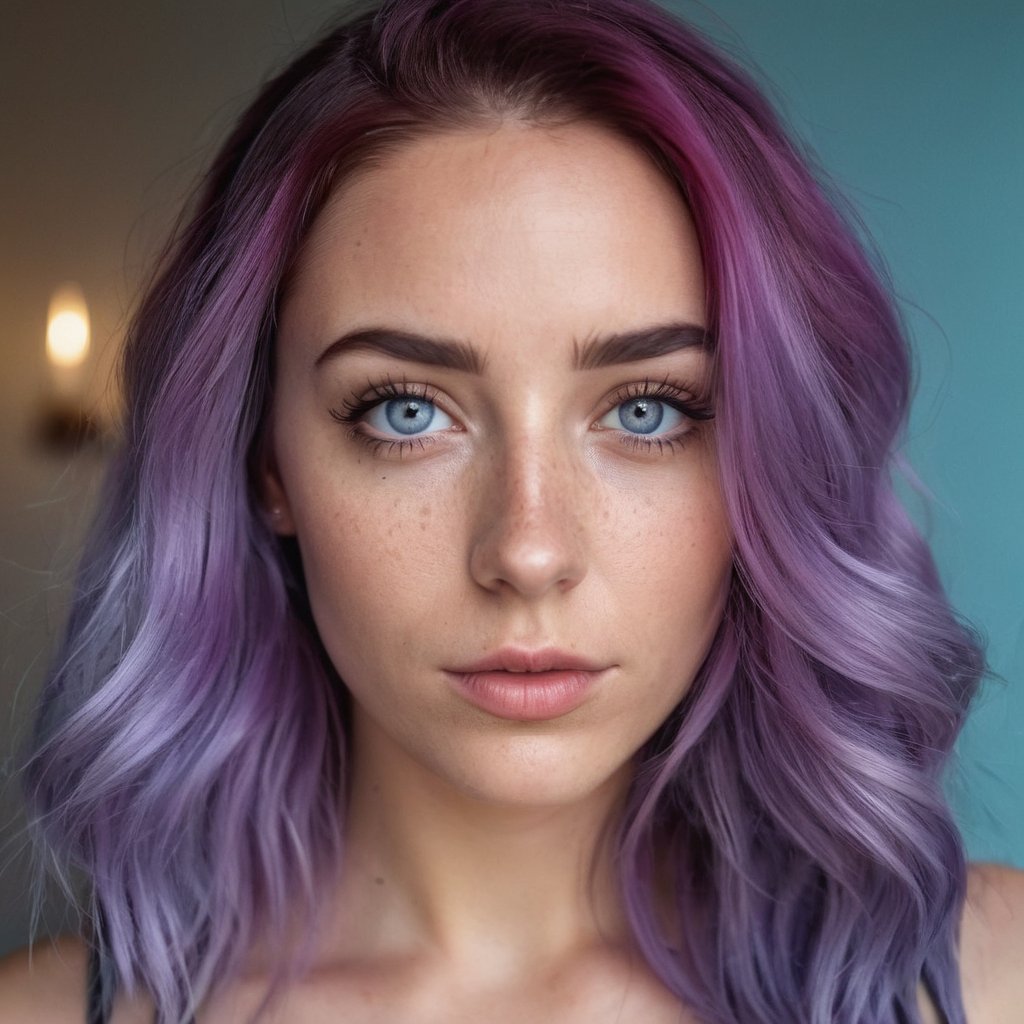
Click on input image > image prompt > upload the base model photo
Next, go to advanced > click on 'Faceswap'
Finally, write a simple prompt of doing something. In my case my prompt was-
"holding a glass of wine in a fancy restaurant"
Next, go to advanced > click on 'Faceswap'
Finally, write a simple prompt of doing something. In my case my prompt was-
"holding a glass of wine in a fancy restaurant"
We have a pretty good model with a consistent face.
Now all you need to do is get creative with the prompt. Add jewelry, different dresses, poses, scenarios etc.
The better the prompt the better the image.
Now all you need to do is get creative with the prompt. Add jewelry, different dresses, poses, scenarios etc.
The better the prompt the better the image.
If you're ready to take it to the next level, consider using some community assets.
There is a wide variety of characters, clothing items, poses, vehicles, objects etc.
Check out websites like civitai. com
All of these assets are open source and free to use.
There is a wide variety of characters, clothing items, poses, vehicles, objects etc.
Check out websites like civitai. com
All of these assets are open source and free to use.
Inpaint
To fix an imperfect area use the 'Inpaint or Outpaint' option.
Just draw the imperfect area and provide a simple prompt like fix this area, change eye colors and so on.
To fix an imperfect area use the 'Inpaint or Outpaint' option.
Just draw the imperfect area and provide a simple prompt like fix this area, change eye colors and so on.
Finally, you can use the default upscaler to upscale the image.
Also, there are some really good paid upscaler out there, if you want to go that way.
Please note:
It took me about 3-4 minutes to generate 2 high-quality images. My system struggled because of only 8 gigs of RAM
Also, there are some really good paid upscaler out there, if you want to go that way.
Please note:
It took me about 3-4 minutes to generate 2 high-quality images. My system struggled because of only 8 gigs of RAM
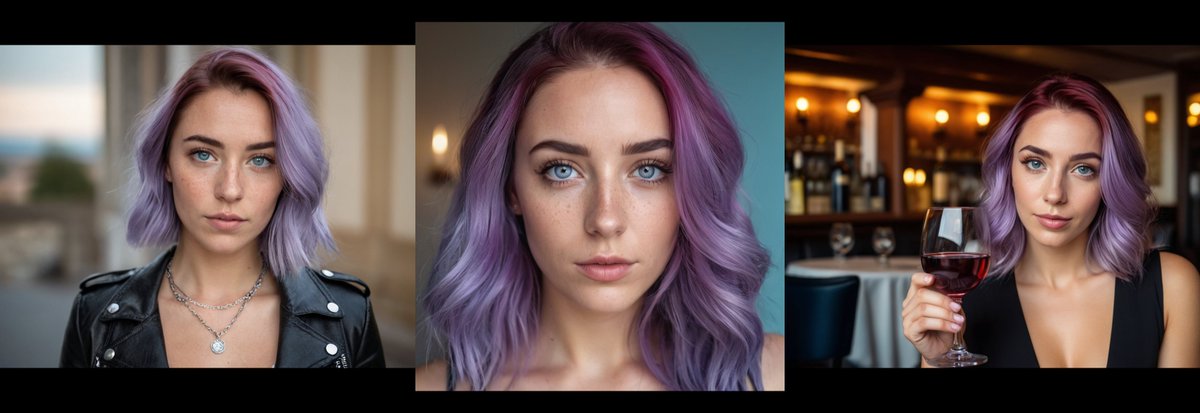
There are a lot of advanced settings to try out but the thread is already too long. Thank you so much if you've come this far!
I share my findings and more in-depth tutorials in my newsletter.
Make sure to subscribe if you're interested in that.
cyberman.beehiiv.com/subscribe
I share my findings and more in-depth tutorials in my newsletter.
Make sure to subscribe if you're interested in that.
cyberman.beehiiv.com/subscribe
I hope you've found this thread helpful. Feel free to ask me any questions.
Follow me @heyronir for more AI news 🔔
P.S. I'd appreciate it if you could Like/Repost the first post:
Follow me @heyronir for more AI news 🔔
P.S. I'd appreciate it if you could Like/Repost the first post:
https://twitter.com/1615314195490443265/status/1741324073827983392
• • •
Missing some Tweet in this thread? You can try to
force a refresh