
A new paper just came out outlining the best ways to maximize ChatGPT prompts.
Using these principles, you can improve LLM responses by up to 50% — now backed by research.
Here are the top 10 ways to get better responses from ChatGPT (with examples):
Using these principles, you can improve LLM responses by up to 50% — now backed by research.
Here are the top 10 ways to get better responses from ChatGPT (with examples):
1. To clarify or get a deeper understanding of a topic, or any piece of information, use the following prompts:
-Explain [insert specific topic] in simple terms.
-Explain to me like I’m 11 years old.
-Explain to me as if I’m a beginner in [field].
-Explain [insert specific topic] in simple terms.
-Explain to me like I’m 11 years old.
-Explain to me as if I’m a beginner in [field].
2. To write any text, such as an essay or paragraph, to replicate a provided sample, use this prompt:
"Please use the same language based on the provided paragraph[/title/text /essay/answer]."
"Please use the same language based on the provided paragraph[/title/text /essay/answer]."
3. To change text without changing its style:
“Try to revise every paragraph sent by users. You should only improve the user’s grammar and vocabulary and make sure it sounds natural. You should not change the writing style, such as making a formal paragraph casual”
“Try to revise every paragraph sent by users. You should only improve the user’s grammar and vocabulary and make sure it sounds natural. You should not change the writing style, such as making a formal paragraph casual”
4. Incorporate the following phrases within your prompt:
“Your task is”, “You MUST”, “You will be penalized”, and ”Answer a question given in a natural, human-like manner”
“Your task is”, “You MUST”, “You will be penalized”, and ”Answer a question given in a natural, human-like manner”
5. Use leading words like writing “think step by step.“
If you made it this far, I've got a free gift for you.
I put together my best 100+ pre-written ChatGPT prompts and over 30 AI tool breakdowns.
You can get the entire guide instantly if you subscribe to my newsletter right now: therundown.ai/subscribe
I put together my best 100+ pre-written ChatGPT prompts and over 30 AI tool breakdowns.
You can get the entire guide instantly if you subscribe to my newsletter right now: therundown.ai/subscribe
6. Repeat a specific word or phrase multiple times within a prompt.
7. Employ affirmative directives such as ‘do,’ while steering clear of negative language like ‘don’t.’
8. To write an essay/text/paragraph/article or any type of text that should be detailed:
“Write a detailed [essay/text/paragraph] for me on [topic] in detail by adding all the information necessary”.
“Write a detailed [essay/text/paragraph] for me on [topic] in detail by adding all the information necessary”.
9. Add the following to the end of your prompt:
“Ensure that your answer is unbiased and does not rely on stereotypes”
“Ensure that your answer is unbiased and does not rely on stereotypes”
10. Assign a role to the large language models.
That's it!
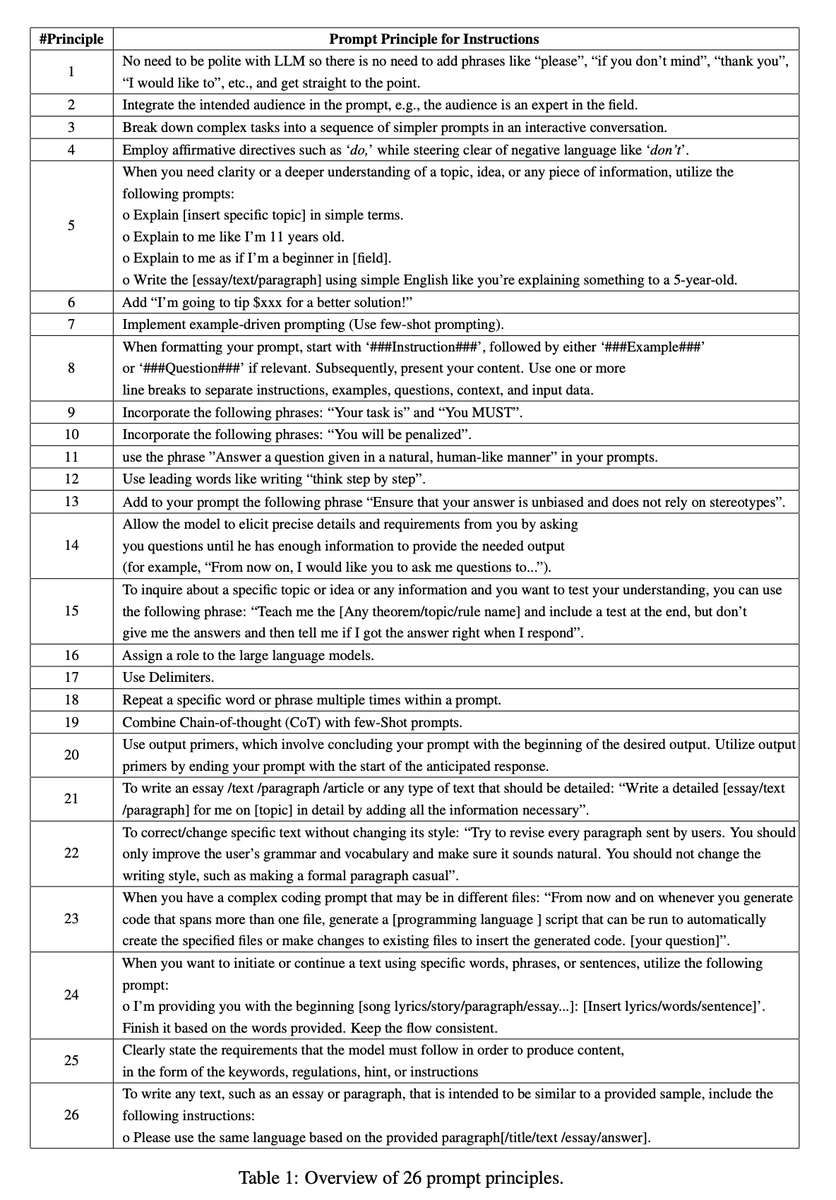
The full paper outlined 26 ways, but these 10 felt the most applicable after it started to get repetitive.
Here's the link to the full paper: arxiv.org/pdf/2312.16171…

The full paper outlined 26 ways, but these 10 felt the most applicable after it started to get repetitive.
Here's the link to the full paper: arxiv.org/pdf/2312.16171…
That's it for today's AI research breakdown.
Follow me @rowancheung for more on AI.
If you found this useful, like/retweet the quoted tweet below to share with friends 👇
Follow me @rowancheung for more on AI.
If you found this useful, like/retweet the quoted tweet below to share with friends 👇
https://x.com/rowancheung/status/1742924602752508235?s=20
That's the top 10 surprising ways to boost LLM outputs.
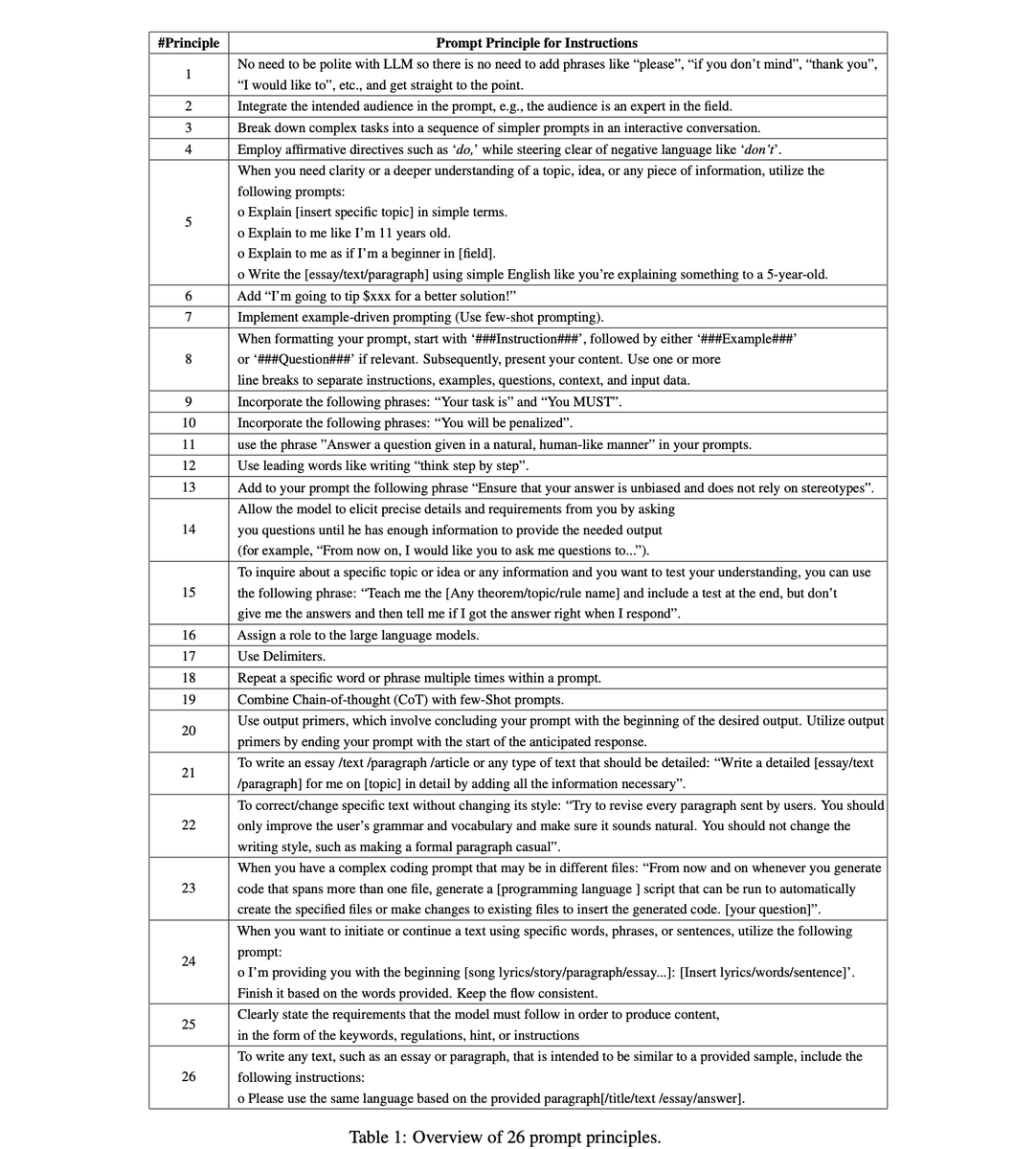
The full paper outlined 26 ways, but these 10 felt the most applicable after it started to get repetitive.
Here's the link to the full paper: arxiv.org/pdf/2312.16171…
The full paper outlined 26 ways, but these 10 felt the most applicable after it started to get repetitive.
Here's the link to the full paper: arxiv.org/pdf/2312.16171…
That's it for today's AI research breakdown.
Follow me @rowancheung for more on AI.
If you found this useful, spare me a like/retweet below to support 👇
Follow me @rowancheung for more on AI.
If you found this useful, spare me a like/retweet below to support 👇
https://twitter.com/rowancheung/status/1742924602752508235
• • •
Missing some Tweet in this thread? You can try to
force a refresh






