
How classic Sonic works. A summary thread.
Slope physics and collision will be explained as briefly as possible.
Sonic games work with 3 methods of collision. Hitboxes, Tiles, and Solid Objects. These will be explained separately.
#SonicTheHedgehog #SonicPhysicsGuide
Slope physics and collision will be explained as briefly as possible.
Sonic games work with 3 methods of collision. Hitboxes, Tiles, and Solid Objects. These will be explained separately.
#SonicTheHedgehog #SonicPhysicsGuide

Terrain:
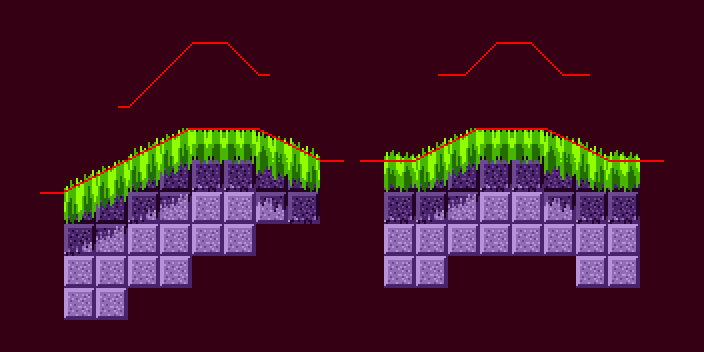
Terrain is made from Solid Tiles. These are a grid of 16x16 height arrays which cover any area that needs to be deemed solid.
Terrain is made from Solid Tiles. These are a grid of 16x16 height arrays which cover any area that needs to be deemed solid.
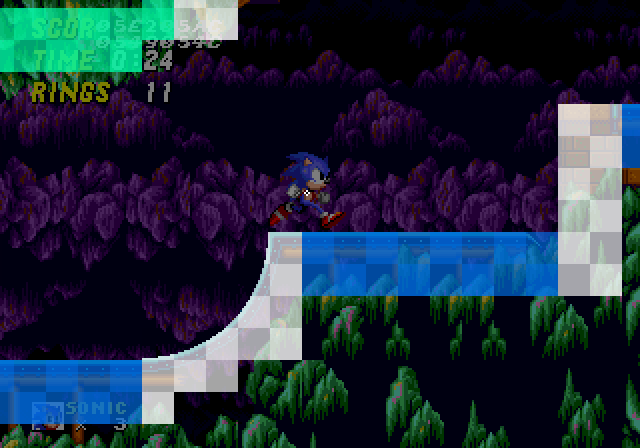
Individual tiles contain their surface Ground Angle.
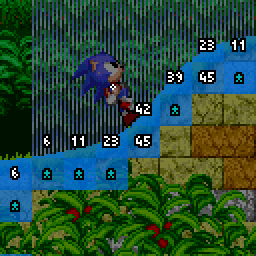
Objects use "sensors" to detect how far a given position (the sensor's "anchor point") is away from the surface.
Sensors can face in any of the four cardinal directions.
Sensors can face in any of the four cardinal directions.
Solid objects:
Objects such as rocks, bridges, platforms, and spikes are all solid objects. These objects do not have Hitboxes but instead have another kind of box, a solid box.
Objects such as rocks, bridges, platforms, and spikes are all solid objects. These objects do not have Hitboxes but instead have another kind of box, a solid box.
Solid boxes simply check where Sonic is, and if overlapping, push him out the the nearest side. If that side happens to be the top, Sonic lands on it. Here's what happens when his position is in a certain position.
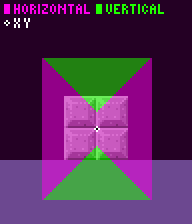
Since object collision doesn't use sensors at all, they actually "override" the Terrain and "sensor" system. When Sonic lands on an object, a flag is set telling him "Don't worry mate, you're on solid ground" and the Ground sensors aren't needed.
Solid objects can opt to use a height array for artificial slopes. this effectively shifts the solid box's Y to the current position in the height array when collision is processed.
Jump through objects use similar but seperate code, only processing their surface solidity. Slopes work in the same way here also.
Unintentionally, Sonic's X position needs to be above an object to land on it, otherwise he will slip over the edges.
Slopes on objects have no angle data, so no slope physics.
Hitboxes:
Hitboxes are the most common way objects check for contact with the player when they don't need to be solid.
Hitboxes are the most common way objects check for contact with the player when they don't need to be solid.
Some objects are both solid and use hitboxes, however, like Item Monitors.
If an object's hitbox overlaps with Sonic's, a response will occur.
Objects can't define their hitbox size, they have to pick their hitbox size from a list, so it's a "best fit" and doesn't always look perfect


Objects can choose from a variety of hitbox types, the most common being the type that badniks use (attackable - pink) and that lava uses (non-attackable - red).
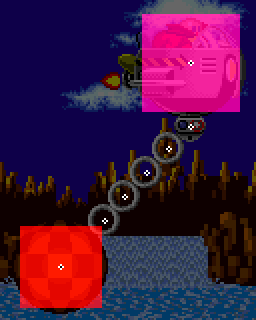
Only one hitbox collision can be processed per frame, so if multiple hitboxes overlap the player, only one will be reacted to.
A relative of hitboxes are "trigger areas" which just means an object performs a special check and reaction rather than using the hitbox system. This includes things like checkpoints, bubbles, and things you hang on.

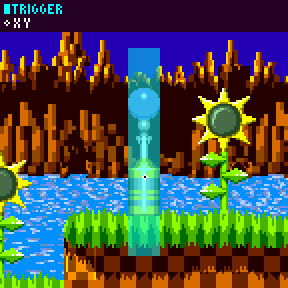
Slope Physics: Sonic's ground acceleration (0.046875 pixels per frame) and friction (same value) are very gradual, taking time to build up to the "maximum" running speed (6 ppf). Deceleration when turning (0.5 ppf) is stronger for a responsive feel.
No matter Sonic's Ground Angle, their current speed along the ground is preserved in memory (Ground Speed) which is converted to X/Y speeds each frame to actually move the player.
While on the ground, Sonic's Ground Speed will be affected by the current Ground Angle. The sine of the Ground Angle multiplied by the "slope factor" is subtracted.
This is a value that depends on the current action. When walking/running, slope factor is always equal to (0.125)
This is a value that depends on the current action. When walking/running, slope factor is always equal to (0.125)
However, rolling is more specific. When rolling uphill it is (0.078125), and when rolling downhill it is (0.3125). This reduced value uphill and stronger value downhill is what gives rolling its iconic speed-building power in a halfpipe.
If Sonic is running/walking on a wall or a ceiling with a Ground Speed of less than (2.5 ppf), the player will slip/fall down, and a horizontal control lock will be set for 30 frames. This differs between games, more info:
https://twitter.com/SonicPhysics/status/1415271492145799168
When moving through the air, all that is altered is Sonic's X and Y speeds, so when landing back on the ground, Ground Speed needs to be recalculated using these speeds and the new Ground Angle. This is an important step in why Sonic physics feel like they do.
When landing on the floor, the new angle dictates how Ground Speed will be calc'd. If flat, Ground Speed can just be set to X speed. On slopes, if moving mostly horizontally, it is still set to X speed. However, if moving mostly vertically into a slope, it becomes more complex.
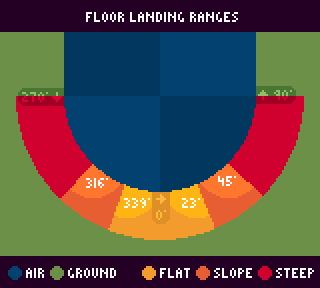
If the slope is steep, Ground Speed becomes the Y speed multiplied by the inverse sign of the sine of the Ground Angle. If the slope is not steep, it's half of that.
Phew.
Phew.
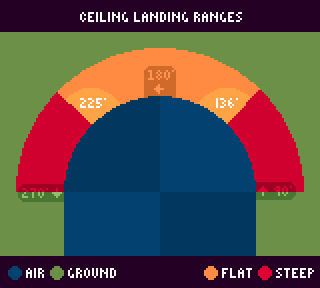
Ceiling landing works similarly. The angle found by the ceiling sensors is tested.
If flat, Y Speed is set to 0 and nothing else. If steep, it's the same as landing on steep ground.
If flat, Y Speed is set to 0 and nothing else. If steep, it's the same as landing on steep ground.
🤓
If you're here, a cookie for you 🍪
If you're here, a cookie for you 🍪
Sensors return a distance value from -32 to 32 pixels. Negative values mean the surface is "inside" the object (above a downward-facing sensor, for example)
When checking for collisions, when a Solid Tile is found, the object checking will "vet" the sensor's returned distance. Usually, anything over 14 pixels away in either direction (positive or negative distances) is rejected and not reacted to.
Jump-through terrain surfaces are "top only" solid, and will only be reacted to by sensors facing Down.
The Player's sensors:
Sonic uses 6 total sensors: 2 Ground Sensors, 2 Ceiling Sensors head, and 2 Push Sensors.
Sonic uses 6 total sensors: 2 Ground Sensors, 2 Ceiling Sensors head, and 2 Push Sensors.
The 2 Ground sensors work in tandem, with the one finding the closest surface becoming dominant and setting Sonic's position. The 2 ceiling sensors work similarly when landing on ceilings.
As Sonic moves along the ground, his Ground Sensors are constantly getting the current Ground Angle from the Solid Tile found by the dominant sensor.
Once Sonic's current Ground Angle crosses a 45-degree threshold, the entire sensor setup rotates 90 degrees, changing "mode".
In a wall mode, the Ground sensors now look for Solid Tiles horizontally instead of vertically, and Sonic aligns to ground level horizontally instead of vertically.
(In the air, the sensors never rotate and are always default upright.)
(In the air, the sensors never rotate and are always default upright.)
Sonic's sensors aren't always active. When grounded, Ground Sensors are always active while Push sensors activate in the movement direction only.
While airborne. Push sensors activate if moving mostly-up or mostly-down, or mostly horizontally in their respective direction.
Celling and Ground sensors activate similarly to the Push sensors but favouring vertical movement instead.
Celling and Ground sensors activate similarly to the Push sensors but favouring vertical movement instead.
While grounded, Sonic will stick to floors that are up to 14 pixels away from his ground sensors, to stay glued to the ground. In Sonic 2 onwards, this is adjusted to be less if Sonic is moving slower.
Specifically it's: minimum(absolute(X Speed) + 4, 14) 🤓
Specifically it's: minimum(absolute(X Speed) + 4, 14) 🤓
While airborne, Sonic will only collide with Ground found "inside" him (negative distance values). If they are, the distance checks are more extensive.
Trigger areas care not for Sonic's hitbox, and instead his exact X/Y position must be within the area.
Sloped objects often swap out their slope array for a new one while Sonic is standing on it. This applies to things like seesaws, flippers, and the spring ramp from Chemical Plant
The slope array itself is stored compressed at half the size, and upon collision checking is simply "read" in such a way that it gets stretched back out
If moving mostly down, Sonic collides if either Ground Sensor distances is larger or equal to negative (his Y Speed plus 8), otherwise he doesn't collide.
But if moving mostly left/right, Sonic collides if his Y Speed is larger or equal to 0.
But if moving mostly left/right, Sonic collides if his Y Speed is larger or equal to 0.
When Sonic's Ceiling sensors touch a ceiling, the ceiling angle needs to be "steep" enough to actually "land" on it. This means that Sonic is pretty much garuanteed to end up in Wall mode in the next frame when he continues to walk along it.
@DSF_FERNANDO So without them adding extra code for symmetrical ranges, we get these ranges which are off by a bit from one side to the other.
Air/Jump Physics:
When you press jump, Sonic and Tails jump with a force of 6.5. Knuckles however, jumps with a force of just 6.
However, when Sonic Jumps, his Y Speed isn't just set to -6.5
When you press jump, Sonic and Tails jump with a force of 6.5. Knuckles however, jumps with a force of just 6.
However, when Sonic Jumps, his Y Speed isn't just set to -6.5
2 things happen:
Jump speed in both X and Y directions are calculated using the sine and cosine of the current Ground Angle multiplied by the jump force.
These are then SUBTRACTED from his current X and Y speed along the ground. This is what enables slope jumping to go so high!
Jump speed in both X and Y directions are calculated using the sine and cosine of the current Ground Angle multiplied by the jump force.
These are then SUBTRACTED from his current X and Y speed along the ground. This is what enables slope jumping to go so high!
While in the air, Gravity accelerates Sonic's Y speed at a rate of (0.21875 pixels per frame). X acceleration and deceleration in the air is all one value (0.09375 ppf), double that of ground acceleration.
The top speed in the air remains (6 ppf) like it is on the ground.
The top speed in the air remains (6 ppf) like it is on the ground.
An air drag is subtracted from X speed to slow Sonic down during the ascent into the air - when Y Speed is negative but larger than -4.
This drag value depends on X Speed, though it is very low, being only (0.1875 ppf) when at full speed.
This drag value depends on X Speed, though it is very low, being only (0.1875 ppf) when at full speed.
While in the air, Sonic's ground angle value (here used just to rotate his sprite mid air) rotates back to 0 by 2.8125° each frame
(The original game does not use degrees, which is why this degree value is so precise when converted)
(The original game does not use degrees, which is why this degree value is so precise when converted)
Jump height can be controlled if you release jump fast enough. If you are no longer holding jump, and if Sonic's Y speed is less than -4, Y speed is SET to -4.
Making a force of -4 the weakest jump possible.
Making a force of -4 the weakest jump possible.
In each of the classic games, on the frame of jumping Sonic will actually move DOWN and stay horizontally still for one frame before making the ascent.
Characters & Sizes:
Player characters can vary in size, both when performing different moves, and differences between characters themselves.
Player characters can vary in size, both when performing different moves, and differences between characters themselves.
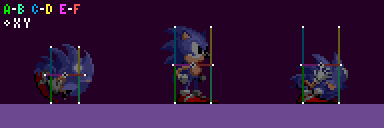
Character sizes determine both where terrain Ground and Ceiling sensors are positioned (each corner) and is the size used for solid object collision.
When standing, Sonic is 19 pixels wide and 39 pixels tall, but when rolling, is 15 pixels wide and 29 pixels tall.
Notice Sonic's size doesnt change when crouched? His hitbox does though. While the hitbox is usually tied to the character height, the game manually modifies Sonic's hitbox when crouching (only in Sonic 1 and 2)
When standing, Tails is smaller at 19 pixels wide and 31 pixels tall. But when rolling, is the same as Sonic at 15 pixels wide and 29 pixels tall.
Tails' hitbox does NOT get altered when crouching. This makes Tails slightly bigger than Sonic when both are crouching - this is why he is hurt by the Chemical Plant zone boss attack even when crouched, while Sonic does not.
Knuckles' sizes are the exact same as Sonic.
And once again, his hitbox does not shrink when crouched.
There's more to Knuckles though, his sizes change dramatically, becoming very "short" when performing his climbing and gliding moves!
An important note is, seperate to these sizes, the width used for the Push sensors and also used for Pushing within object collision is fixed, and is always 21 pixels wide, no matter what.
The varying widths shown above mainly affect the spacing of Ground and Ceiling collision.
The varying widths shown above mainly affect the spacing of Ground and Ceiling collision.
And if you arent satisfied, be sure to check out the full Sonic Physics Guide wiki page for basically ALL the information this brief thread misses out on
info.sonicretro.org/Sonic_Physics_…
info.sonicretro.org/Sonic_Physics_…
When jumping ontop of a Badnik or Item Monitor, Sonic will rebound. Sonic's Y speed is always fully reversed!
What gives you control over the height, is the fact that Sonic is still "jumping". It's the exact same variable jump height code.
What gives you control over the height, is the fact that Sonic is still "jumping". It's the exact same variable jump height code.
https://twitter.com/SonicPhysics/status/1747932555456704635
Because of this, if you instead roll off a ledge into a Badnik or Item Monitor, you are not jumping and thus you have no such control, you will always bounce full height.
• • •
Missing some Tweet in this thread? You can try to
force a refresh




