I’m surprised most people still don’t use AI on their phones.
Here are 10 ways to use AI on your phone and save hours weekly: (for free)
(Check the comments below so you don't miss them)
Here are 10 ways to use AI on your phone and save hours weekly: (for free)
(Check the comments below so you don't miss them)

1. Bing Chat
It is more powerful than ChatGPT and customized for search.
✅Get Free access to GPT-4
✅Generate amazing content
✅Translate multiple languages
It is more powerful than ChatGPT and customized for search.
✅Get Free access to GPT-4
✅Generate amazing content
✅Translate multiple languages
2. Perplexity
The answers you need—right at your fingertips.
✅Guided AI search
✅Ask with voice or text
✅Credible and up-to-date answers
The answers you need—right at your fingertips.
✅Guided AI search
✅Ask with voice or text
✅Credible and up-to-date answers
3. Otter AI
Record and transcribe conversations and meetings on your phone.
It records audio, writes notes, captures slides, and generates summaries
Works for Zoom, Google Meet, Microsoft Teams and more.
Record and transcribe conversations and meetings on your phone.
It records audio, writes notes, captures slides, and generates summaries
Works for Zoom, Google Meet, Microsoft Teams and more.
4. ChatGPT App
Meet your everyday AI companion.
✅Instant Answers
✅Brainstorm partner
✅Personalized response
✅Use voice mode to speak
✅Creative content creation
Meet your everyday AI companion.
✅Instant Answers
✅Brainstorm partner
✅Personalized response
✅Use voice mode to speak
✅Creative content creation
5. Character AI
Chat with anyone, anywhere, and anytime.
Chat with ultra-realistic AI personalities.
Enjoy unlimited free messaging without interruptions.
Chat with anyone, anywhere, and anytime.
Chat with ultra-realistic AI personalities.
Enjoy unlimited free messaging without interruptions.
6. Canva magic studio
All the power of Canva's AI, all in one place.
Magic Studio brings together the best AI-powered tools for you and your team
Get all tools inside Canva.
All the power of Canva's AI, all in one place.
Magic Studio brings together the best AI-powered tools for you and your team
Get all tools inside Canva.
7. Microsoft Designer
Design like a pro with Microsoft Designer.
✅Stunning templates
✅Advance typography
✅Integrate with other apps
✅Real-time AI suggestions
Design like a pro with Microsoft Designer.
✅Stunning templates
✅Advance typography
✅Integrate with other apps
✅Real-time AI suggestions
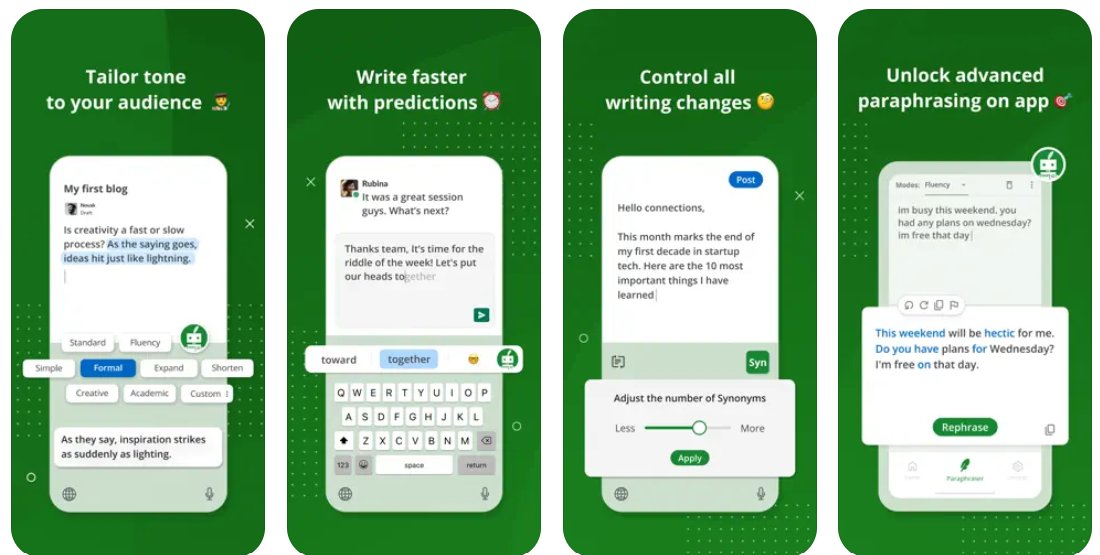
8. Quillbot
Write, edit, and perfect your writing with this AI app.
✅AI-powered grammar checks
✅Vocabulary enhancements
✅Style suggestions
Write, edit, and perfect your writing with this AI app.
✅AI-powered grammar checks
✅Vocabulary enhancements
✅Style suggestions
9. Notion AI
All-in-one productivity companion with AI capabilities.
✅Summarize lengthy text
✅Generate blog post outlines
✅Use AI to organize tasks
And many more features.
All-in-one productivity companion with AI capabilities.
✅Summarize lengthy text
✅Generate blog post outlines
✅Use AI to organize tasks
And many more features.
10. Socratic by Google
Free educational app powered by Google AI.
✅Assist with learning
✅Instant explanations
✅Take photos of problems for analysis
It is designed to help school and university students.
Free educational app powered by Google AI.
✅Assist with learning
✅Instant explanations
✅Take photos of problems for analysis
It is designed to help school and university students.
That's a wrap!
If you found this helpful:
Follow me @HeyAbhishekk for more hidden resources.
Like and repost to share this with your family and friends.
If you found this helpful:
Follow me @HeyAbhishekk for more hidden resources.
Like and repost to share this with your family and friends.
https://twitter.com/1547059723811229696/status/1776969182971859340
You should try others too. They're great for saving time.
• • •
Missing some Tweet in this thread? You can try to
force a refresh