Document OCR in 90+ languages using python (100% free and without internet):
For document OCR, we'll use opensource toolkit Surya.
Python toolkit that does:
• OCR in 90+ languages
• Line-level text detection in any language
• Layout analysis (table, image detection)
• Reading order detection
• Outperforms Tesseract, on par with Google Cloud vision
Python toolkit that does:
• OCR in 90+ languages
• Line-level text detection in any language
• Layout analysis (table, image detection)
• Reading order detection
• Outperforms Tesseract, on par with Google Cloud vision

1. Install the Python library
Run the following command from your terminal. You'll need python 3.9+ and PyTorch.
Run the following command from your terminal. You'll need python 3.9+ and PyTorch.

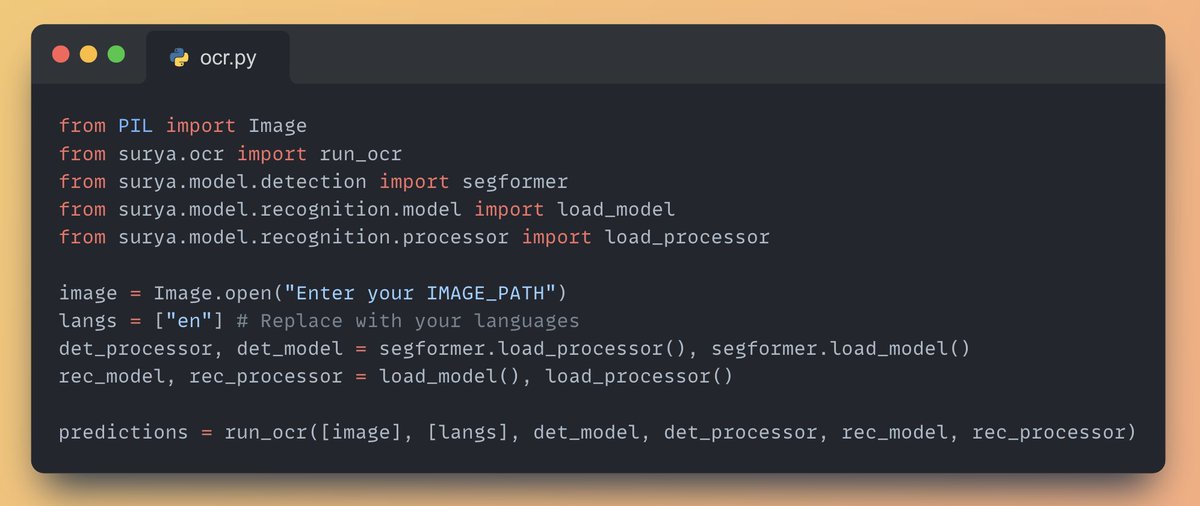
2. Try out the OCR (text detection) boilerplate code
3. Try out the built-in interactive demo with Streamlit.
Install Streamlit and run the following command in your terminal: 'surya_gui'
Install Streamlit and run the following command in your terminal: 'surya_gui'
🌟 Support the opensource project:
8000+ readers receive my AI newsletter everyday and you are not one of them. Join @_unwind_ai to stay on top of the latest AI developments and tools: github.com/VikParuchuri/s…
unwindai.substack.com
8000+ readers receive my AI newsletter everyday and you are not one of them. Join @_unwind_ai to stay on top of the latest AI developments and tools: github.com/VikParuchuri/s…
unwindai.substack.com
• • •
Missing some Tweet in this thread? You can try to
force a refresh