Akshay 🚀 Profile picture
Jul 16, 2024 10 tweets 3 min read Read on X
Multiprocessing in Python clearly explained:
Ever felt like your Python code could run faster❓

Multiprocessing might be the solution you're looking for!

Today, I'll simplify it for you in this step-by-step guide.

Let's go! 🚀 Image
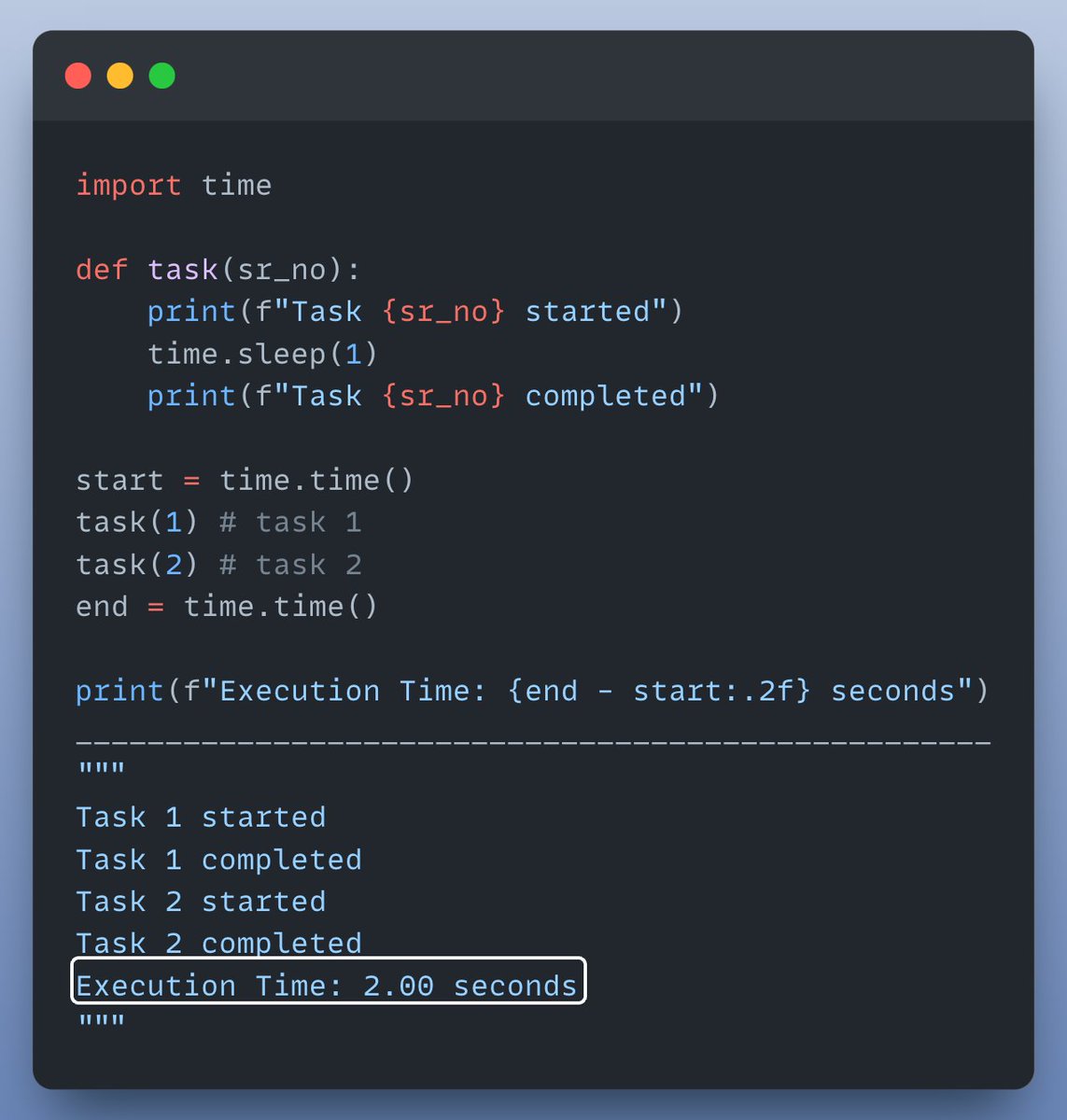
Let's start with an example where we run a simple function twice sequentially (without multiprocessing).

Check this out👇 Image
Let's visually understand what happened in the code above & how multi processing can help here.

• Sequential execution: task 2 starts only when task 1 is finished.

• Parallel execution: both tasks are performed at the same time in parallel, on separate CPU cores

Check this👇 Image
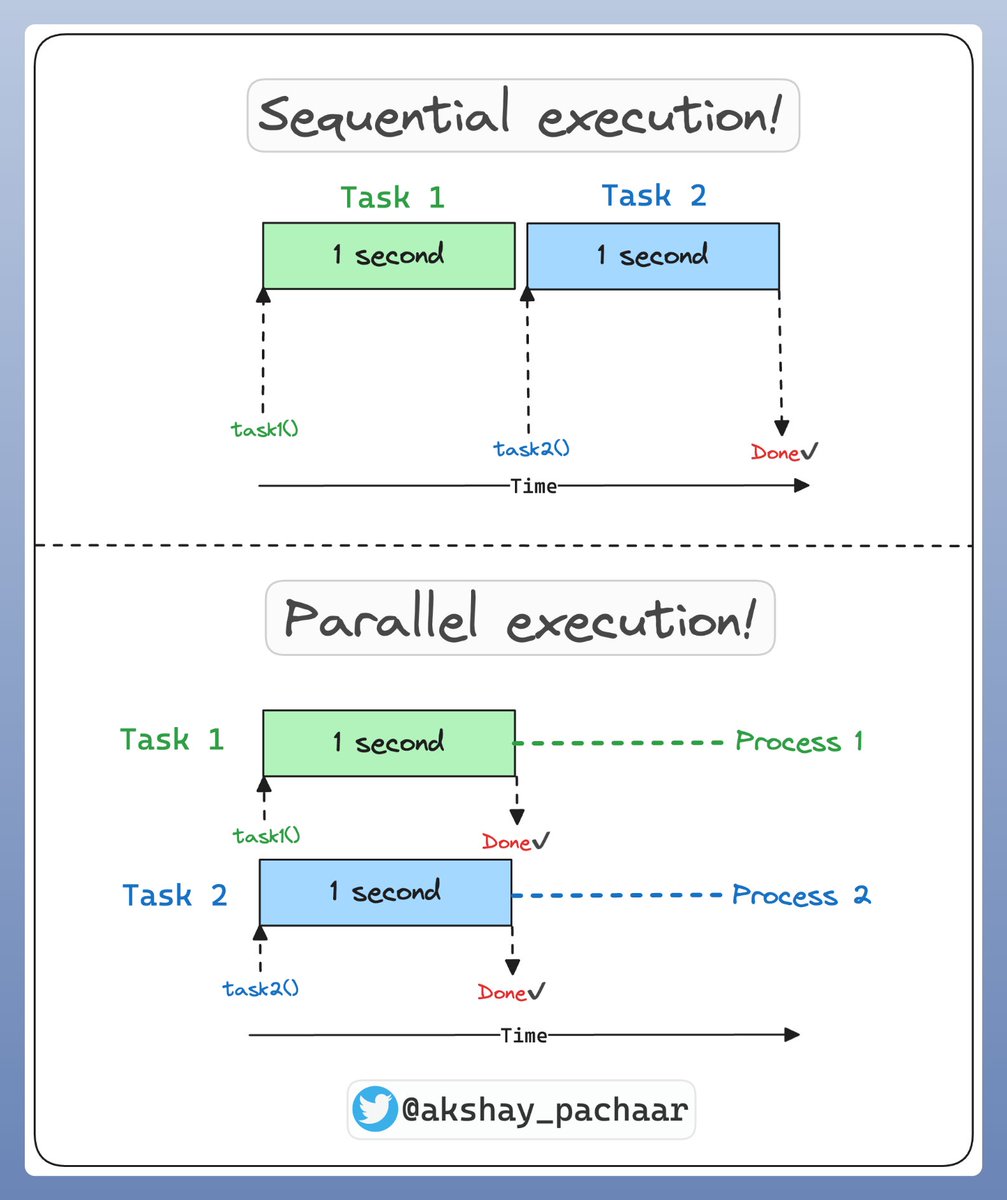
Now that we understand the difference between sequential & parallel execution!

Let’s add multiprocessing to the mix and see the difference in execution time! ⏰

Check this out👇 Image
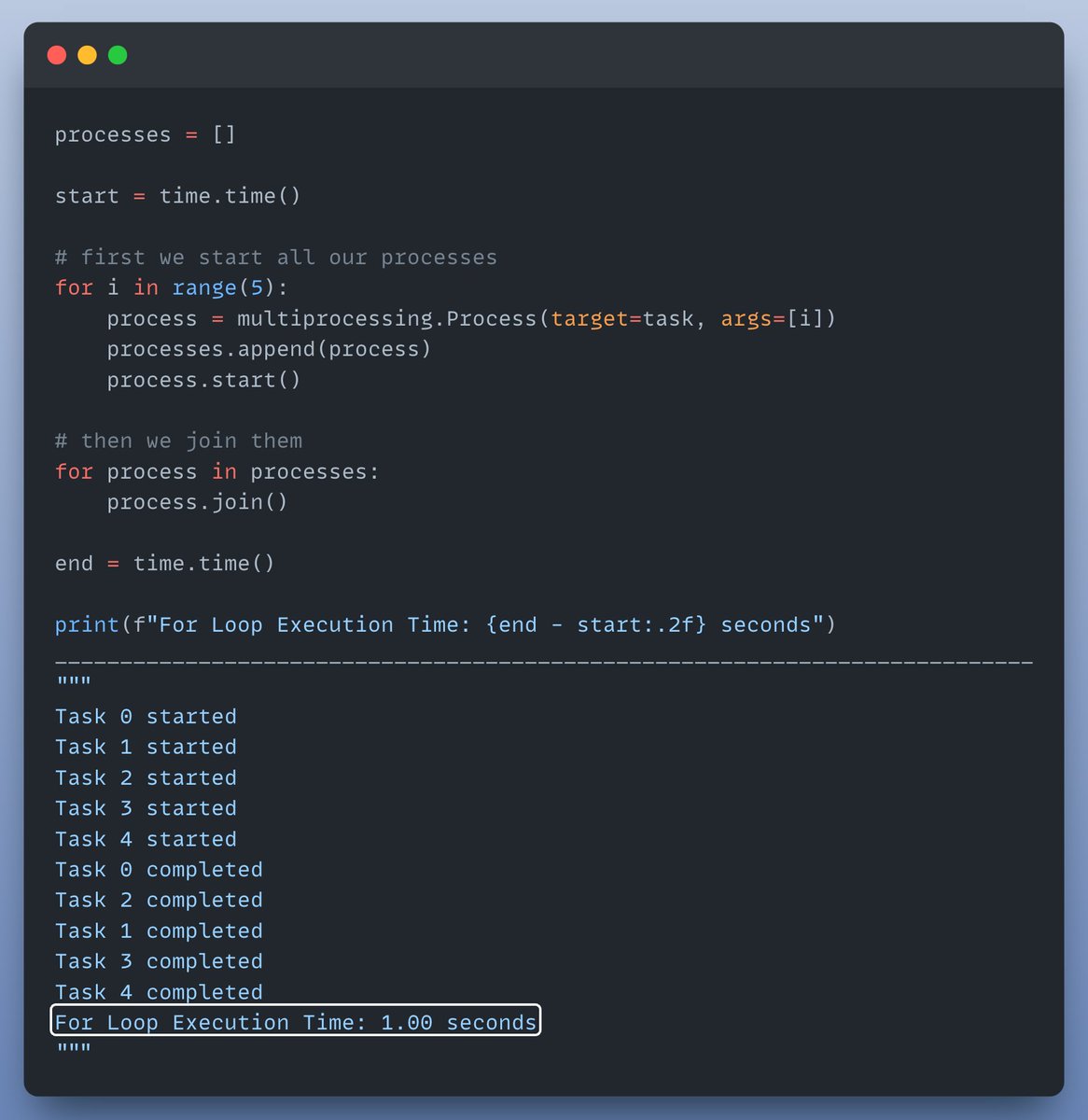
But why stop there? Let’s run our function multiple times using a for loop to see the real power of multiprocessing!

Check this out👇 Image
To make it even simpler, we can use a ProcessPool!

The recommended way to write multi-processing code in Python.

Check this out👇 Image
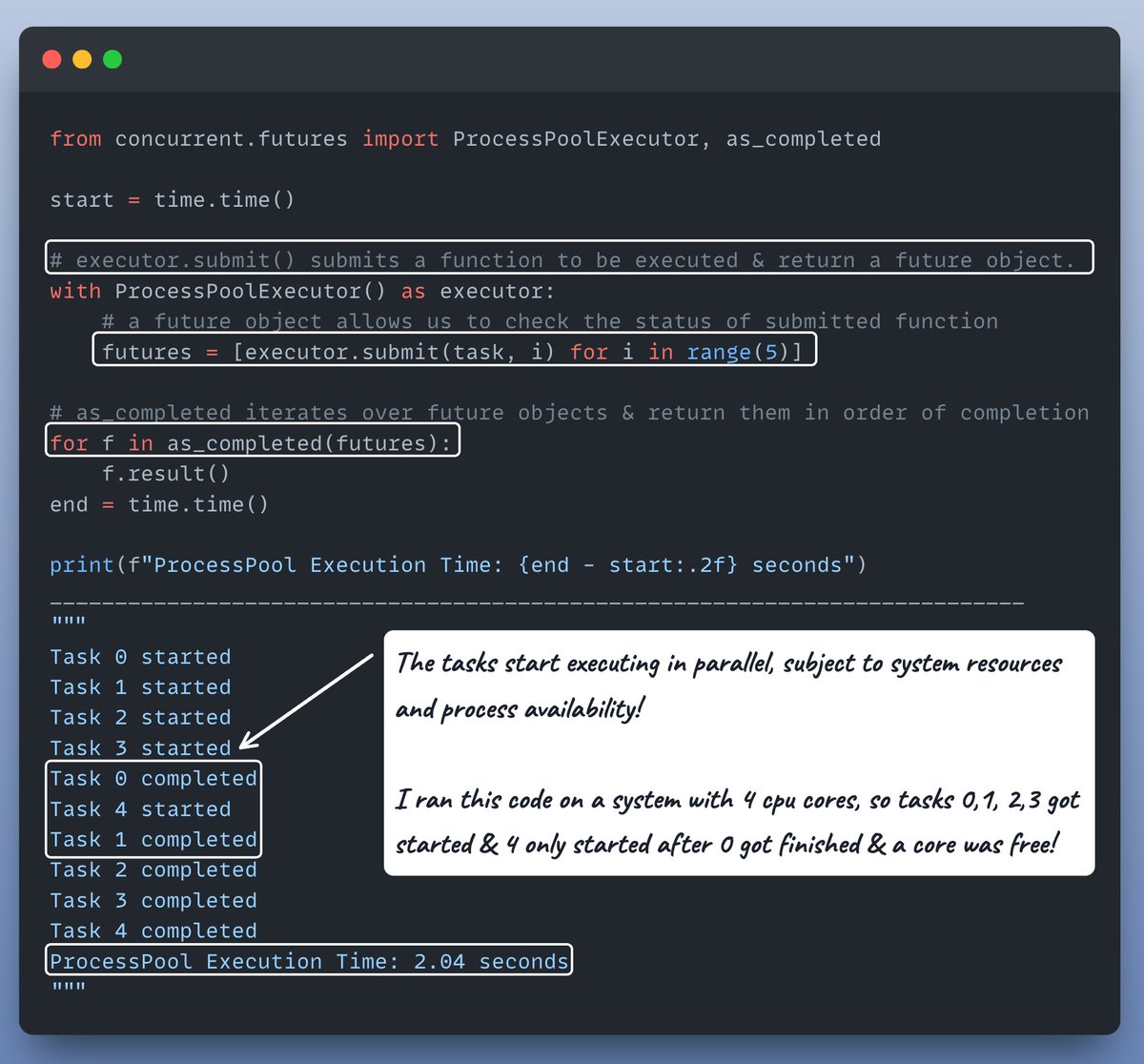
OK, last but not least let's do one more interesting thing before we wrap it up!

Let's modify task() to take sleep_time as an argument & observe how execution order changes.

Check this out👇 Image
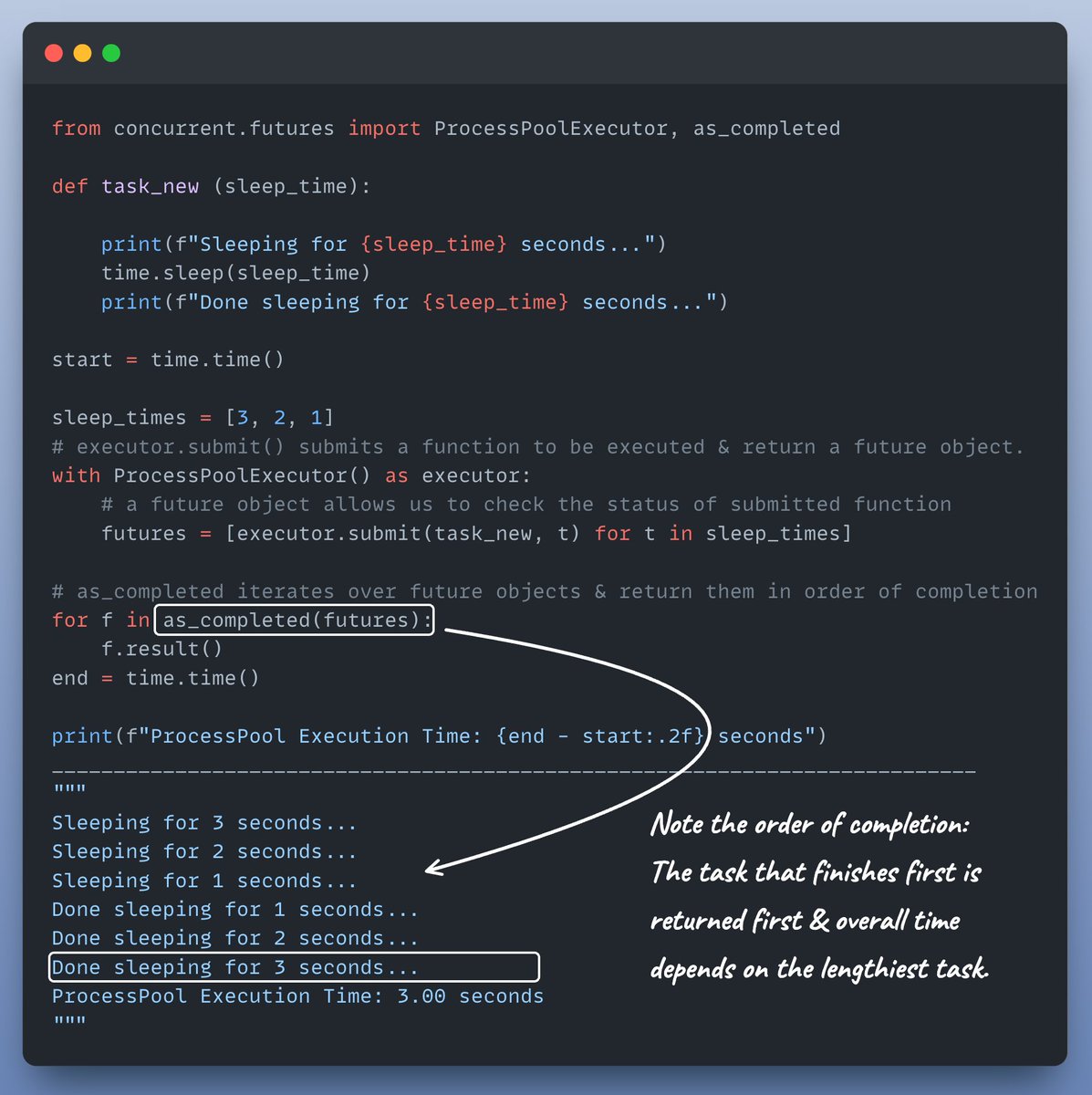
Multiprocessing is ideal for CPU-bound tasks (intensive calculations, data processing), as each process operates in its own memory space.

Where as multithreading suits I/O-bound tasks (network requests, file I/O), where threads share memory within the same process.
Interested in:

- Python 🐍
- ML/AI Engineering ⚙️

Find me → @akshay_pachaar ✔️

Enjoyed today's tutorial❓
Check out my book for more: bit.ly/InstantPython

• • •

Missing some Tweet in this thread? You can try to force a refresh

 

Keep Current with Akshay 🚀

Akshay 🚀 Profile picture

Stay in touch and get notified when new unrolls are available from this author!

Read all threads

This Thread may be Removed Anytime!

PDF

Twitter may remove this content at anytime! Save it as PDF for later use!

Try unrolling a thread yourself!

how to unroll video
  1. Follow @ThreadReaderApp to mention us!

  2. From a Twitter thread mention us with a keyword "unroll"
@threadreaderapp unroll

Practice here first or read more on our help page!

More from @akshay_pachaar

Jun 7
Google just dropped a new LLM!

You can run it locally on just 8GB RAM.

Let's fine-tune this on our own data (100% locally):
Google released Gemma 4 12B, a multimodal model that runs text, images, and audio on 8GB VRAM!

We'll fine-tune it to master chess and predict the exact next move.

Tech stack:
- @UnslothAI for efficient fine-tuning.
- @huggingface transformers to run it locally.

Let's go! 🚀
1️⃣ Load the model

We start by loading Gemma 4 12B and its tokenizer using Unsloth.

Check this 👇 Image
Read 10 tweets
Jun 3
You're in a Research Scientist interview at OpenAI.

The interviewer asks:

"How would you expand the context length of an LLM from 2K to 128K tokens?"

You: "I will fine-tune the model on longer docs with 128K context."

Interview over.

Here's what you missed:
Extending the context window isn't just about larger matrices.

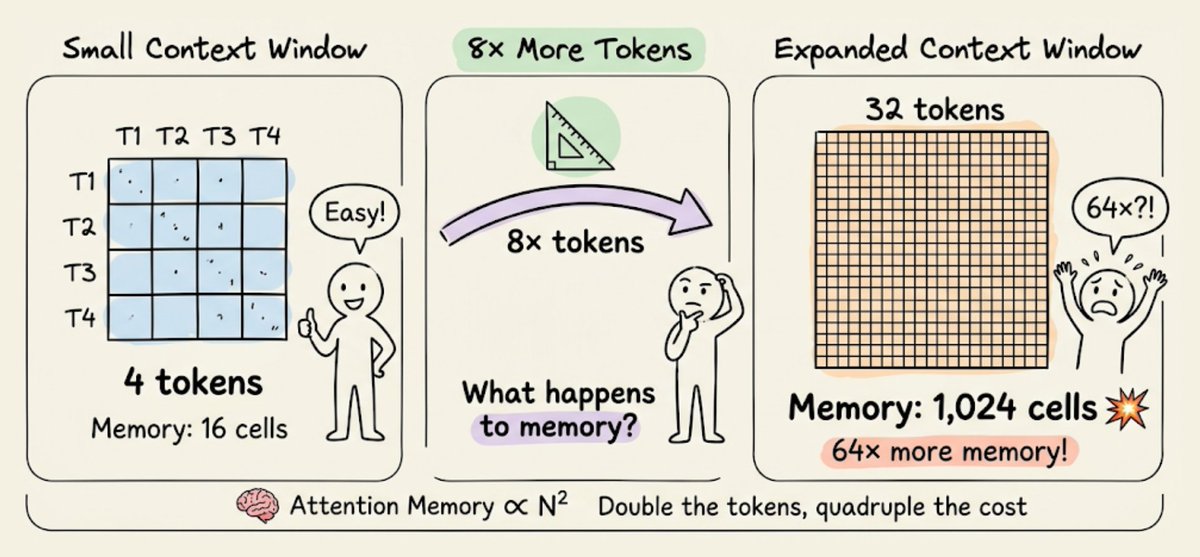
In a traditional transformer, expanding tokens by 8x increases memory needs by 64x due to the quadratic complexity of attention. Refer to the image below!

So, how do we manage it?

continue...👇 Image
1) Sparse Attention

It limits the attention computation to a subset of tokens by:

- Using local attention (tokens attend only to their neighbors).
- Letting the model learn which tokens to focus on.

But this has a trade-off between computational complexity and performance. Image
Read 12 tweets
Dec 18, 2025
Turn any Autoregressive LLM into a Diffusion LM.

dLLM is a Python library that unifies the training & evaluation of diffusion language models.

You can also use it to turn ANY autoregressive LM into a diffusion LM with minimal compute.

100% open-source.
Here's why this matters:

Traditional autoregressive models generate text left-to-right, one token at a time. Diffusion models work differently - they refine the entire sequence iteratively, giving you better control over generation quality and more flexible editing capabilities.
dLLM GitHub:

(don't forget to star 🌟)github.com/ZHZisZZ/dllm
Read 4 tweets
Dec 6, 2025
You're in a Research Scientist interview at Google.

Interviewer: We have a base LLM that's terrible at maths. How would you turn it into a maths & reasoning powerhouse?

You: I'll get some problems labeled and fine-tune the model.

Interview over.

Here's what you missed:
When outputs are verifiable, labels become optional.

Maths, code, and logic can be automatically checked and validated.

Let's use this fact to build a reasoning model without manual labelling.

We'll use:

- @UnslothAI for parameter-efficient finetuning.
- @HuggingFace TRL to apply GRPO.

Let's go! 🚀
What is GRPO?

Group Relative Policy Optimization is a reinforcement learning method that fine-tunes LLMs for math and reasoning tasks using deterministic reward functions, eliminating the need for labeled data.

Here's a brief overview of GRPO before we jump into code:
Read 11 tweets
Dec 5, 2025
I have been training neural networks for 10 years now.

Here are 16 ways I actively use to optimize model training:

(detailed explanation ...🧵)
First, lets look at some basic techniques:

1) Use efficient optimizers—AdamW, Adam, etc.

2) Utilize hardware accelerators (GPUs/TPUs).

3) Max out the batch size.

4) Use multi-GPU training through Model/Data/Pipeline/Tensor parallelism.

Check the visual👇
5) Bayesian optimization for hyperparameter optimization:

This technique takes informed steps based on the results of the previous hyperparameter configs.

This way, the model converges to an optimal set of hyperparameters much faster.

Check these results 👇 Image
Read 9 tweets
Nov 23, 2025
You’re in an ML Engineer interview at Google.

Interviewer: We need to train an LLM across 1,000 GPUs. How would you make sure all GPUs share what they learn?

You: Use a central parameter server to aggregate and redistribute the weights.

Interview over.

Here’s what you missed:
One major run-time bottleneck in multi-GPU training happens during GPU synchronization.

For instance, in multi-GPU training via data parallelism:

- The same model is distributed to different GPUs.
- Each GPU processes a different subset of the whole dataset.

Check this 👇
This leads to different gradients across different devices.

So, before updating the model parameters on each GPU device, we must communicate the gradients to all other devices to sync them.

Let’s understand 2 common strategies next!
Read 14 tweets

Did Thread Reader help you today?

Support us! We are indie developers!


This site is made by just two indie developers on a laptop doing marketing, support and development! Read more about the story.

Become a Premium Member ($3/month or $30/year) and get exclusive features!

Become Premium

Don't want to be a Premium member but still want to support us?

Make a small donation by buying us coffee ($5) or help with server cost ($10)

Donate via Paypal

Or Donate anonymously using crypto!

Ethereum

0xfe58350B80634f60Fa6Dc149a72b4DFbc17D341E copy

Bitcoin

3ATGMxNzCUFzxpMCHL5sWSt4DVtS8UqXpi copy

Thank you for your support!

Follow Us!

:(