Akshay 🚀 Profile picture
Jul 16 10 tweets 3 min read Read on X
Multiprocessing in Python clearly explained:
Ever felt like your Python code could run faster❓

Multiprocessing might be the solution you're looking for!

Today, I'll simplify it for you in this step-by-step guide.

Let's go! 🚀 Image
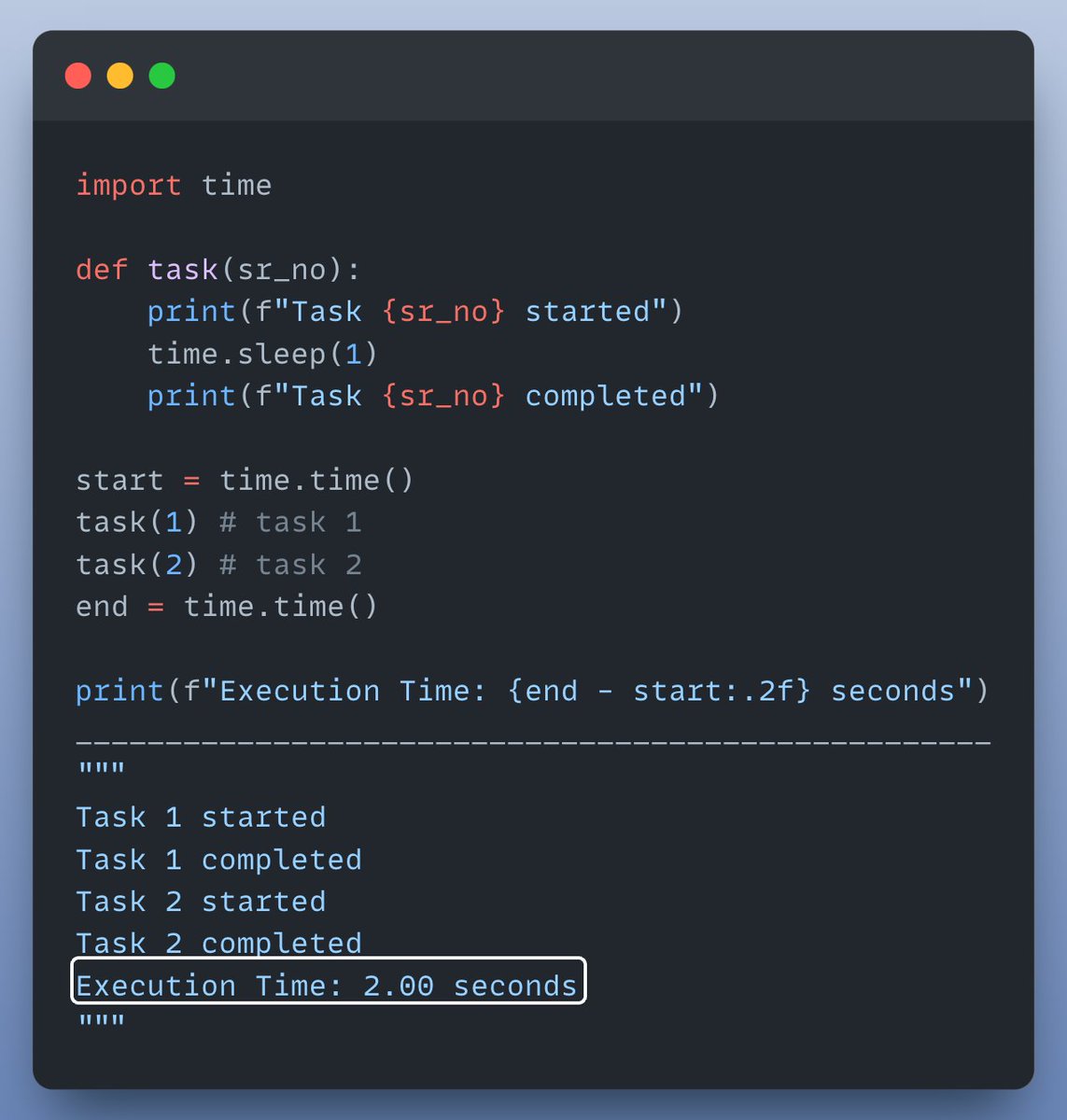
Let's start with an example where we run a simple function twice sequentially (without multiprocessing).

Check this out👇 Image
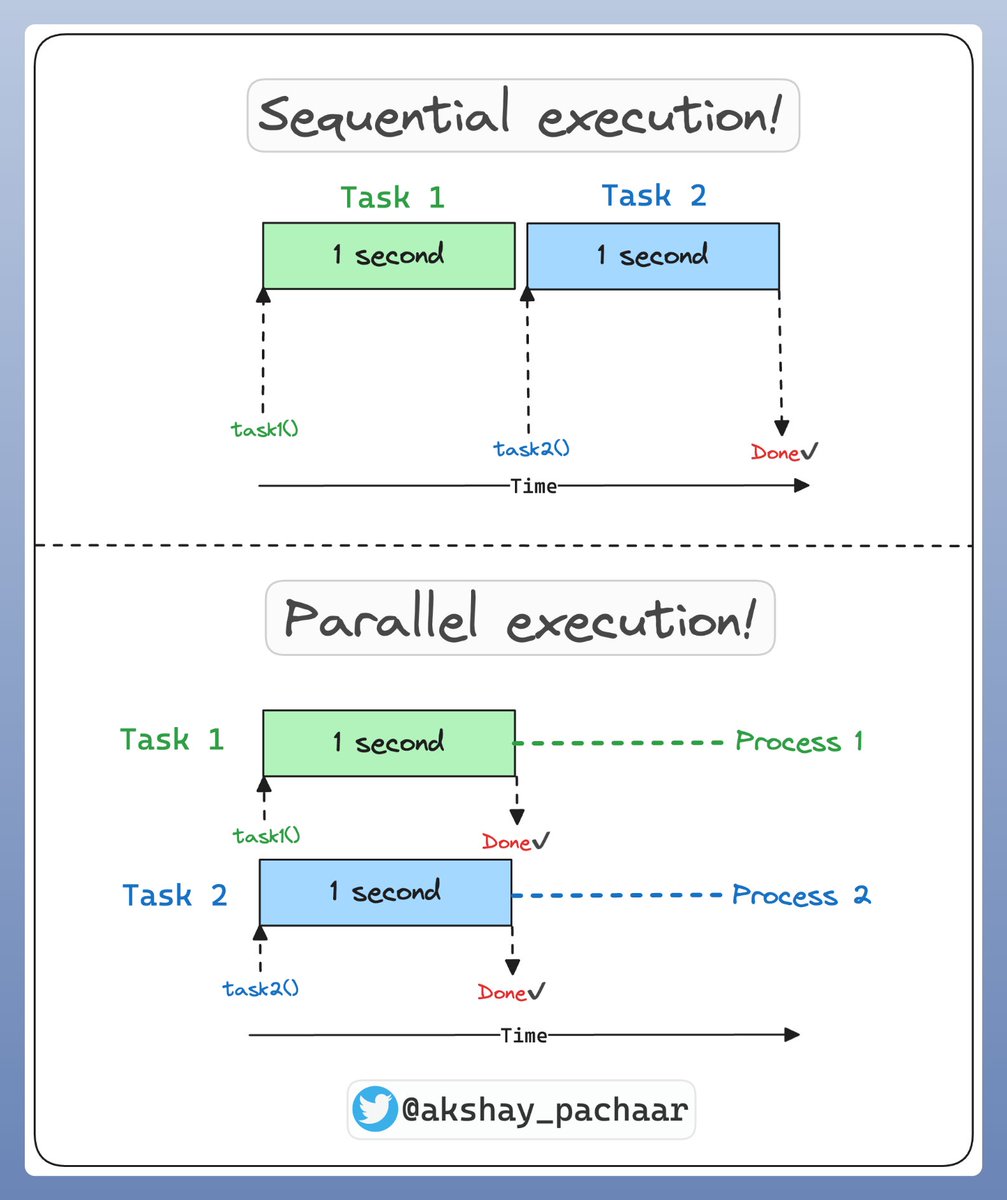
Let's visually understand what happened in the code above & how multi processing can help here.

• Sequential execution: task 2 starts only when task 1 is finished.

• Parallel execution: both tasks are performed at the same time in parallel, on separate CPU cores

Check this👇 Image
Now that we understand the difference between sequential & parallel execution!

Let’s add multiprocessing to the mix and see the difference in execution time! ⏰

Check this out👇 Image
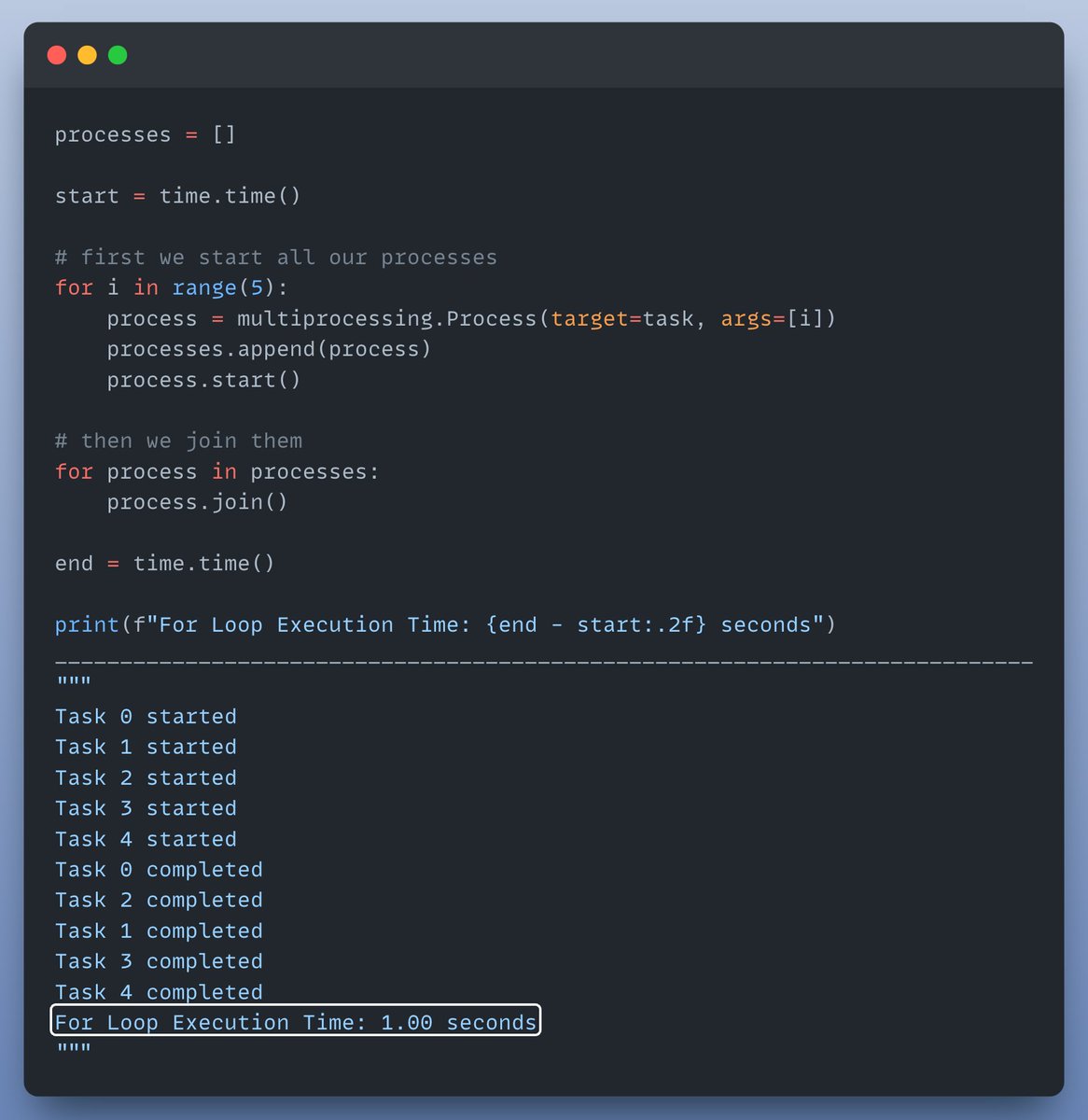
But why stop there? Let’s run our function multiple times using a for loop to see the real power of multiprocessing!

Check this out👇 Image
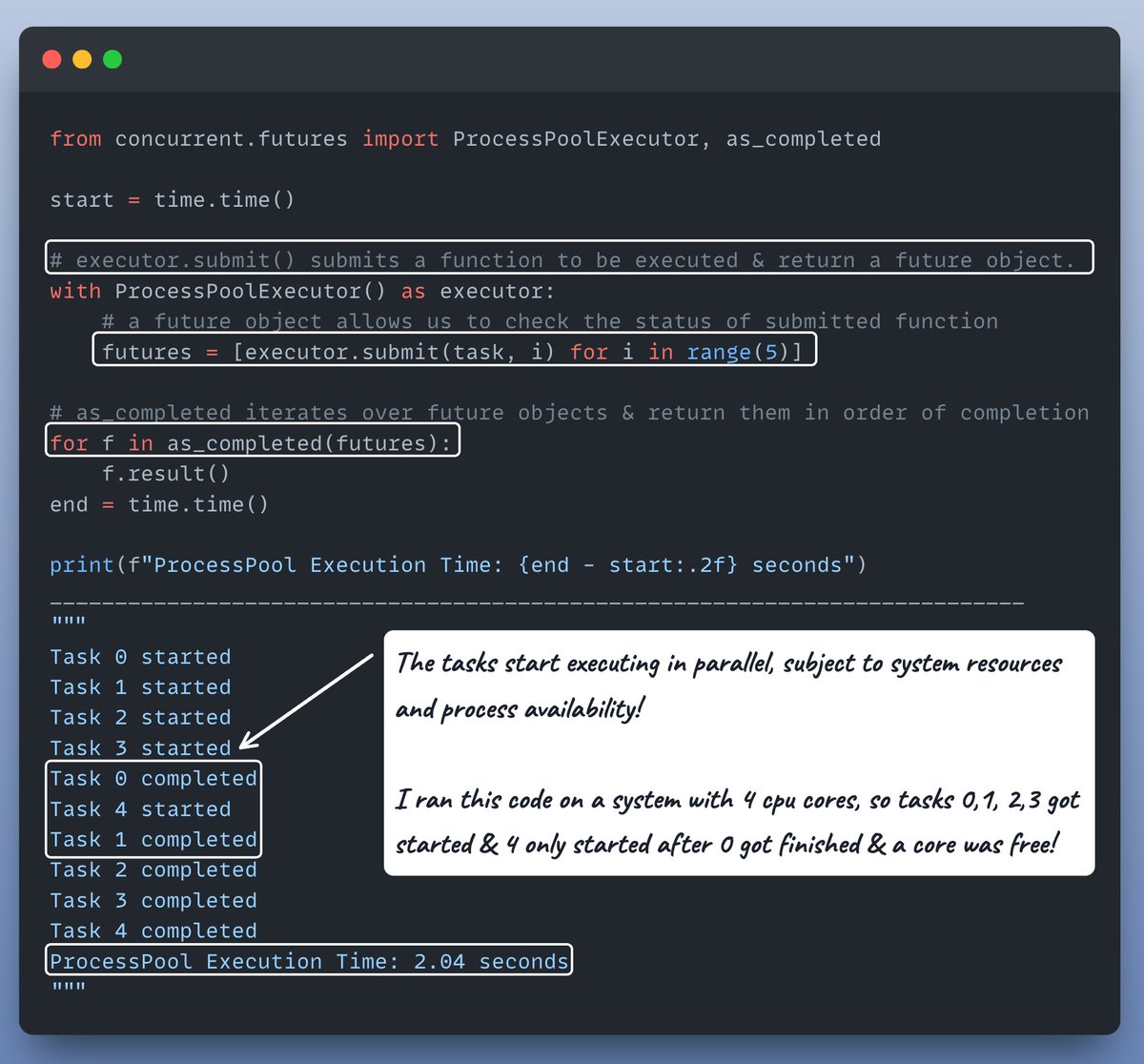
To make it even simpler, we can use a ProcessPool!

The recommended way to write multi-processing code in Python.

Check this out👇 Image
OK, last but not least let's do one more interesting thing before we wrap it up!

Let's modify task() to take sleep_time as an argument & observe how execution order changes.

Check this out👇 Image
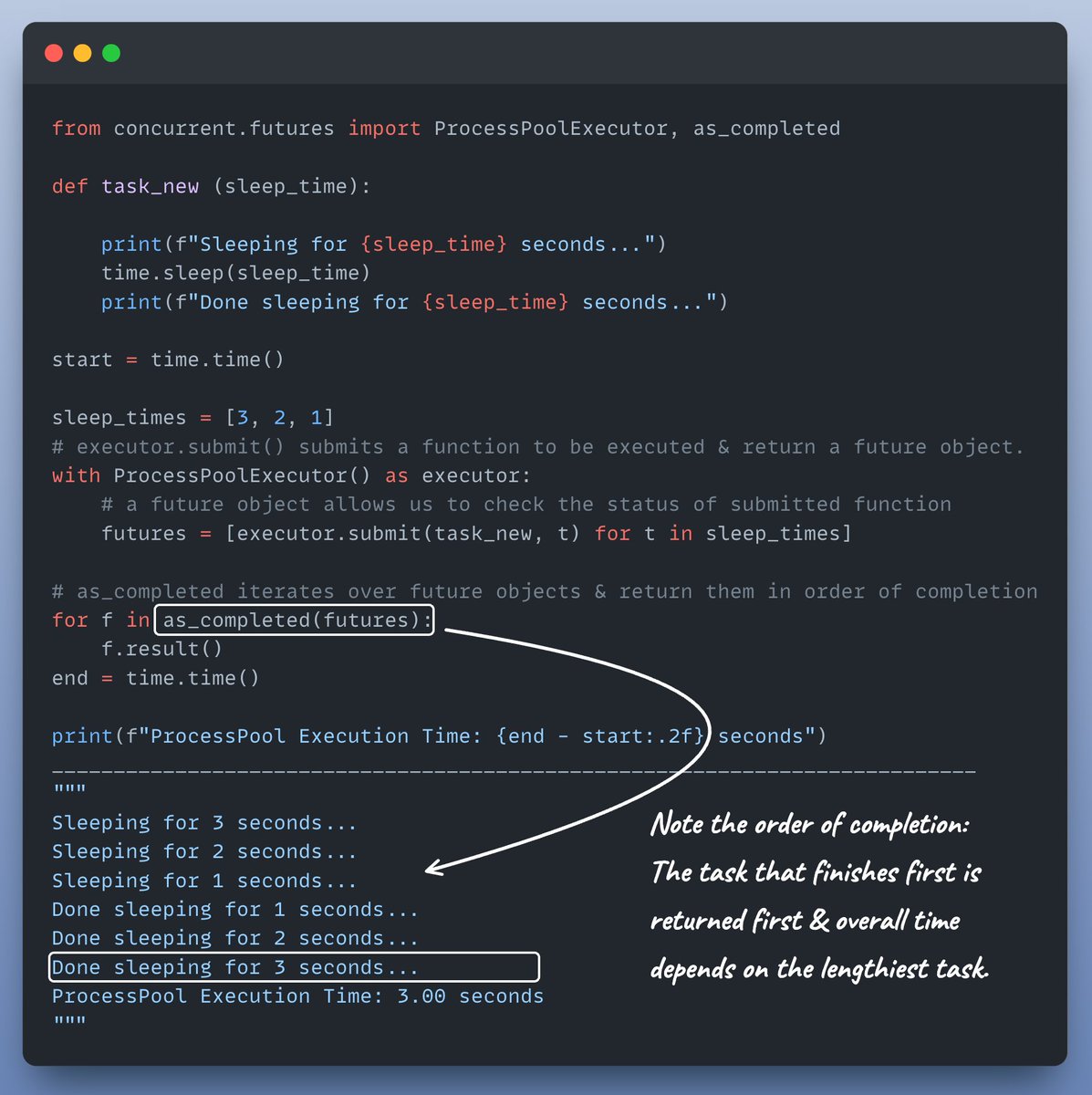
Multiprocessing is ideal for CPU-bound tasks (intensive calculations, data processing), as each process operates in its own memory space.

Where as multithreading suits I/O-bound tasks (network requests, file I/O), where threads share memory within the same process.
Interested in:

- Python 🐍
- ML/AI Engineering ⚙️

Find me → @akshay_pachaar ✔️

Enjoyed today's tutorial❓
Check out my book for more: bit.ly/InstantPython

• • •

Missing some Tweet in this thread? You can try to force a refresh

 

Keep Current with Akshay 🚀

Akshay 🚀 Profile picture

Stay in touch and get notified when new unrolls are available from this author!

Read all threads

This Thread may be Removed Anytime!

PDF

Twitter may remove this content at anytime! Save it as PDF for later use!

Try unrolling a thread yourself!

how to unroll video
  1. Follow @ThreadReaderApp to mention us!

  2. From a Twitter thread mention us with a keyword "unroll"
@threadreaderapp unroll

Practice here first or read more on our help page!

More from @akshay_pachaar

Jul 17
Let's build an advanced "Chat with your code" RAG application (100% local):
Before we begin, take a look at what we're about to create!

Here's what you'll learn:

- @Llama_Index for orchestration
- @Qdrant_Engine to self-host a vectorDB
- LlamaIndex's advanced code parsers
- @Ollama for serving LLMs locally

Let's go! 🚀
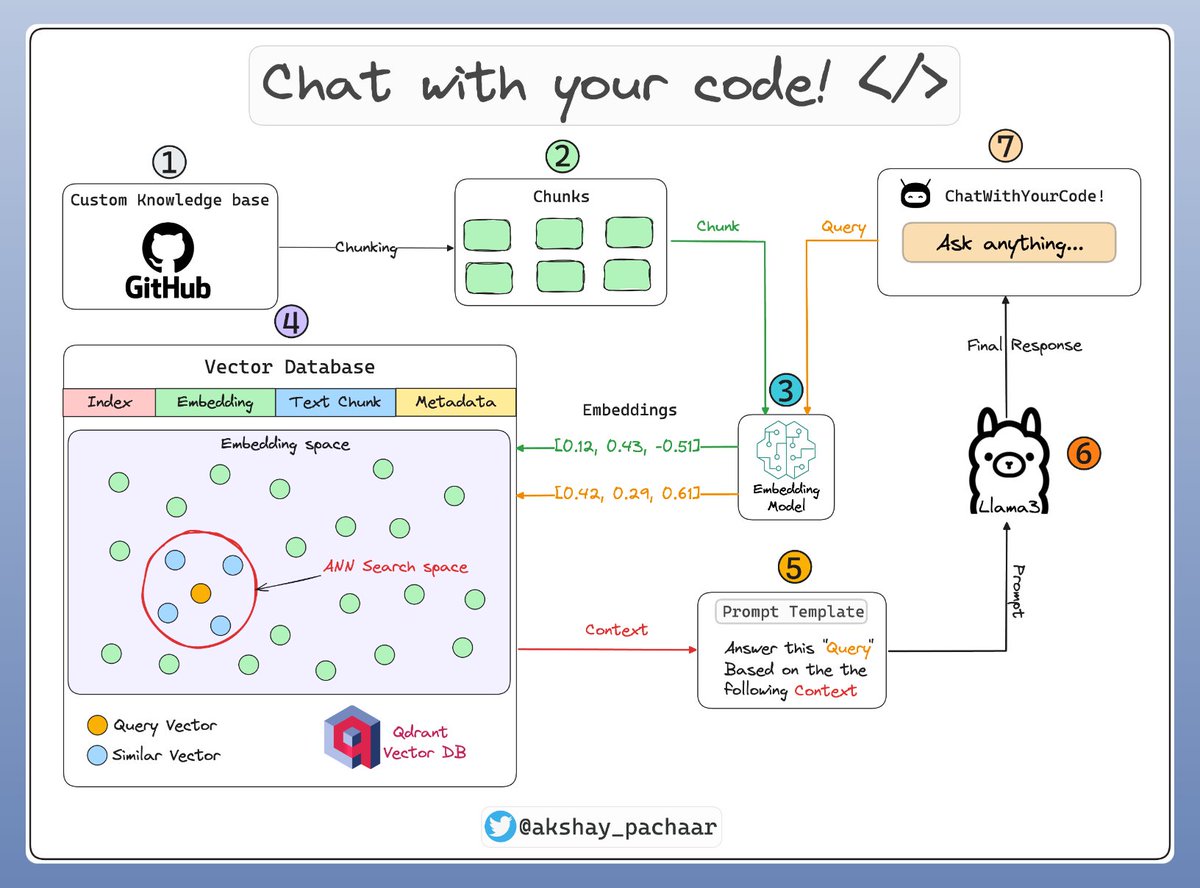
The architecture diagram presented below illustrates some of the key components & how they interact with each other!

It will be followed by detailed descriptions & code for each component: Image
Read 11 tweets
Jul 15
Autoencoders are one of my favourite neural networks!

Today, I'll clearly explain:

- What they are❓
- And how they work❓

Let's go! 🚀

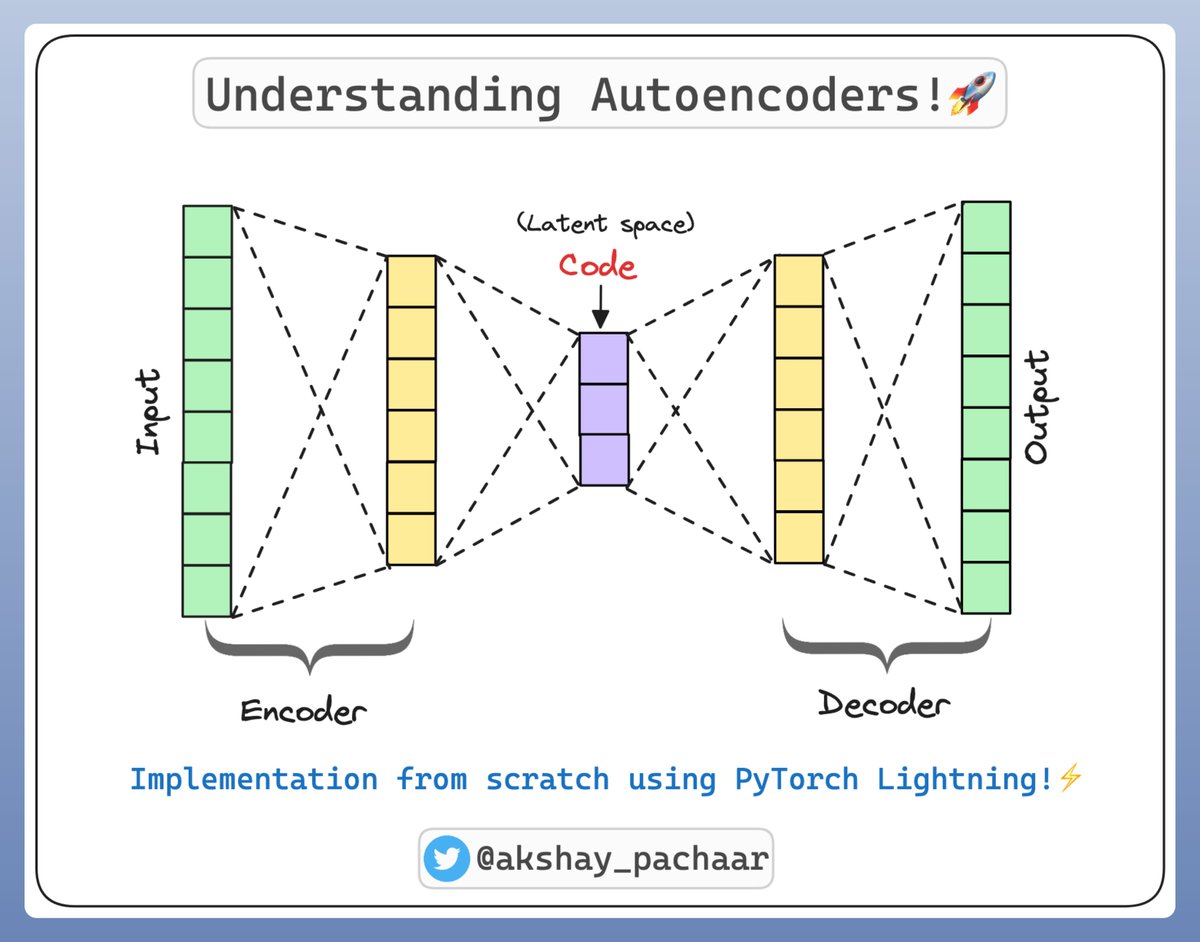
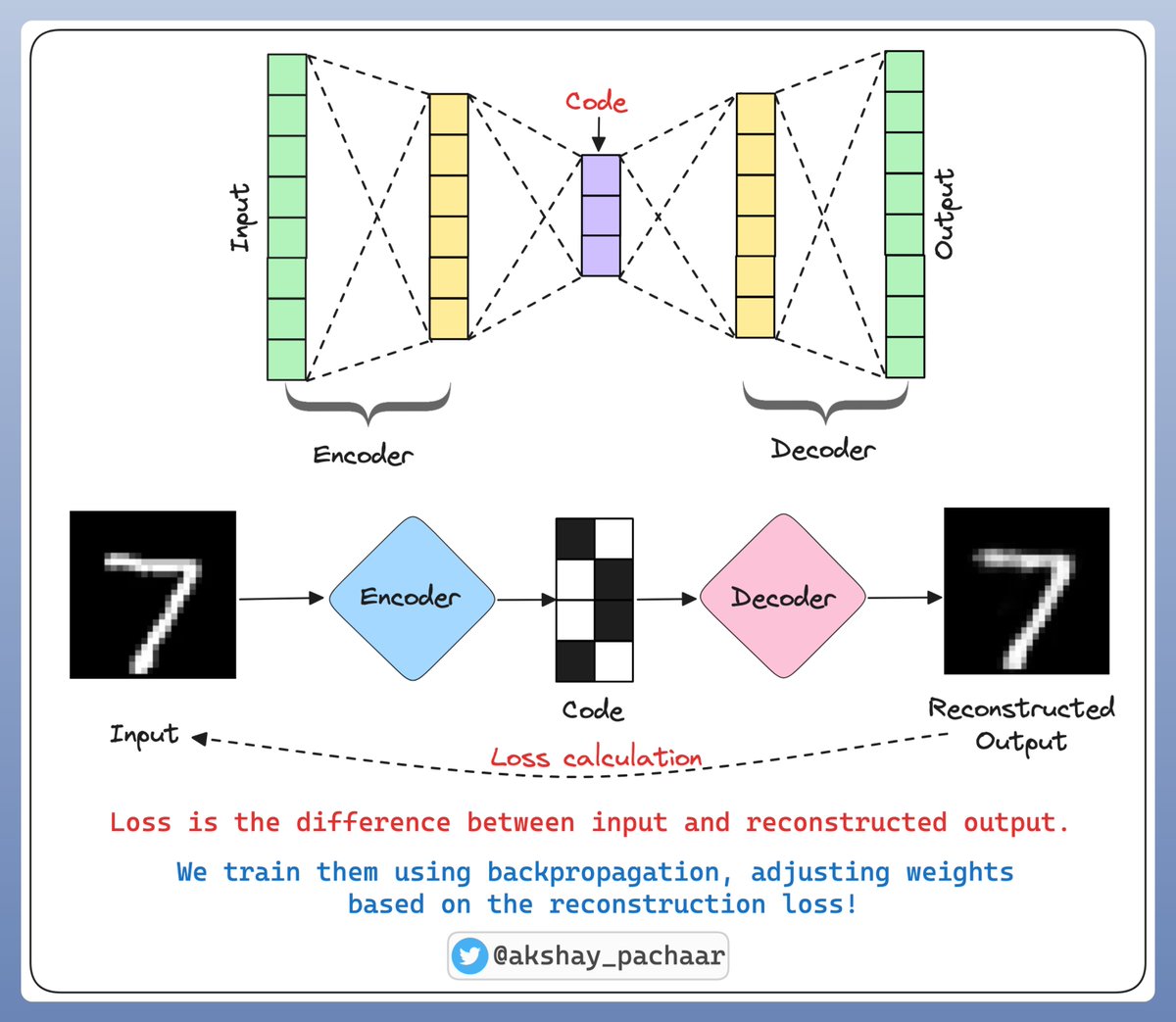
1/n Image
Autoencoders have two main parts:

1️⃣ Encoder: Compresses the input into a dense representation (latent space)

2️⃣ Decoder: Reconstructs the input from this dense representation.

The idea is to make the reconstructed output as close to the original input as possible:👇

2/n Image
Applications of Autoencoders:

- Dimensionality Reduction: Like PCA but cooler. 😎
- Anomaly Detection: If reconstruction error is high, something's fishy!
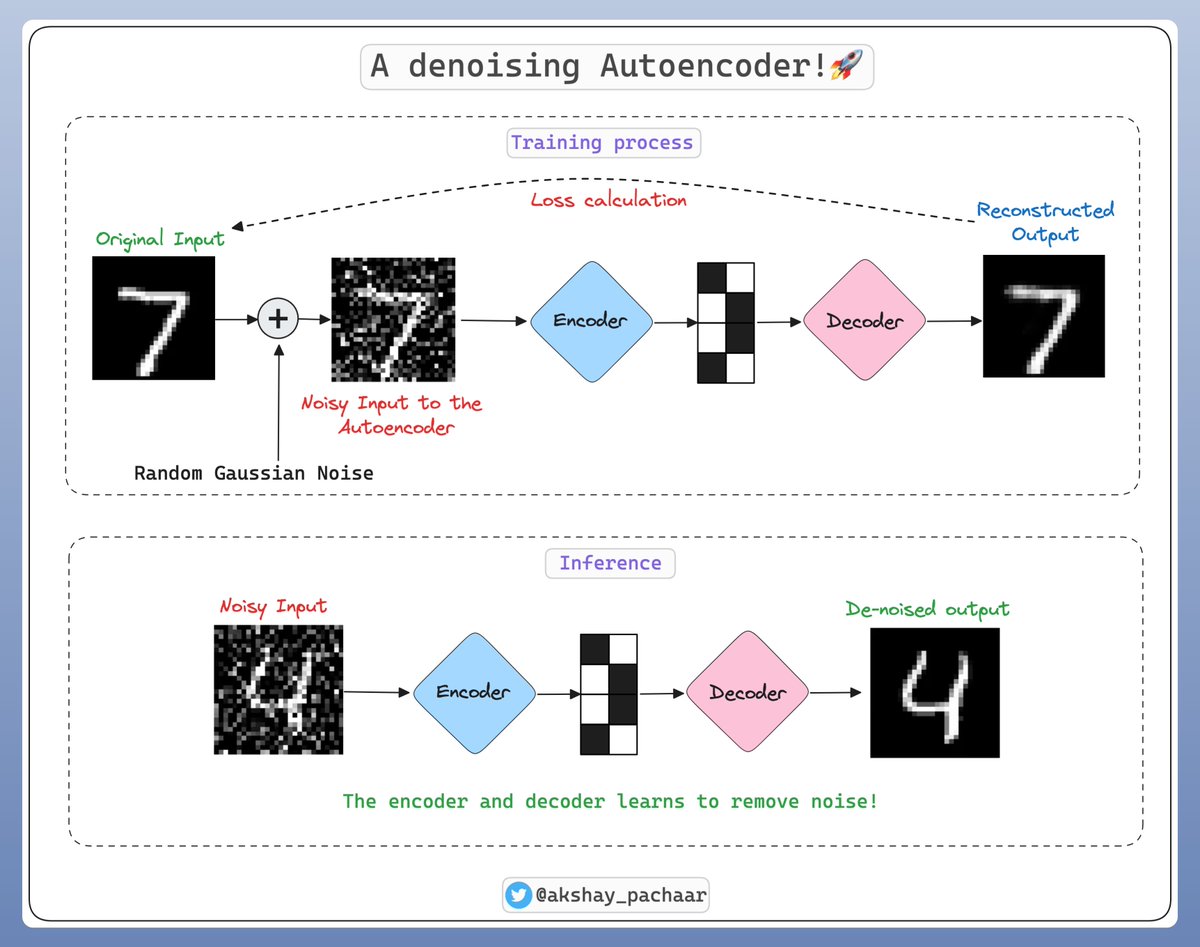
- Data Denoising: Clean noisy data by training on noise.

A glimpse on how a denoising autoencoder is trained:👇

3/n Image
Read 10 tweets
Jul 12
ML models can only be as good as the data they're trained on!

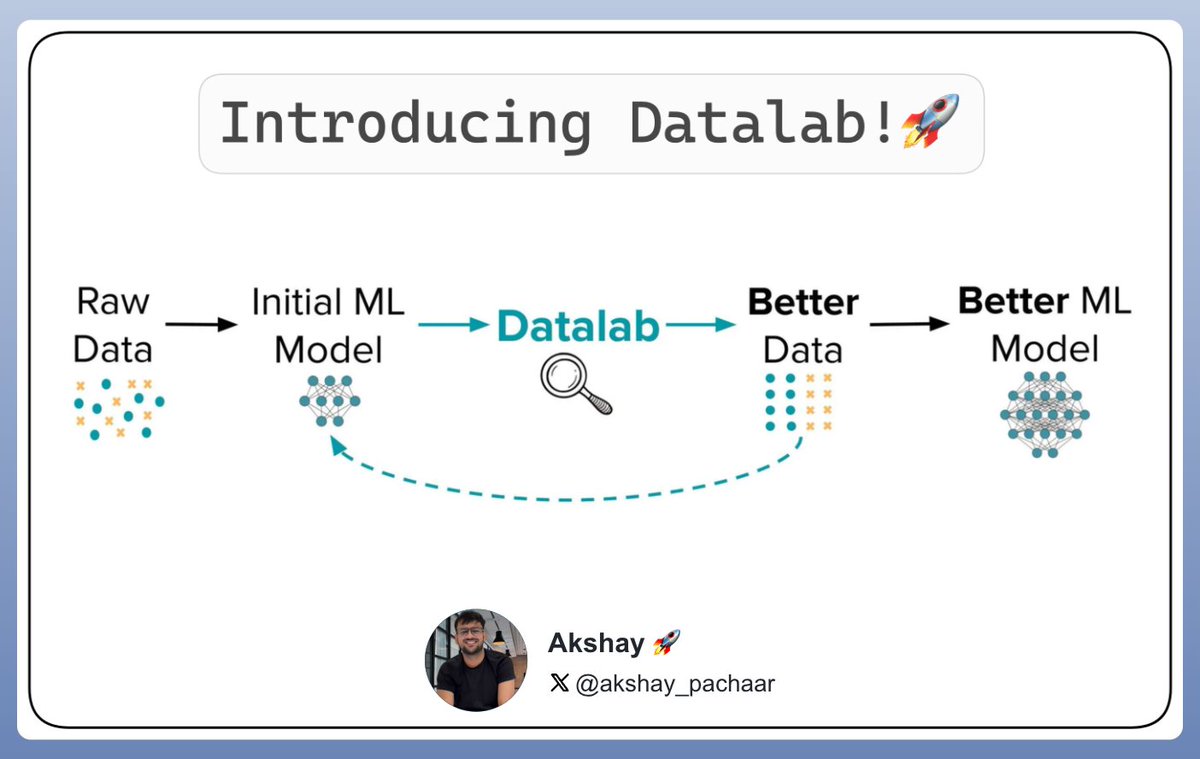
Introducing Datalab, now you can automatically detect:

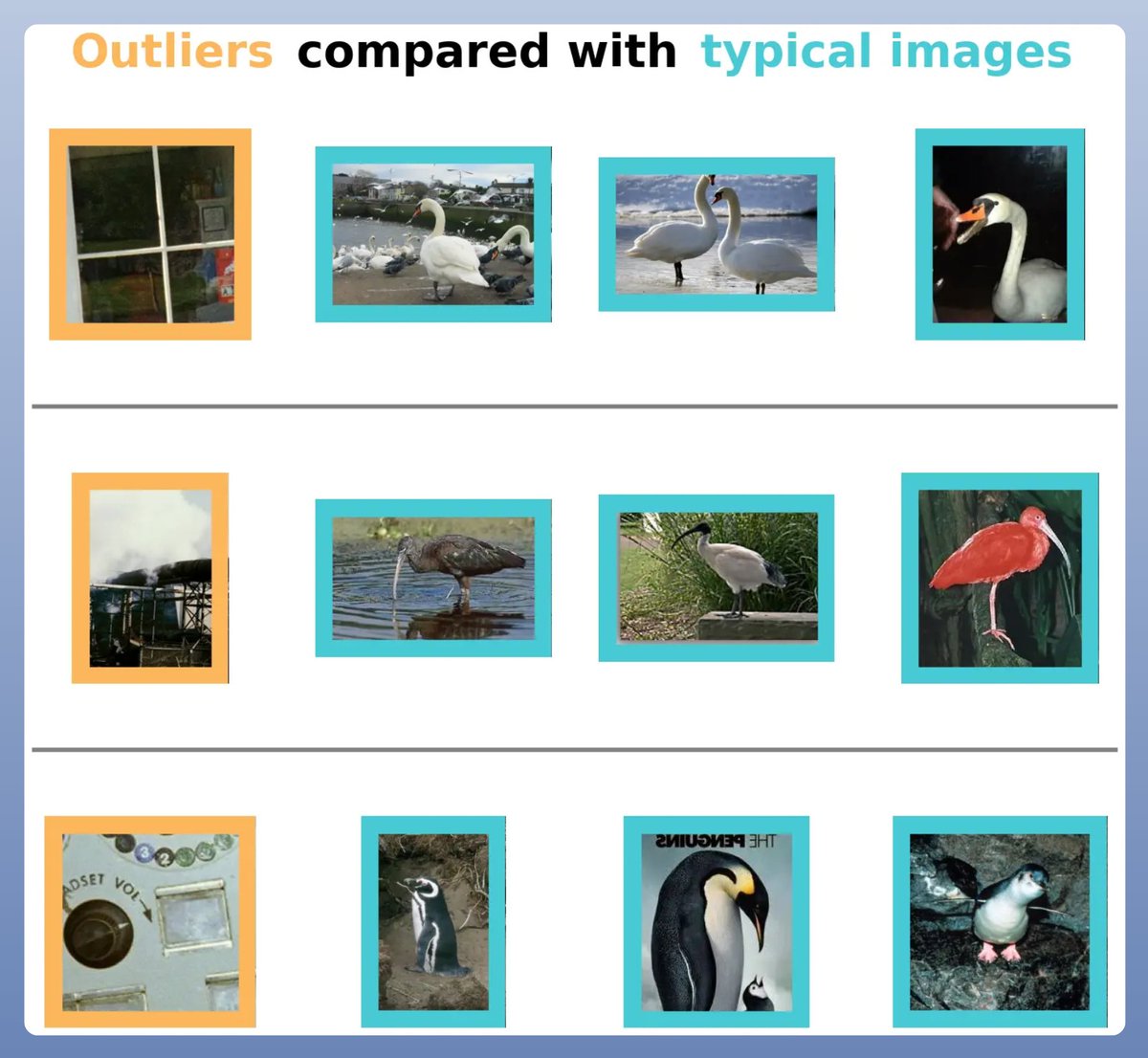
- outliers
- label errors
- (near) duplicates
- low-quality/non-IID sampling

Developed at MIT, Datalab works with all types of data & any trained model!

1/n Image
How to use Datalab❓

Datalab works with any ML model you have already trained!

It's like a magic wand! 🪄

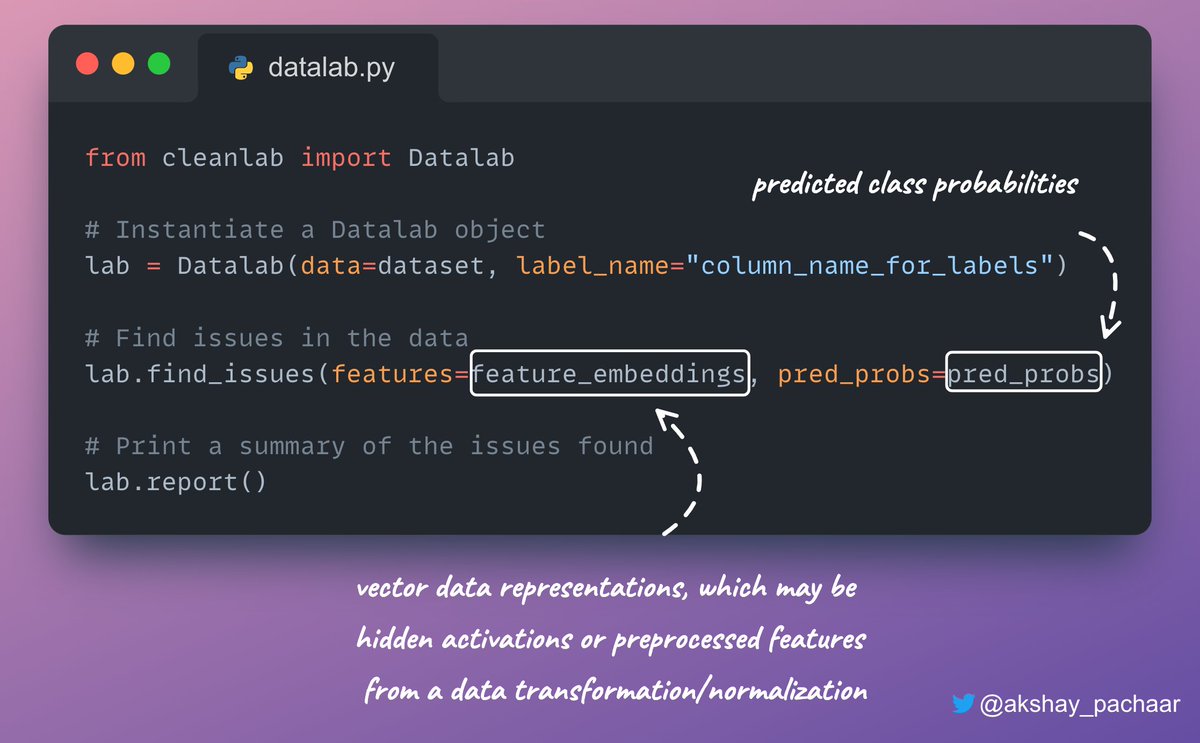
Inspecting your dataset with Datalab merely requires the code below! 👇

2/n Image
For each type of issue, Datalab automatically estimates:

- Which examples in the dataset suffer from this issue
- How severe this issue is (via a quality score)
- And how severe overall the issue is across the dataset.

1️⃣ Detect Outliers

3/n Image
Read 7 tweets
Jul 11
Let's build a "Chat with your docs" RAG application, step-by-step:
Before we begin, take a look at what we're about to create!

We'll be using:

- @Cohere highly capable ⌘R+ as the LLM
- @Llama_Index for orchestration
- @Streamlit for the UI

Everything in just ~170 lines of Python code, that I've shared at the end! 🔥

Let's go! 🚀
The architecture diagram presented below illustrates some of the key components & how they interact with each other!

It will be followed by detailed descriptions & code for each component: Image
Read 11 tweets
Jul 9
5 GitHub repositories that will give you superpowers as an AI/ML Engineer:
1️⃣ Awesome Artificial Intelligence

A curated list of Artificial Intelligence:

- courses
- books
- video lectures
- and papers with code

Check this out 👇
github.com/owainlewis/awe…
2️⃣ Cleanlab

You're missing out on a lot if you haven't started using Cleanlab yet!

Cleanlab helps you clean data and labels by automatically detecting issues in a ML dataset.

It's like a magic wand! 🪄✨

Check this out👇
github.com/cleanlab/clean…
Read 7 tweets
Jul 8
This is the future of building RAGs. Let me introduce you to DSPy today:
In terms of analogy, DSPy is to RAG as PyTorch is to DNNs.

DSPy : RAG :: PyTorch : DNNs

To understand DSPy, we need to grasp three key concepts:

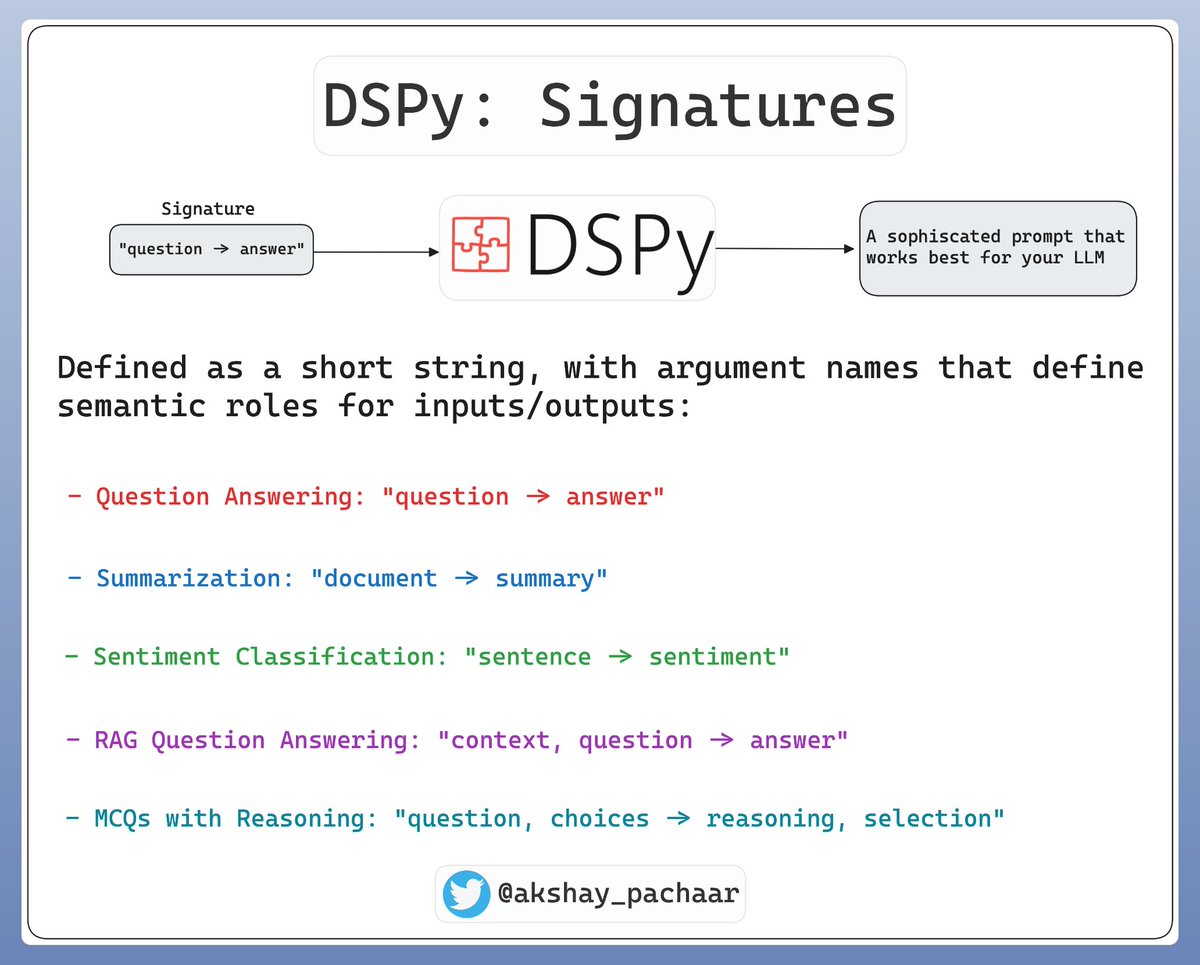
- Signatures
- Modules
- Optimizers

Let's delve into each one! 🚀 Image
1️⃣ Signature

We use a signature to tell DSPy what to do instead of how to do; they save us from writing gigantic & complex prompts.

DSPy supports inline short strings as signatures; however, you can always write a class for it if necessary! Image
Read 9 tweets

Did Thread Reader help you today?

Support us! We are indie developers!


This site is made by just two indie developers on a laptop doing marketing, support and development! Read more about the story.

Become a Premium Member ($3/month or $30/year) and get exclusive features!

Become Premium

Don't want to be a Premium member but still want to support us?

Make a small donation by buying us coffee ($5) or help with server cost ($10)

Donate via Paypal

Or Donate anonymously using crypto!

Ethereum

0xfe58350B80634f60Fa6Dc149a72b4DFbc17D341E copy

Bitcoin

3ATGMxNzCUFzxpMCHL5sWSt4DVtS8UqXpi copy

Thank you for your support!

Follow Us!

:(