Shubham Saboo Profile picture
Sep 25 9 tweets 3 min read Read on X
Build an Autonomous AI Web Agent that can take actions on its own in just 10 lines of Python Code (step-by-step instructions):
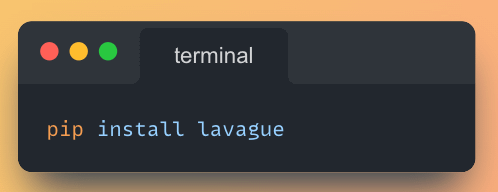
1. Install the required Python library

You will need to set the OPENAI_API_KEY variable in your local environment with a valid API key for this example to work. Image
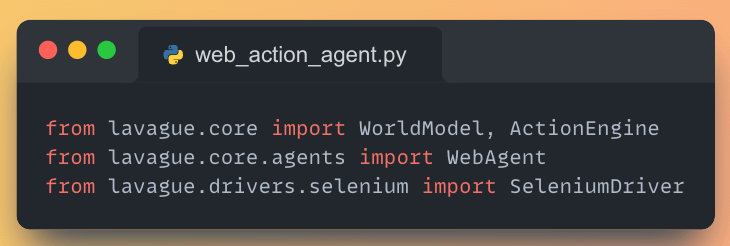
2. Import the necessary components

This sets up the foundation for our web automation agent. Image
3. Initialize the core components of LaVague

The SeleniumDriver runs in headless mode, ActionEngine controls interactions, and WorldModel represents the web environment. Image
4. Create the WebAgent and set the target URL

This agent combines the world model and action engine, allowing it to understand and interact with web pages. Image
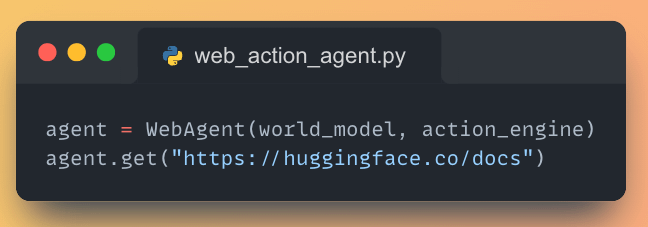
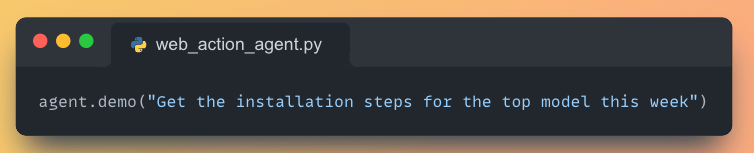
5. Giving a task to the web AI Agent

We're asking the agent to find and retrieve installation steps for the most popular model. Image
Working Application demo using @Gradio

Paste the above code in vscode or pycharm and run the following command: 'python web_action_agent.py'
@Gradio Find all the awesome LLM Apps demo with RAG and AI agents in my AI newsletter for 10x developers.

P.S: Don't forget to subscribe for FREE to show your support 🌟

theunwindai.com
@Gradio If you find this useful, RT to share it with your friends.

Don't forget to follow me @Saboo_Shubham_ for more such LLM tips and tutorials.

• • •

Missing some Tweet in this thread? You can try to force a refresh

 

Keep Current with Shubham Saboo

Shubham Saboo Profile picture

Stay in touch and get notified when new unrolls are available from this author!

Read all threads

This Thread may be Removed Anytime!

PDF

Twitter may remove this content at anytime! Save it as PDF for later use!

Try unrolling a thread yourself!

how to unroll video
  1. Follow @ThreadReaderApp to mention us!

  2. From a Twitter thread mention us with a keyword "unroll"
@threadreaderapp unroll

Practice here first or read more on our help page!

More from @Saboo_Shubham_

Sep 20
Run an Opensource conversational AI model like ChatGPT voice mode locally on your computer in just three simple steps (100 % free and offline):
1. Install the Python Library Moshi MLX Image
2. Run the following command in your terminal to open the web application.

You mi Image
Read 7 tweets
Sep 14
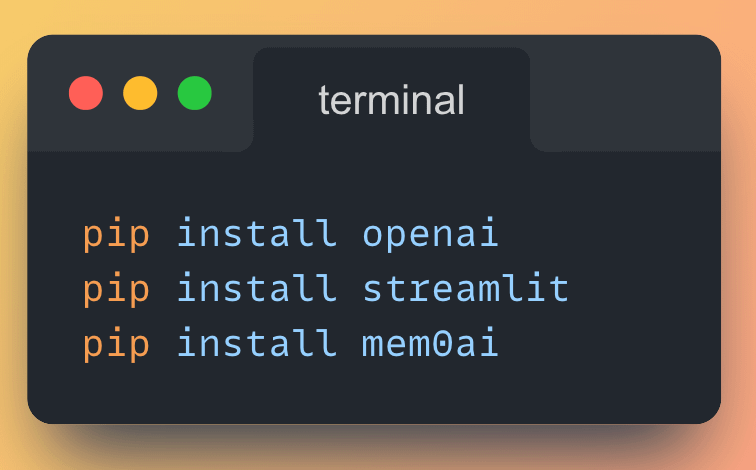
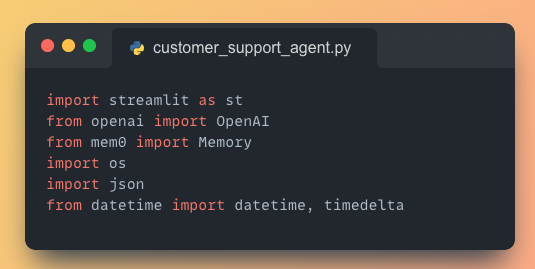
Build an AI Customer Support Agent with memory using GPT-4o and vector database in less than 100 lines of Python Cod (step-by-step instructions):
1. Install the necessary Python Libraries

Run the following commands from your terminal to install the required libraries: Image
2. Import necessary libraries

• Streamlit for building the web app
• OpenAI for using GPT-4o
• Mem0 for personalized memory layer Image
Read 13 tweets
Aug 17
Build an LLM app with Mixture of AI Agents using small Opensource LLMs that can beat GPT-4o in just 40 lines of Python Code (step-by-step instructions):
1. Install the necessary Python Libraries

Run the following commands from your terminal to install the required libraries: Image
2. Import necessary libraries

• Streamlit for the web interface
• asyncio for asynchronous operations
• Together AI for LLM interactions Image
Read 12 tweets
Aug 15
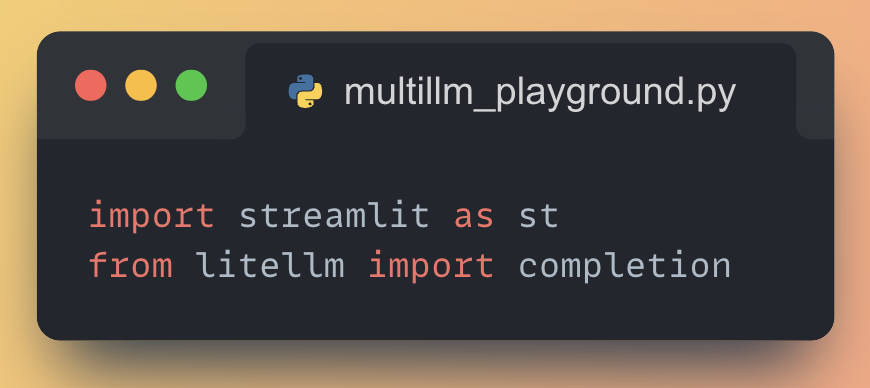
Build a Multi LLM playground with OpenAI GPT-4o, Claude Sonnet 3.5 and Cohere Command R in just 15 lines of Python Code (step-by-step instructions):
1. Install the necessary Python Libraries

Run the following commands from your terminal to install the required libraries: Image
2. Import necessary libraries

• Streamlit for the web interface
• LiteLLM for unified access to multiple Language Models Image
Read 12 tweets
Jul 28
3 ways to run Llama 3.1 locally on your computer (100% free and without internet):
1. Ollama + OpenWebUI

Ollama is an opensource project that provides an easy way to download and run local LLMs like Llama 3.1 on your computer.

Ollama integrates with the OpenWebUI project, which gives you a web-based ChatGPT like user interface to interact with the local LLMs.
2. LM Studio

LM Studio is a desktop app designed for running local and opensource LLMs like Llama 3.1 on your computer.

It is a tool that allows you to run Llama 3.1 and other opensource LLMs offline on your local PC.
Read 5 tweets
Jul 23
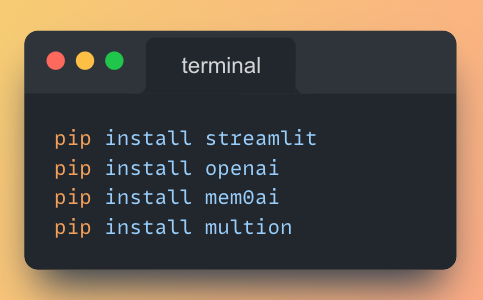
Build an AI Research Agent with memory using GPT-4o-mini and vector database to search relevant research papers based on your interest in just 40 lines of Python Code (step-by-step instructions):
1. Install the necessary Python Libraries

Run the following commands from your terminal to install the required libraries: Image
2. Import necessary libraries

• Streamlit for building the web app
• OpenAI for using GPT-4o-mini
• MultiOn for accessing Arxiv and getting the data (Internet of Agent)
• Mem0 for personalized memory layer Image
Read 12 tweets

Did Thread Reader help you today?

Support us! We are indie developers!


This site is made by just two indie developers on a laptop doing marketing, support and development! Read more about the story.

Become a Premium Member ($3/month or $30/year) and get exclusive features!

Become Premium

Don't want to be a Premium member but still want to support us?

Make a small donation by buying us coffee ($5) or help with server cost ($10)

Donate via Paypal

Or Donate anonymously using crypto!

Ethereum

0xfe58350B80634f60Fa6Dc149a72b4DFbc17D341E copy

Bitcoin

3ATGMxNzCUFzxpMCHL5sWSt4DVtS8UqXpi copy

Thank you for your support!

Follow Us!

:(