New video: Tracking every item in my house with video using Google Gemini 🎥 -> 🛋️
I call it "KeepTrack" 😎
Input: 10-minute casual walk around video.
Output: Structured database w/ 70+ items.
Cost: ~$0.07 w/ caching, ~$0.10 w/o caching.
Full details... 🧵
I call it "KeepTrack" 😎
Input: 10-minute casual walk around video.
Output: Structured database w/ 70+ items.
Cost: ~$0.07 w/ caching, ~$0.10 w/o caching.
Full details... 🧵
TL;DR
Gemini features which make this possible:
1. Video processing.
2. Long context windows (video data = ~300 tokens per second, 10 minute video = 165,000 tokens).
3. Context caching (process inputs once, inference for 4x cheaper).
Prices are with Gemini 1.5 Flash.
Gemini features which make this possible:
1. Video processing.
2. Long context windows (video data = ~300 tokens per second, 10 minute video = 165,000 tokens).
3. Context caching (process inputs once, inference for 4x cheaper).
Prices are with Gemini 1.5 Flash.

1. Video Processing/Prompting
Intuition: Show *and* tell.
Technical: Video = 4 modalities in one: vision, audio, time, text (Gemini can read text in video frames).
Instead of writing down every item in my house, I just walked through pointing at things and talking about them.
Gemini tracked everything I said/saw almost flawlessly (it missed a few things due to 1 FPS sampling but this will get better).
Doing this via text/photos alone would've taken much longer.
There are many more fields/problems where video input unlocks a whole new range of possibilities.
Intuition: Show *and* tell.
Technical: Video = 4 modalities in one: vision, audio, time, text (Gemini can read text in video frames).
Instead of writing down every item in my house, I just walked through pointing at things and talking about them.
Gemini tracked everything I said/saw almost flawlessly (it missed a few things due to 1 FPS sampling but this will get better).
Doing this via text/photos alone would've taken much longer.
There are many more fields/problems where video input unlocks a whole new range of possibilities.

2. Long Context Windows
Generative models like Gemini generate outputs based on their inputs.
And Gemini’s long context windows mean they can create outputs based on incredibly large amounts of input data.
Gemini Flash can handle 1 million input tokens (a token is a small piece of input information whether text, image or audio).
And Gemini Pro can handle 2 million input tokens.
This long context window is important in our use case because video data requires far more tokens than words.
In KeepTrack, our 4000 word text-based instructions equals ~11,000 tokens.
However, our 10 minute 30FPS 720p house tour video equals ~165,000 tokens (~300 tokens per frame).
This means that even with 176,000 input tokens, Gemini still has plenty of room to move if we needed to input a longer video or more instructions.
Without a long context window input, our use case wouldn’t be possible.
From a developer standpoint, the benefits of a long context window mean less data preprocessing and wrangling and more letting the model do the heavy lifting.
And from an end user standpoint, it means there’s no multi-step process on the frontend to upload separate pieces of data.
Generative models like Gemini generate outputs based on their inputs.
And Gemini’s long context windows mean they can create outputs based on incredibly large amounts of input data.
Gemini Flash can handle 1 million input tokens (a token is a small piece of input information whether text, image or audio).
And Gemini Pro can handle 2 million input tokens.
This long context window is important in our use case because video data requires far more tokens than words.
In KeepTrack, our 4000 word text-based instructions equals ~11,000 tokens.
However, our 10 minute 30FPS 720p house tour video equals ~165,000 tokens (~300 tokens per frame).
This means that even with 176,000 input tokens, Gemini still has plenty of room to move if we needed to input a longer video or more instructions.
Without a long context window input, our use case wouldn’t be possible.
From a developer standpoint, the benefits of a long context window mean less data preprocessing and wrangling and more letting the model do the heavy lifting.
And from an end user standpoint, it means there’s no multi-step process on the frontend to upload separate pieces of data.
3. Context Caching
Context caching = process information once, store in cache, perform several passes for 4x less.
In KeepTrack, we perform three passes of the same video to generate an accurate structured data output of household items.
Rather than process the video from scratch for each pass, context caching means we can process it once and use it as inputs to a subsequent step at a far lower cost.
From a developer standpoint, context caching means 4x cheaper input token processing.
From an end user standpoint, context caching means more accurate results due to the Gemini being able to do multiple rounds of looking at the data.
Thanks to context caching, processing a 10-minute video 3x and extracting high-quality itemised information cost less than 10c.
Context caching = process information once, store in cache, perform several passes for 4x less.
In KeepTrack, we perform three passes of the same video to generate an accurate structured data output of household items.
Rather than process the video from scratch for each pass, context caching means we can process it once and use it as inputs to a subsequent step at a far lower cost.
From a developer standpoint, context caching means 4x cheaper input token processing.
From an end user standpoint, context caching means more accurate results due to the Gemini being able to do multiple rounds of looking at the data.
Thanks to context caching, processing a 10-minute video 3x and extracting high-quality itemised information cost less than 10c.
So how does it happen?
We use three major steps:
1. Video + initial prompt + examples -> check outputs, fix if necessary.
2. Video + secondary prompt + examples -> check outputs, fix if necessary.
3. Video + final prompt + examples -> check outputs, fix if necessary.
And two major model instances:
1. Gemini Model for doing the video inference (with a different input prompt each step).
2. Gemini Model for fixing the CSV if it fails validation checks (the check is the same for each step).
Each builds upon the previous the outputs of the previous step.
Step 1 produces the initial information extraction and details.
Step 2 takes step 1's outputs and tries to expand on them if necessary.
Step 3 reviews the combined outputs of step 1 and 2 and finalizes them.
All major steps use the same Gemini model instance with a context cached video input.
Each step has a verification step to make sure its outputs are valid (e.g. fix the CSV outputs if simple programmatic checks fail to make sure they are formatted correctly).
We use three major steps:
1. Video + initial prompt + examples -> check outputs, fix if necessary.
2. Video + secondary prompt + examples -> check outputs, fix if necessary.
3. Video + final prompt + examples -> check outputs, fix if necessary.
And two major model instances:
1. Gemini Model for doing the video inference (with a different input prompt each step).
2. Gemini Model for fixing the CSV if it fails validation checks (the check is the same for each step).
Each builds upon the previous the outputs of the previous step.
Step 1 produces the initial information extraction and details.
Step 2 takes step 1's outputs and tries to expand on them if necessary.
Step 3 reviews the combined outputs of step 1 and 2 and finalizes them.
All major steps use the same Gemini model instance with a context cached video input.
Each step has a verification step to make sure its outputs are valid (e.g. fix the CSV outputs if simple programmatic checks fail to make sure they are formatted correctly).

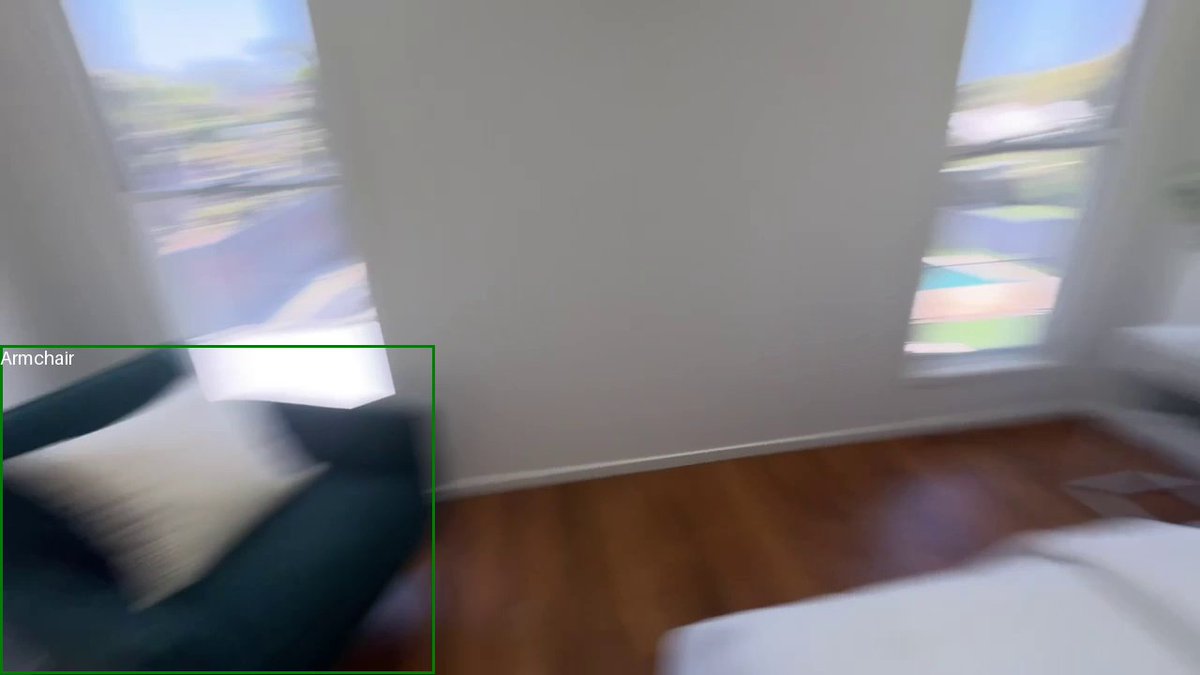
Bonus: Gemini can do bounding boxes :D
Even works on:
- blurry frames (some frames are blurry due to 1 FPS sampling)
- kind of obscure items like "weight bag"
- multiple items (e.g. 3x outdoor benches)
- items in packaging (e.g. folding chairs in their bags)
All boxes were output by Gemini given only the frame of the video at the timestamp where Gemini said the item was + the item name Gemini said was at the timestamp.
Even works on:
- blurry frames (some frames are blurry due to 1 FPS sampling)
- kind of obscure items like "weight bag"
- multiple items (e.g. 3x outdoor benches)
- items in packaging (e.g. folding chairs in their bags)
All boxes were output by Gemini given only the frame of the video at the timestamp where Gemini said the item was + the item name Gemini said was at the timestamp.


Bonus 2: I created a barebones web app to inspect/correct the results.
Most of them were more than enough for simple record keeping.
Most of them were more than enough for simple record keeping.
Tidbits & takeaways.

Future avenues/other things I tried:
• Creating a "story mode"/"memory palace" then turning the story into structured data actually worked *really* well. Example: "watch this video and create a memory palace story of all the major items"
• Creating a "story mode"/"memory palace" then turning the story into structured data actually worked *really* well. Example: "watch this video and create a memory palace story of all the major items"

Why do this?
1. Fun :D
3. I actually had this problem. Trying to sell my place/get a small office/apply for different insurance and they asked "how much should we insure you for?" and so I decided to find out an actual answer.
Things I've tried this workflow on: office, storage shed, home, record collection (works quite well).
4. This was my entry to a Kaggle competition to showcase the Gemini Long Context window.
1. Fun :D
3. I actually had this problem. Trying to sell my place/get a small office/apply for different insurance and they asked "how much should we insure you for?" and so I decided to find out an actual answer.
Things I've tried this workflow on: office, storage shed, home, record collection (works quite well).
4. This was my entry to a Kaggle competition to showcase the Gemini Long Context window.
All code + prompts + data is available.
You could replicate this similar workflow by changing the Gemini API key + the input video (or try it with my video).
• Code + prompts: kaggle.com/code/mrdbourke…
• Data: kaggle.com/datasets/mrdbo…
• Original competition: kaggle.com/competitions/g…
You could replicate this similar workflow by changing the Gemini API key + the input video (or try it with my video).
• Code + prompts: kaggle.com/code/mrdbourke…
• Data: kaggle.com/datasets/mrdbo…
• Original competition: kaggle.com/competitions/g…
• • •
Missing some Tweet in this thread? You can try to
force a refresh