Kubernetes Command :Cheat Sheet for DevOps Professionals
1. Working with Pods
2. Working with Deployments
3. Working with Services
4. Working with ConfigMaps and Secrets
5. Working with Namespaces
6. Managing Nodes
7. Working with Persistent Volumes (PV) and Claims (PVC)
8. Configuring and Viewing Contexts
9. Debugging Resources
10. Managing Jobs and CronJobs
11. Applying and Deleting Manifests
Let's check step by step!! 👇👇
1. Working with Pods
2. Working with Deployments
3. Working with Services
4. Working with ConfigMaps and Secrets
5. Working with Namespaces
6. Managing Nodes
7. Working with Persistent Volumes (PV) and Claims (PVC)
8. Configuring and Viewing Contexts
9. Debugging Resources
10. Managing Jobs and CronJobs
11. Applying and Deleting Manifests
Let's check step by step!! 👇👇
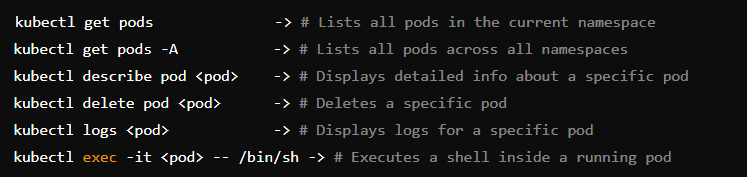
1. Working with Pods 
2. Working with Deployments
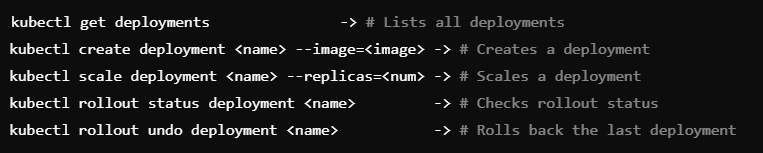
3. Working with Services

4. Working with ConfigMaps and Secrets
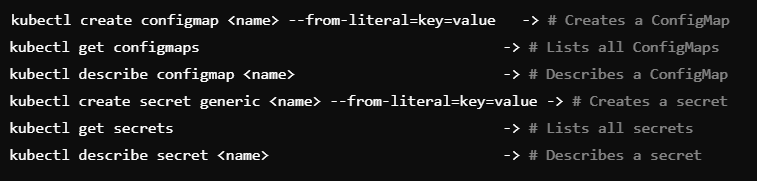
5. Working with Namespaces

6. Managing Nodes
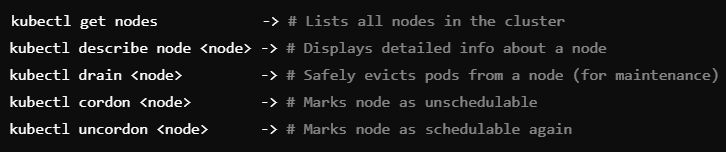
7. Working with Persistent Volumes (PV) and Claims (PVC)

8. Configuring and Viewing Contexts

9. Debugging Resources
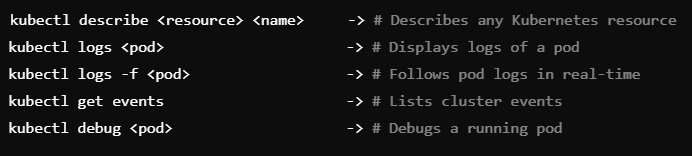
10. Managing Jobs and CronJobs

11. Applying and Deleting Manifests

This quick cheat sheet covers the most important Kubernetes commands every DevOps professional should know.
If you find this thread helpful then share with more Tech Professionals!
If you find this thread helpful then share with more Tech Professionals!
https://x.com/techyoutbe/status/1870352551532486957
• • •
Missing some Tweet in this thread? You can try to
force a refresh