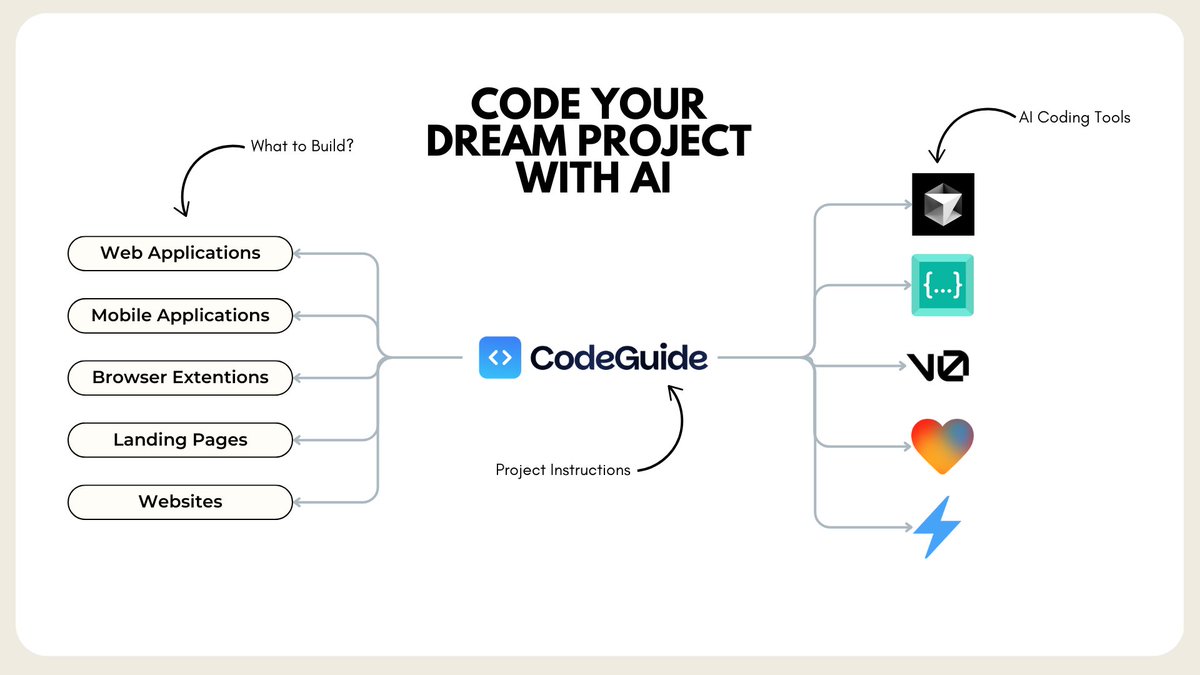
Code your Dream Project with AI
Use tools like:
- Cursor to code complex projects.
- bolt, lovable to code websites, micro SaaS.
- v0 lovable to code frontend screens
Step by Step Guide to code your first software with AI:
(Bookmark this for future use)
Use tools like:
- Cursor to code complex projects.
- bolt, lovable to code websites, micro SaaS.
- v0 lovable to code frontend screens
Step by Step Guide to code your first software with AI:
(Bookmark this for future use)
First of all, you need to understand how AI coding works.
We have amazing LLM models like Claude Sonnet 3.5 that can write high quality code (based on instructions) in any famous coding language.
It can help you build:
- web apps
- mobile apps
- browser extentions
- downloadable software
- landing pages or websites
You name a use case, AI models are now able to code that.
We have amazing LLM models like Claude Sonnet 3.5 that can write high quality code (based on instructions) in any famous coding language.
It can help you build:
- web apps
- mobile apps
- browser extentions
- downloadable software
- landing pages or websites
You name a use case, AI models are now able to code that.
We also have amazing AI coding tools that help us code, debug and deploy your project.
Tools like:
- cursor AI (famous AI code IDE)
- bolt .new (simple IDE on the web)
- lovable (similar to bolt, getting better)
And more.
Each AI coding tool has its own superpowers.
Some can code softwares really good, some code websites or landing pages.
Tools like:
- cursor AI (famous AI code IDE)
- bolt .new (simple IDE on the web)
- lovable (similar to bolt, getting better)
And more.
Each AI coding tool has its own superpowers.
Some can code softwares really good, some code websites or landing pages.
So we need to pick the best AI coding tool for your use case and use Sonnet 3.5 model to get our first project done.
AI coding = Detailed Documentation + Step by Step Prompting.
Let me explain this:
AI coding = Detailed Documentation + Step by Step Prompting.
Let me explain this:
Claude Sonnet 3.5 and other coding models works great when they are given proper plan.
A detailed end to end blueprint of the project.
Whats the project is all about? What Tech Stack are we using? Whats the app flow? Design instructions? Backend Structure etc
The point is: Don't let AI models assume things! Give them proper plan to follow.
A detailed end to end blueprint of the project.
Whats the project is all about? What Tech Stack are we using? Whats the app flow? Design instructions? Backend Structure etc
The point is: Don't let AI models assume things! Give them proper plan to follow.

Now let me tell you how to work with 4 major tools.
- Cursor/Windsurf
- Bolt .new
- Lovable
We choose the AI coding tool and we provide them Documentation around our project.
Lets talk about what Documentation you need to create?
- Cursor/Windsurf
- Bolt .new
- Lovable
We choose the AI coding tool and we provide them Documentation around our project.
Lets talk about what Documentation you need to create?
1. Project Requirements Doc (PRD)
It provides the overview of the project. It covers all major parts of your project in a concise way
- Introduction
- Tech stack
- Frontend
- Backend
etc
It provides the overview of the project. It covers all major parts of your project in a concise way
- Introduction
- Tech stack
- Frontend
- Backend
etc

2. App flow Document: This document provides a complete rundown of the project page-by-page like:
"User starts their journey from x landing page and sign up with Google and land on dashboard. On dashboard there are y, z, a, b sections......"
This is also a very important document for AI model to map out the application in its context.
"User starts their journey from x landing page and sign up with Google and land on dashboard. On dashboard there are y, z, a, b sections......"
This is also a very important document for AI model to map out the application in its context.

3. Tech Stack document: This document covers all technical information about what:
- What tech stack we are using?
- What packages, dependencies to install?
- What APIs we are using? Their docs
Basically it provides AI models the framework to work with, for that project.
These 3 documents are CORE documents that provides 60% of context about your project.
- What tech stack we are using?
- What packages, dependencies to install?
- What APIs we are using? Their docs
Basically it provides AI models the framework to work with, for that project.
These 3 documents are CORE documents that provides 60% of context about your project.

Then you should alse create:
- Frontend Guidelines
- Backend Structure
- File Structure Doc
These 3 docs are specific for their fuction and it provides function specific details.
- Frontend Guidelines
- Backend Structure
- File Structure Doc
These 3 docs are specific for their fuction and it provides function specific details.

You can use GPT o1 model to get these documents done.
This is a MUST step for AI coding practice. You skip and and you regret it when you get tons of errors and hallucinations from AI models.
I automated this process for you with CodeGuide.
Create all your Project Development Documentation with CodeGuide.
This is a MUST step for AI coding practice. You skip and and you regret it when you get tons of errors and hallucinations from AI models.
I automated this process for you with CodeGuide.
Create all your Project Development Documentation with CodeGuide.

But what would I do after I download all documents?
Let me tell you what docs you would need for what tools.
If you work with Cursor, you need to create a folder in root directory with "instructions" or "Documentation" name.
Then attach all documents you've created with CodeGuide.
Then open a new Composer terminal and ask: What do you know about my project? And tag the folder.
Cursor will go tead through all docs and provide you the overview.
Perfect now you can start asking it Step by Step, what to build.
Let me tell you what docs you would need for what tools.
If you work with Cursor, you need to create a folder in root directory with "instructions" or "Documentation" name.
Then attach all documents you've created with CodeGuide.
Then open a new Composer terminal and ask: What do you know about my project? And tag the folder.
Cursor will go tead through all docs and provide you the overview.
Perfect now you can start asking it Step by Step, what to build.

If you work with Bolt or Lovable.
You need Project Requirements Document + app flow document.
Add PRD first, ask it: before you start coding, tell me what do you understand about my project?
And then once you get the response you attach App flow document. This will provide end to end flow of your project.
Then you can start with your project setup, and coding the components step by step.
You need Project Requirements Document + app flow document.
Add PRD first, ask it: before you start coding, tell me what do you understand about my project?
And then once you get the response you attach App flow document. This will provide end to end flow of your project.
Then you can start with your project setup, and coding the components step by step.

Bottomline:
AI models can code, but they hallucinate, make errors if we don't provide project context.
Project Development Documentation solves this issue. (with CodeGuide)
AI tools are use case specific. Pick your use case and then use the best AI coding tool for that purpose.
For simple projects use bolt, lovable, replit and v0
For complex applications use Cursor or Windsurf
AI models can code, but they hallucinate, make errors if we don't provide project context.
Project Development Documentation solves this issue. (with CodeGuide)
AI tools are use case specific. Pick your use case and then use the best AI coding tool for that purpose.
For simple projects use bolt, lovable, replit and v0
For complex applications use Cursor or Windsurf
For simple projects attach PRD + app flow doc to begin with and then attach relevant documents on the go.
Like when you need to build backend, attach backend structure doc.
This approach don't put stress on thess tools and provide the right context at right time.
For Cursor/Windsurf create a folder and attach all docs in the beginning.
Like when you need to build backend, attach backend structure doc.
This approach don't put stress on thess tools and provide the right context at right time.
For Cursor/Windsurf create a folder and attach all docs in the beginning.
Sign up with today.
I have 30% off for Yearly plan for limited time.
If you need a discount on monthly plan, DM me I have few coupons left.
But guys, get strated. Learn AI code. It'll change your life for good.
Peace
CJCodeGuide.dev
I have 30% off for Yearly plan for limited time.
If you need a discount on monthly plan, DM me I have few coupons left.
But guys, get strated. Learn AI code. It'll change your life for good.
Peace
CJCodeGuide.dev
• • •
Missing some Tweet in this thread? You can try to
force a refresh