Abhishek Profile picture
Feb 23 6 tweets 2 min read Read on X
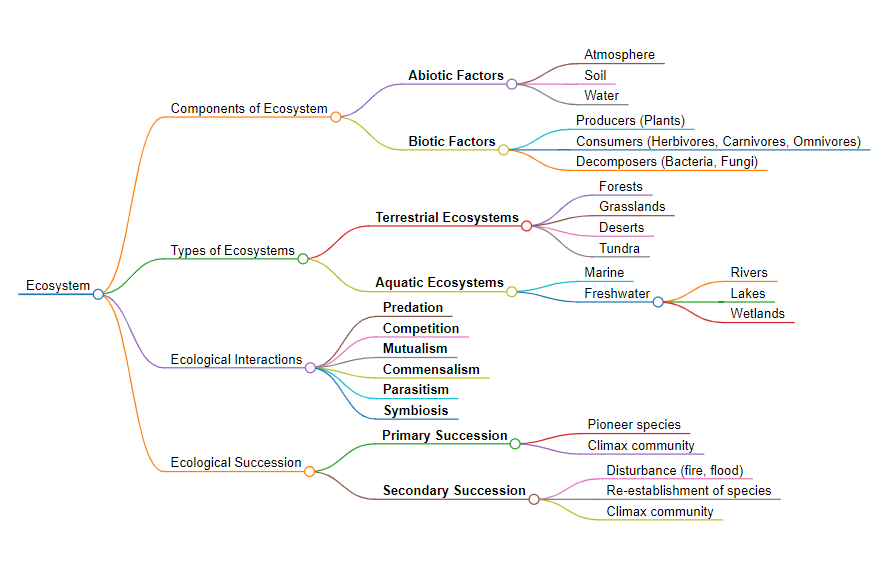
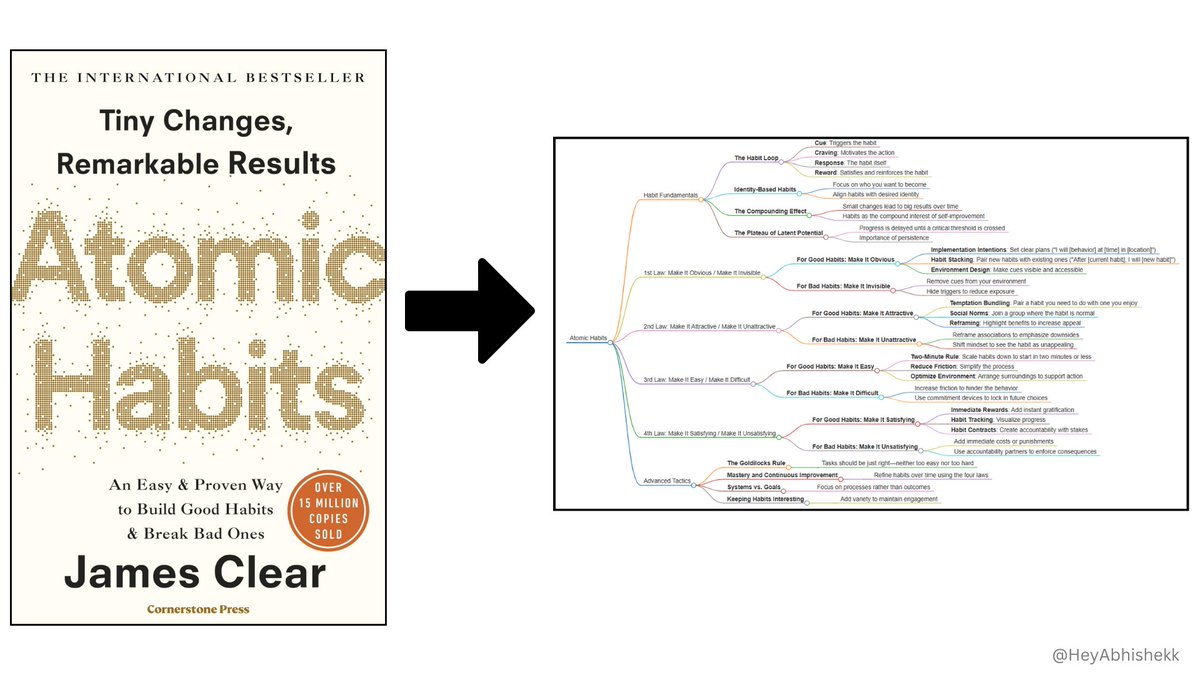
Grok 3 can now create Mind Maps for books.

No more wasting hours creating visuals for studying or breaking down complex books.

Here’s how to create a mind map in just few minutes: Image
1. Head over to Grok

Begin by identifying the concept or process you want to map.

Then Write your concept with a tailored prompt.

Prompt → "Create a mind map of [Your Topic]. List topics as central ideas, main branches, and sub-branches."
2. Transforming Text into Structure

- Once Grok responds.
- Ask It to create a mind map in markdown format.
- Copy markdown content for further use.

This is where your text begins its transformation into a visual entity.
3. Visualize with Markmap

- Visit Markmap
- Paste your markdown content into the editor.

Watch your ideas grow into a colorful mind map as if by magic.

After finishing, download it as an interactive HTML for online use or as an SVG for pictures.
Pro Tip:

Experiment with various prompts and structures to tailor your mind map perfectly to your vision.

Share your creations and insights in the comments to inspire others.
I hope you've found this guide helpful, then:

1. Follow me at @HeyAbhishekk for more AI insights.

2. Like and Repost the quote below with your friends.

• • •

Missing some Tweet in this thread? You can try to force a refresh

 

Keep Current with Abhishek

Abhishek Profile picture

Stay in touch and get notified when new unrolls are available from this author!

Read all threads

This Thread may be Removed Anytime!

PDF

Twitter may remove this content at anytime! Save it as PDF for later use!

Try unrolling a thread yourself!

how to unroll video
  1. Follow @ThreadReaderApp to mention us!

  2. From a Twitter thread mention us with a keyword "unroll"
@threadreaderapp unroll

Practice here first or read more on our help page!

More from @HeyAbhishekk

Feb 22
Google loves keeping valuable websites from you a secret.

Here, 11 cool websites you probably don’t know existed (until now) :

10/10 would bookmark: Image
1. Otio AI - @otioai

Otio is fastest way to do research.

Generate AI summaries, chat with docs and automate complex workflows.

🔗 otio.ai/?ref=abhishek
2. Vivago AI - @vivago_ai

Vivago helps you create AI videos with just text in under few seconds.

All the footage in the video comes from vivago's text-to-video generation.

🔗 vivago. ai
Read 13 tweets
Feb 15
Breaking 🚨

AI can now track your finances in real time.

This AI integrates to your Bank Account and analyzes your spending and finds savings.

Here are incredible use cases already:
1. Connect Your Bank with @RowsHQ

Head to and connect your bank.

Securely connects with 12,000+ banks across the US, EU, and Canada.

Syncs transactions daily for a real-time view of your finances. Rows.com
2. Automate Expense Tracking

Import all bank transactions in one click.

Set up automatic refreshes to keep records up to date.
Read 6 tweets
Feb 13
ChatGPT can now create Flowcharts and Diagrams.

No more wasting hundreds of hours creating visuals for presentations or research papers.

Here’s how to do it for free in a few minutes: Image
1️. Initiate with ChatGPT

Start by asking ChatGPT to outline the steps for your project.

Like a step-by-step roadmap to master Python.

Input your request, and voilà, receive a detailed step list.
2️. Craft Your Flowchart

Next, prompt ChatGPT to create a flowchart based on the steps provided.

Specify any particular arrangement needs, such as placing related steps together.

This customization ensures your diagram accurately reflects the process.
Read 6 tweets
Feb 7
Stop wasting $20 on ChatGPT.

I've discovered an excellent all-in-one AI tool that provides access to ChatGPT, DeepSeek-R1, Gemini, Midjourney, Perplexity, Runway, and more.

Let me show you how to use it↓ Image
🎯Meet GlobalGPT| @GlbGPT

Access ChatGPT, DeepSeek-R1, Grok, Gemini, Llama, Claude, Midjourney, Ideogram, Flux, Perplexity, Runway and more all in one place. Enjoy the ultimate convenience of AI Chat, Image, Video, and Search.

Visit: glbgpt.com
1. AI Chat

ChatGPT-o1, Grok, Gemini, Llama, Claude, DeepSeek-R1, MiniMax, QvQ, Mistral each model has different features, and here you can enjoy them to the fullest.
Read 8 tweets
Feb 5
ChatGPT can now create Mind Maps.

No more wasting hundreds of hours making visuals for studying or simplifying complex ideas.

Here’s how to do it for free in a few seconds: Image
1️. Head over to ChatGPT

Begin by identifying the concept or process you want to map.

Then Write your concept with a tailored prompt.

Prompt → "Create a mind map of [Your Topic]. List topics as central ideas, main branches, and sub-branches."
2. Transforming Text into Structure

- Once ChatGPT responds.
- Ask It to create mind map in markdown format.
- Copy markdown content for further use.

This is where your text begins its transformation into a visual entity.
Read 7 tweets
Feb 1
Google loves keeping valuable websites from you a secret.

Here, 11 cool websites you probably don’t know existed (until now) :

10/10 would bookmark: Image
1. Vivago AI - @vivago_ai

Vivago helps you create AI videos with just text in under few seconds.

All the footage in the video comes from vivago's text-to-video generation.

🔗 vivago.ai/?invitationcod…
2. Tiny Wow

Tiny Wow offers free online tools for just about anything you need.

🔗Tinywow. com
Read 13 tweets

Did Thread Reader help you today?

Support us! We are indie developers!


This site is made by just two indie developers on a laptop doing marketing, support and development! Read more about the story.

Become a Premium Member ($3/month or $30/year) and get exclusive features!

Become Premium

Don't want to be a Premium member but still want to support us?

Make a small donation by buying us coffee ($5) or help with server cost ($10)

Donate via Paypal

Or Donate anonymously using crypto!

Ethereum

0xfe58350B80634f60Fa6Dc149a72b4DFbc17D341E copy

Bitcoin

3ATGMxNzCUFzxpMCHL5sWSt4DVtS8UqXpi copy

Thank you for your support!

Follow Us!

:(