I code with AI tools for 6-7 hours daily.
Built over 36 projects in last 12 months.
Truth: "Build me ........... app" in 1 prompt is not possible.
So, here're all the MISTAKES you might be making with AI code:
Built over 36 projects in last 12 months.
Truth: "Build me ........... app" in 1 prompt is not possible.
So, here're all the MISTAKES you might be making with AI code:

1. No Planning.
I go from idea to a well written draft for my MVP in few hours with my planning hack.
I just turn on ChatGPT voice and we have one-on-one conversation about what do I want.
15 minute chat then I ask: "write me a well structured draft on all the tings we've finalized in this conversation"
I use ChatGPT voice as my brainstorm buddy, critique, web researcher and then draft writer.
In the end I get the core features of this MVP on one page.
Don't build blindly. Plan before you hunt.
I go from idea to a well written draft for my MVP in few hours with my planning hack.
I just turn on ChatGPT voice and we have one-on-one conversation about what do I want.
15 minute chat then I ask: "write me a well structured draft on all the tings we've finalized in this conversation"
I use ChatGPT voice as my brainstorm buddy, critique, web researcher and then draft writer.
In the end I get the core features of this MVP on one page.
Don't build blindly. Plan before you hunt.
2. NO Knowledge base for AI model
Then I take the idea draft, put it into @CodeGuidedev and write {coding docs} to build a knowledge base for AI coding models.
This step is important to reduce AI hallucinations for coding models.
Docs include:
- PRD
- App flow doc
- Tech Stack doc
- Frontend guidelines
- Backend structure
AI models can refer to these docs at any time to know what to build next and what not to build!
Then I take the idea draft, put it into @CodeGuidedev and write {coding docs} to build a knowledge base for AI coding models.
This step is important to reduce AI hallucinations for coding models.
Docs include:
- PRD
- App flow doc
- Tech Stack doc
- Frontend guidelines
- Backend structure
AI models can refer to these docs at any time to know what to build next and what not to build!

3. NOT picking the right tools
Every AI coding tool has it's own superpower. I published my findings on this few days back.
Every AI coding tool has it's own superpower. I published my findings on this few days back.
https://x.com/cj_zZZz/status/1900569981991137742
4. Not picking the right tech stack
AI models are trained on certain coding languages. Only use them for best code quality, and less errors.
Use these AI friendly Tech Stacks:
Frontend: NextJS/Vite/Flask
Database: Supabase (PostgreSQL)/Firebase
Auth: ClerkDev/Supabase/Firebase
AI: OpenAI/Claude/Gemini
AI models are trained on certain coding languages. Only use them for best code quality, and less errors.
Use these AI friendly Tech Stacks:
Frontend: NextJS/Vite/Flask
Database: Supabase (PostgreSQL)/Firebase
Auth: ClerkDev/Supabase/Firebase
AI: OpenAI/Claude/Gemini
5. Not building step by step
When you let AI to plan the next steps 8/10 times AI will mess up the codebase.
Use AI models just to execute the plan and implement the code.
Use a detailed plan like @CodeGuidedev 50-step implementation plan to force AI not to miss anything.
When you let AI to plan the next steps 8/10 times AI will mess up the codebase.
Use AI models just to execute the plan and implement the code.
Use a detailed plan like @CodeGuidedev 50-step implementation plan to force AI not to miss anything.
6. NO Debug prompting
Degugging is the most frustrating part of AI coding. To make it leas painful use these tricks.
- Attach the error and say "use chain of thought reasoning to find the core issue first and then plan step by step to fix the issue.
- Ask it to "follow the best practices of code. Search the web and find the fix for this issue"
- Only attach relevant files so AI can focus better.
Degugging is the most frustrating part of AI coding. To make it leas painful use these tricks.
- Attach the error and say "use chain of thought reasoning to find the core issue first and then plan step by step to fix the issue.
- Ask it to "follow the best practices of code. Search the web and find the fix for this issue"
- Only attach relevant files so AI can focus better.
7. No use of multiple AI models
1 AI model can't do everything. Use different models for different scenarios.
In Cursor/Windsurf:
Use Claude sonnet 3.5 for coding (yes for executing code it is better than 3.7.)
Use GPT o1/o3-mini-high to debug complex errors.
Use Gemini Flash 2.0 to scan the complete codebase and update docs.
1 AI model can't do everything. Use different models for different scenarios.
In Cursor/Windsurf:
Use Claude sonnet 3.5 for coding (yes for executing code it is better than 3.7.)
Use GPT o1/o3-mini-high to debug complex errors.
Use Gemini Flash 2.0 to scan the complete codebase and update docs.
8. No use if Starter Kits
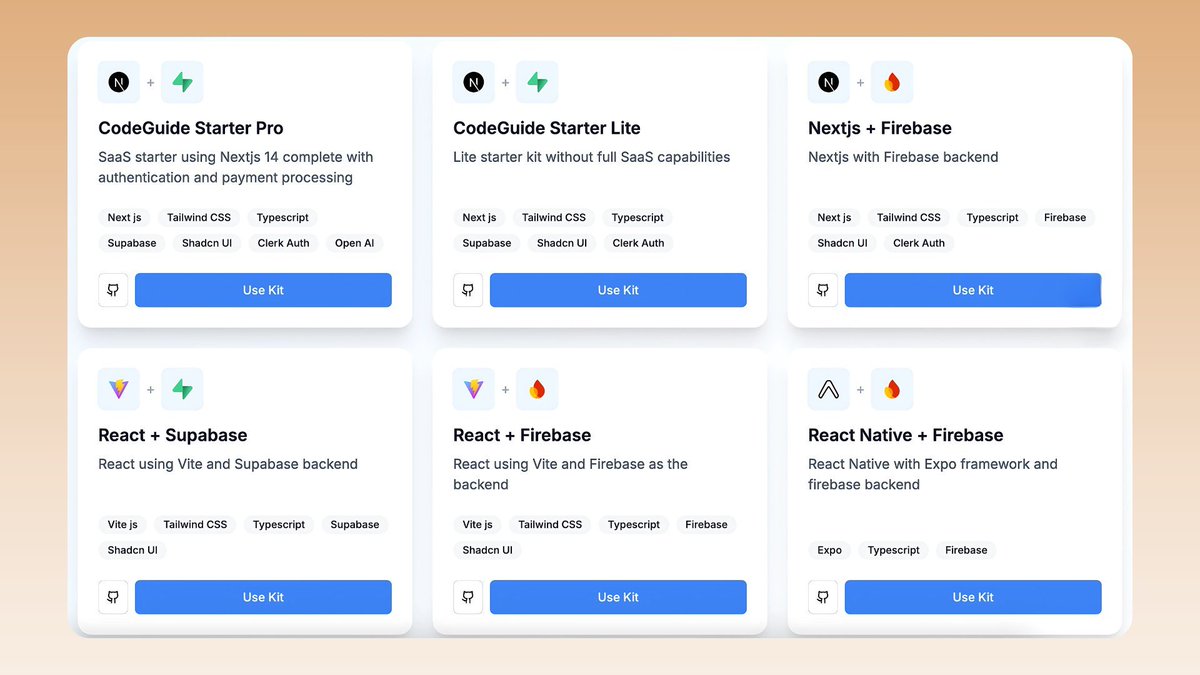
Why start from scratch everytime and burn requests/tokens and fix unwanted errors.
Use Starter kits (boilerplates) with pre-installed components to build fast.
CodeGuide have 6 boilerplates that're built for just AI coding models.
Why start from scratch everytime and burn requests/tokens and fix unwanted errors.
Use Starter kits (boilerplates) with pre-installed components to build fast.
CodeGuide have 6 boilerplates that're built for just AI coding models.
9. Quitting too early
AI coding is fun until you 3rd prompt, then you start fixing errors and refining the layout.
There will be 100s of errors, build issues, and AI will mess up the codebase.
But if you have strong foundation (docs and rules) you can tame AI better.
AI coding is fun until you 3rd prompt, then you start fixing errors and refining the layout.
There will be 100s of errors, build issues, and AI will mess up the codebase.
But if you have strong foundation (docs and rules) you can tame AI better.
TL;DR
- Plan the app before you open any AI coding tool
- Write detailed coding docs to provide context using @CodeGuidedev
- Pick best AI tool for your use case
- Use AI friendly Teck stacks only
- Prompt better when debugging
- Use different models for different work
- Plan the app before you open any AI coding tool
- Write detailed coding docs to provide context using @CodeGuidedev
- Pick best AI tool for your use case
- Use AI friendly Teck stacks only
- Prompt better when debugging
- Use different models for different work
• • •
Missing some Tweet in this thread? You can try to
force a refresh