Model Context Protocol (MCP), clearly explained:
MCP is like a USB-C port for your AI applications.
Just as USB-C offers a standardized way to connect devices to various accessories, MCP standardizes how your AI apps connect to different data sources and tools.
Let's dive in! 🚀
Just as USB-C offers a standardized way to connect devices to various accessories, MCP standardizes how your AI apps connect to different data sources and tools.
Let's dive in! 🚀
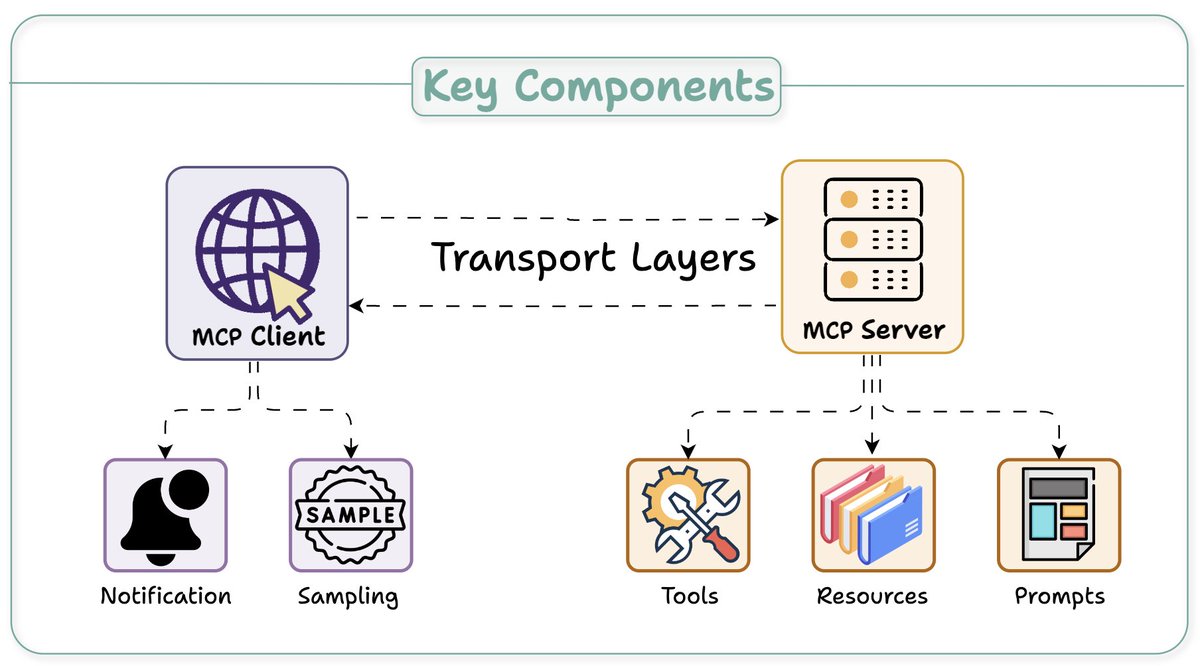
At its core, MCP follows a client-server architecture where a host application can connect to multiple servers.
Key components include:
- Host
- Client
- Server
Here's an overview before we dig deep 👇
Key components include:
- Host
- Client
- Server
Here's an overview before we dig deep 👇
The Host and Client:
Host: An AI app (Claude desktop, Cursor) that provides an environment for AI interactions, accesses tools and data, and runs the MCP Client.
MCP Client: Operates within the host to enable communication with MCP servers.
Next up, MCP server...👇
Host: An AI app (Claude desktop, Cursor) that provides an environment for AI interactions, accesses tools and data, and runs the MCP Client.
MCP Client: Operates within the host to enable communication with MCP servers.
Next up, MCP server...👇

The Server
A server exposes specific capabilities and provides access to data.
3 key capabilities:
- Tools: Enable LLMs to perform actions through your server
- Resources: Expose data and content from your servers to LLMs
- Prompts: Create reusable prompt templates and workflows
A server exposes specific capabilities and provides access to data.
3 key capabilities:
- Tools: Enable LLMs to perform actions through your server
- Resources: Expose data and content from your servers to LLMs
- Prompts: Create reusable prompt templates and workflows

The Client-Server Communication
Understanding client-server communication is essential for building your own MCP client-server.
Let's begin with this illustration and then break it down step by step... 👇
Understanding client-server communication is essential for building your own MCP client-server.
Let's begin with this illustration and then break it down step by step... 👇
1️⃣ & 2️⃣: capability exchange
client sends an initialize request to learn server capabilities.
server responds with its capability details.
e.g., a Weather API server provides available `tools` to call API endpoints, `prompts`, and API documentation as `resource`.
client sends an initialize request to learn server capabilities.
server responds with its capability details.
e.g., a Weather API server provides available `tools` to call API endpoints, `prompts`, and API documentation as `resource`.
3️⃣ Notification
Client then acknowledgment the successful connection and further message exchange continues.
Before we wrap, one more key detail...👇
Client then acknowledgment the successful connection and further message exchange continues.
Before we wrap, one more key detail...👇
Unlike traditional APIs, the MCP client-server communication is two-way.
Sampling, if needed, allows servers to leverage clients' AI capabilities (LLM completions or generations) without requiring API keys.
While clients to maintain control over model access and permissions
Sampling, if needed, allows servers to leverage clients' AI capabilities (LLM completions or generations) without requiring API keys.
While clients to maintain control over model access and permissions
I hope this clarifies what MCP does.
In the future, I'll explore creating custom MCP servers and building hands-on demos around them.
Over to you! What is your take on MCP and its future?
In the future, I'll explore creating custom MCP servers and building hands-on demos around them.
Over to you! What is your take on MCP and its future?
If you found it insightful, reshare with your network.
Find me → @akshay_pachaar ✔️
For more insights and tutorials on LLMs, AI Agents, and Machine Learning!
Find me → @akshay_pachaar ✔️
For more insights and tutorials on LLMs, AI Agents, and Machine Learning!
https://x.com/akshay_pachaar/status/1933503158225154514
• • •
Missing some Tweet in this thread? You can try to
force a refresh