Millie Marconi Profile picture
Oct 9, 2025 8 tweets 3 min read Read on X
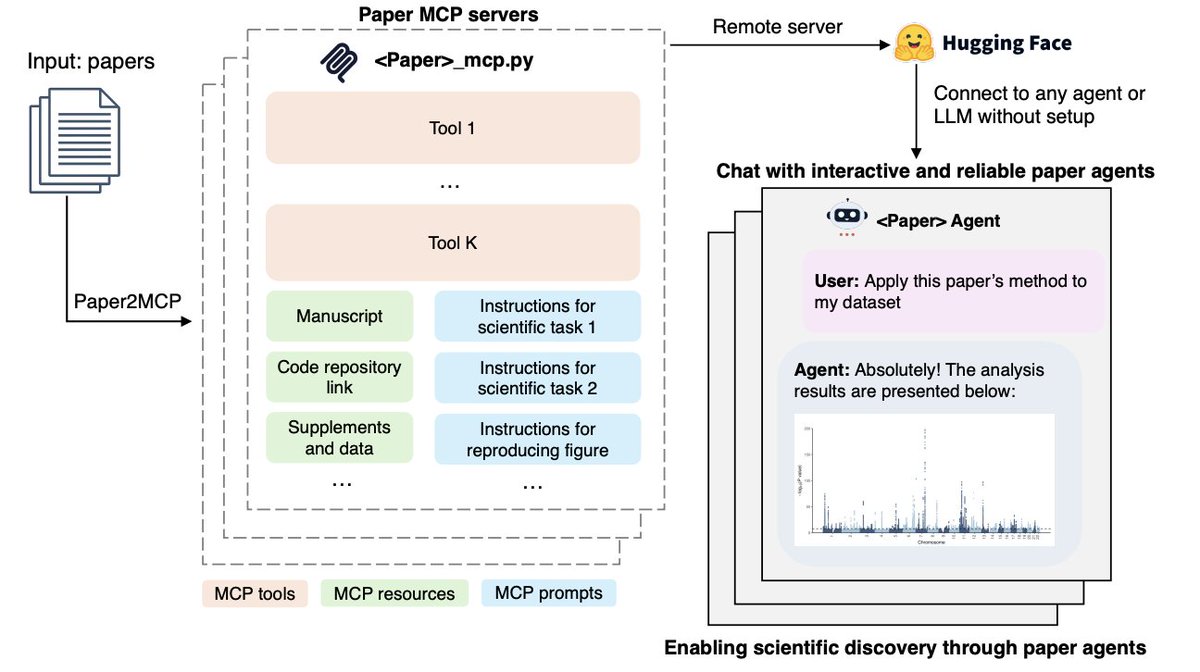
Holy shit...Stanford just built a system that converts research papers into working AI agents.

It’s called Paper2Agent, and it literally:

• Recreates the method in the paper
• Applies it to your own dataset
• Answers questions like the author

This changes how we do science forever.

Let me explain ↓Image
The problem is obvious to anyone who’s ever read a “methods” paper:

You find the code. It breaks.
You try the tutorial. Missing dependencies.
You email the authors. Silence.

Science moves fast, but reproducibility is a joke.

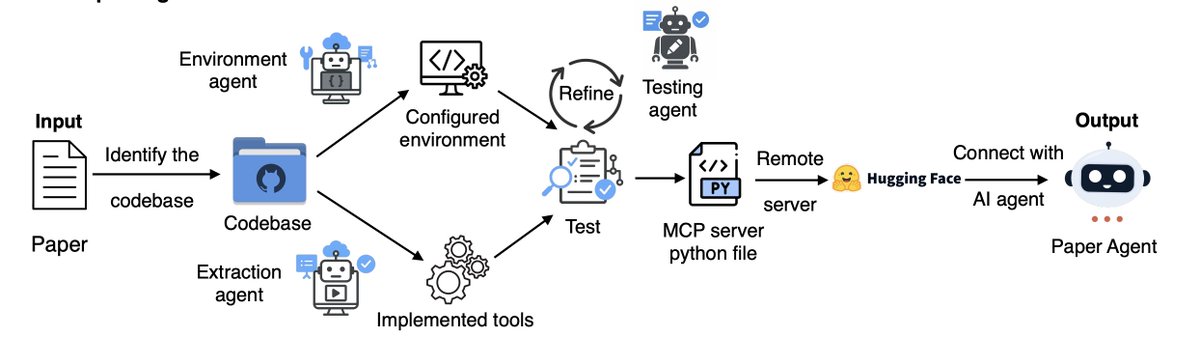
Paper2Agent fixes that. It automates the whole conversion paper → runnable AI agent.
Here’s how it works (and this part is wild):

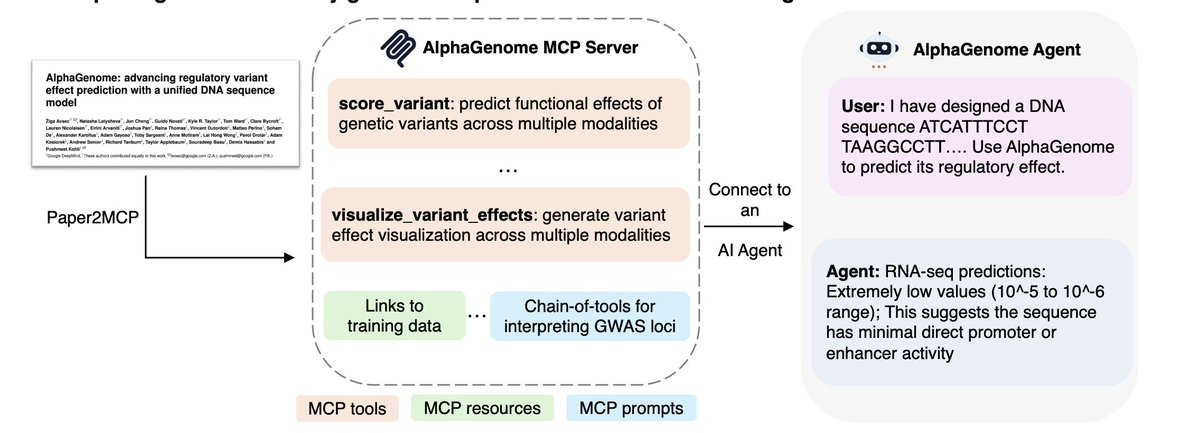
It reads the paper, grabs the GitHub repo, builds the environment, figures out the methods, then wraps everything as an MCP server.

That’s a protocol any LLM (Claude, GPT, Gemini) can talk to.
So you just ask:

“Run the Scanpy pipeline on my data.h5ad”

and it actually runs it.Image
They tested it on three big biology papers:

• AlphaGenome - predicts genetic variant effects
• TISSUE - uncertainty-aware spatial transcriptomics
• Scanpy - single-cell clustering

All converted automatically.
All reproduced results exactly.

Zero human setup. Image
And this is where it gets interesting.

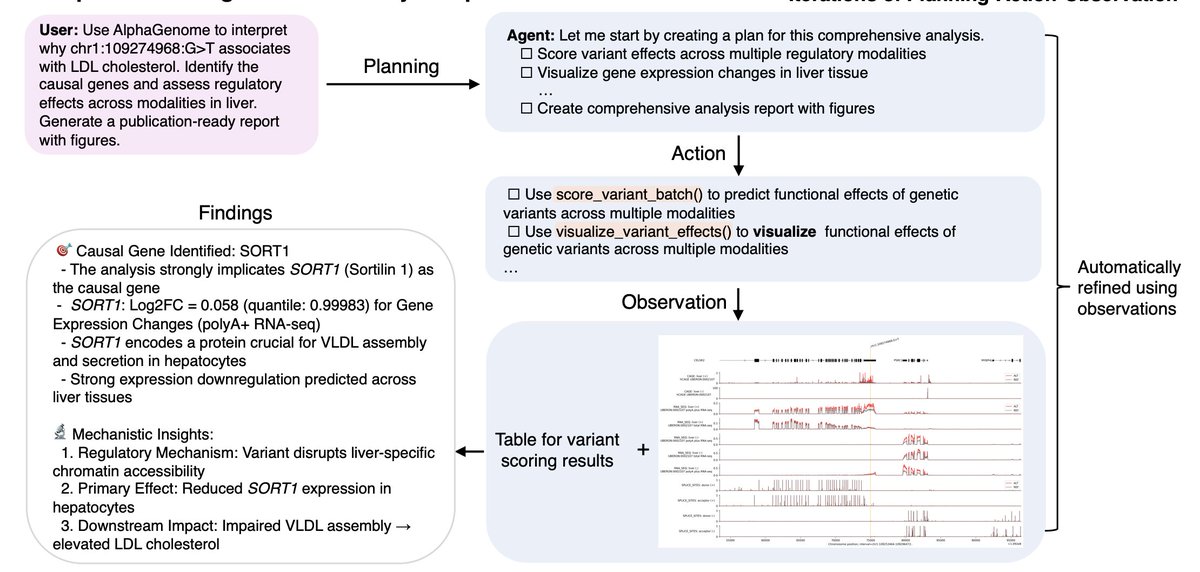
The AlphaGenome agent disagreed with the original authors.

When asked to re-analyze a variant linked to cholesterol, it picked a different causal gene (SORT1) and defended it with plots, quantile scores, and biological reasoning.

An AI agent just reinterpreted a Nature paper.Image
Think about what that means.

Every paper becomes a living system.
You don’t just read it - you talk to it.
You test it, challenge it, extend it.

And if your paper can’t be turned into an agent?
Maybe it wasn’t reproducible to begin with.
PDFs are static.
Agents are alive.

Paper2Agent hints at a future where discoveries are interactive.

Where AlphaFold could talk to Scanpy.
Where methods become APIs.

Honestly, this might be what “AI co-scientists” actually looks like. Image
Stop guessing what your customers want.

TestFeed gives you AI personas of your target customers + expert consultants that:

- See your screen while you work
- Give contextual feedback in real-time
- Think like the actual people you're building for

Try it free: testfeed.ai

• • •

Missing some Tweet in this thread? You can try to force a refresh

 

Keep Current with Millie Marconi

Millie Marconi Profile picture

Stay in touch and get notified when new unrolls are available from this author!

Read all threads

This Thread may be Removed Anytime!

PDF

Twitter may remove this content at anytime! Save it as PDF for later use!

Try unrolling a thread yourself!

how to unroll video
  1. Follow @ThreadReaderApp to mention us!

  2. From a Twitter thread mention us with a keyword "unroll"
@threadreaderapp unroll

Practice here first or read more on our help page!

More from @MillieMarconnni

Feb 5
Most people use Perplexity like a fancy Google search.

That's insane.

It's actually a full-blown research assistant that can compress 10 hours of analysis into 20 seconds if you feed it the right prompts.

Here's what actually works: Image
1. Competitive Intelligence Dashboard

Prompt I use:

"
Create a competitive analysis for [COMPANY/PRODUCT] covering:

1. Recent product launches (last 90 days)
2. Pricing changes (with before/after if available)
3. Customer sentiment (Reddit, Twitter, G2 reviews - categorize positive/negative themes)
4. Technical stack (from job postings and tech blogs)
5. Funding/financial news (any recent rounds, partnerships, layoffs)

Format as a table:
| Category | Key Findings | Source Date | Impact Assessment |

Focus on information from the last 30 days. Cite every claim.
"
2. Technical Comparison Matrix

Prompt:

"
Compare [TOOL A] vs [TOOL B] vs [TOOL C] for [SPECIFIC USE CASE]:

Build a decision matrix:
| Feature | Tool A | Tool B | Tool C | Winner & Why |

Must include:
- Pricing (exact tiers, hidden costs)
- Performance benchmarks (from independent tests)
- Integration options (with [MY STACK])
- Community size (GitHub stars, Discord members, Stack Overflow activity)
- Recent updates (last 3 months)
- Known issues (from issue trackers, Reddit)

Rank overall winner with confidence score (1-10) and reasoning.

Cite every benchmark and review.
"
Read 13 tweets
Feb 3
Plot twist: The best prompts are negative.

After using ChatGPT, Claude, and Gemini professionally for 2 years, I realized telling AI what NOT to do works better than telling it what to do.

Here are 8 "anti-prompts" that changed everything: Image
1/ DON'T use filler words

Instead of: "Write engaging content"

Use: "No fluff. No 'delve into'. No 'landscape'. No 'it's important to note'. Get straight to the point."

Result: 67% shorter outputs with 2x more substance.

The AI stops padding and starts delivering. Image
Image
2/ DON'T explain the obvious

Add this line: "Skip introductions. Skip conclusions. Skip context I already know."

Example: When asking for code, I get the function immediately.

No "Here's a Python script that..." preamble.

Saves 40% of my reading time. Image
Image
Read 12 tweets
Jan 31
OpenAI and Anthropic engineers leaked the secret to consistent AI outputs.

I've been using insider knowledge for 6 months. The difference is insane.

Here's what they don't want you to know (bookmark this). Image
Step 1: Control the Temperature

Most AI interfaces hide this, but you need to set temperature to 0 or 0.1 for consistency.

Via API:

ChatGPT: temperature: 0
Claude: temperature: 0
Gemini: temperature: 0

Via chat interfaces:

ChatGPT Plus: Can't adjust (stuck at ~0.7)
Claude Projects: Uses default (~0.7)
Gemini Advanced: Can't adjust

This is why API users get better consistency. They control what you can't see.

If you're stuck with web interfaces, use the techniques below to force consistency anyway.Image
Step 2: Build a System Prompt Template

Stop rewriting your prompt every time.

Create a master template with fixed structure:

ROLE: [Exactly who the AI is]
TASK: [Exactly what to do]
FORMAT: [Exactly how to structure output]
CONSTRAINTS: [Exactly what to avoid]
EXAMPLES: [Exactly what good looks like]

Example for blog writing:

ROLE: You are a direct, no-fluff content writer
TASK: Write a 500-word blog intro on [topic]
FORMAT: Hook → Problem → Solution → CTA. 3 paragraphs max.
CONSTRAINTS: No corporate speak. No "in today's world". No metaphors.
EXAMPLES: [paste your best previous output here]

Reuse this template. Change only the [topic]. Consistency skyrockets.Image
Read 14 tweets
Jan 29
Holy shit... I just reverse-engineered how top AI engineers build agents.

They don't touch n8n's UI. They use ONE Claude prompt.

It generates complete workflows, logic trees, API connections, and error handling in seconds.

Here's the exact prompt: ↓ Image
THE MEGA PROMPT:

---

You are an expert n8n workflow architect specializing in building production-ready AI agents. I need you to design a complete n8n workflow for the following agent:

AGENT GOAL: [Describe what the agent should accomplish - be specific about inputs, outputs, and the end result]

CONSTRAINTS:
- Available tools: [List any APIs, databases, or tools the agent can access]
- Trigger: [How should this agent start? Webhook, schedule, manual, email, etc.]
- Expected volume: [How many times will this run? Daily, per hour, on-demand?]

YOUR TASK:
Build me a complete n8n workflow specification including:

1. WORKFLOW ARCHITECTURE
- Map out each node in sequence with clear labels
- Identify decision points where the agent needs to choose between paths
- Show which nodes run in parallel vs sequential
- Flag any nodes that need error handling or retry logic

2. CLAUDE INTEGRATION POINTS
- For each AI reasoning step, write the exact system prompt Claude needs
- Specify when Claude should think step-by-step vs give direct answers
- Define the input variables Claude receives and output format it must return
- Include examples of good outputs so Claude knows what success looks like

3. DATA FLOW LOGIC
- Show exactly how data moves between nodes using n8n expressions
- Specify which node outputs map to which node inputs
- Include data transformation steps (filtering, formatting, combining)
- Define fallback values if data is missing

4. ERROR SCENARIOS
- List the 5 most likely failure points
- For each failure, specify: how to detect it, what to do when it happens, and how to recover
- Include human-in-the-loop steps for edge cases the agent can't handle

5. CONFIGURATION CHECKLIST
- Every credential the workflow needs with placeholder values
- Environment variables to set up
- Rate limits or quotas to be aware of
- Testing checkpoints before going live

6. ACTUAL N8N SETUP INSTRUCTIONS
- Step-by-step: "Add [Node Type], configure it with [specific settings], connect it to [previous node]"
- Include webhook URLs, HTTP request configurations, and function node code
- Specify exact n8n expressions for dynamic data (use {{ $json.fieldName }} syntax)

7. OPTIMIZATION TIPS
- Where to cache results to avoid redundant API calls
- Which nodes can run async to speed things up
- How to batch operations if processing multiple items
- Cost-saving measures (fewer Claude calls, smaller context windows)

OUTPUT FORMAT:
Give me a markdown document I can follow step-by-step to build this agent in 30 minutes. Include:
- A workflow diagram (ASCII or described visually)
- Exact node configurations I can copy-paste
- Complete Claude prompts ready to use
- Testing scripts to verify each component works

Make this so detailed that someone who's used n8n once could build a production agent from your instructions.

IMPORTANT: Don't give me theory. Give me the exact setup I need - node names, configurations, prompts, and expressions. I want to copy-paste my way to a working agent.

---
Most people ask Claude: "how do I build an agent with n8n?"

And get generic bullshit about "first add nodes, then connect them."

This prompt forces Claude to become your senior automation engineer.

It doesn't explain concepts. It builds the actual architecture.
Read 6 tweets
Jan 27
After testing Perplexity vs ChatGPT vs Grok for market research...

Perplexity destroyed them both.

Here are 7 prompts that turn Perplexity into your personal research team: Image
1. Market Timing Intel

Prompt:

"Find every major announcement, funding round, and product launch in [industry] from the last 90 days. For each one, show me: the date it happened, the companies involved, the dollar amounts if applicable, and most importantly - what trend or shift this signals. Then connect the dots: what pattern emerges when you look at all of these together? What's about to happen in this market that most people aren't seeing yet?"

Perplexity pulls real-time data with sources. ChatGPT hallucinates dates and makes up funding rounds.

I used this to spot the AI coding tools wave 4 months early. Built a product that hit $40k MRR because I saw it coming.
2. Competitive Teardown

Prompt:

"Deep dive on [company name]. I need: their actual revenue model (not what they say publicly, what they actually charge), their customer acquisition strategy (which channels they're investing in based on job postings and ads), their product roadmap clues (based on recent hires, patents, and beta features), their weaknesses (negative reviews, customer complaints, what people say on Reddit), and their next move (based on their hiring, funding, and market position). Give me sources for everything."

ChatGPT gives you generic competitive analysis. Perplexity finds the actual Reddit threads where users complain, the actual job postings that reveal strategy, the actual data.

I've used this to reverse-engineer 30+ competitors. Know their playbook before they execute it.
Read 11 tweets
Jan 26
Everyone's using ChatGPT for content writing. Meanwhile, I switched to Claude and my engagement went up 340% on all social media platforms.

Here are 10 prompts that make Claude write like a human (not a robot): Image
1. The Coffee Shop Test

Prompt:

"Write this like you're explaining it to a friend over coffee. No marketing speak. No corporate jargon. Just straight talk about [topic]. If it sounds like a LinkedIn post, rewrite it."

Claude actually gets this. ChatGPT still sounds like it's pitching a SaaS product.
2. Voice Finder

Prompt:

"Give me 5 different ways to say this same idea. Make each one sound like a different person wrote it - one cynical, one excited, one skeptical, one matter-of-fact, one surprised."

This is how I find MY voice. Pick the version that feels most natural, then Claude refines it.
Read 14 tweets

Did Thread Reader help you today?

Support us! We are indie developers!


This site is made by just two indie developers on a laptop doing marketing, support and development! Read more about the story.

Become a Premium Member ($3/month or $30/year) and get exclusive features!

Become Premium

Don't want to be a Premium member but still want to support us?

Make a small donation by buying us coffee ($5) or help with server cost ($10)

Donate via Paypal

Or Donate anonymously using crypto!

Ethereum

0xfe58350B80634f60Fa6Dc149a72b4DFbc17D341E copy

Bitcoin

3ATGMxNzCUFzxpMCHL5sWSt4DVtS8UqXpi copy

Thank you for your support!

Follow Us!

:(