Laundromat/Dry Cleaner SEO Checklist for BeginnersThis checklist is designed for business owners new to SEO (Search Engine Optimization). SEO helps your website and Google Business Profile show up higher in search results when people look for services like yours. We'll explain each section simply, and each item includes a short note on why it matters and how to do it. Start with the basics and work your way down. Tools like Google Search Console (free) can help you track progress. Google Business Profile OptimizationYour Google Business Profile (GBP) is the free listing that appears in Google Maps and local searches. It's like your online storefront—keep it accurate and complete to attract more customers.
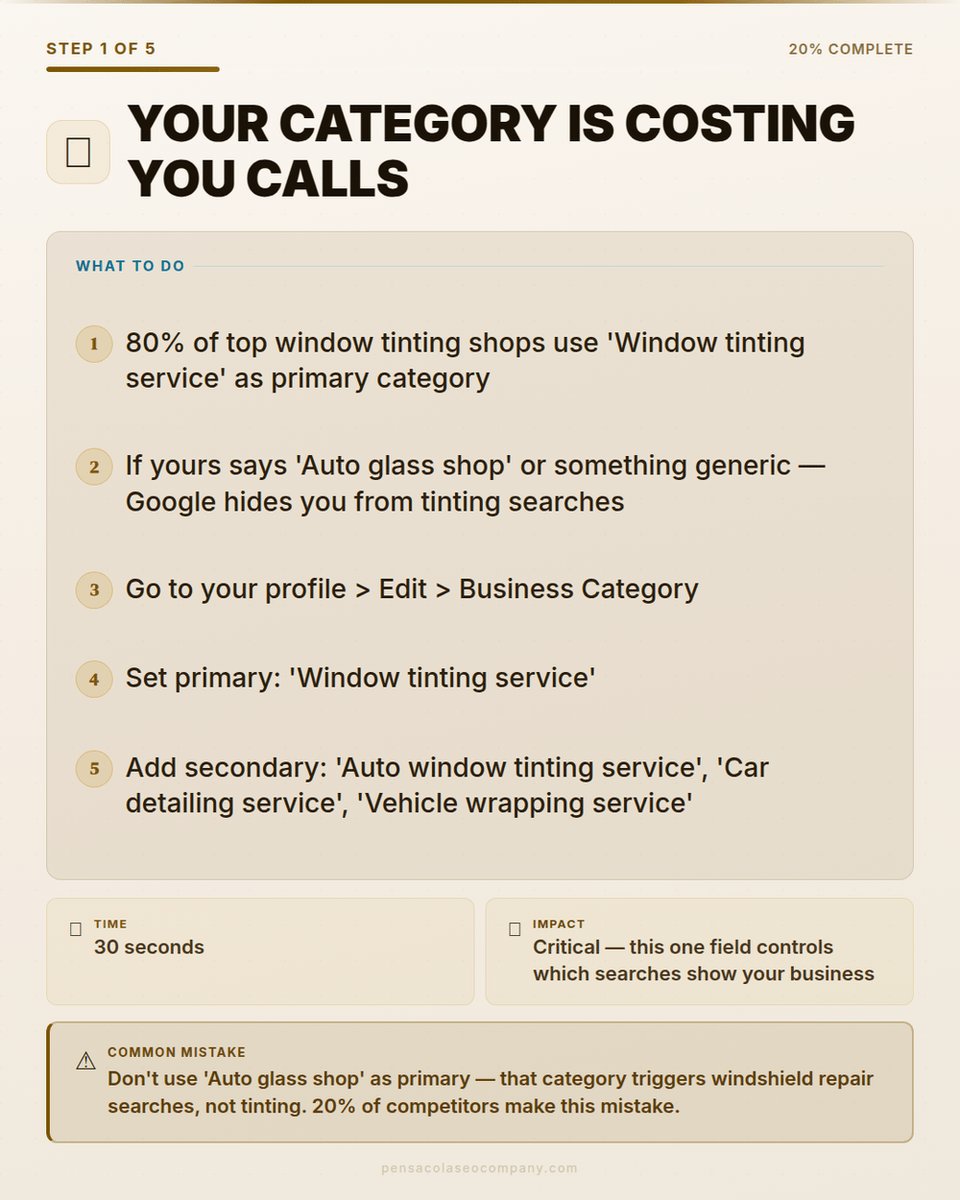
Choose the best main category (dry cleaner or laundromat) based on what makes you the most money Why? Google uses this to match your business to searches. If laundromat services bring in more revenue, switch to that for better visibility. Check and update in your GBP dashboard.
Make sure there's only one Better Business Bureau (BBB) profile (delete extras) Why? Duplicates confuse Google and customers. Search for your business on BBB.org and contact them to merge or remove old ones.
Double-check that your name, address, phone, and website match everywhere online Why? Inconsistent info hurts your rankings. Use tools like Moz Local (free scan) to check listings on other sites.
List all your services in your GBP Why? This helps Google show your profile for specific searches like "wash and fold near me." Add them in the "Services" section of your GBP.
Write a full description using up to 750 characters Why? A detailed description with keywords (like your services and location) improves search relevance. Include what makes your business unique, like "eco-friendly dry cleaning."
Add your service areas if you do pickups or deliveries Why? This tells Google you serve nearby areas, expanding your reach. Enter cities or zip codes in GBP settings.
Website Technical SEOTechnical SEO fixes the "behind-the-scenes" stuff on your site so Google can understand and rank it better. If you're using WordPress, plugins like Yoast can help, but don't rely on defaults—customize them.
Add meta descriptions to every page (at least 160 characters) Why? These are the snippets shown in search results. They encourage clicks. Use Yoast or similar to add them, including keywords like "affordable laundromat in [city]."
Verify all important pages are indexed by Google Why? Indexed means Google knows about them. Use "site:yourwebsite.com" in Google search to check. Submit your sitemap in Google Search Console if pages are missing.
Remove useless pages from Google's index (like plain review pages) Why? Low-quality pages can drag down your site. Use robots.txt or noindex tags in Yoast to hide them.
Add better schema markup (beyond basic plugins) Why? Schema is code that explains your business to Google (e.g., hours, services). Use free tools like Google's Structured Data Markup Helper.
Include contact info and service areas in schema Why? Helps Google show your business in local searches. Add to your homepage code.
Add Google Knowledge Graph IDs (property values) to schema Why? Connects your business to Google's database for better understanding. Search for your business in Google to find IDs.
List your services in schema markup Why? Makes services like "dry cleaning" easier for Google to recognize. Include prices if possible.
Use local business schema on location pages Why? Boosts local rankings. Apply to pages about your physical store.
Fix any missing HTML tags (like headings or lists) Why? Proper structure helps Google read your content. Run a free audit with tools like Screaming Frog.
Add descriptive alt text to all images Why? Helps with image searches and accessibility. Describe the image with keywords, e.g., "modern laundromat machines in [city]."
Website Content & StructureGood content keeps visitors on your site and signals to Google that you're helpful. Structure makes it easy to navigate.
Create a footer with your contact details (phone, email, address) Why? Appears on every page for easy access. Add it in your website editor.
Link to your social media profiles in the footer (even if you don't post often) Why? Builds trust and helps Google connect your online presence.
Put links to key pages (like services or contact) in the footer Why? Improves navigation and helps Google crawl your site faster.
Add Terms of Service and Privacy Policy pages Why? Required for trust and some ads. Use free templates online and customize.
Replace old or mismatched photos Why? Fresh images build credibility. Use high-quality photos of your actual location.
Group content into "silos" by service (e.g., one section for laundromat, one for dry cleaning) Why? Organizes your site thematically for better rankings. Link related pages together.
Write helpful blog posts related to your main services Why? Attracts visitors searching for tips (e.g., "how to wash delicates"). Use keywords naturally.
Make sure there's only one Better Business Bureau (BBB) profile (delete extras) Why? Duplicates confuse Google and customers. Search for your business on BBB.org and contact them to merge or remove old ones.
Double-check that your name, address, phone, and website match everywhere online Why? Inconsistent info hurts your rankings. Use tools like Moz Local (free scan) to check listings on other sites.
List all your services in your GBP Why? This helps Google show your profile for specific searches like "wash and fold near me." Add them in the "Services" section of your GBP.
Write a full description using up to 750 characters Why? A detailed description with keywords (like your services and location) improves search relevance. Include what makes your business unique, like "eco-friendly dry cleaning."
Add your service areas if you do pickups or deliveries Why? This tells Google you serve nearby areas, expanding your reach. Enter cities or zip codes in GBP settings.
Website Technical SEOTechnical SEO fixes the "behind-the-scenes" stuff on your site so Google can understand and rank it better. If you're using WordPress, plugins like Yoast can help, but don't rely on defaults—customize them.
Add meta descriptions to every page (at least 160 characters) Why? These are the snippets shown in search results. They encourage clicks. Use Yoast or similar to add them, including keywords like "affordable laundromat in [city]."
Verify all important pages are indexed by Google Why? Indexed means Google knows about them. Use "site:yourwebsite.com" in Google search to check. Submit your sitemap in Google Search Console if pages are missing.
Remove useless pages from Google's index (like plain review pages) Why? Low-quality pages can drag down your site. Use robots.txt or noindex tags in Yoast to hide them.
Add better schema markup (beyond basic plugins) Why? Schema is code that explains your business to Google (e.g., hours, services). Use free tools like Google's Structured Data Markup Helper.
Include contact info and service areas in schema Why? Helps Google show your business in local searches. Add to your homepage code.
Add Google Knowledge Graph IDs (property values) to schema Why? Connects your business to Google's database for better understanding. Search for your business in Google to find IDs.
List your services in schema markup Why? Makes services like "dry cleaning" easier for Google to recognize. Include prices if possible.
Use local business schema on location pages Why? Boosts local rankings. Apply to pages about your physical store.
Fix any missing HTML tags (like headings or lists) Why? Proper structure helps Google read your content. Run a free audit with tools like Screaming Frog.
Add descriptive alt text to all images Why? Helps with image searches and accessibility. Describe the image with keywords, e.g., "modern laundromat machines in [city]."
Website Content & StructureGood content keeps visitors on your site and signals to Google that you're helpful. Structure makes it easy to navigate.
Create a footer with your contact details (phone, email, address) Why? Appears on every page for easy access. Add it in your website editor.
Link to your social media profiles in the footer (even if you don't post often) Why? Builds trust and helps Google connect your online presence.
Put links to key pages (like services or contact) in the footer Why? Improves navigation and helps Google crawl your site faster.
Add Terms of Service and Privacy Policy pages Why? Required for trust and some ads. Use free templates online and customize.
Replace old or mismatched photos Why? Fresh images build credibility. Use high-quality photos of your actual location.
Group content into "silos" by service (e.g., one section for laundromat, one for dry cleaning) Why? Organizes your site thematically for better rankings. Link related pages together.
Write helpful blog posts related to your main services Why? Attracts visitors searching for tips (e.g., "how to wash delicates"). Use keywords naturally.
Link blog posts back to your main service pages Why? Passes "link juice" to important pages, boosting their rankings.
Show reviews with stars and keywords from customers Why? Improves trust and clicks. Pull from Google reviews and highlight ones mentioning services.
Off-Page SEOThis is about building your reputation outside your site, like getting mentioned elsewhere online.
Send out a press release to 250+ news sites Why? Gets backlinks from reputable domains, improving authority. Use services like EIN Presswire.
Track new websites linking to yours Why? More quality links mean higher rankings. Use Ahrefs or SEMrush (free trials available).
Watch what competitors do for links Why? Learn from them to get similar opportunities.
Keep adding blog content after setup Why? Fresh content signals an active site to Google.
Advanced Schema ImplementationSchema is like labels for Google. Start simple, then add more.
Research and add full JSON-LD code to your site Why? Better than basic plugins. Use free generators online.
Include details about the owner (like education) in schema Why? Builds credibility. Add to business schema.
Put services and price ranges in schema Why? Helps in rich results (stars in search).
Link related things (entities) in schema Why? Helps Google understand connections, like services to locations.
Ongoing OptimizationSEO isn't one-time—keep checking and improving.
Run site reports monthly to spot issues Why? Tools like Google Analytics show what's working.
Check GBP and Search Console for how people search for you Why? Adjust keywords based on real data.
chrissimpsonseo.com
Show reviews with stars and keywords from customers Why? Improves trust and clicks. Pull from Google reviews and highlight ones mentioning services.
Off-Page SEOThis is about building your reputation outside your site, like getting mentioned elsewhere online.
Send out a press release to 250+ news sites Why? Gets backlinks from reputable domains, improving authority. Use services like EIN Presswire.
Track new websites linking to yours Why? More quality links mean higher rankings. Use Ahrefs or SEMrush (free trials available).
Watch what competitors do for links Why? Learn from them to get similar opportunities.
Keep adding blog content after setup Why? Fresh content signals an active site to Google.
Advanced Schema ImplementationSchema is like labels for Google. Start simple, then add more.
Research and add full JSON-LD code to your site Why? Better than basic plugins. Use free generators online.
Include details about the owner (like education) in schema Why? Builds credibility. Add to business schema.
Put services and price ranges in schema Why? Helps in rich results (stars in search).
Link related things (entities) in schema Why? Helps Google understand connections, like services to locations.
Ongoing OptimizationSEO isn't one-time—keep checking and improving.
Run site reports monthly to spot issues Why? Tools like Google Analytics show what's working.
Check GBP and Search Console for how people search for you Why? Adjust keywords based on real data.
chrissimpsonseo.com
Add local keywords, including in other languages if needed Why? Matches how people in your area search.
Update pages based on what performs well Why? Focus on winners to grow traffic.
Build funnels to capture leads (e.g., for commercial clients) Why? Turns visitors into customers.
Review competitors every few months Why? Stay ahead by adapting to changes.
Measurement & TrackingTrack results to see what's working.
Get full access to Google Search Console Why? Shows search performance and errors.
Monitor where you rank for key words like "laundromat near me" Why? Use free tools like Google itself or SERPWatcher.
Watch for new backlinks Why? Ensures your efforts are building authority.
Look at GBP insights for customer searches Why? Reveals popular queries to target.
Check overall SEO scores and fix low areas Why? Tools like Sitebulb give grades to improve.
References
Google Business Profile Help - For category selection and optimization basics.
Schema. org Documentation - Guidelines for local business and service schema markup.
Moz Beginner's Guide to SEO - General best practices for on-page and technical SEO.
Search Engine Journal - Articles on backlinks, press releases, and content silos.
Ahrefs Blog - Insights on keyword research and competitor analysis
digg.com/pensacola-seo-…
Update pages based on what performs well Why? Focus on winners to grow traffic.
Build funnels to capture leads (e.g., for commercial clients) Why? Turns visitors into customers.
Review competitors every few months Why? Stay ahead by adapting to changes.
Measurement & TrackingTrack results to see what's working.
Get full access to Google Search Console Why? Shows search performance and errors.
Monitor where you rank for key words like "laundromat near me" Why? Use free tools like Google itself or SERPWatcher.
Watch for new backlinks Why? Ensures your efforts are building authority.
Look at GBP insights for customer searches Why? Reveals popular queries to target.
Check overall SEO scores and fix low areas Why? Tools like Sitebulb give grades to improve.
References
Google Business Profile Help - For category selection and optimization basics.
Schema. org Documentation - Guidelines for local business and service schema markup.
Moz Beginner's Guide to SEO - General best practices for on-page and technical SEO.
Search Engine Journal - Articles on backlinks, press releases, and content silos.
Ahrefs Blog - Insights on keyword research and competitor analysis
digg.com/pensacola-seo-…
@threadreaderapp Unroll
• • •
Missing some Tweet in this thread? You can try to
force a refresh