Ege Profile picture
May 29 7 tweets 4 min read Read on X
What if Photoshop, Premiere Pro, Express and Lightroom could all work from a single prompt?

Adobe for creativity in Claude feels like having your favorite Adobe creative apps directly inside your conversation.

Instead of jumping between apps, you simply describe what you want to achieve, refine the result and stay focused on the creative work.

For this project, I tested three workflows:

• Portrait Retouch
• Design from Template
• Resize Video

All you need to know about Adobe for creativity in Claude 👇

#AdobeAmbassadors #Ad #AdobeforClaude
Setup takes just a few minutes.

First, install Adobe for creativity inside Claude:

→ Open Claude Desktop (or Claude on the web)
→ Click Customize
→ Open Connectors
→ Click "+"
→ Search for "Adobe for creativity"
→ Install and connect
Then you'll need to add a Skill.

→ Download a Skill from Adobe's GitHub repository (github.com/adobe/skills/t…)
→ Open the Skill folder
→ Open the file called "Skill.md"
→ Download the raw file

Back in Claude:
→ Customize
→ Skills
→ "+"
→ Create Skill
→ Upload Skill
→ Select the downloaded Skill.md file

Once installed, the Skill becomes available in your conversations and helps guide Adobe tools through specific workflows like Portrait Retouch, Design from Template and Resize Video.

A quick note about how this works:

The connector gives Claude access to Adobe tools.

The Skills provide workflow-specific guidance.

Think of the connector as the engine and the Skills as the driving instructions.

Together they make tasks like portrait retouching, social design and video formatting much more structured and consistent.
Next, I tested Design from Template.

Prompt:
"Make an Instagram Story for my boutique sale from template library."

Claude surfaced multiple template options directly in the conversation. Image
Image
Image
Image
From there, I refined the design step by step:

→ Updated the text
→ Changed the background color
→ Added animation

The workflow feels much closer to collaborating with a creative assistant than manually rebuilding assets from scratch.
Finally, I uploaded a video and asked:

"Resize this video for YouTube Shorts."

A few moments later, I had a Shorts-ready version without having to manually reframe anything.
Adobe tools handle the detailed execution directly inside Claude, making creative tasks much faster without constantly switching between different applications.

Try Adobe for creativity in Claude now:
adobe.com/go/adobe-for-c…

• • •

Missing some Tweet in this thread? You can try to force a refresh

 

Keep Current with Ege

Ege Profile picture

Stay in touch and get notified when new unrolls are available from this author!

Read all threads

This Thread may be Removed Anytime!

PDF

Twitter may remove this content at anytime! Save it as PDF for later use!

Try unrolling a thread yourself!

how to unroll video
  1. Follow @ThreadReaderApp to mention us!

  2. From a Twitter thread mention us with a keyword "unroll"
@threadreaderapp unroll

Practice here first or read more on our help page!

More from @egeberkina

Feb 12
I built this entire bucket hat campaign inside Firefly Boards from the very first concept to the final polished video.

Started with a single image to brainstorm the direction.
Then I generated images for extreme weather + daily life scenarios to build out the concept.
Turned them into videos.
Upscaled everything.
Added soundtrack + voiceover.

Everything started on one board and evolved from there.

Here’s my exact workflow 👇

This post is sponsored by Adobe as an Adobe Firefly Ambassador

#AdobeFireflyAmbassadors #Ad #FireflyBoards
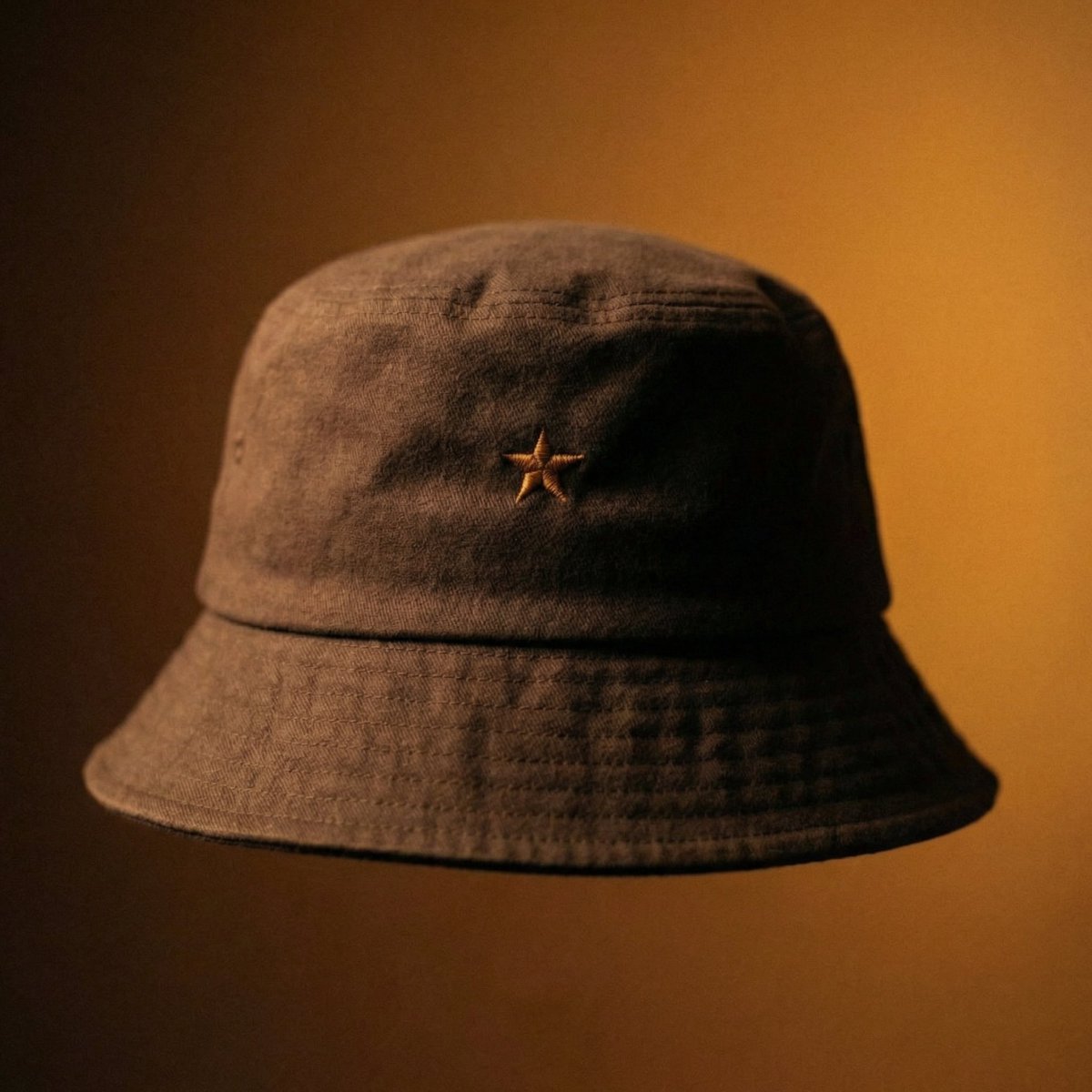
I used Nano Banana Pro directly in Boards to generate the hero bucket hat visual.

Prompt:
Premium fictional bucket hat with a softly structured crown.
Balanced crown height, neither too tall nor too shallow.
Brim has a gentle downward slope with a rounded edge.
Fabric is premium brushed cotton in deep espresso brown.
Front embroidery is a small star symbol stitched in warm amber thread.
No other branding.

Cinematic portrait lighting with a single soft side light.
Deep shadows and warm highlights.
Background is an amber-to-dark-brown gradient.
Analog film grain, luxury editorial photography.Image
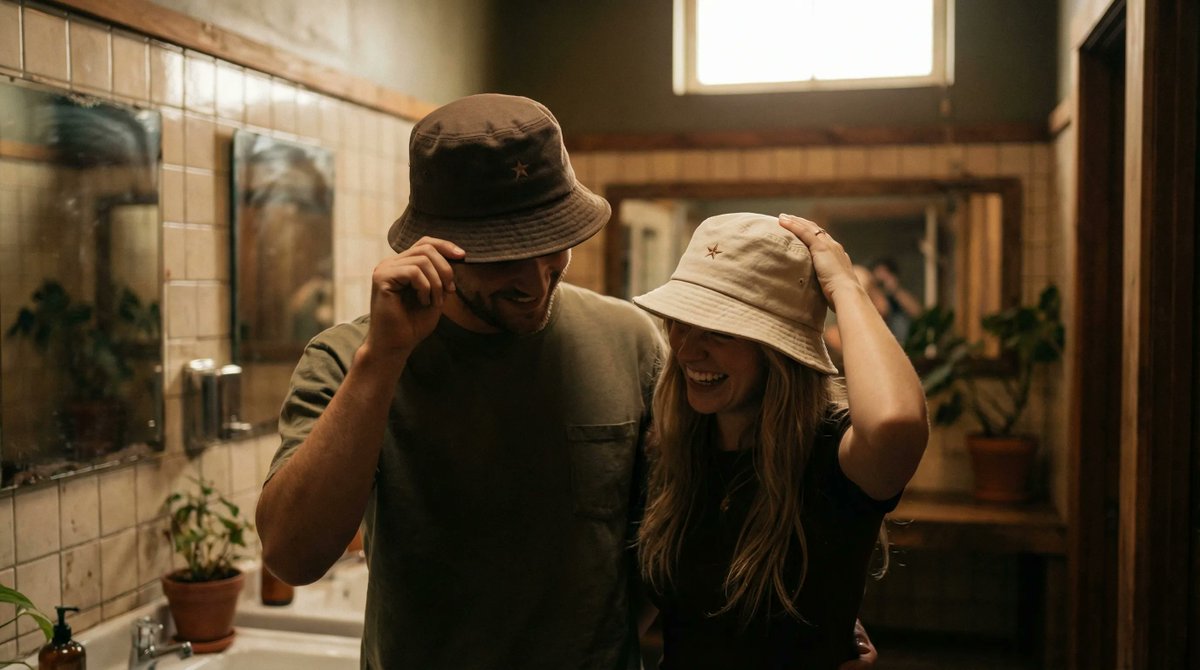
I built the whole campaign inside Firefly Boards.

Starting from the hero bucket hat above, I wrote different JSON prompts to place it on real people in different scenarios using Nano Banana Pro. Image
Image
Image
Read 7 tweets
Dec 9, 2025
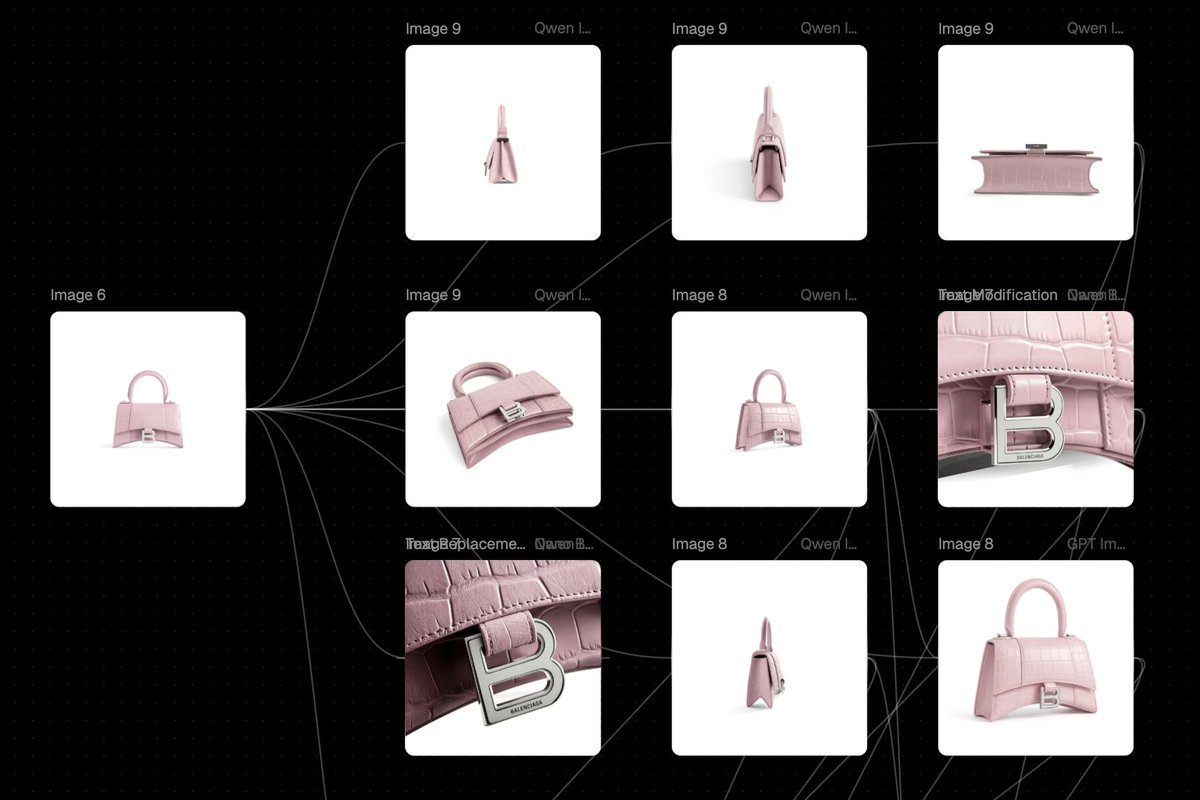
Turn one hero image into a full multi-angle carousel without writing a single prompt.

Front, 3/4, top down, low angle and all from a single image.

Qwen Edit Angles in Flora is kind of crazy. You can just rotate the camera and keep the subject exactly the same.

Workflow 👇
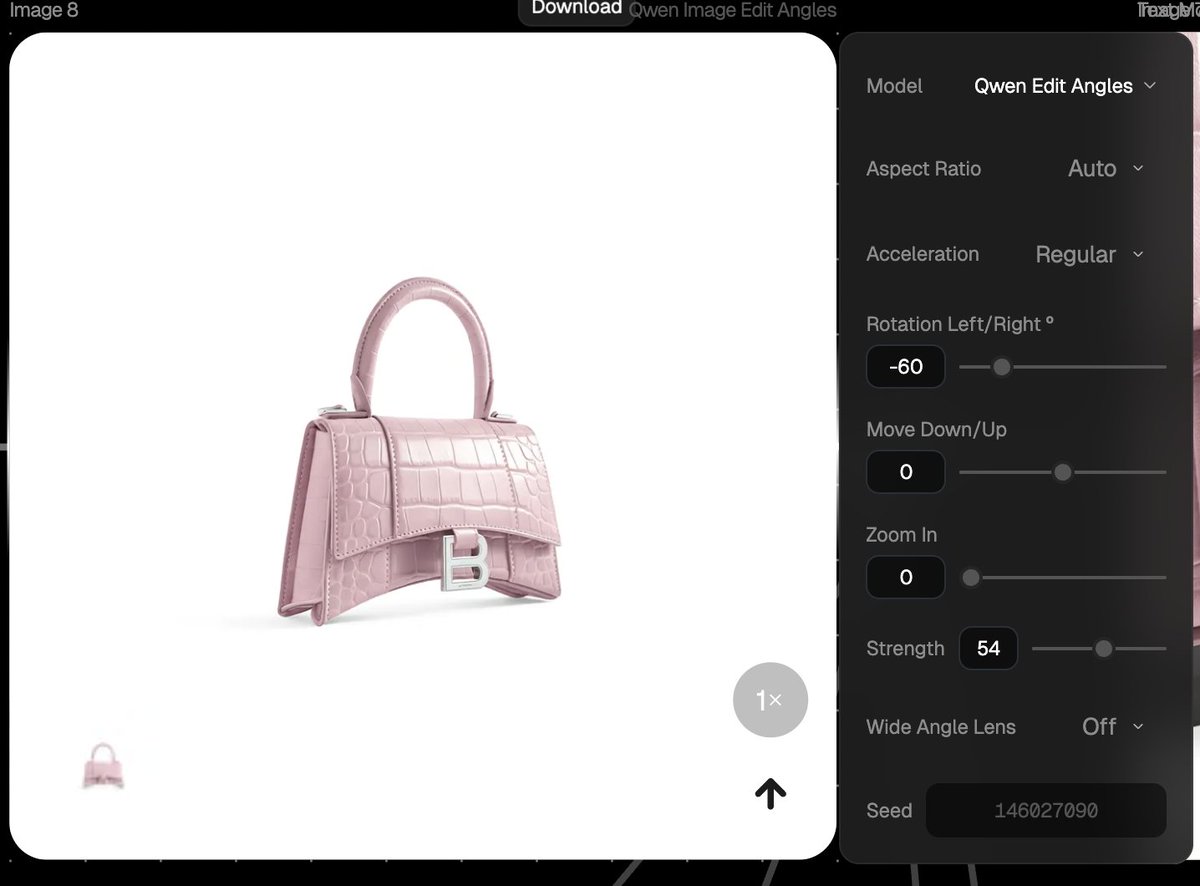
How to Use It

- Open Flora → Add an image block
- Choose “Qwen Edit Angles” as the model
- Upload or pipe in your base image
- Iterate from one base with numerical precision Image
Connect the base image to the image block, adjust the camera angles and the best part: no prompt needed. Image
Read 4 tweets
May 19, 2025
BIG UPDATE for AI creators!

Flora now lets you upload LoRA’s for more consistent generations!

I just created Airbnb-style skeuomorphic 3D icons with ease using Flora.

Full tutorial below 👇
I started by downloading the LoRA for skeuomorphic isomorphic 3D icons from huggingface, trained by @multimodalart to generate those Airbnb-style icons
Simply uploaded the .safetensor file to Flora, then typed “RBNBICN, icon, white background, isometric perspective” to trigger the image generation
Read 9 tweets
May 12, 2025
WOW! I'm speechless.

I’ve been testing Lovart, the first AI design agent, and it helped me create a complete brand kit that would’ve taken me days.

The difference? It actually understands context!

Here’s how I built KRAVAR, a dystopian fashion brand, from scratch 👇🧵
It all started with a core prompt:

“Avant-garde fashion brand VI system, brand name “KRAVAR”, rooted in dystopian luxury and oversized minimalism, The brand embraces stark silhouettes, raw industrial aesthetics, and a muted palette of dirty beige, deep asphalt, and washed-out black, Visuals reflect hyperreal editorial photography with confrontational angles and anti-fashion attitude, The logo is a bold, extended sans-serif, applied unapologetically across brutalist layouts and asymmetrical grid systems, Models appear anonymous and oversized, shot in mundane or sterile urban settings, Inspired by Balenciaga, Vetements, and post-apocalyptic streetwear, Scenarios: crumpled cardboard mailers, aggressive barcode-style hang tags, oversized nylon dust bags, industrial tape-style stickers”

From that alone, the Lovart generated an entire brand world:

- Brutalist layouts
- Anonymous models
- Barcode tags & crumpled mailers
- Deep asphalt tones + sterile urban mood
I tried multiple logo routes and logo concept 3 stood out: bold, unapologetic and totally on-brand.

It now anchors the entire visual identity.

#LovartAI #FirstDesignAgent #LovartBeta Image
Read 8 tweets
May 8, 2025
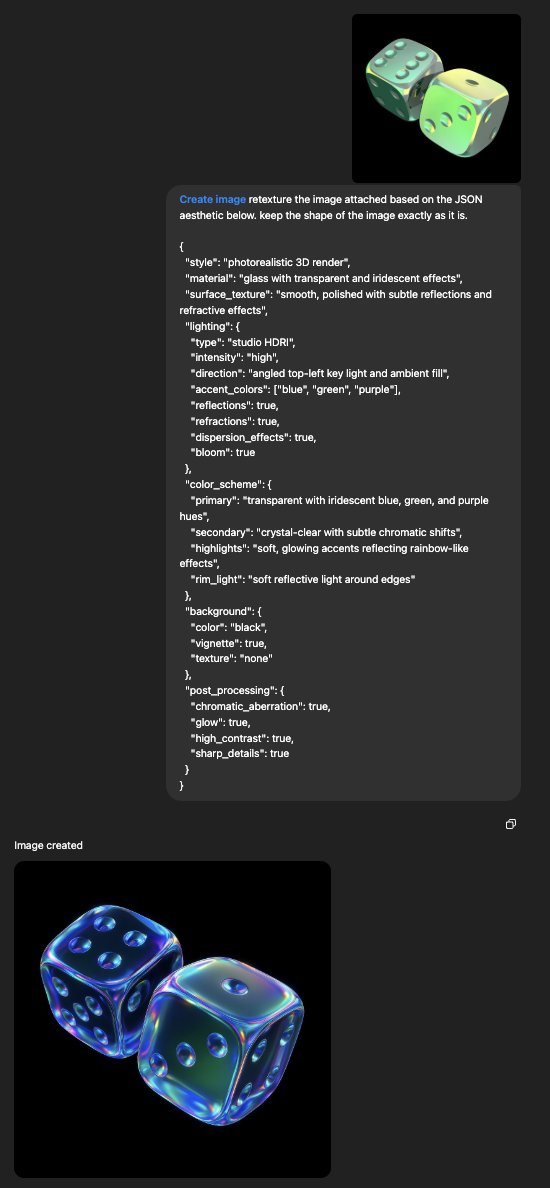
GPT-4o + JSON = next-level visuals with precision and style!

Prompt 👇 Image
Image
Image
Image
Prompt: retexture the image attached based on the JSON aesthetic below

{
"style": "photorealistic 3D render",
"material": "glass with transparent and iridescent effects",
"surface_texture": "smooth, polished with subtle reflections and refractive effects",
"lighting": {
"type": "studio HDRI",
"intensity": "high",
"direction": "angled top-left key light and ambient fill",
"accent_colors": ["blue", "green", "purple"],
"reflections": true,
"refractions": true,
"dispersion_effects": true,
"bloom": true
},
"color_scheme": {
"primary": "transparent with iridescent blue, green, and purple hues",
"secondary": "crystal-clear with subtle chromatic shifts",
"highlights": "soft, glowing accents reflecting rainbow-like effects",
"rim_light": "soft reflective light around edges"
},
"background": {
"color": "black",
"vignette": true,
"texture": "none"
},
"post_processing": {
"chromatic_aberration": true,
"glow": true,
"high_contrast": true,
"sharp_details": true
}
}Image
Read 8 tweets
Apr 18, 2025
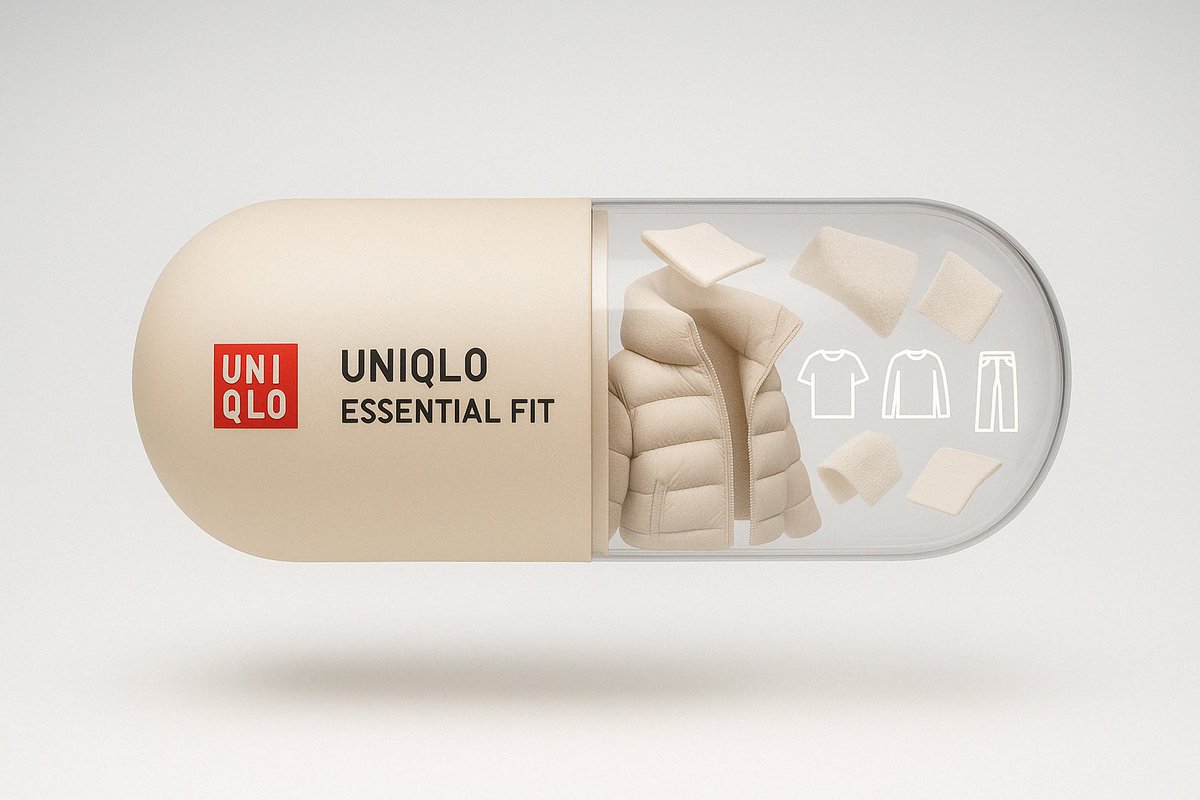
Branded pills you never knew you needed!

Created with ChatGPT-4o!
Prompt: A tall, realistic cheerful capsule floats horizontally. The left side is soft neutral beige, labeled “UNIQLO – ESSENTIAL FIT” with the classic red UNIQLO logo. The right half is transparent, filled with floating fabric swatches, puffer coat folds, thermal fiber textures, and line icons of wardrobe basics.Image
Prompt: A tall, realistic cheerful capsule floats horizontally. The left side is soft silver-grey, labeled “DYSON – AIR TECH” in minimalist typography. The right half is transparent, showcasing mini turbine blades, filters, airflow trails, and precision components — designed to feel light, clean, and futuristic.Image
Read 5 tweets

Did Thread Reader help you today?

Support us! We are indie developers!


This site is made by just two indie developers on a laptop doing marketing, support and development! Read more about the story.

Become a Premium Member ($3/month or $30/year) and get exclusive features!

Become Premium

Don't want to be a Premium member but still want to support us?

Make a small donation by buying us coffee ($5) or help with server cost ($10)

Donate via Paypal

Or Donate anonymously using crypto!

Ethereum

0xfe58350B80634f60Fa6Dc149a72b4DFbc17D341E copy

Bitcoin

3ATGMxNzCUFzxpMCHL5sWSt4DVtS8UqXpi copy

Thank you for your support!

Follow Us!

:(