10 powerful Twitter hacks every user should know:
1/ Most popular Tweets
Ever wanted to find someone's most popular Tweets of all-time?
Or maybe their most popular recent Tweets?
Install @Twemex App and instantly find them all.
Ever wanted to find someone's most popular Tweets of all-time?
Or maybe their most popular recent Tweets?
Install @Twemex App and instantly find them all.

@twemex 2/ Most active times
It's best to Tweet when your followers are online.
Do you know when they are most active?
Twitter doesn't tell you, but @Followerwonk does
Get more engagement with better timing.
It's best to Tweet when your followers are online.
Do you know when they are most active?
Twitter doesn't tell you, but @Followerwonk does
Get more engagement with better timing.

@twemex @followerwonk 3/ Auto-retweeting for growth
The shelf-life of a Tweet is about 24 hours.
One great way to get more engagement is to Retweet yourself.
I RT myself 9 hours later using @hypefury
The best part? They UN-Retweet 24 hours later.
That keeps your profile nice and clean.
The shelf-life of a Tweet is about 24 hours.
One great way to get more engagement is to Retweet yourself.
I RT myself 9 hours later using @hypefury
The best part? They UN-Retweet 24 hours later.
That keeps your profile nice and clean.

@twemex @followerwonk @hypefury 4/ Auto-plugging for subscribers
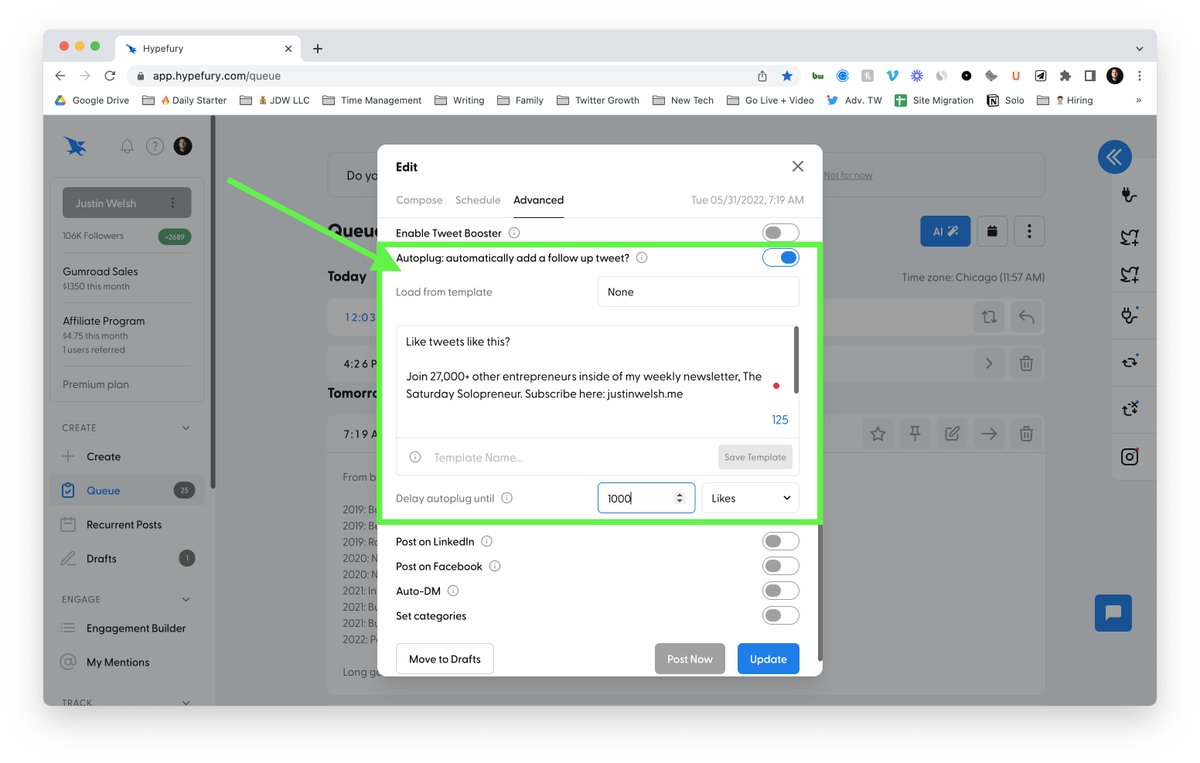
@Hypefury will also auto-plug your newsletter.
- Select the number of likes/engagements.
- Create your custom message to add-on
Voila.
If your post reaches the threshold, it will auto-plug your newsletter.
Great for products/services too!
@Hypefury will also auto-plug your newsletter.
- Select the number of likes/engagements.
- Create your custom message to add-on
Voila.
If your post reaches the threshold, it will auto-plug your newsletter.
Great for products/services too!
@twemex @followerwonk @hypefury 5/ Hyper-fast engagement
Engaging with top accounts is crucial.
I use @blackmagic_so to create my list of important accounts.
It shows me how many Tweets I've missed from them.
Then, 2x per day, I engage at hyper-speed to keep growing.
You can do it right from the sidebar!
Engaging with top accounts is crucial.
I use @blackmagic_so to create my list of important accounts.
It shows me how many Tweets I've missed from them.
Then, 2x per day, I engage at hyper-speed to keep growing.
You can do it right from the sidebar!

@twemex @followerwonk @hypefury @blackmagic_so 6/ Personal Twitter CRM
Struggle to remember everyone's kid's names?
Or maybe how you met? Or if someone introduced you?
@blackmagic_so also has built-in CRM functionality.
Never forget another important detail.
Struggle to remember everyone's kid's names?
Or maybe how you met? Or if someone introduced you?
@blackmagic_so also has built-in CRM functionality.
Never forget another important detail.

@twemex @followerwonk @hypefury @blackmagic_so 7/ Bookmark folders
Want to save and organize your favorite Tweets?
With @TwitterBlue you can build out an entire file cabinet of bookmarks.
Just sign up, build out your folders, and get saving.
Want to save and organize your favorite Tweets?
With @TwitterBlue you can build out an entire file cabinet of bookmarks.
Just sign up, build out your folders, and get saving.

@twemex @followerwonk @hypefury @blackmagic_so @TwitterBlue 8/ Creating powerful lists
Lists are a powerful way to organize a relevant Twitter ecosystem.
Just create your lists and add your people.
Once you do, you can visit lists to see all relevant Tweets from that group.
Great for groups, local meetups, and any other organization.
Lists are a powerful way to organize a relevant Twitter ecosystem.
Just create your lists and add your people.
Once you do, you can visit lists to see all relevant Tweets from that group.
Great for groups, local meetups, and any other organization.

@twemex @followerwonk @hypefury @blackmagic_so @TwitterBlue 9/ Mute conversations
Ever get mentioned in a tweet & you start getting hundreds of notifications?
It clogs up your whole notification feed.
Expand the details of the tweet and click the 3 dots on the top right-hand corner.
Then, click "mute this conversation."
Ever get mentioned in a tweet & you start getting hundreds of notifications?
It clogs up your whole notification feed.
Expand the details of the tweet and click the 3 dots on the top right-hand corner.
Then, click "mute this conversation."

@twemex @followerwonk @hypefury @blackmagic_so @TwitterBlue 10/ Hide Twitter Trends
Twitter trends are usually negative.
And they can be distracting and detrimental to your mental health.
Unless you install "Hide Twitter Trends".
This plugin will let you focus and regain your sanity by hiding the trends section.
Highly recommend.
Twitter trends are usually negative.
And they can be distracting and detrimental to your mental health.
Unless you install "Hide Twitter Trends".
This plugin will let you focus and regain your sanity by hiding the trends section.
Highly recommend.

@twemex @followerwonk @hypefury @blackmagic_so @TwitterBlue That's it for today!
Follow me → @thejustinwelsh for Tweets on building a portfolio of one-person businesses to $5M in revenue.
Join 27,000+ other solopreneurs in my weekly newsletter.
You'll get 1 audience & business growth tip every Saturday.
justinwelsh.me
Follow me → @thejustinwelsh for Tweets on building a portfolio of one-person businesses to $5M in revenue.
Join 27,000+ other solopreneurs in my weekly newsletter.
You'll get 1 audience & business growth tip every Saturday.
justinwelsh.me
If you like Tweets like this, you might enjoy my weekly newsletter: The Saturday Solopreneur.
1 actionable online business tip. Always 4 minutes or less.
Join here: justinwelsh.me/blog?tag=newsl…
1 actionable online business tip. Always 4 minutes or less.
Join here: justinwelsh.me/blog?tag=newsl…
• • •
Missing some Tweet in this thread? You can try to
force a refresh