You don't need to spend a penny to learn Machine Learning.

Here are 5 GitHub repositories to learn Machine Learning for free 👇
Homemade Machine Learning

This repository contains examples of popular machine learning algorithms implemented in Python with mathematics behind them being explained.

github.com/trekhleb/homem…
Made With ML

Learn the foundations of machine learning through intuitive explanations, clean code and visualizations.

madewithml.com
Complete Machine Learning Package

This is a comprehensive repository containing 35 notebooks on Python programming, data analysis, data visualization, classical machine learning, and much more.

github.com/Nyandwi/machin…
500 AI Machine learning Deep learning Computer vision NLP Projects with code

github.com/ashishpatel26/…
Mathematics-for-ML

A collection of resources to learn mathematics for machine learning

github.com/dair-ai/Mathem…

• • •

Missing some Tweet in this thread? You can try to force a refresh

 

Keep Current with Dan | Machine Learning Engineer

Dan | Machine Learning Engineer Profile picture

Stay in touch and get notified when new unrolls are available from this author!

Read all threads

This Thread may be Removed Anytime!

PDF

Twitter may remove this content at anytime! Save it as PDF for later use!

Try unrolling a thread yourself!

how to unroll video
  1. Follow @ThreadReaderApp to mention us!

  2. From a Twitter thread mention us with a keyword "unroll"
@threadreaderapp unroll

Practice here first or read more on our help page!

More from @DanKornas

Nov 28
Day 28 of #60daysOfMachineLearning

🔷 Data Visualization with Matplotlib

💠 Histograms📊

A histogram is a graphical representation of frequency distributions.

It is a graph that displays the number of observations within each interval.

Lets create a histogram 👇
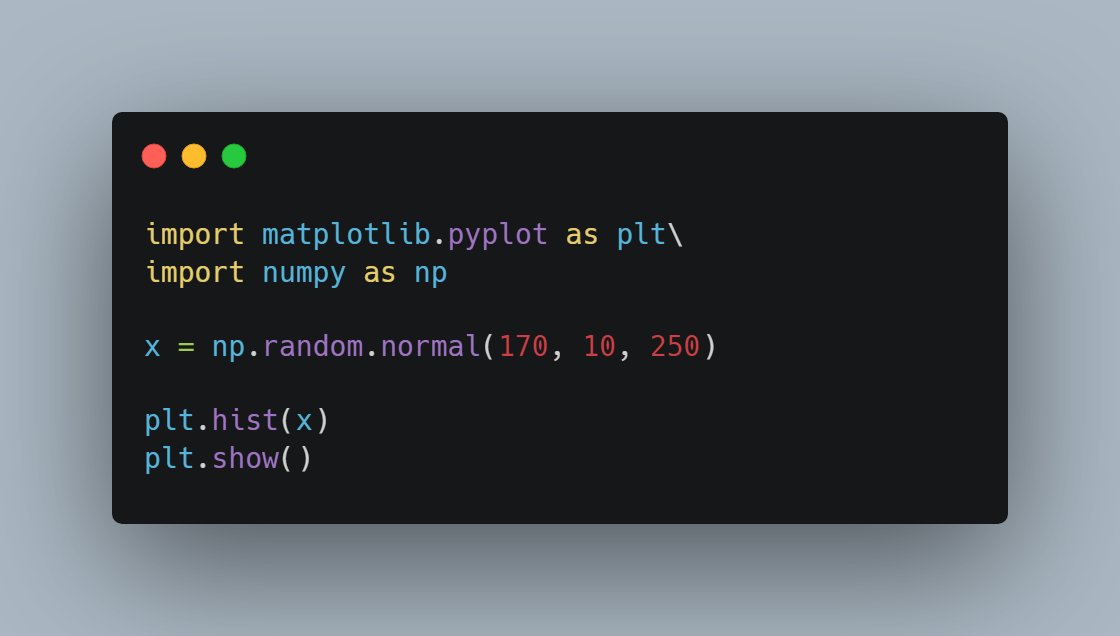
To generate histograms in Matplotlib, we use the 'hist()' function.

The 'hist()' method will produce a histogram from an array of numbers, which is sent into the function as an argument.

For simplicity, we use NumPy to generate a random array of 250 values.
The hist() function will read the array and produce a histogram.

A simple histogram:
Read 5 tweets
Nov 27
Day 27 of #60daysOfMachineLearning

🔷 Data Visualization - @matplotlib 🔷

💠 Bar Plots 📊

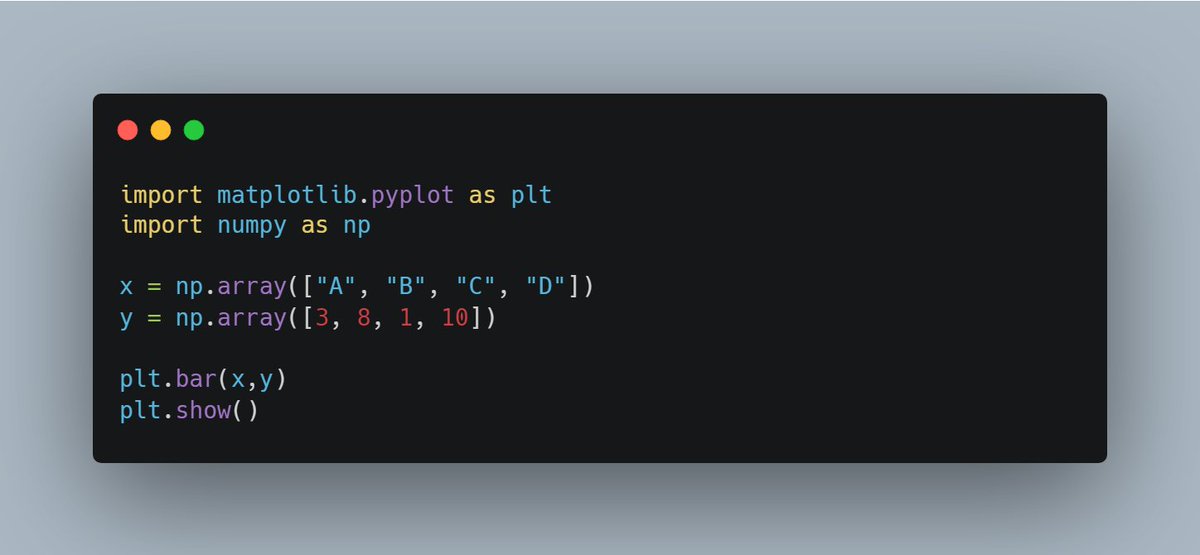
With Pyplot, you can use the bar() function to draw bar graphs.

Draw 4 bars:
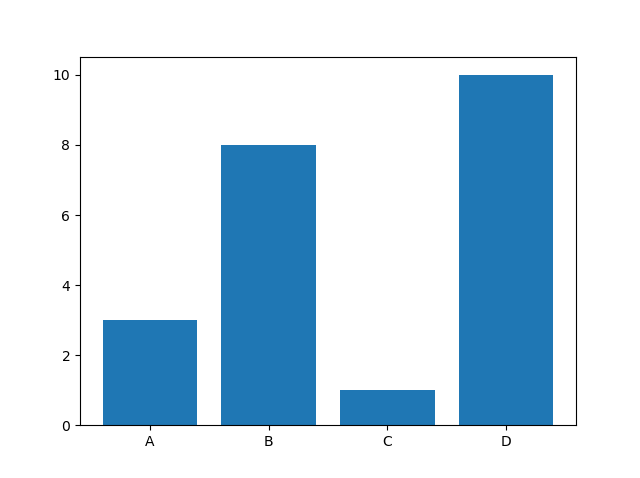
💠 Result

The bar() function takes arguments that describes the layout of the bars.

The categories and their values represented by the first and second argument as arrays.
💠 Horizontal Bars

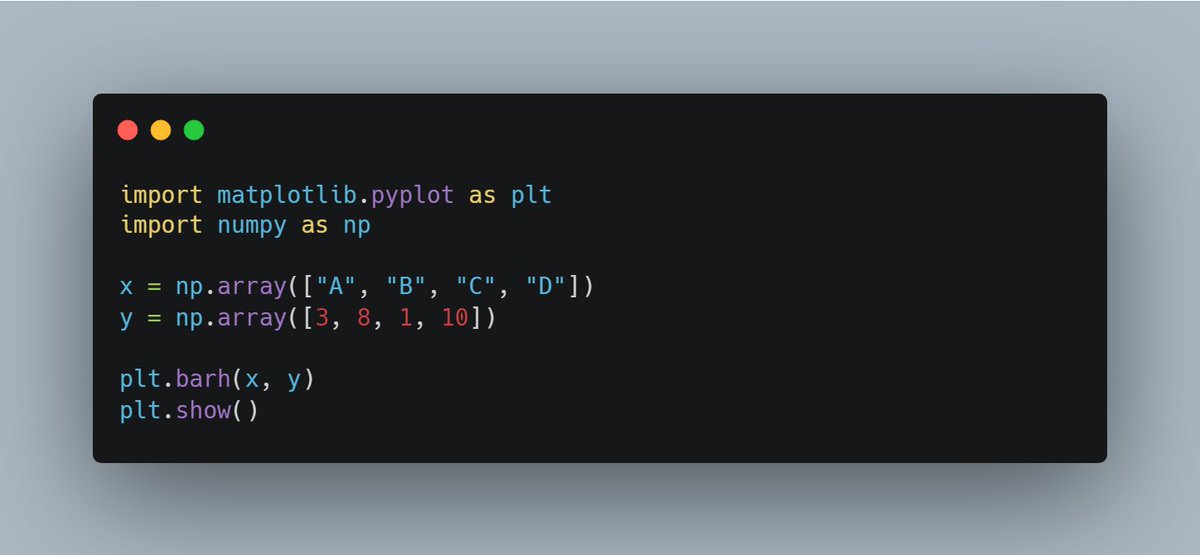
If you want the bars to be displayed horizontally instead of vertically, use the barh() function.

Draw 4 horizontal bars:
Read 6 tweets
Nov 26
Day 26 of #60daysOfMachineLearning

🔷 Data Visualization - Matplotlib 🔷

💠 Creating Scatter Plots

With Pyplot, you can use the scatter() function to draw a scatter plot.

The scatter() function plots one dot for each observation. Image
💠 Result

The observation in this example is the result of 13 cars passing by.

The X-axis shows how old the car is.

The Y-axis shows the speed of the car when it passes. Image
💠 Compare Plots

In the example above, there seems to be a relationship between speed and age, but what if we plot the observations from another day as well? Will the scatter plot tell us something else?

Draw two plots on the same figure: Image
Read 5 tweets
Nov 23
Day 23 of #60daysOfMachineLearning

🔷 Data Management - Joining Tables 🔷

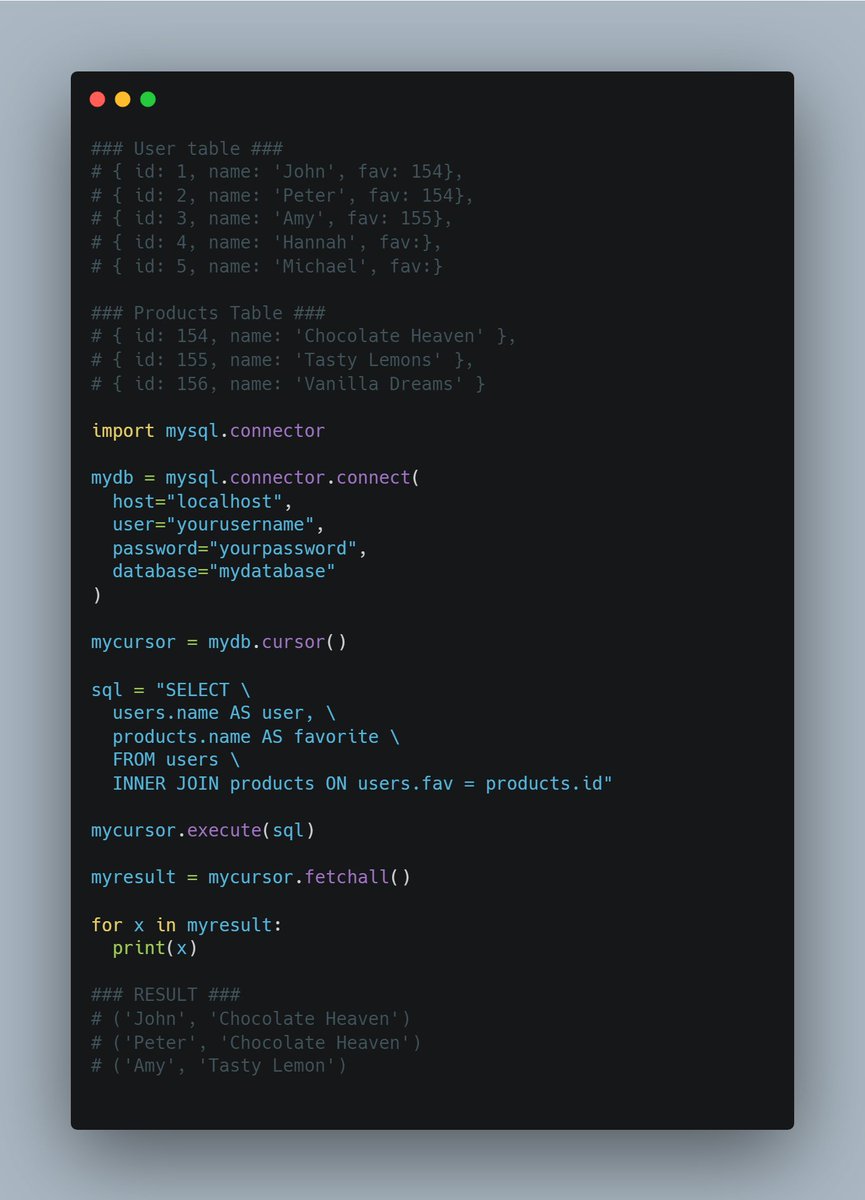
You can combine rows from two or more tables, based on a related column between them, by using a JOIN statement.

Consider you have a "users" table and a "products" table. These two tables can be combined
💠 Left Join

Hannah and Michael were excluded from the result in the preceding example because INNER JOIN only displays data when there is a match.

Use the LEFT JOIN statement to show all users, even if they don't have a favorite product.
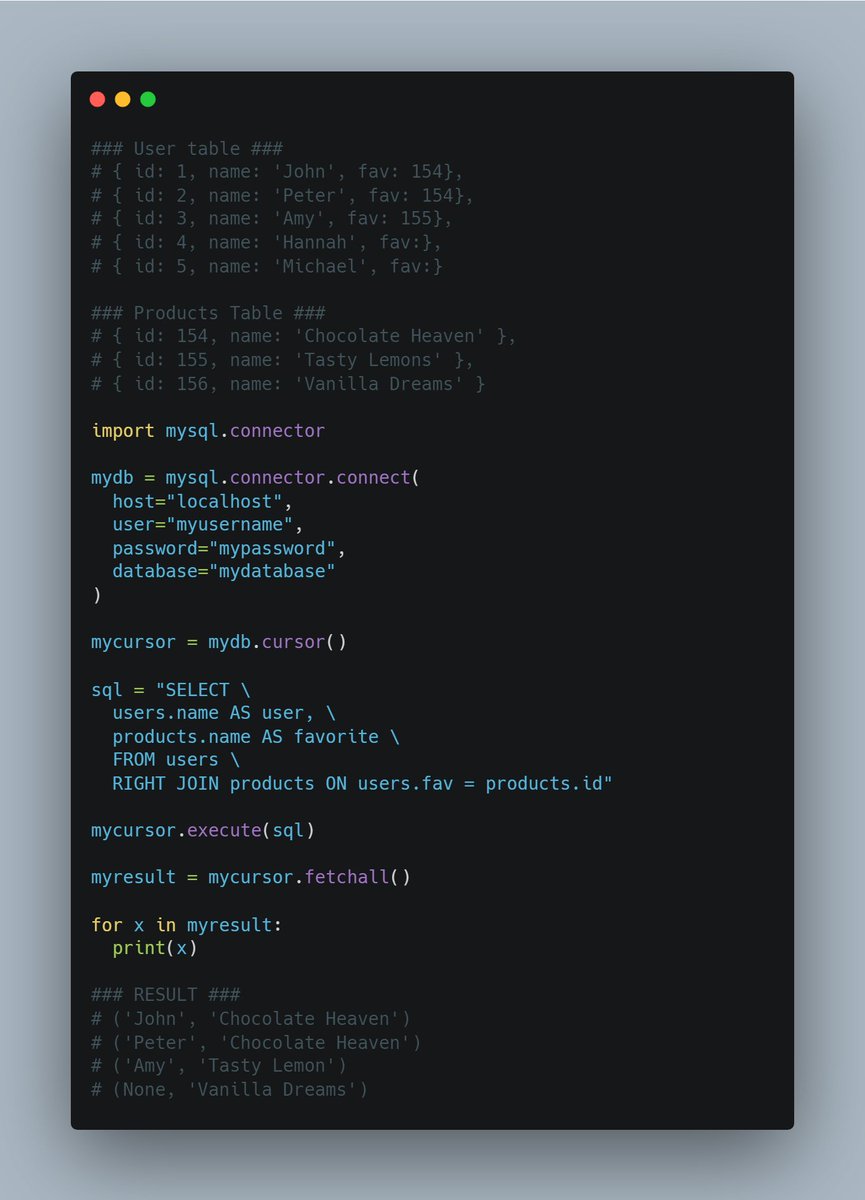
💠 Right Join

Use the RIGHT JOIN statement to return all items and people who have them as their favorite, even if no user has them as their favorite.

Select all products, and the user(s) who have them as their favorite:
Read 4 tweets
Nov 17
SQL is one of the most important skills for any programmer, irrespective of technology, framework, and domain.

It is even said to be more popular than the mainstream programming languages like Java and Python.

Start future-proofing your career with these 5 awesome courses 👇 Image
1. SQL for Data Science [Coursera’s Best SQL Couse]
coursera.org/learn/sql-for-…
2. Building Basic Relational Databases in SQL Server Management Studio — Coursera
coursera.org/projects/basic…
Read 6 tweets
Nov 17
Day 17 of #60daysOfMachineLearning

🔷 Data Management - Adding & Updating Records to a Table

To fill a table in MySQL, use the "INSERT INTO" statement.

Insert a record in the "customers" table:
💠 Insert Multiple Rows

To insert multiple rows into a table, use the executemany() method.

The second parameter of the executemany() method is a list of tuples, containing the data you want to insert:
💠 Get Inserted ID

You can get the id of the row you just inserted by asking the cursor object. If you insert more than one row, the id of the last inserted row is returned.
Read 5 tweets

Did Thread Reader help you today?

Support us! We are indie developers!


This site is made by just two indie developers on a laptop doing marketing, support and development! Read more about the story.

Become a Premium Member ($3/month or $30/year) and get exclusive features!

Become Premium

Don't want to be a Premium member but still want to support us?

Make a small donation by buying us coffee ($5) or help with server cost ($10)

Donate via Paypal

Or Donate anonymously using crypto!

Ethereum

0xfe58350B80634f60Fa6Dc149a72b4DFbc17D341E copy

Bitcoin

3ATGMxNzCUFzxpMCHL5sWSt4DVtS8UqXpi copy

Thank you for your support!

Follow Us on Twitter!

:(