1/13 Update on my deep dive into @logseq.
Logseq is feature rich.
I am two weeks into my deep dive. There are many things I like and a few that I hope will improve. Let me give you an update.
Bottom line: If you prefer Outliners and want local first, Logseq is a solid choice.
Logseq is feature rich.
I am two weeks into my deep dive. There are many things I like and a few that I hope will improve. Let me give you an update.
Bottom line: If you prefer Outliners and want local first, Logseq is a solid choice.
2/13 Every day I learn something new while using Logseq & I feel I have barely brushed the surface.
The outliner is an excellently implemented standard "Outlining" tool (folding, zooming, expanding/collapsing).
Any outliner veteran will feel at home in Logseq.
The outliner is an excellently implemented standard "Outlining" tool (folding, zooming, expanding/collapsing).
Any outliner veteran will feel at home in Logseq.
3/13 Interaction - mouse/keyboard
In addition to solid mouse support (drag, drop, create block refs), it has excellent keyboard support. It seems anything you can do with the mouse can be done with the keyboard.
In addition to solid mouse support (drag, drop, create block refs), it has excellent keyboard support. It seems anything you can do with the mouse can be done with the keyboard.
4/13 So far, I have kept the plugins to a minimum and have not installed any additional themes.
Overall the note-taking area is clean, with lots of luscious white space, bullets are not too big or bold but visible, and the "lines" connecting the bullets are clear.
Overall the note-taking area is clean, with lots of luscious white space, bullets are not too big or bold but visible, and the "lines" connecting the bullets are clear.
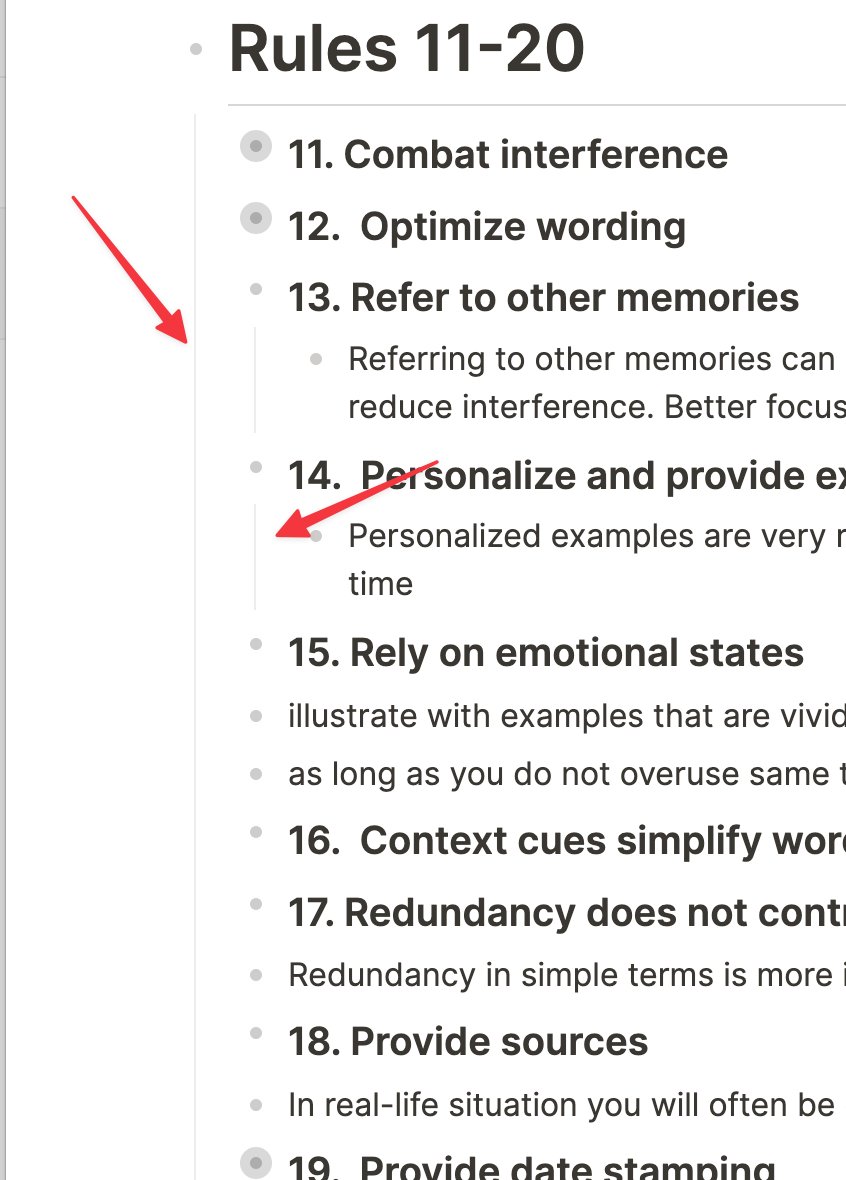
5/13 The lines connecting bullets
If you look at the first video, you'll see that when I click on the lines connecting the bullets, they expand and collapse the blocks within their scope.
This is so subtle... but allows for quick navigation of many bullets and deep structures.
If you look at the first video, you'll see that when I click on the lines connecting the bullets, they expand and collapse the blocks within their scope.
This is so subtle... but allows for quick navigation of many bullets and deep structures.
6/13 So there are a few improvements I hope to see that will help Logseq be a contender in this competitive space.
7/13 #1: No plugin support on mobile
Unlike desktop app, mobile doesn't support plugins. This worries me, as mobile should grow step-by-step with the desktop app to maintain compatibility.
Mobile is the future of computing, not the desktop, especially for capture.
Unlike desktop app, mobile doesn't support plugins. This worries me, as mobile should grow step-by-step with the desktop app to maintain compatibility.
Mobile is the future of computing, not the desktop, especially for capture.
8/13 #2: Odd User Interface elements in prime real estate
The User Interface feels to be designed for engineers, not everyday users. In my opinion, there are some weird features exposed in primary areas.
The User Interface feels to be designed for engineers, not everyday users. In my opinion, there are some weird features exposed in primary areas.

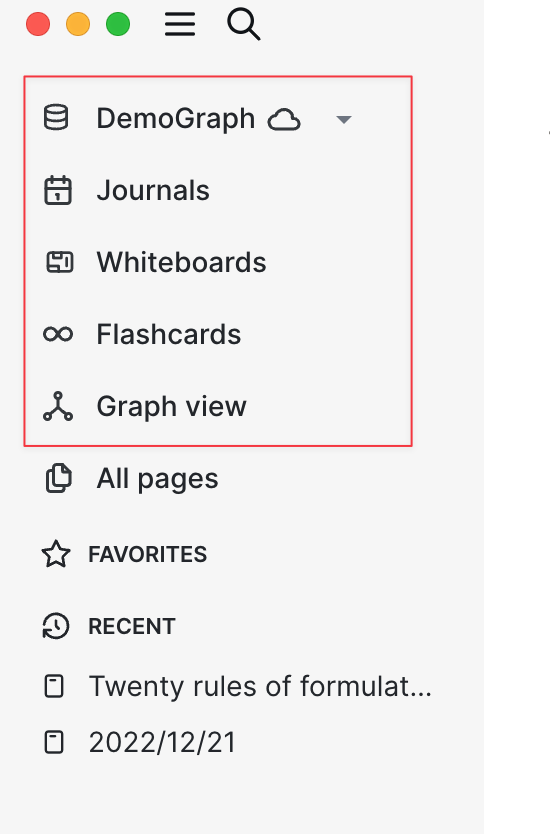
9/13 This is nit-picky, but it makes me wonder who the audience is for Logseq. Is it the super nerd or everyday note-taker?
Logseq has a second challenge, many users don't understand the power of outliners, so there is an additional learning curve for potential new users.
Logseq has a second challenge, many users don't understand the power of outliners, so there is an additional learning curve for potential new users.
10/13 Logseq should significantly invest in the user experience and onboarding to help the user initially.
Having said that, they can address this with a strong focus on usability and UX design.
Having said that, they can address this with a strong focus on usability and UX design.
11/13 Finally, I wouldn't say I like the product's name. Logseq? What does that mean?
There is a definition, but... it is a super nerdy name and gives us no insight into the program's purpose.
Plus, everyone is confused how to pronounce it. A product name should be easy to say.
There is a definition, but... it is a super nerdy name and gives us no insight into the program's purpose.
Plus, everyone is confused how to pronounce it. A product name should be easy to say.
12/13 As Logseq looks to add value through "commercial" features to its open-source initiatives, I would recommend they consider rebranding:
+ New name
+ Change the icon (Looks like a bear's paw)
+ Move away from the dark green theme
+ New name
+ Change the icon (Looks like a bear's paw)
+ Move away from the dark green theme
13/13 In conclusion, I am enjoying working with Logseq. I am sufficiently satisfied that I am continuing to use it as my daily driver.
I will report back on intriguing findings as my investigation progresses.
I will report back on intriguing findings as my investigation progresses.
• • •
Missing some Tweet in this thread? You can try to
force a refresh