
How We Beat Out Etsy and Ranked a Brand for the Keyword "Custom Pants" in the Top 3 Spots of Google!
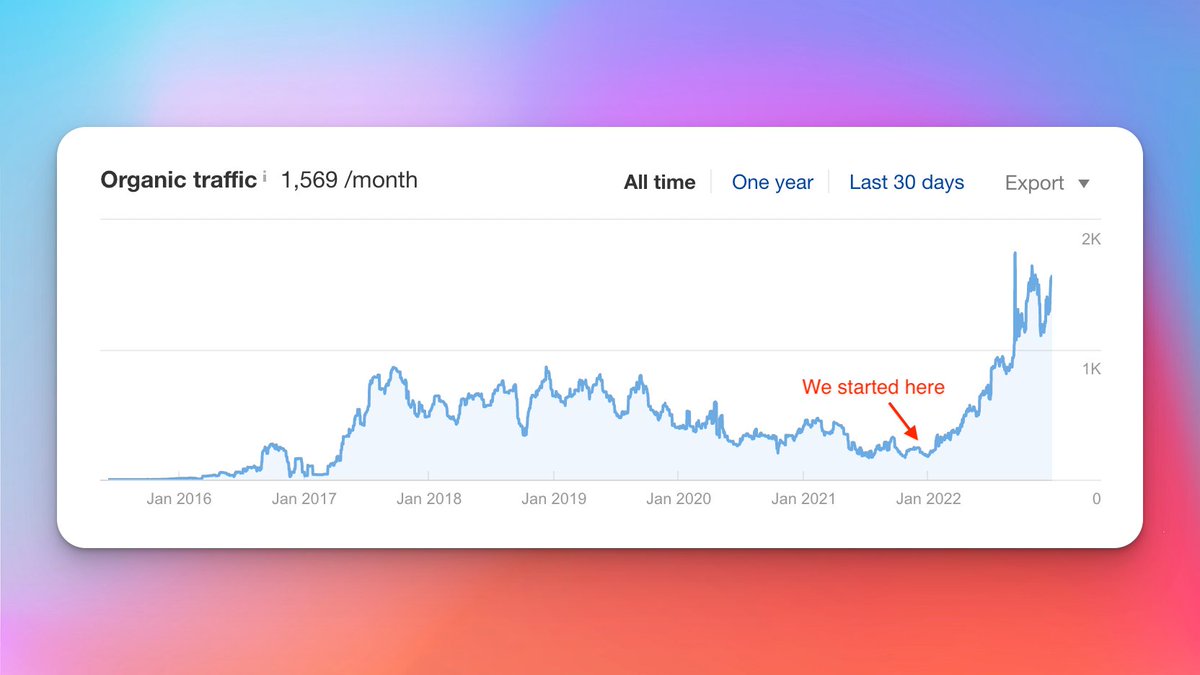
Since we ranked this page, we've seen a 5x increase in traffic to this page alone.
Let's talk about how I did it.
A thread... 🧵
Since we ranked this page, we've seen a 5x increase in traffic to this page alone.
Let's talk about how I did it.
A thread... 🧵
Whenever you're trying to rank for competitive keywords, you typically have to outrank some massive brands that have a ton of authority.
I'm talking about brands like Amazon, Etsy, Walmart, Bed Bath & Beyond, etc.
They're usually hard to outrank...
But I know how to do it!
I'm talking about brands like Amazon, Etsy, Walmart, Bed Bath & Beyond, etc.
They're usually hard to outrank...
But I know how to do it!
In this case, the brand we were working with wanted to rank for the keyword "custom pants" — which is a pretty competitive keyword.
The big brand we had to outrank, in this case, was Etsy.
Etsy has insane authority and SEO presence.
But, we knew our strategies could beat them!
The big brand we had to outrank, in this case, was Etsy.
Etsy has insane authority and SEO presence.
But, we knew our strategies could beat them!
We took this brand through our five phases of SEO:
1. Technical SEO
2. Keyword Research
3. On-Page Optimization
4. Content Creation
5. Link Building
And sure enough, after some time, this brand hit the top 3 spots for "custom pants" and other similar keyword variations!
1. Technical SEO
2. Keyword Research
3. On-Page Optimization
4. Content Creation
5. Link Building
And sure enough, after some time, this brand hit the top 3 spots for "custom pants" and other similar keyword variations!
1. Technical SEO
The first step of our SEO process is fixing technical errors hurting a site's ability to rank.
This sets the foundation of our SEO campaign and makes a site more "Google-friendly."
The more "Google-friendly" a website is, the easier it's going to be to rank.
The first step of our SEO process is fixing technical errors hurting a site's ability to rank.
This sets the foundation of our SEO campaign and makes a site more "Google-friendly."
The more "Google-friendly" a website is, the easier it's going to be to rank.
What are technical errors?
Well, there are A LOT of them. But we focus on the big ones that actually make an impact:
- 404 errors
- Broken backlinks
- Poor URL structure
- Duplicate/thin content
- Poor internal linking
- Poor website architectue
- Missing meta data & H1 tags
Well, there are A LOT of them. But we focus on the big ones that actually make an impact:
- 404 errors
- Broken backlinks
- Poor URL structure
- Duplicate/thin content
- Poor internal linking
- Poor website architectue
- Missing meta data & H1 tags
We audited the entire site, and since this brand was on a custom platform, we worked with the dev team to get all of these errors fixed.
Next up, keyword research.
Next up, keyword research.
2. Keyword Research
Keyword research is the process of identifying target keywords for all transactional pages (in this case, product category pages) and blog content opportunities.
Keyword research is the process of identifying target keywords for all transactional pages (in this case, product category pages) and blog content opportunities.
We identified target keywords for ALL of this brand's product category pages, but for the purpose of this thread, we're going to focus on one:
Their custom pants product category pages.
Obviously, we identified the keyword "custom pants", but we found some other ones as well.
Their custom pants product category pages.
Obviously, we identified the keyword "custom pants", but we found some other ones as well.
Other closely related keywords we identified included:
- custom made pants
- custom pants online
- custom pants men
These were all keywords that had similar intent to "custom pants", so we knew we could rank for those keywords as well.
Spoiler alert: We did.
- custom made pants
- custom pants online
- custom pants men
These were all keywords that had similar intent to "custom pants", so we knew we could rank for those keywords as well.
Spoiler alert: We did.
Now, onto blog content keyword research:
The purpose of blog content is to build something called topical relevancy.
The idea is that if we write a ton of blog posts about custom pants, we'll build topical relevancy for custom pants, and all custom pants pages will rank higher.
The purpose of blog content is to build something called topical relevancy.
The idea is that if we write a ton of blog posts about custom pants, we'll build topical relevancy for custom pants, and all custom pants pages will rank higher.
Unfortunately, there aren't a ton of blog content opportunities for just custom pants, specifically.
So, we focused on finding general keywords for pants instead.
I like to focus on question keywords so we found keywords like:
- chinos vs dress pants
- how to taper pants
- etc
So, we focused on finding general keywords for pants instead.
I like to focus on question keywords so we found keywords like:
- chinos vs dress pants
- how to taper pants
- etc
3. On-Page SEO
In order to rank a product category page for the keyword "custom pants" and all variations, we had to optimize the page for those keywords.
We add those keywords to:
- Meta title
- Meta description
- H1 tag
- URL slug
In order to rank a product category page for the keyword "custom pants" and all variations, we had to optimize the page for those keywords.
We add those keywords to:
- Meta title
- Meta description
- H1 tag
- URL slug
I should mention that when it came to the H1 tag and the URL slug, we only optimized them for the main keyword: custom pants.
We didn't try to cram all of the keywords in there, as that would look spammy and ultimately hurt your SEO.
Next up, we added some content to the page.
We didn't try to cram all of the keywords in there, as that would look spammy and ultimately hurt your SEO.
Next up, we added some content to the page.
The content was around 500 words and it was focused on all of the keywords we were targeting.
As a bonus, we made sure we included all of our target keywords on H2 tags within the content.
H2 tags are a big help for keyword optimization, so don't ignore them!
As a bonus, we made sure we included all of our target keywords on H2 tags within the content.
H2 tags are a big help for keyword optimization, so don't ignore them!
4. Content Creation
We started publishing blog content around those question keywords we found.
We aimed to publish around 4-5 blog posts a month, and we added an internal link from each blog post to the custom pants product category pages.
This is super important!
We started publishing blog content around those question keywords we found.
We aimed to publish around 4-5 blog posts a month, and we added an internal link from each blog post to the custom pants product category pages.
This is super important!
5. Link Building
And lastly, we did link building.
We built links throughout the site:
- homepage
- custom pants product category page
- blog posts relevant to the custom pants
And that's pretty much it!
And lastly, we did link building.
We built links throughout the site:
- homepage
- custom pants product category page
- blog posts relevant to the custom pants
And that's pretty much it!
After enough time creating content and building links, keyword rankings began to move.
And now they're all in the top 3 spots of Google... above Etsy.
These keywords now bring over 1,000-2,000 warm, ready-to-buy users a month to this single product category page.
And now they're all in the top 3 spots of Google... above Etsy.
These keywords now bring over 1,000-2,000 warm, ready-to-buy users a month to this single product category page.
• • •
Missing some Tweet in this thread? You can try to
force a refresh






