Mushtaq Bilal, PhD Profile picture
Mar 2, 2023 11 tweets 3 min read Read on X
If ChatGPT and Google Scholar got married, their child would be Consensus — an AI-powered search engine.

Here's how to use it:
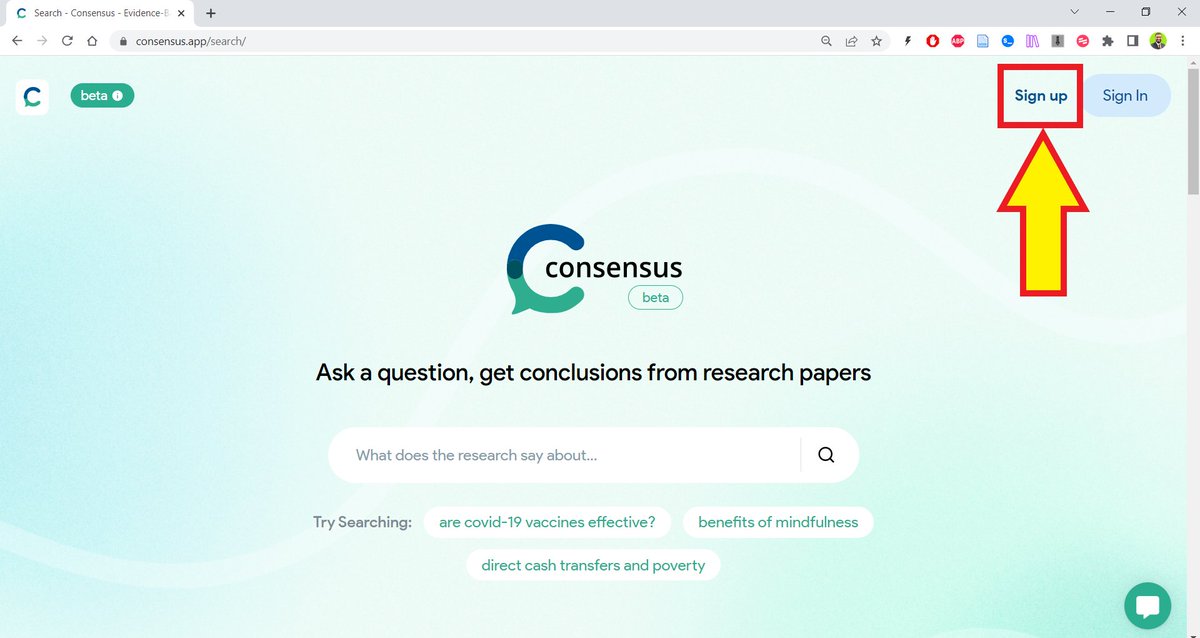
Go to consensus(dot)app and sign up for a free account. A yellow arrow points to th...
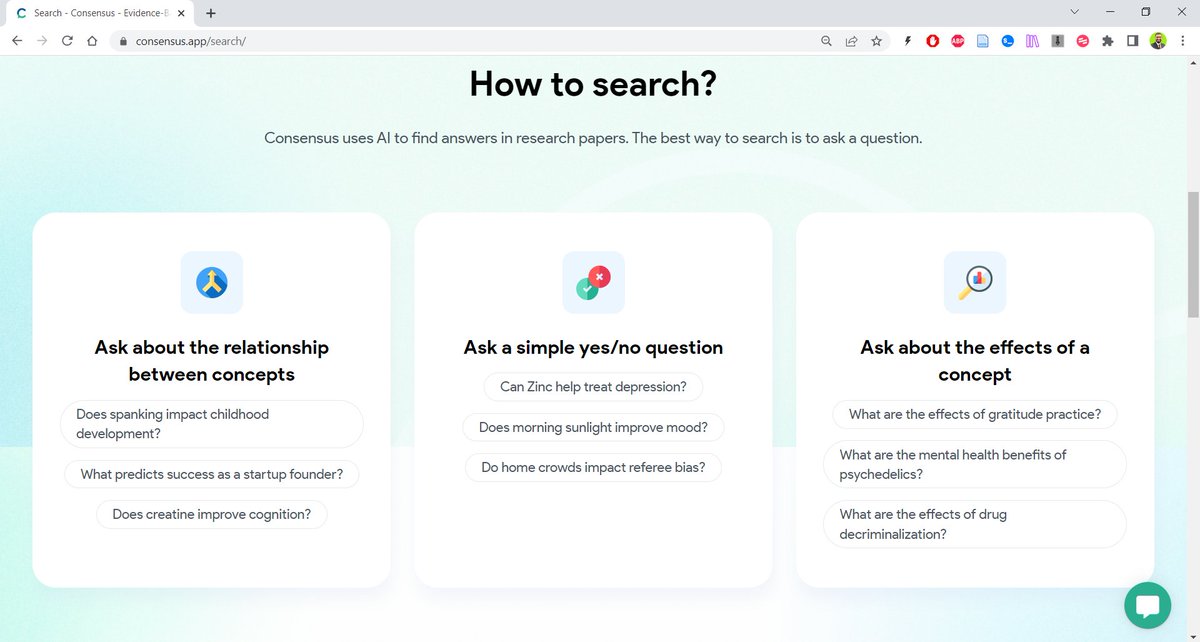
You can ask Consensus:

1. Questions about the relationship between concepts
2. Questions about the effects of something
3. Yes/No questions A screenshot of the three t...
You can ask Consensus questions about 6 topics:

1. Social policy
2. Medicine
3. Mental health
4. Health supplements
5. Economics
6. Sleep
If you search about the effects of X on Y or the relationship between X and Y, Consensus gives you a list of relevant papers.

This doesn't seem very different from Google Scholar.

But...
If you ask a Yes/No question, it will tell you what the consensus of the scientific community is regarding the question.

This is an extraordinary feature that will save scholars and researchers a lot of time.
If you want to become an efficient academic writer with the help of AI-powered apps, I have an ebook for you.

For details, please see my pinned tweet. Become an Efficient Academi...
Found this thread helpful?

1. Scroll to the top and hit the "Like" button on the first tweet.

2. Follow me @MushtaqBilalPhD for regular threads on how to supercharge your research with AI-powered apps.
In tomorrow's newsletter, I will share with you how to train ChatGPT to write in your own style.

Sign up below to read it:

keepwriting.beehiiv.com/subscribe
Folks @ConsensusNLP are looking forward to your suggestions. So, if you have any feedback, please go ahead and post.
Want me to email you tips on academic writing?

Sign up for my newsletter. It's FREE!

keepwriting.beehiiv.com/subscribe

• • •

Missing some Tweet in this thread? You can try to force a refresh

 

Keep Current with Mushtaq Bilal, PhD

Mushtaq Bilal, PhD Profile picture

Stay in touch and get notified when new unrolls are available from this author!

Read all threads

This Thread may be Removed Anytime!

PDF

Twitter may remove this content at anytime! Save it as PDF for later use!

Try unrolling a thread yourself!

how to unroll video
  1. Follow @ThreadReaderApp to mention us!

  2. From a Twitter thread mention us with a keyword "unroll"
@threadreaderapp unroll

Practice here first or read more on our help page!

More from @MushtaqBilalPhD

Apr 20
Screening titles and abstracts for your systematic literature review is a very time-consuming process.

Researchers have to screen thousands of papers.

You can use Claude Code to automate the screening process with accuracy:

Here's how to do it:
1. Create a folder on your computer, "systematic review"
2. Run a search in PubMed or any other database.

Download a PubMed or RIS file of the search results.

Be sure to include abstracts when you download.

Name it "abstractsforscreening"
Read 9 tweets
Apr 18
Codex is one of the most powerful AI agents for research work.

But most academics don't know how to get started on it. They're still stuck with ChatGPT.

Here's a step-by-step tutorial to help you get started on Codex.

Codex 101 for academics: A screenshot of the Codex landing page.
1. Go to openai[.]com/codex

Download and instal the Codex app on you computer.

Unlike ChatGPT that you use in your browser, Codex is a desktop app.

Don't be intimidated by its name. You don't need any coding experience to use it.
2. When you open it for the first time, it will create a folder "Playground" on your computer.

Everything you do here will be saved in Playground. You can, of course, change the folder.

For serious academic work, choose the lastes model (GPT-5.4) with "Extra High" Reasoning
Read 12 tweets
Apr 8
Karpathy's idea of LLM Knowledge Bases went viral: 18M+ views.

Now everyone wants to build one but many are facing problems, especially non-technical folks.

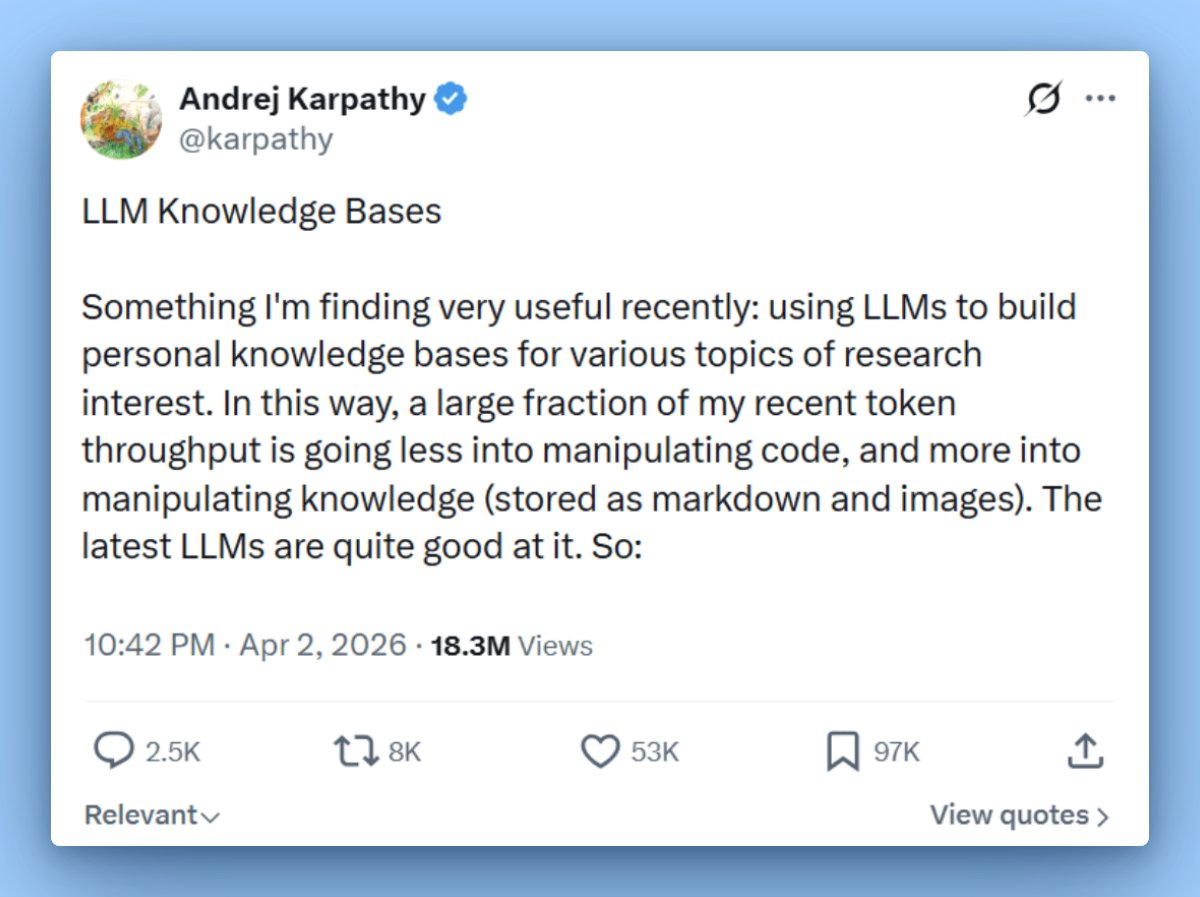
Here is a step-by-step tutorial on setting up an LLM Knowledge Base for non-technical folks: A tweet by Andrej Karpathy discusses using LLMs for personal knowledge bases, achieving 18.3M views and highlighting user challenges.
1. Go to obsidian[.]md

Download and install the app on your computer.
2. Once installed, Obsidian will ask you to create a "Vault" (folder on your computer).

Create a vault called "MyWiki" and save it in your Documents.

Once your vault is created, Obsidian will open it for you.

Don't be intimidated by what you see. It's very easy to use.
Read 16 tweets
Mar 19
Scopus has 100M+ research papers.

LeapSpace AI lets you generate research reports and literature overviews based on full-text papers in Scopus.

It generated for me a 27-page report with 143 references.

Also helps you find research grants.

Here's how to use it:
1. Go to researcher[.]elsevier[.]com and sign up for a free trial.

Log in to LeapSpace and enable deep research.

Ask a question and it will generate a complete report based on full texts of research papers.

Click on a reference and it will give you the relevant paper.
2. You can also download the research report as a PDF.

You can see here that it's a 27-page long report with 143 references to papers in Scopus.
Read 6 tweets
Mar 5
A lot of academics still think AI apps generate fake references to papers that don't exist.

They are living in 2023.

You can easily integrate a database of 280M research papers with Claude and ChatGPT to get answers with references to published papers.

Here's how to do it:
1. Go to scite[.]ai/mcp and select Claude ai

Copy the URL given in the second line. Then click on the blue "Add Scite" button.

This will open Claude Connectors. Type in the name Scite and paste the URL in the "Remote MCP" field.

Then click on "Add."
2. This will add a Scite Connector to your Claude.

Scroll down a little and you will see a Scite Connector. Click on "Connect" and log in to your Scite account.

Give Claude permission to access Scite. And that's it.

You will need a paid subscription for Scite to do this.
Read 7 tweets
Mar 4
Claude Code will fundamentally change the nature of academic research.

But most academics don't know how to use it.

Here's how to get started on Claude Code (even if you've never coded).

Claude Code for Academics 101:
Before getting started, we need to understand what Claude Code (CC) is.

It's not a simple chatbot.

Think of it as a general-purpose work enviroment that lets you create customized features for your own specific purposes.

It'll become clear by the end of this thread.
1. To get started, go to claude[.]com/download and download the Claude desktop app.

You will need a paid plan.

Select the $20/m one. That'll be enough to get you started.
Read 17 tweets

Did Thread Reader help you today?

Support us! We are indie developers!


This site is made by just two indie developers on a laptop doing marketing, support and development! Read more about the story.

Become a Premium Member ($3/month or $30/year) and get exclusive features!

Become Premium

Don't want to be a Premium member but still want to support us?

Make a small donation by buying us coffee ($5) or help with server cost ($10)

Donate via Paypal

Or Donate anonymously using crypto!

Ethereum

0xfe58350B80634f60Fa6Dc149a72b4DFbc17D341E copy

Bitcoin

3ATGMxNzCUFzxpMCHL5sWSt4DVtS8UqXpi copy

Thank you for your support!

Follow Us!

:(