Android 14 DP2 is here! Google just announced it over on the Android Developers blog. Stay tuned for my breakdown of what’s new, but first, here’s my summary of what Google announced:
Selected photos access: When an app targeting SDK 33+ requests access to your gallery via READ_MEDIA_IMAGES/READ_MEDIA_VIDEO, you can now select which photos/videos that app has access to using the Photo Picker. 
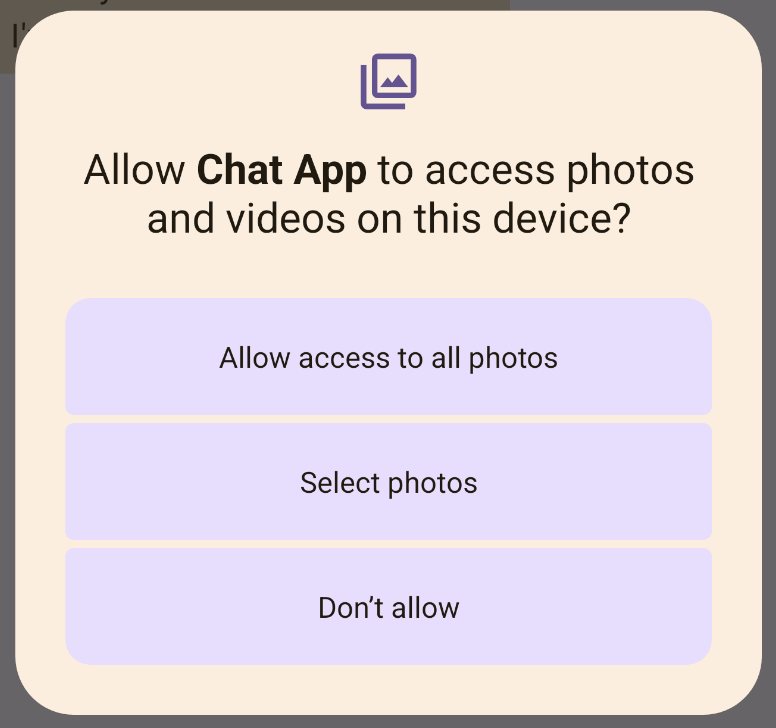
Previously, it was up to apps whether or not they wanted to interact with the Photo Picker. With this change, you get to choose whether to grant an app full gallery access or limited access to media items you select.
App developers should be ready for users to take advantage of this feature. Declare the READ_MEDIA_VISUAL_USER_SELECTED permission and prompt users to select media items by requesting the media permissions again.
For more information on this feature, check out Google’s documentation or read the article I wrote last month that goes in-depth on this change and why it matters. xda-developers.com/android-14-pho…
Credential Manager: This new framework API aims to “make sign-in easier for users with APIs that retrieve and store credentials with user-configured credential providers.” More importantly, Credential Manager supports passkeys, the new passwordless authentication standard.
(If you’re wondering what a passkey is, give this podcast a listen!) blog.esper.io/what-is-a-pass…
The credential selector UI is managed by a new system app called Credential Manager, which has been updated in DP2 to feature improvements in the UI styling for the account selector.
https://twitter.com/MishaalRahman/status/1631063611366952961
While Android 14 enables platform support for passkeys within 3p credential providers like Dashlane, the Credential Manager API is also accessible by apps on older Android versions (as far back as Android 4.4) through a Jetpack library with a Google Play Services implementation.
Safer implicit intents: For apps targeting Android 14, creating a mutable pending intent with an implicit intent will throw an exception, preventing them from being able to be used to trigger unexpected code paths.
Background activity launching: Foreground apps have more control over the ability of apps they interact with to start activities. Apps targeting Android 14 will need to grant privileges to start activities in the background when sending a PendingIntent or when binding a Service.
Background optimizations: A few seconds after an app enters the cached state, background work is disallowed outside of conventional Android app lifecycle APIs such as foreground services, JobScheduler, or WorkManager.
In Android 13, users can dismiss all notifications except those created with FLAG_ONGOING_EVENT. In Android 14, even these notifications will be dismissable once the device is unlocked. Important notifications like system & device policy notifications will remain non-dismissable.
Android 14 introduces a number of new APIs to improve (third-party) app store experiences, including “update ownership” and “gentle updates”, as I previously talked about in this article: xda-developers.com/android-14-new…
My article also talked about a new “install pre-approval” API, but I was incorrect about what it does. This API lets a 3P app store get confirmation from a user that they want to install a particular app before the APK has actually been downloaded.
This API aims to solve the issue wherein you download an app from a 3P app store and you have to agree to install the app twice: Once when you tap to install the app through the app store & again when the APK is downloaded and Android asks you if you want to install the app.
This isn’t a problem if the APK you download is tiny, but it could be awkward when the APK is huge. You could tap to install an app within a 3P app store and then wait a minute to confirm again that yes, you want to install the app.
This happens because app stores can only request user approval to install an app after APKs are written to an install session and the session is committed. In Android 14, requestUserPreapproval lets app stores get user approval before committing the install session.
A new PackageInstaller API introduced in DP2 is setDontKillApp, which lets installers tell the system not to kill an app’s running processes when new split APKs are installed. This lets 3P app stores dynamically deliver features while the user is using the app, like Google Play.
Split APKs were introduced in API level 22 to reduce how much space apps take up on devices. Instead of creating a monolithic APK with every resource for every device configuration, a base APK can be installed as well as whatever split APKs are needed for the user’s device.
Regional Preferences in Settings > System > Languages & input. Here, Android 14 lets users personalize temperature units, the first day of the week, and numbering system. For example, an American living in the UK may want temperature units in apps to be shown in F instead of C.
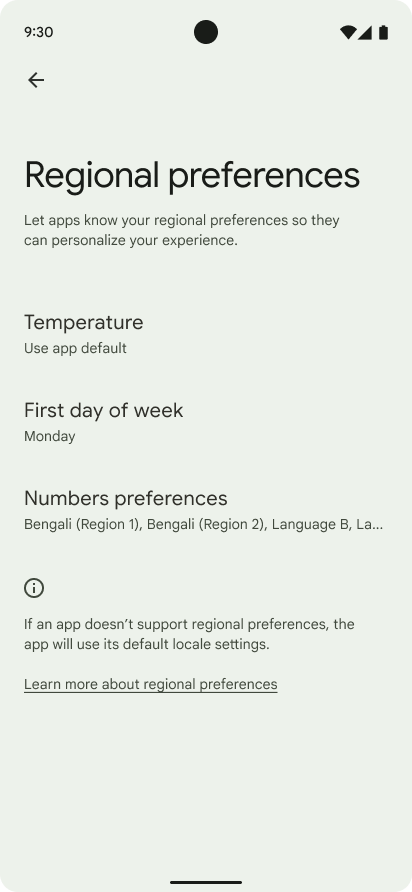
Apps can use new LocalePreferences APIs (getTemperatureUnit, getFirstDayOfWeek) to read the user’s regional preferences and adjust accordingly. The ACTION_LOCALE_CHANGED broadcast will be sent when the user updates their regional preferences.
A new screenshot detection API lets apps get notified when a screen capture of its windows is attempted. This requires the app to request the new DETECT_SCREEN_CAPTURE permission.
All app-facing system behaviors in Android 14 are toggleable so you can more easily test how your app behaves when running on the Developer Preview and/or when upgrading your app to API 34.
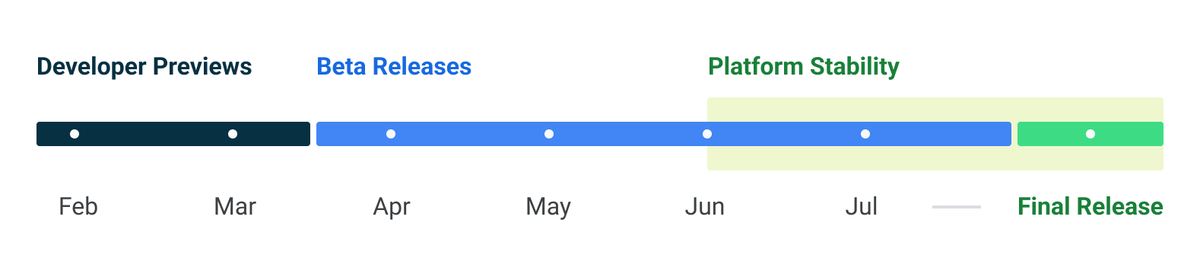
According to the release timeline, Beta 1 in April is the next release. Beta 2 will likely be released during Google I/O on May 10. Beta 3 in June is when Android 14 will reach Platform Stability. Beta 4 in July will be the final beta before the stable release.
Android 14 DP2 is today available on the Pixel 4a (5G) through Pixel 7 Pro. You’ll still have to manually install it, though. 64-bit emulator images are available for the Android Emulator through Android Studio.
If you missed Google’s blog post on Android 14 DP1, I have a summary of that in this thread here:
Of course, I’ll be digging through Android 14 DP2 shortly and will post a separate thread containing my findings soon.
https://twitter.com/MishaalRahman/status/1623381444759265292
Of course, I’ll be digging through Android 14 DP2 shortly and will post a separate thread containing my findings soon.
• • •
Missing some Tweet in this thread? You can try to
force a refresh