Prof Lennart Nacke, PhD Profile picture
May 1, 2023 11 tweets 4 min read Read on X
Academics hate doing graphic design.

But visualizations, diagrams, and figures elevate any paper.

Here's how I use ChatGPT to create TikZ figures unlike anyone else. ↓ The TikZ figure that we cre...
In this thread, I will teach you:

• how to add beautiful diagrams simply by describing them
• without any coding skills but using a LaTeX package
• how to work ChatGPT to do the coding for you
• how to format the diagrams

And more...

Let's dive in.
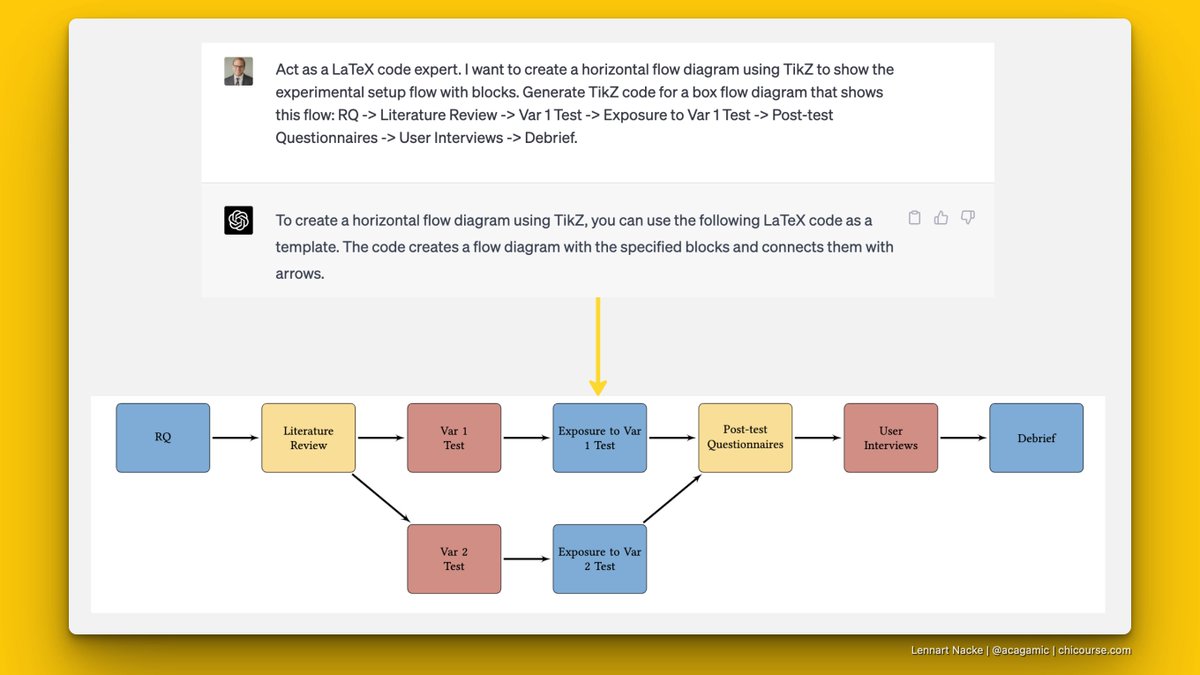
Here's the figure we are going to create:

It's a simple experimental flow diagram.

This helps you describe pre and post conditions

And flow through your experimental design. This is how the final outpu...
LaTeX is a markup language that is popular for scientific publications.

It makes it easy to reference in different format and citation styles.

The TikZ package allows you to create diagrams using text only.

I use a free online editor called @overleaf to edit my papers.
Creating a TikZ figure can take time for someone not prolific in coding.

I have this problem, and I get lost in tinkering around with the code.

Let's focus on building the figure we want instead.

Enter ChatGPT, your coding assistant.

Here's is how to use it for TikZ:
First, I draw the diagram or think about how it should look like.

Then, I prompt ChatGPT with the details:

• Act as a LaTeX expert
• Create a horizontal box flow diagram with TikZ
• Describe the flow or sequence of the diagram in detail

See figure for the prompt and output. The first ChatGPT prompt: A...
Make sure to include the usepackage and usetikzlibrary in the header.

The code output is operational already.

You can put it in Overleaf.

This is how it looks like.

Next: colouring. Output figure of the prompt...
The diagram is excellent but even better with some colour.

I wanted to improve: fonts, arrows, height, contrast ratio.

I already knew I wanted to use the xcolor package.

And I had a colour scheme in mind.

I continued to prompt ChatGPT specifically with these instructions. Next prompt: Make all the b...
Finally, I wanted to add a condition to the experiment (more boxes).

I also wanted to fix the colour names from generic to more specific.

All that was left was to iterate on the prompt (see image).

Then, I ended up with the figure from the beginning of the thread. Final prompt: Change the co...
Hope this little ChatGPT trick was helpful for you.

1,245 smart academics read this before anyone else in my newsletter.

Join us here: view.flodesk.com/pages/6438556c…
If you got value from this: Are you going to retweet this thread?

• • •

Missing some Tweet in this thread? You can try to force a refresh

 

Keep Current with Prof Lennart Nacke, PhD

Prof Lennart Nacke, PhD Profile picture

Stay in touch and get notified when new unrolls are available from this author!

Read all threads

This Thread may be Removed Anytime!

PDF

Twitter may remove this content at anytime! Save it as PDF for later use!

Try unrolling a thread yourself!

how to unroll video
  1. Follow @ThreadReaderApp to mention us!

  2. From a Twitter thread mention us with a keyword "unroll"
@threadreaderapp unroll

Practice here first or read more on our help page!

More from @acagamic

May 8
AI without positioning doesn't make you visible.

It makes you disappear faster, with better punctuation.

I tracked what separates the experts who break through from the ones who blend in:
Most treat AI like a content factory.

Prompt → output → post.

Result: Generic sludge that sounds like everyone else.
Skip the smoothie that tastes like socks.

Value comes to those who nail positioning first.

It's the frame that makes your expertise unignorable.
My favourite approach is April Dunford's framework in Obviously Awesome. It's brutal but it works.

She breaks positioning into 5 steps you do in order. Skip the sequence, you’re toast.
Read 10 tweets
Feb 6
I once watched a researcher present at a conference.

Perfectly polished slides. Flawless delivery. Zero connection.

Then someone else got up-stumbled through their intro, admitted they weren't sure about one of their findings, showed messy preliminary data.

That's the one everyone wanted to talk to afterward.

Here's what I've learned helping academics turn research into content:
The polished version gets you respect.
The real version gets you readers.

I see this everywhere now.

Researchers afraid to share:
- Failed experiments
- Questions they don't have answers to
- The messy middle of their thinking

They think it undermines their credibility.

It does the opposite.
When you share the uncertainty, the struggle, the "I don't know yet" in public, that's when people lean in. Because that's what real research looks like. That's what real thinking looks like.

Your audience isn't looking for another perfectly packaged insight. They're suffocating in those.
Read 5 tweets
Jan 11
Reviewers don't read your paper like a detective novel.

They skim for structure.

If they can't see your logic in 90 seconds, they'll assume it doesn't exist.

Signposting lets your paper survive.
The worst rejections happen because reviewers got lost.

Not because your methods were weak.
Not because your data was insufficient.

Because they couldn't follow your argument.

Tired reviewers reject confusion.
Signposting fixes this.

Three essential elements:

1. Subheadings that preview conclusions
2. Transition sentences that connect sections
3. Opening paragraphs that state what's coming

Every section needs all three.
Read 10 tweets
Jan 1
Your paper doesn't prove you can think.

It proves you can execute.

The real question reviewers should ask:

Did you place a new brick on the wall of knowledge?

Or did you just describe the bricks already there?

Scientific merit isn't volume.

It's contribution.

Here's how to know the difference:
Repetition disguises itself as rigour.
• You run the same study in a different population.
• You replicate findings everyone already accepts.
• You add one more variable to an exhausted model.

It feels productive.

But you're repainting the same wall.
Contribution looks different:
• It answers a question nobody else asked
• It challenges assumptions your field takes for granted
• It opens doors instead of confirming what's behind them

The test is brutal but simple.
Read 8 tweets
Dec 31, 2025
Most researchers treat skill development like cardio: more time equals better results.

Wrong.

You don't get better at critical thinking by just reading more papers.

You get better by practicing specific exercises with clear progress indicators.

Seven skills, seven protocols:
1. Critical Thinking Practice
Take any paper you cited uncritically.

List five questions about their methodology you should have asked.

Identify one assumption they made that could invalidate their conclusion.

Weekly time: 30 minutes.
Progress indicator: You spot flaws before reading discussion sections.
2. Information Literacy Practice

Build a search protocol for an unfamiliar topic.

Document every decision:

which databases, what terms, which filters, why.

Give it to a colleague and see if they get the same results.

Weekly time: 45 minutes.
Progress indicator: Your protocols become templates others request.
Read 9 tweets
Dec 23, 2025
I thought 200 PDFs meant progress with my lit review.

But my reviewers called it a filing cabinet.

If you’re supervising MSc/PhD students
(or writing your first review),
this will save you weeks.

I've supervised dozens of graduate students.
But most of them dive into papers without a protocol.

They collect PDFs. They summarize each one.
And the review ships as a pile of summaries.
Reviewers shred it in two sentences.

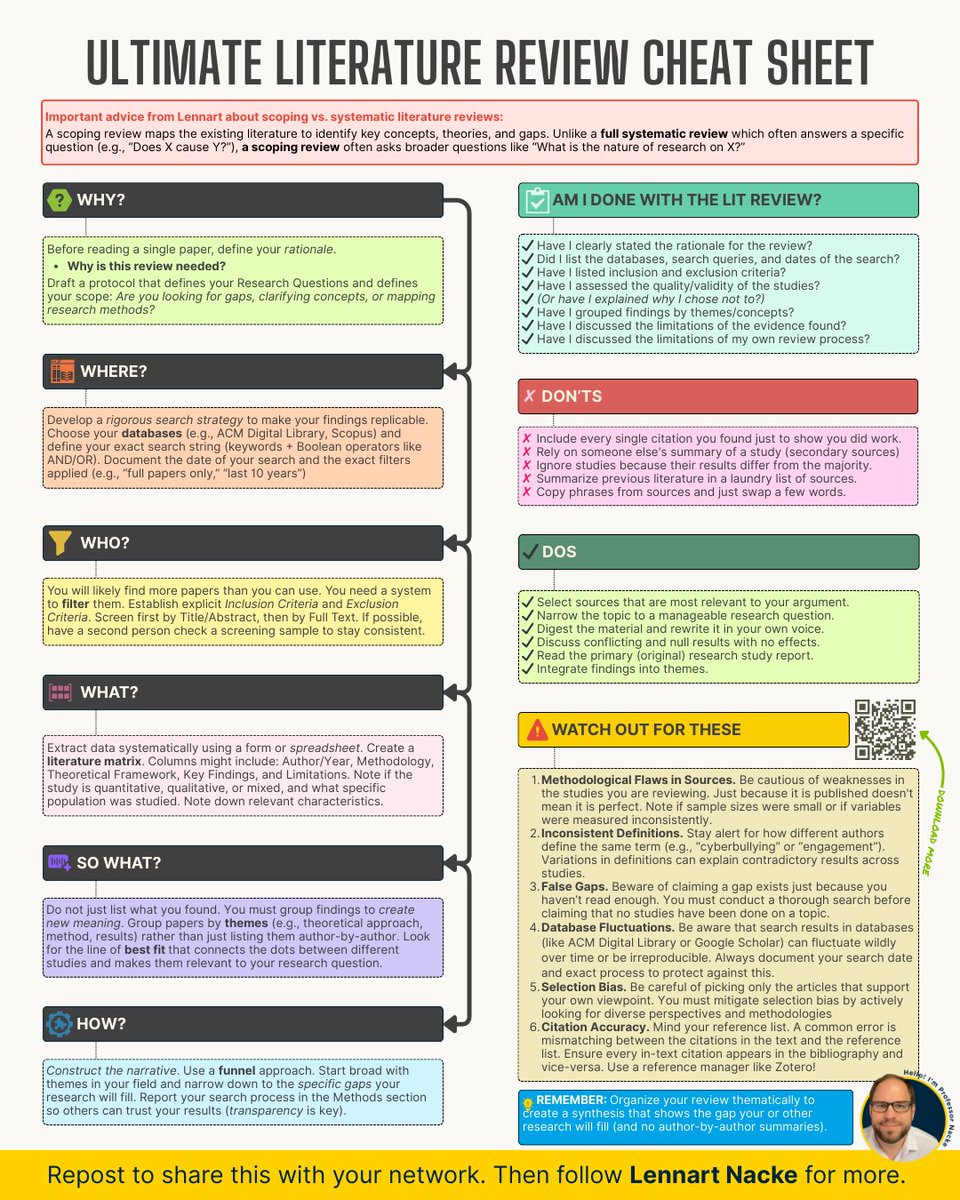
Here's how to fix this before it wastes another 3 months:Colorful infographic titled "Ultimate Literature Review Cheat Sheet" outlining why/where/who/what/how steps, dos/don’ts, checklist and tips for conducting a literature review.
1. Write the protocol before reading
Why: No protocol = random reading, weak scholarship.

DO THIS:
• Define one research question (1 sentence)
• Choose your goal: methods/find gaps/clarify concepts

• Write a 5-line plan:
→ scope
→ concepts
→ outcomes
→ timeframe
→ method
2. Document your search like a Wikipedia entry
Why: If it can't be replicated, it won't be trusted.

DO THIS:
• List databases: Scopus/WoS/PubMed/Google Scholar
• Record: keywords + Boolean + filters
• Log dates + totals: "23 Dec 2025 → 612 hits"
• Keep a simple search log table (even in a Notes doc)
Read 9 tweets

Did Thread Reader help you today?

Support us! We are indie developers!


This site is made by just two indie developers on a laptop doing marketing, support and development! Read more about the story.

Become a Premium Member ($3/month or $30/year) and get exclusive features!

Become Premium

Don't want to be a Premium member but still want to support us?

Make a small donation by buying us coffee ($5) or help with server cost ($10)

Donate via Paypal

Or Donate anonymously using crypto!

Ethereum

0xfe58350B80634f60Fa6Dc149a72b4DFbc17D341E copy

Bitcoin

3ATGMxNzCUFzxpMCHL5sWSt4DVtS8UqXpi copy

Thank you for your support!

Follow Us!

:(