This week's release just landed. Let's take a look at what's new! 

You can read the whole list here, or read on for the highlights: tldraw.substack.com/p/release-note…
And you can try the new features now at tldraw.com
And you can try the new features now at tldraw.com
This week we added a new people menu where you can change your name and color, see who else is in the room...

And even follow viewports!
We've added a laser pointer! Works in shared rooms and readonly rooms, too.
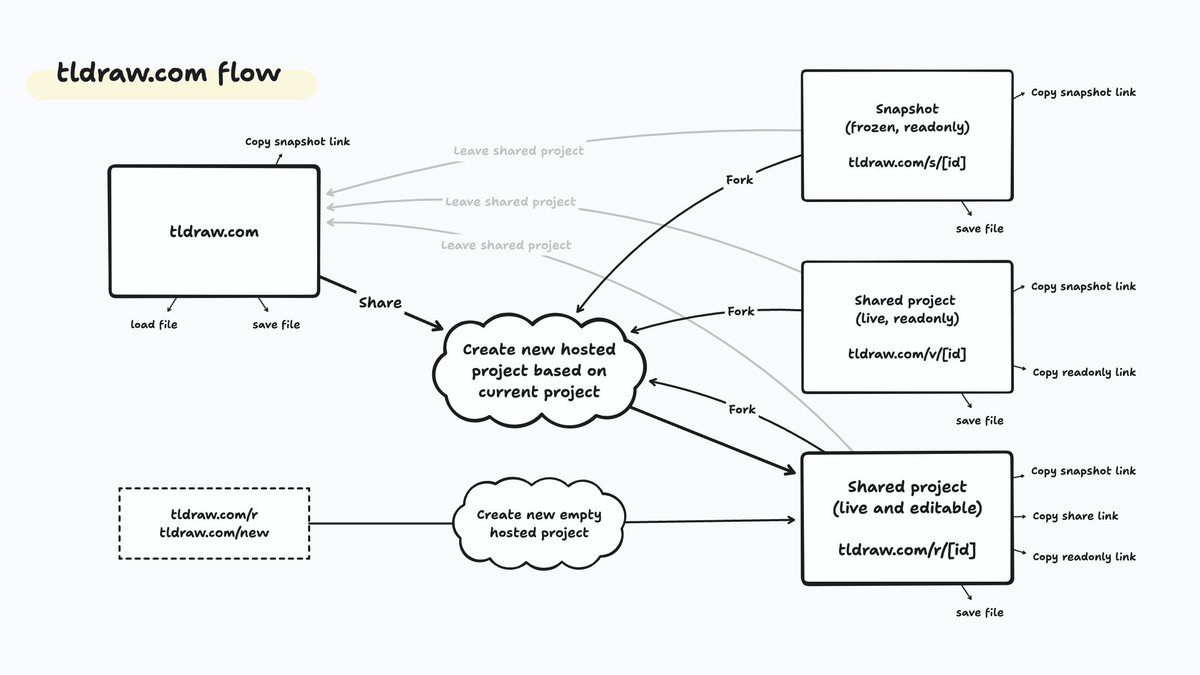
We've added snapshot links, which allow you to store a frozen, read-only copy of a project’s current state to the cloud.
We've greatly improved text pasting in the app, especially for indented or multi-line text.
And we've added the long-awaited, much-requested text label positioning.
That's it for this week! If you have any ideas or feedback, drop by our Discord (link in profile). And if you’re a developer, come check out the GitHub repo. tldraw tldraw discord.gg/Up7bFHPstc
• • •
Missing some Tweet in this thread? You can try to
force a refresh