You can now create graphs in ChatGPT in seconds.
No more need to use Excel to do it.
Here's how to create all the graphs you want:
No more need to use Excel to do it.
Here's how to create all the graphs you want:
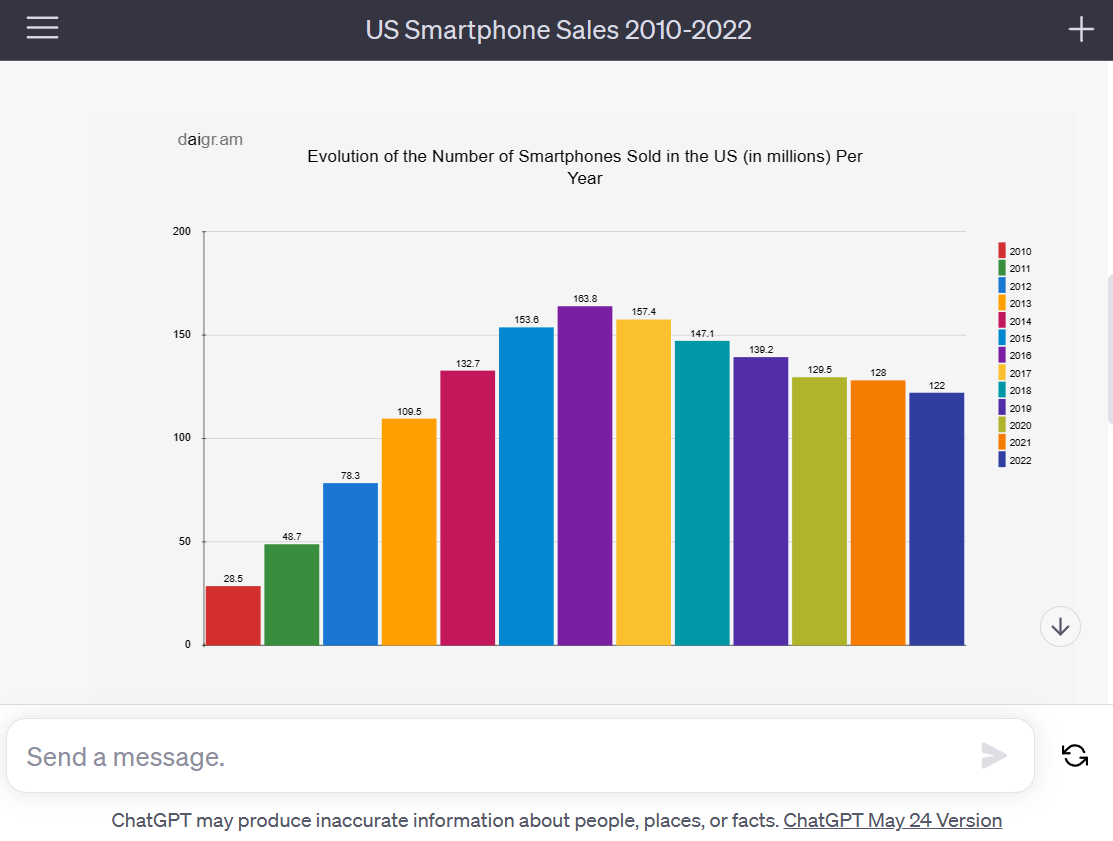
1. Install the daigr .am plugin
→ Activate plugins in ChatGPT's Beta settings
→ Search for and install the daigr .am plugin in the plugin store
→ Activate plugins in ChatGPT's Beta settings
→ Search for and install the daigr .am plugin in the plugin store
2. Enter your prompt
→ Check that the daigr .am plugin is enabled
→ Write the prompt below and paste your data
Prompt: Create a bar chart of (your topic) from this data: (paste your data)
→ Check that the daigr .am plugin is enabled
→ Write the prompt below and paste your data
Prompt: Create a bar chart of (your topic) from this data: (paste your data)
3. Create a pie chart
→ It works for all types of charts
→ Bar, line, pie, ...
Prompt (example): Create a pie graph from the data in this table showing the market share of different brands in smartphone sales in 2022: (paste your data)
→ It works for all types of charts
→ Bar, line, pie, ...
Prompt (example): Create a pie graph from the data in this table showing the market share of different brands in smartphone sales in 2022: (paste your data)
4. Save your graph
→ Save your graph as a .svg image
→ Use an online SVG to PNG converter if necessary
→ Save your graph as a .svg image
→ Use an online SVG to PNG converter if necessary
You'll also love my newsletter:
I send one email a week with a tip or tutorial on how you can use AI and No-Code.
Subscribe for free to receive it:
→ paulai.cc
I send one email a week with a tip or tutorial on how you can use AI and No-Code.
Subscribe for free to receive it:
→ paulai.cc
I hope this was useful to you! If you enjoyed this guide, please:
1. Follow me @itsPaulAi for more AI content
2. Like & Retweet the first tweet below:
1. Follow me @itsPaulAi for more AI content
2. Like & Retweet the first tweet below:
https://twitter.com/itsPaulAi/status/1667162519876632578?s=20
• • •
Missing some Tweet in this thread? You can try to
force a refresh