Literature review is one of the most time-consuming parts of any research project.
Here's a new Zotero+SciSummary workflow to supercharge your literature review.
It'll help you collect, organize, and summarize papers in a fraction of a time.
You can learn it in 15 min:
Here's a new Zotero+SciSummary workflow to supercharge your literature review.
It'll help you collect, organize, and summarize papers in a fraction of a time.
You can learn it in 15 min:
1. Go to zotero(dot)org. Download and install it on your computer.
You will also need to install Zotero Connector. This is a tool that connects Zotero with your web browser. (I am using Chrome.)
Click on "Install Chrome Connector" and add it your browser.
Once it's added, click on the puzzle-like icon and pin the Zotero Connector to your browser.
You will also need to install Zotero Connector. This is a tool that connects Zotero with your web browser. (I am using Chrome.)
Click on "Install Chrome Connector" and add it your browser.
Once it's added, click on the puzzle-like icon and pin the Zotero Connector to your browser.
2. Open your Zotero and click on "File" and then select "New Collection."
Name your collection.
Name your collection.
3. Go to Google Scholar or PubMed (or your university's online library). Look up papers relevant to your project.
Click on the Zotero Connector in the top-right corner. It will open an "Item Selector" with all the items on the page.
Select the papers you want to read and click on OK. Then choose the collection that you just created and click on "Done."
Zotero will add the selected papers to your library. It will also retrieve open source PDFs of those papers.
If you are logged in through your university's library, Zotero will even retrieve PDFs of paywalled articles.
Click on the Zotero Connector in the top-right corner. It will open an "Item Selector" with all the items on the page.
Select the papers you want to read and click on OK. Then choose the collection that you just created and click on "Done."
Zotero will add the selected papers to your library. It will also retrieve open source PDFs of those papers.
If you are logged in through your university's library, Zotero will even retrieve PDFs of paywalled articles.
4. Register for a free Zotero account. This will do two things.
First, it will give you an online backup of your library.
Second, it will help you integrate Zotero with SciSummary.
Go to zotero(dot)org and click on "Log In." Then click on "Register for a free account."
Log in to your acocunt after creating it.
First, it will give you an online backup of your library.
Second, it will help you integrate Zotero with SciSummary.
Go to zotero(dot)org and click on "Log In." Then click on "Register for a free account."
Log in to your acocunt after creating it.
5. To read these papers efficiently, we will use an AI-powered app SciSummary.
Go to scisummary(dot)com and register for a free account.
Go to scisummary(dot)com and register for a free account.
6. Next we need to integrate Zotero with SciSummary.
Log in to your SciSummary account and click on your name in the top-right corner and select "Profile."
Scroll down to Zotero and click on "Login with Zotero." You will be asked to sign in to your Zotero account.
Zotero will tell you that SciSummary wants to access your account. Click on "Accept Defaults."
This will integrated Zotero and SciSummary.
Log in to your SciSummary account and click on your name in the top-right corner and select "Profile."
Scroll down to Zotero and click on "Login with Zotero." You will be asked to sign in to your Zotero account.
Zotero will tell you that SciSummary wants to access your account. Click on "Accept Defaults."
This will integrated Zotero and SciSummary.
7. Go to your SciSummary dashboard. Click on "Add Articles" and select "Import from Zotero."
SciSummary will show you a list of articles that were recently added to your Zotero library.
Select the articles you want to summarize and click on "Submit."
SciSummary will open an article you have just uploaded.
Click on "Request New Summary" and SciSummary will summarize the article for you.
SciSummary will also hyperlink all important words and terms to Wikipedia entries. This feature alone can save you a lot of time and effort.
SciSummary will show you a list of articles that were recently added to your Zotero library.
Select the articles you want to summarize and click on "Submit."
SciSummary will open an article you have just uploaded.
Click on "Request New Summary" and SciSummary will summarize the article for you.
SciSummary will also hyperlink all important words and terms to Wikipedia entries. This feature alone can save you a lot of time and effort.
8. You can export these summaries as notes to your Zotero library.
Click on the "Actions" button and choose "Add As Zoteor Note."
SciSummary will export summary to your Zotero. It will automatically attach the summary to the relevant article for better organization.
Click on the "Actions" button and choose "Add As Zoteor Note."
SciSummary will export summary to your Zotero. It will automatically attach the summary to the relevant article for better organization.
Want to learn how to supercharge your academic writing with AI apps?
I have a tutorial for you.
4,000+ academics including those at Harvard, Stanford, and Yale are using it.
You can get it here👇
efficientacademicwriter.carrd.co
I have a tutorial for you.
4,000+ academics including those at Harvard, Stanford, and Yale are using it.
You can get it here👇
efficientacademicwriter.carrd.co
9. If English is not your first language, you can ask SciSummary to summarize articles in your own language.
In the "Summaries" tab, click on "Language" and select your language. Here I have selected Urdu.
Then click on "Request New Summary" and SciSummary will summarize the article in your language.
And you can export this summmary to Zotero.
In the "Summaries" tab, click on "Language" and select your language. Here I have selected Urdu.
Then click on "Request New Summary" and SciSummary will summarize the article in your language.
And you can export this summmary to Zotero.
10. SciSummary can also help you with research questions.
Click on the "Summary Mode" and select "Opportunities for Future Research." Then click on "Request New Summary."
SciSummary will give you a list research questions.
You can export these questions to Zotero and take notes on them.
Click on the "Summary Mode" and select "Opportunities for Future Research." Then click on "Request New Summary."
SciSummary will give you a list research questions.
You can export these questions to Zotero and take notes on them.
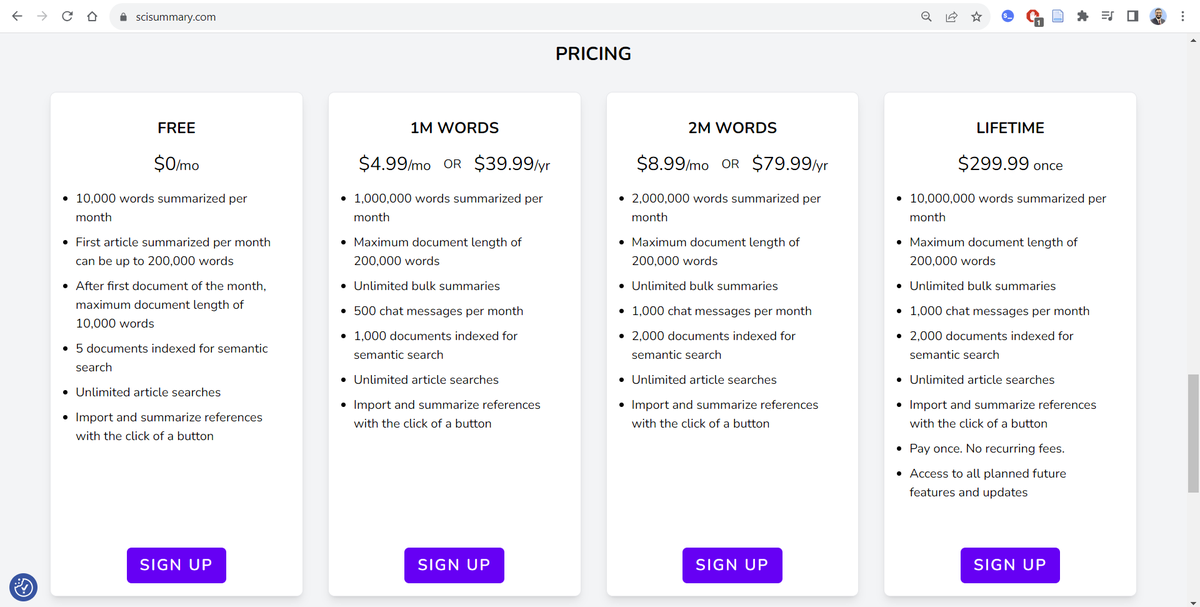
11. SciSummary offers several pricing plans.
The free plan lets you summarize 10,000 words a month.
If you are interested in a paid subscription, you can buy one month's subsciption for $0.99 only with the code FIRSTMONTH.

The free plan lets you summarize 10,000 words a month.
If you are interested in a paid subscription, you can buy one month's subsciption for $0.99 only with the code FIRSTMONTH.
Found this workflow helpful?
1. Scroll to the top and hit "Like" on the first tweet.
2. Bookmark it so you can come back to it later.
3. Follow me for more tutorials on how to supercharge your academic writing with AI apps.
1. Scroll to the top and hit "Like" on the first tweet.
2. Bookmark it so you can come back to it later.
3. Follow me for more tutorials on how to supercharge your academic writing with AI apps.
• • •
Missing some Tweet in this thread? You can try to
force a refresh