Nathan McNulty Profile picture
Nov 20, 2023 9 tweets 5 min read Read on X
Someone asked about recreating Security Defaults in Conditional Access so similar policies still apply but with more flexibility

This short thread is my best attempt based on the information available here:


Note: Entra ID P2 required for full replacementlearn.microsoft.com/en-us/microsof…
1) "Requiring all users and admins to register for MFA using the Microsoft Authenticator app or any third-party application using OATH TOTP"

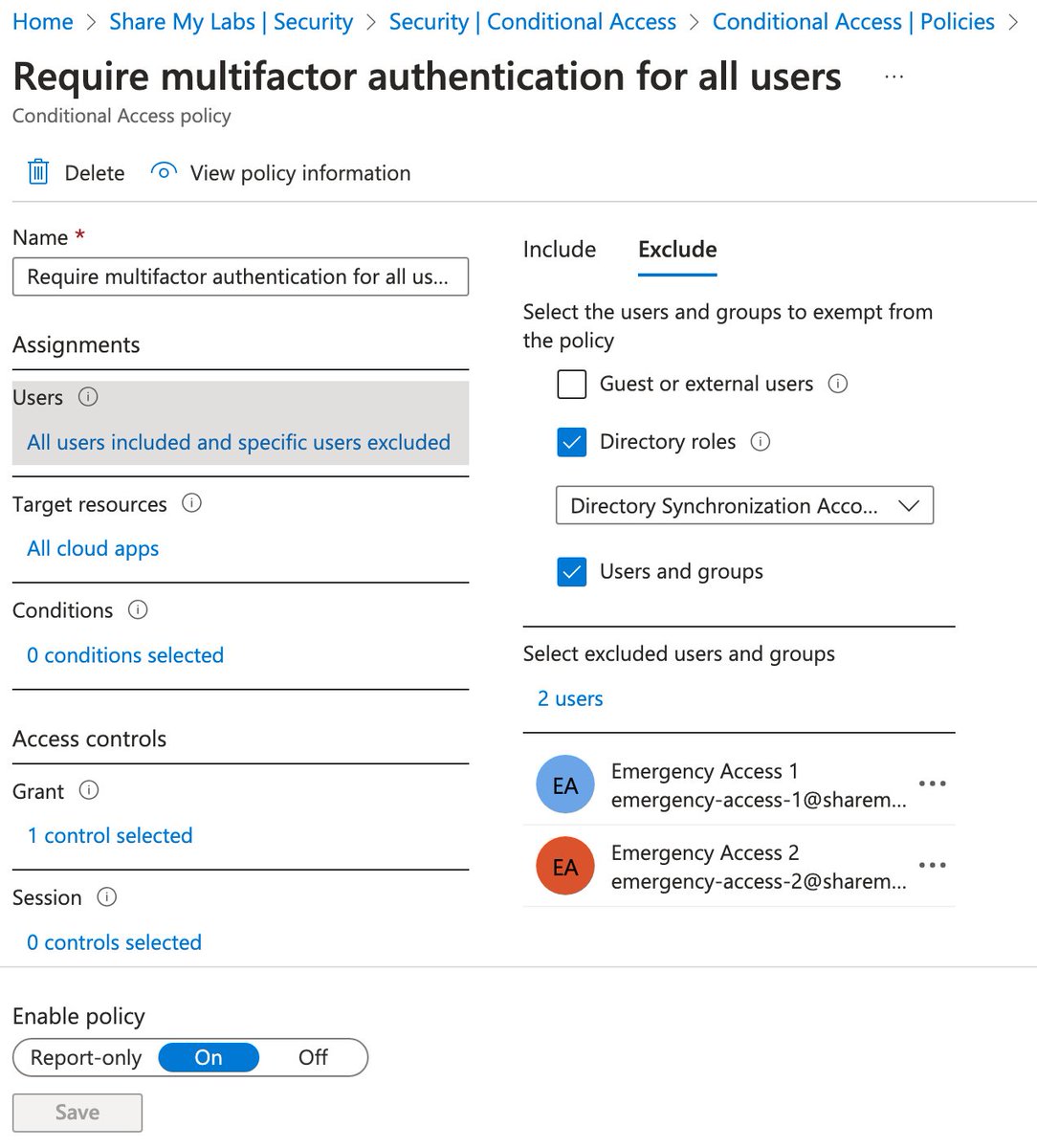
For this, we need to combine the "Require multifactor authentication for all users" template with limiting use of Authentication methods Image
For this template, it is recommended to have a couple of emergency access accounts and ensure they are excluded


If you use Entra Connect, be sure to exclude the Directory Synchronization Accounts role

These are good practices on all MFA policies learn.microsoft.com/en-us/entra/id…
Image
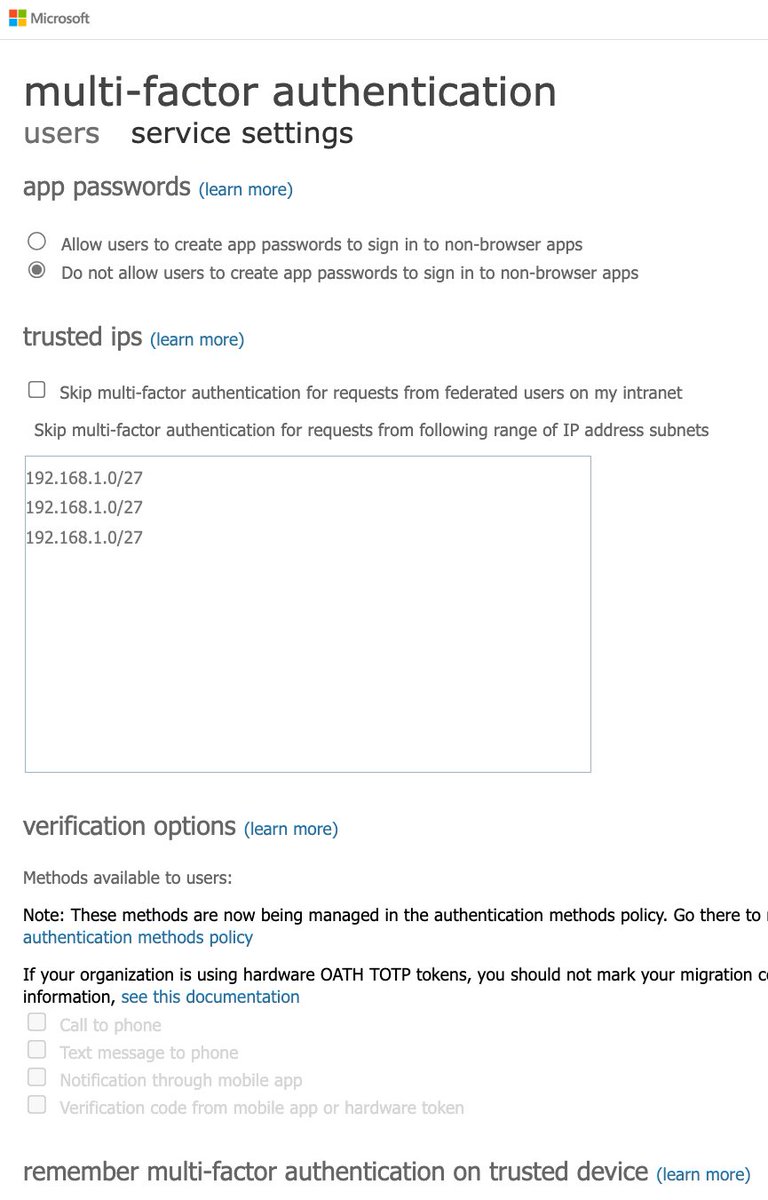
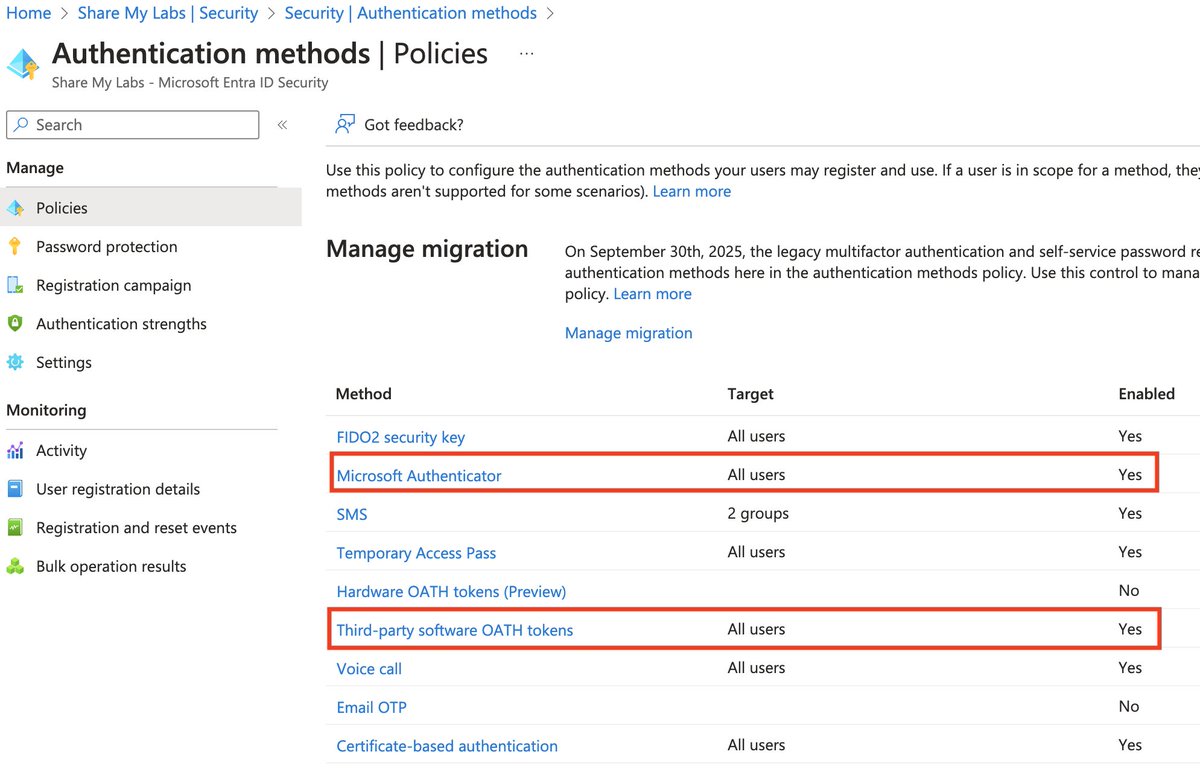
Auth methods gets a tricky because there are two places you can set them

For per-user MFA (legacy), only choose the last verification code option


For auth methods, only enable MS Authenticator and software OATH tokens
…ount.activedirectory.windowsazure.com/UserManagement…
portal.azure.com/#view/Microsof…
Image
Image
2) "Challenging users with MFA, mostly when they show up on a new device or app, but more often for critical roles and tasks"

This requires Entra ID P2 licensing but very cool they give this for free with Security Defaults!

Use the Require MFA for risky sign-ins template Image
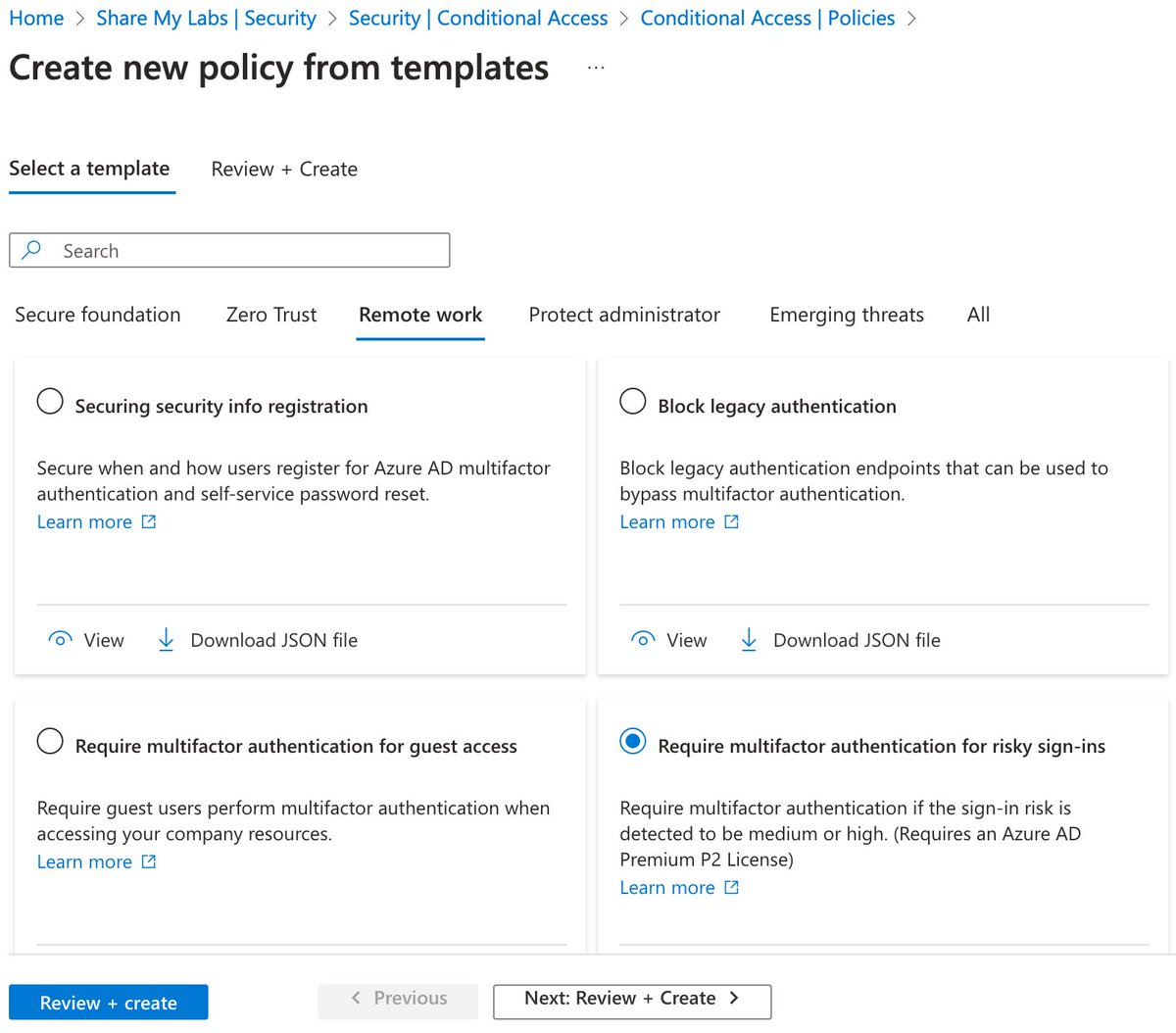
There may be some other logic they are using as part of this, but I don't believe that information is published anywhere

You can read more about this policy here as well:


I recommend a second policy for admins with risk set to high, medium, and low risklearn.microsoft.com/en-us/entra/id…
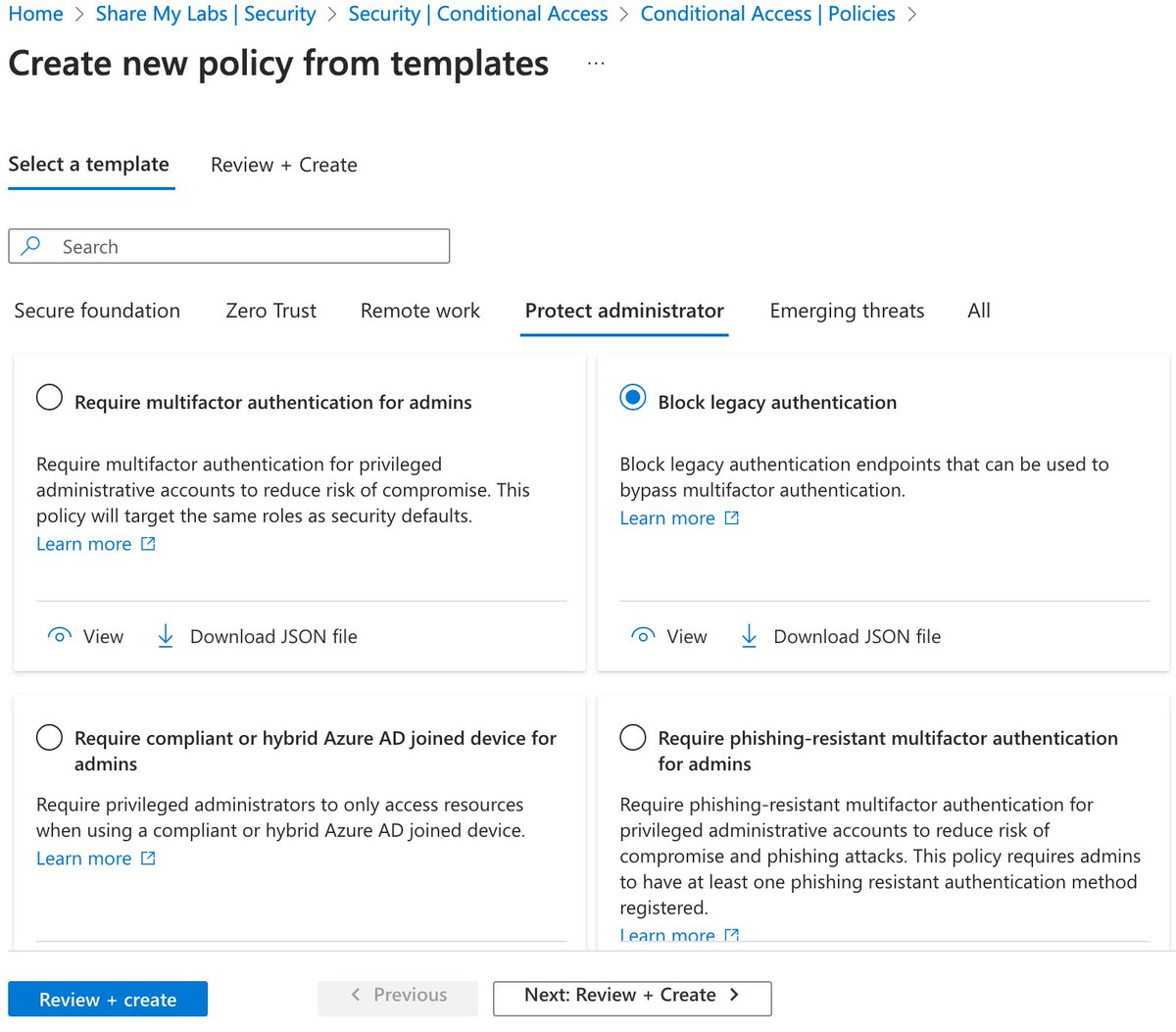
3) "Disabling authentication from legacy authentication clients that can't do MFA"

This one is easy - use the Block legacy authentication template

For more info, see:

⚠️ Note: This does not block credential validation. Disable protocols on the mailbox. learn.microsoft.com/en-us/entra/id…
Image
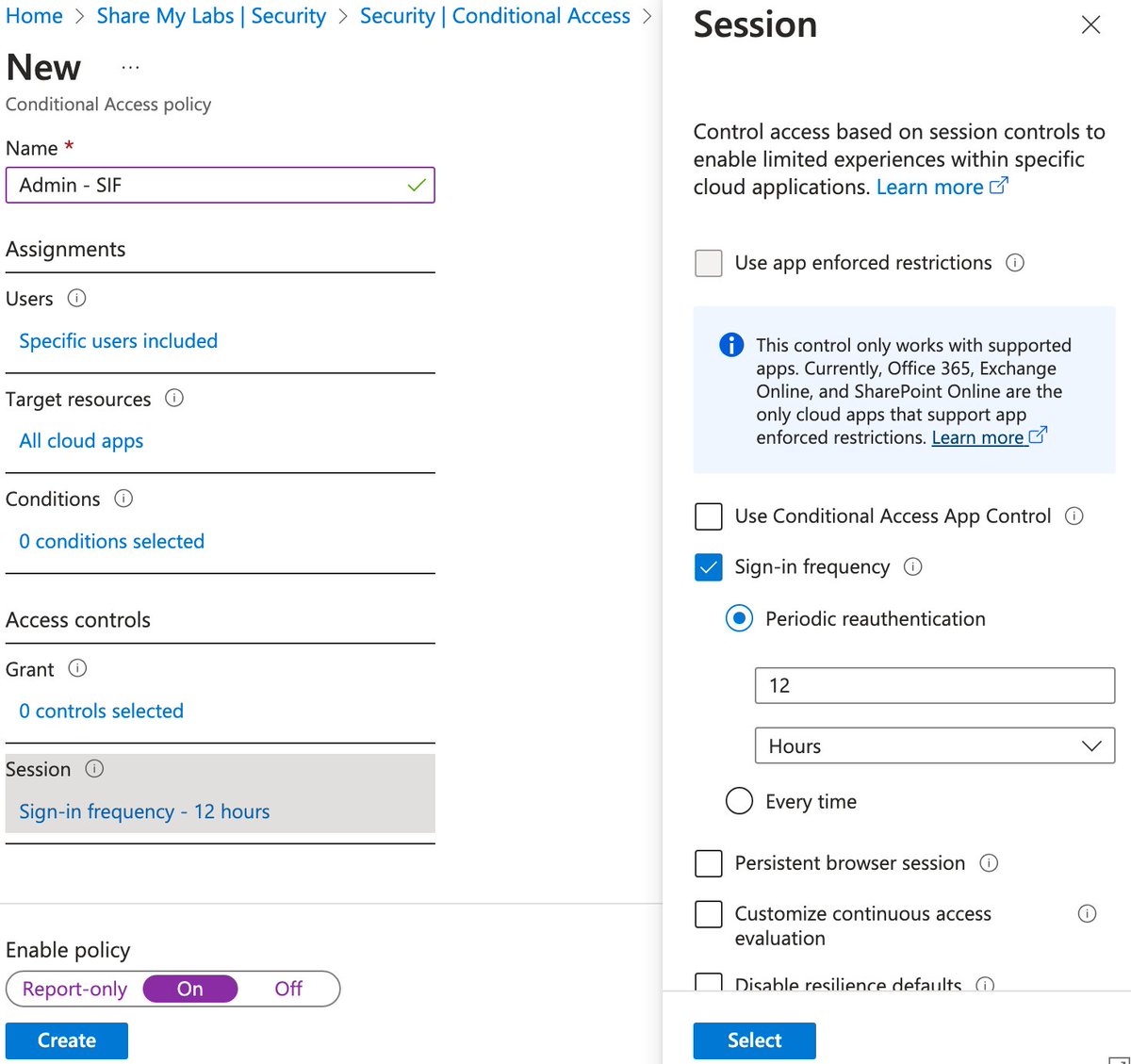
4) "Protecting admins by requiring extra authentication every time they sign in"

This one is very ambiguous. AFAICT, they are selecting admin roles under Users and using Sign-in frequency.

I haven't reverse engineered duration, but anything 12 hours or shorter is a good choice Image
I hope this helps for anyone needing to disable Security Defaults due to some issues they've run into but still want to have similar protection

Hopefully if I've missed anything, others will chime in, and I might create a blog with some deployment automation tooling later :)

• • •

Missing some Tweet in this thread? You can try to force a refresh

 

Keep Current with Nathan McNulty

Nathan McNulty Profile picture

Stay in touch and get notified when new unrolls are available from this author!

Read all threads

This Thread may be Removed Anytime!

PDF

Twitter may remove this content at anytime! Save it as PDF for later use!

Try unrolling a thread yourself!

how to unroll video
  1. Follow @ThreadReaderApp to mention us!

  2. From a Twitter thread mention us with a keyword "unroll"
@threadreaderapp unroll

Practice here first or read more on our help page!

More from @NathanMcNulty

Nov 5, 2025
Sign-In Frequency (SIF) is a commonly misunderstood control, one many orgs use to inflict unnecessary suffering on their employees 😩

It probably doesn't work the way you think it does and is often used in less than ideal ways...

So let's look at how it works and when to use it Image
To understand authorization controls (Conditional Access), we need to understand the authentication tokens it evaluates

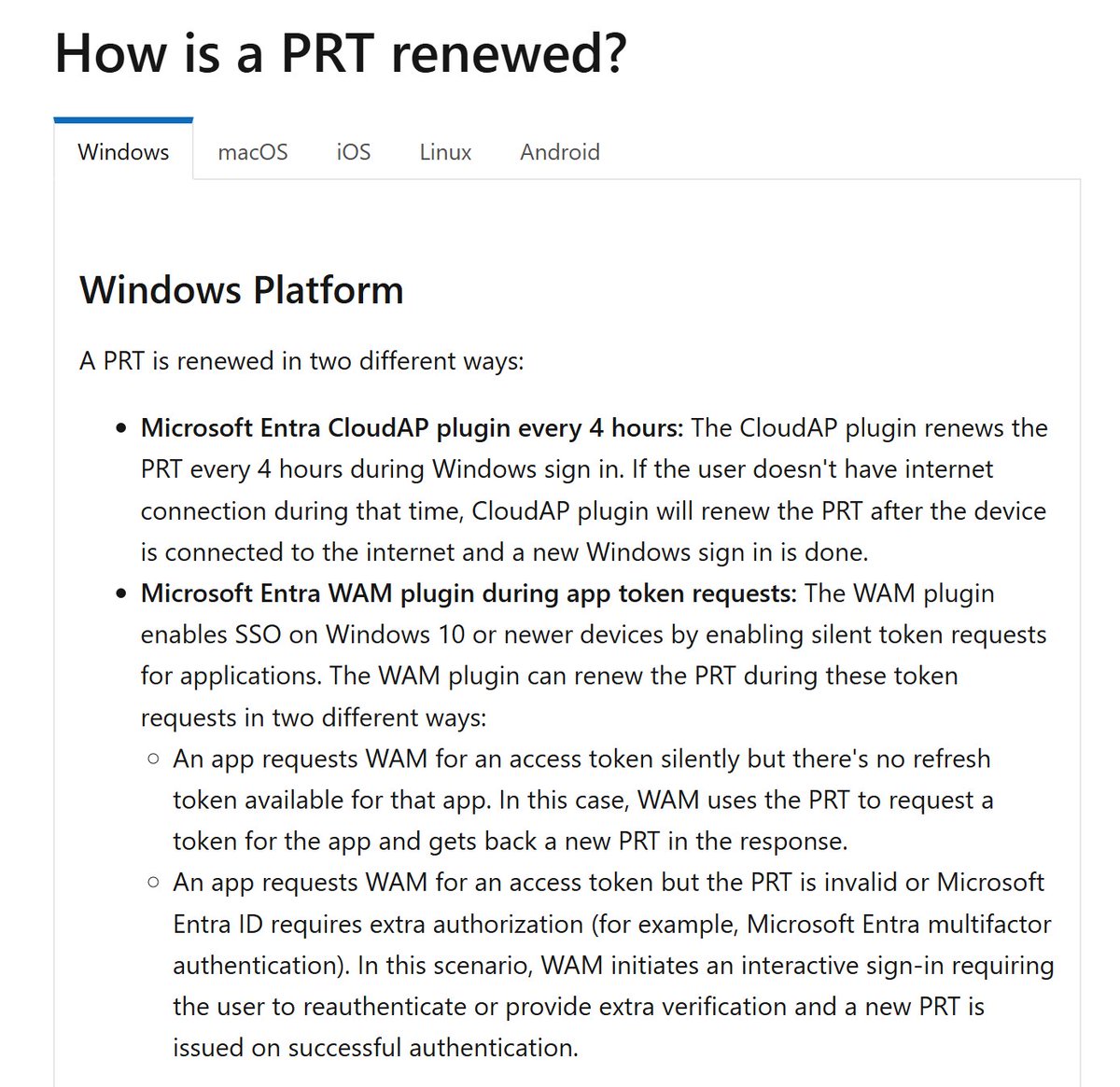
When we log into a Hybrid or Entra joined device, we authenticate to Entra and get a Primary Refresh Token (PRT) with the time of the event in it

The "issue": Image
PRTs renew at login/unlock if older than 4 hours, but only the factor used has the time updated

If we use a password to log in, the time for password is updated but not MFA... 💡

If we use a strong auth methods to log in, like Hello or passkeys, time of both factors are updated Image
Read 9 tweets
Jan 25, 2025
Hello for Business works great with AD integrated apps (Kerberos/NTLM), but it requires setting up a trust model

Very poorly generalized, Hello uses certificates that AD doesn't understand, so we need a way to request a Kerberos ticket with the certs

This is crazy easy now 🧵
Before I share how easy it is now, I want to share why people still hate Hello because its history was way more complicated

Originally we had certificate trust which required full PKI deploying certificates to all of your devices and AD

Doing this properly was really hard...
So with Server 2016, Microsoft introduced a massive improvement - key trust

This meant we only needed to put certificates on domain controllers

This was so much easier, but it still required PKI and setting up the templates

And a hybrid model was added to support Azure AD... Image
Read 6 tweets
Jan 24, 2025
I think the most common misunderstanding of Conditional Access is its relationship to authentication, and this results in not understanding how the rest of the controls actually work

Conditional Access performs authorization by evaluating tokens from the authentication service
This provides important insights 💡

CA policies cannot block anything until AFTER authentication occurs

This means CA cannot help with password spray/credential stuffing. This is why we have Password Protection and Smart Lockout.

learn.microsoft.com/en-us/entra/id…
This also means an attacker blocked by a CA policy either has a valid username/password or has a stolen token

When we don't understand this, we don't monitor and respond, and we give attackers more time with valid credentials

Identity Protection helps here, but it isn't perfect
Read 7 tweets
Jan 20, 2025
You likely aren't collecting all available events to the Unified Audit Log

First, not all events are enabled or retained optimally. Consider creating this policy in the Purview portal (leave users and record types blank to collect everything).

Retention is based on license... Image
This policy only applies to users with the Microsoft 365 Advanced Audit SKU assigned, audit records are retained for 1 year. Audit records for users without this SKU are retained for 180 days (thanks CISA for the bump up from 90 days!)

Second, this still doesn't get everything..
Next we have to enable all the records for mailbox auditing

But wait, Microsoft totally pinky promises that you don't need to manage these records because they enable them for you


It would be nice if they actually enabled everything, but they don't :-/ learn.microsoft.com/en-us/purview/…Image
Read 6 tweets
Sep 6, 2024
A common ask I get often is:

I want to require fresh strong authenticaton from a compliant device (or specific devices) when someone activates a role via PIM

So let's walk through that scenario really quick

If anything is unclear, just try harder!

I'm kidding, ask away 😜
First, if the built-in phishing resistant auth strength works for you, use it

If not, we can customize exactly what we want (avoid requiring one not allowed in another poilcy)

We can even define AAGUIDs to specify exact models of keys that must be used

learn.microsoft.com/en-us/entra/id…
Image
Second, we need to create an authentication context

This is like a label used to tie PIM activation to a specific Conditional Access policy. The name can be changed any time 😉


In our access token, this is the 'acr' value
learn.microsoft.com/en-us/entra/id…
learn.microsoft.com/en-us/entra/id…Image
Image
Read 5 tweets
Aug 8, 2024
In this thread, I will provide Graph PowerShell commands to find synced users with admin privileges

Microsoft has been very vocal about not granting privileges to synced accounts for about 4 years now

Read this post by @Alex_T_Weinert:


Then check below techcommunity.microsoft.com/t5/microsoft-e…
@Alex_T_Weinert For those with PIM, these two scopes will help us get what we need (remove the /'s):

Connect-MgGraph -Scopes 'RoleAssignmentSchedule./Read.Directory','RoleEligibilitySchedule./Read.Directory'

If you don't use PIM, I believe you only need: RoleManagement./Read.Directory
First, we can get a list of all synced users who have an active assignment:

# Get active assignments
Get-MgBetaRoleManagementDirectoryRoleAssignmentSchedule -ExpandProperty RoleDefinition,Principal,DirectoryScope -All | ForEach-Object {
if ($_.Principal.AdditionalProperties."@odata.type" -match '.user' -and $_.Principal.AdditionalProperties.onPremisesSyncEnabled -eq $true) {
Write-Output "$($_.RoleDefinition.DisplayName),$($_.Principal.AdditionalProperties.userPrincipalName)"
}
if ($_.Principal.AdditionalProperties."@odata.type" -match '.group') {
$roleName = $_.RoleDefinition.DisplayName
$members = (Get-MgGroupMember -GroupId $_.PrincipalId).AdditionalProperties.userPrincipalName
if ($members.Count -ne 0) { $members | ForEach-Object { Write-Output "$roleName,$_" }}
}
#if ($_.Principal.AdditionalProperties."@odata.type" -match '.servicePrincipal') {
#    Write-Output "$($_.RoleDefinition.DisplayName),$($_.Principal.AdditionalProperties.appId)"
#}
}
Read 6 tweets

Did Thread Reader help you today?

Support us! We are indie developers!


This site is made by just two indie developers on a laptop doing marketing, support and development! Read more about the story.

Become a Premium Member ($3/month or $30/year) and get exclusive features!

Become Premium

Don't want to be a Premium member but still want to support us?

Make a small donation by buying us coffee ($5) or help with server cost ($10)

Donate via Paypal

Or Donate anonymously using crypto!

Ethereum

0xfe58350B80634f60Fa6Dc149a72b4DFbc17D341E copy

Bitcoin

3ATGMxNzCUFzxpMCHL5sWSt4DVtS8UqXpi copy

Thank you for your support!

Follow Us!

:(