Zotero is the best citation management tool for academic writing.
And it's new version — Zotero 7 — is now available for use.
Here's how to automate your citations and references with Zotero 7.
You can learn this workflow in 15 min:
And it's new version — Zotero 7 — is now available for use.
Here's how to automate your citations and references with Zotero 7.
You can learn this workflow in 15 min:
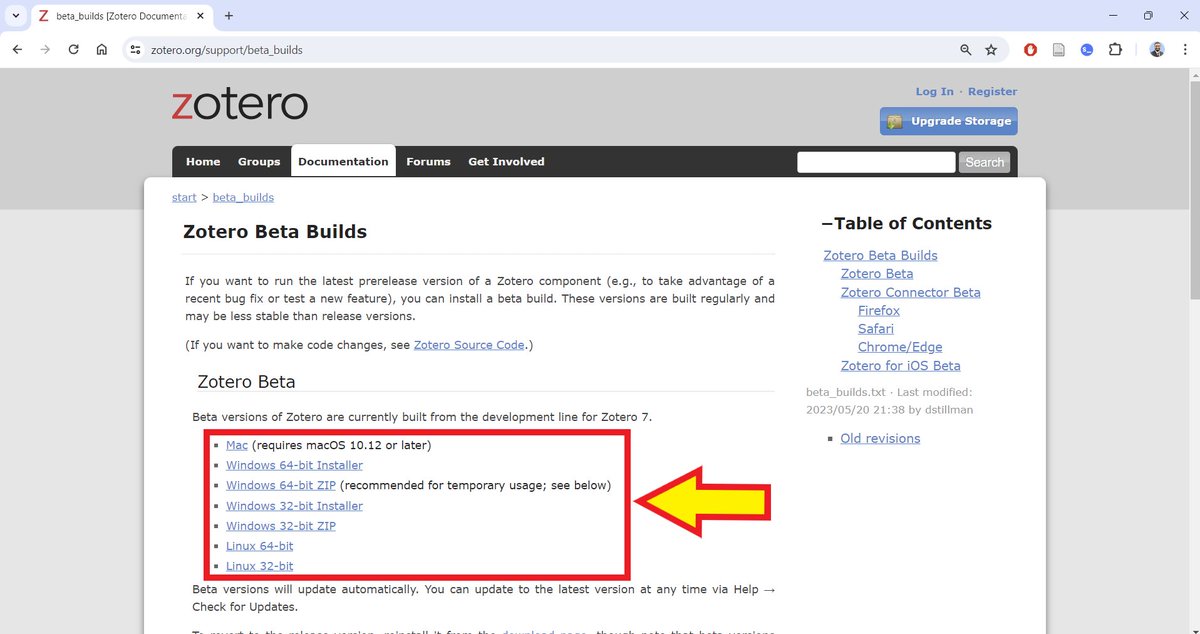
Go to this link below and download the version compatible with your computer.
Link: zotero(dot)org/support/beta_builds (replace the word "dot" with ".")
Install the app on your computer.
If you already use Zotero 6, it will get updated with Zotero 7 without any loss of data.
Link: zotero(dot)org/support/beta_builds (replace the word "dot" with ".")
Install the app on your computer.
If you already use Zotero 6, it will get updated with Zotero 7 without any loss of data.
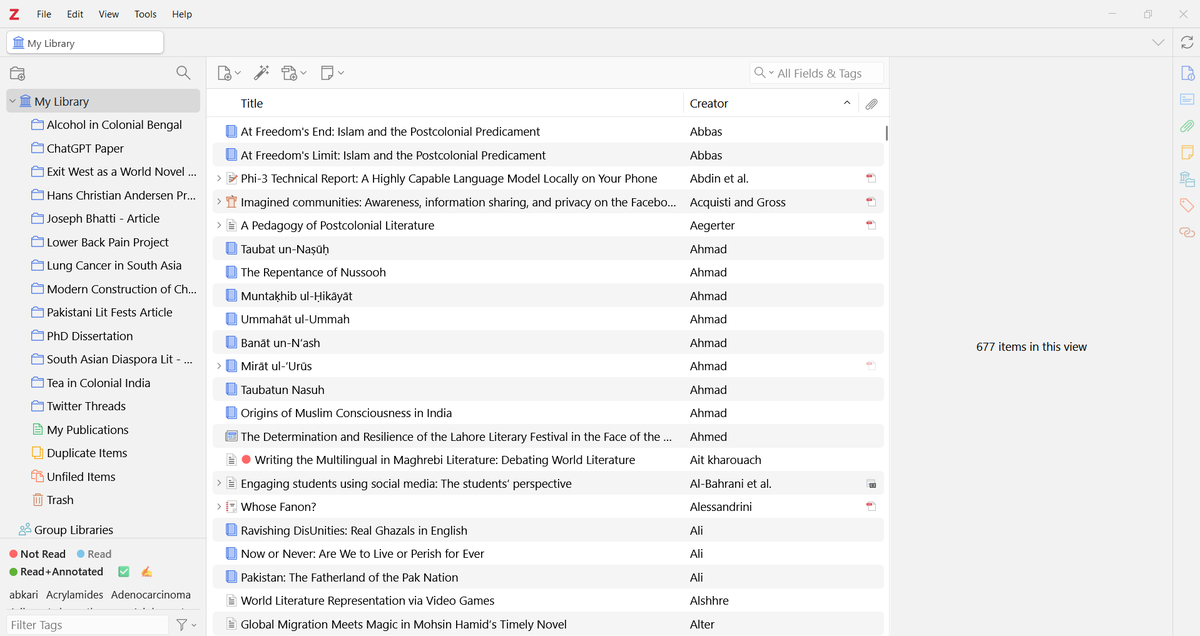
Open your Zotero desktop app after you have installed it.
This is how your Zotero 7 interface would look like. Your collections from Zotero 6 will remain unaffected.
If you are using Zotero for the first time, you won't see any items in your library.
This is how your Zotero 7 interface would look like. Your collections from Zotero 6 will remain unaffected.
If you are using Zotero for the first time, you won't see any items in your library.
If you are starting out on Zotero, you would also need a Zotero account.
Go to zotero(dot)org. Click on "Log In" and then "Register for a free account."
Go to zotero(dot)org. Click on "Log In" and then "Register for a free account."

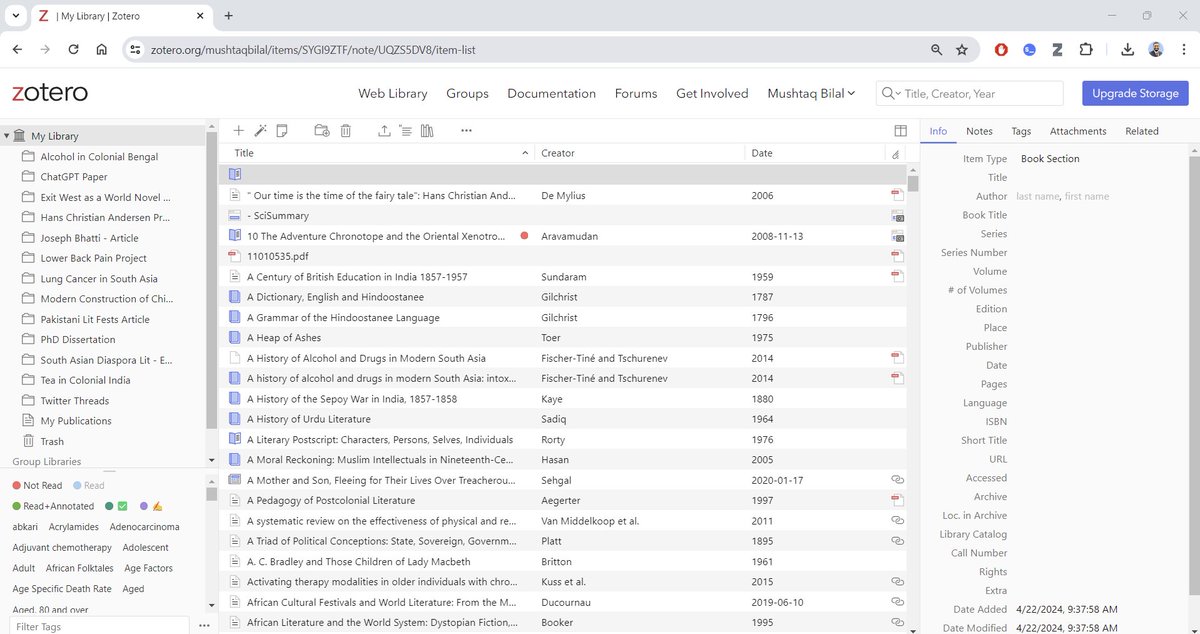
A Zotero account gives you an online backup of your library.
As you can see here, my whole Zotero library is available online.
If you change your computer, all you need to do is install Zotero, log in to your account, and your whole Zotero library will be available.
As you can see here, my whole Zotero library is available online.
If you change your computer, all you need to do is install Zotero, log in to your account, and your whole Zotero library will be available.
If you are a new Zotero user, you will also need to install a Zotero Connector for your browser.
Go to Chrome Web Store and look for Zotero Connector.
Add it to your browser and then pin it by.
Go to Chrome Web Store and look for Zotero Connector.
Add it to your browser and then pin it by.
Open your Zotero desktop app. Cclick on "File" and then select "New Collection."
Choose a name for your collection and click on "Create Collection."
You will now have a new collection with no items in it yet.
Choose a name for your collection and click on "Create Collection."
You will now have a new collection with no items in it yet.
Go to Google Scholar and run a search using keywords related to your project.
You will get a list of papers/books.
Click on the Zotero Connector in the top-right corner. Zotero will open an Item Selector.
Select the items you find relevant and click on "OK."
Zotero will start saving them to your library. Select the collection you just created so Zotero saves these items there. This will help you keep things organized.
You will get a list of papers/books.
Click on the Zotero Connector in the top-right corner. Zotero will open an Item Selector.
Select the items you find relevant and click on "OK."
Zotero will start saving them to your library. Select the collection you just created so Zotero saves these items there. This will help you keep things organized.
You can also do this with other academic databases like PubMed or JSTOR.
Run a search, open Zotero Item Selector, select relevant papers, and add them to your Zotero collection.
Run a search, open Zotero Item Selector, select relevant papers, and add them to your Zotero collection.
After you are done adding items, go to your Zotero desktop app and you will all the items in the relevant collection.
Zotero will also retrieve open-access PDFs of papers and add them to your collection.
For paywalled papers, you can use your university's llibrary.
To read a paper, simply double-click on it and Zotero will open it for you.
Now you can read the paper and highlight important parts of it.
Zotero will also retrieve open-access PDFs of papers and add them to your collection.
For paywalled papers, you can use your university's llibrary.
To read a paper, simply double-click on it and Zotero will open it for you.
Now you can read the paper and highlight important parts of it.
Finding research gaps and crafting novel research questions takes a lot of time and labor.
Research Kick is an AI app that will help you craft compelling research questions and find research gaps — in minutes.
660+ academics are using it.
Tutorial 👇
Research Kick is an AI app that will help you craft compelling research questions and find research gaps — in minutes.
660+ academics are using it.
Tutorial 👇
https://twitter.com/MushtaqBilalPhD/status/1786415677722484872
You can also add items using their DOIs, ISBNs, and PMIDs.
Click on the magic wand-like button in the top bar and enter an item's DOI, ISBN, or PMID.
Zotero will add it to your collection.
Click on the magic wand-like button in the top bar and enter an item's DOI, ISBN, or PMID.
Zotero will add it to your collection.
To add a citation to your paper, place the cursor where you want to insert the citation.
Click on the Zotero tab and select "Add/Edit Citation."
Zotero will open a red search bar for you. Type in the name of the author you want to cite and any additional details like a page number.
Press Enter/Return and Zotero will add the citation.
Add all citations in this manner.
Click on the Zotero tab and select "Add/Edit Citation."
Zotero will open a red search bar for you. Type in the name of the author you want to cite and any additional details like a page number.
Press Enter/Return and Zotero will add the citation.
Add all citations in this manner.
To add bibliography to your paper, place the cursor where you want to add it.
Then click on "Add/Edit Bibliography." Zotero may ask you to select a citation style. If it does, select the style relevant to your field.
And Zotero will add the properly formatted bibliography.
Then click on "Add/Edit Bibliography." Zotero may ask you to select a citation style. If it does, select the style relevant to your field.
And Zotero will add the properly formatted bibliography.
Zotero 7 also has dark mode.
To switch to dark mode, click on "Edit" and then "Settings."
In the "General" tab, select "Dark."
To switch to dark mode, click on "Edit" and then "Settings."
In the "General" tab, select "Dark."
Found this thread on Zotero 7 helpful?
1. Scroll to the top and repost the first tweet to share it with your friends.
2. Follow me for more threads on Zotero and AI apps for academic writing.
1. Scroll to the top and repost the first tweet to share it with your friends.
2. Follow me for more threads on Zotero and AI apps for academic writing.
• • •
Missing some Tweet in this thread? You can try to
force a refresh