
Everything you can do legally (or almost) with Flipper Zero.
The Ultimate Tamagotchi for Hackers...
[ 🔖 Save this for later ]
The Ultimate Tamagotchi for Hackers...
[ 🔖 Save this for later ]
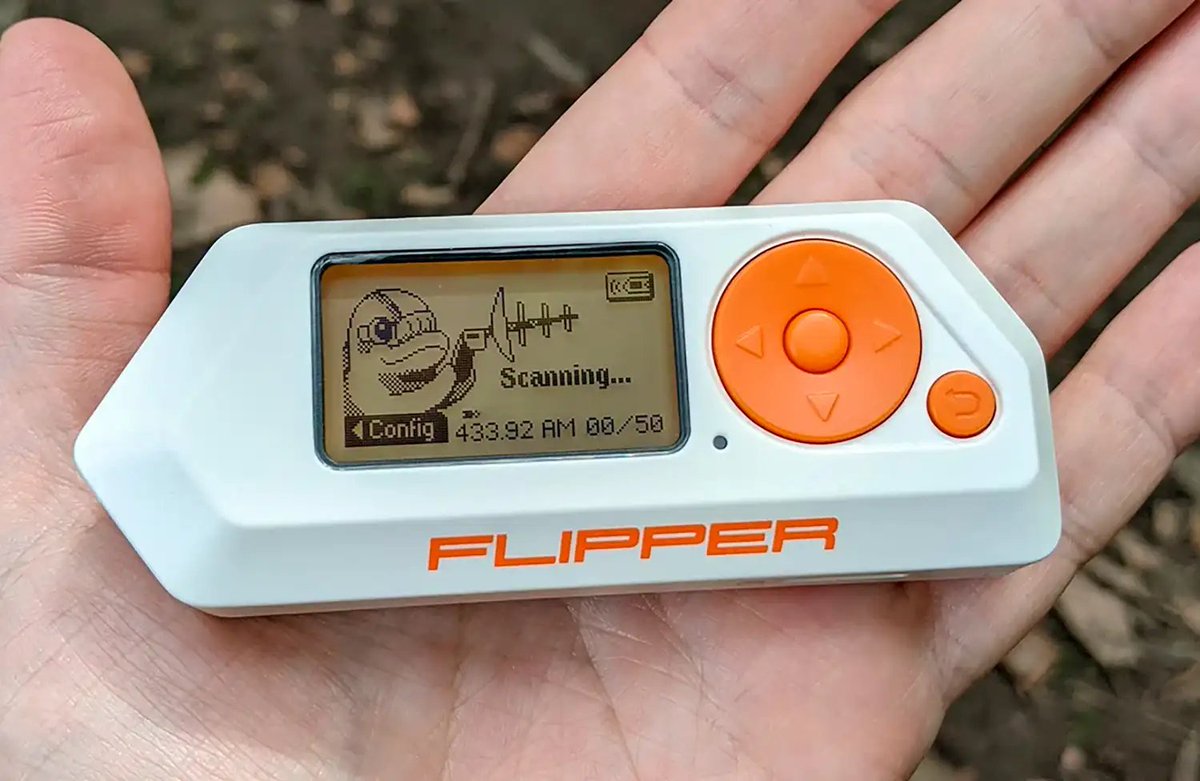
Though it may appear as a mere toy, this device is incredibly powerful for IT experts, enabling them to explore and manipulate the invisible waves that surround us.
Duplicate Access Cards
Easily replicate access credentials like work badges or hotel room keys.
Easily replicate access credentials like work badges or hotel room keys.
Transform your devices into smart ones
With Flipper Zero, you can control a wide array of electronic devices using its extensive library of infrared codes.
With Flipper Zero, you can control a wide array of electronic devices using its extensive library of infrared codes.
Manipulate mobiles
This technique exploits a Bluetooth protocol vulnerability, allowing interference with normal operations.
This technique exploits a Bluetooth protocol vulnerability, allowing interference with normal operations.
Scan and extract key details from a credit card
Capable of recognizing essential credit card information.
Capable of recognizing essential credit card information.
Garage door openers interact with various security systems, including some older, more vulnerable models
Play for free
Breaching Security Cameras
Finish a class ahead of schedule
Capture infrared signals, or even a USB rubber ducky remote control.
Flipper Zero vs Walmart
Take command of your car’s audio system
Hotel Room Key
Flipper Zero vs iPhone
Guess the PIN Protection
The quickest hack to score Wi-Fi access
Disconnect everyone around me from their WiFi?
No trouble unlocking your car
Flipper Zero vs. the World
That's the Wrap up🤩
If you found this helpful!
👉 Repost and share with your Network!
Follow me @riyazmd774 for more useful content.
If you found this helpful!
👉 Repost and share with your Network!
Follow me @riyazmd774 for more useful content.
https://x.com/riyazmd774/status/1819977443404292111?t=DwpnEvJELqp2MtRcP4on-Q&s=19
• • •
Missing some Tweet in this thread? You can try to
force a refresh




